
HP Chromebook 14a (ne Series)
Updated on

The HP Chromebook 14a (ne Series) is a 14-inch budget notebook built around the Intel Celeron N4500 and 4GB of soldered memory, with ChromeOS updates running through June 2033. Web browsing, Google Workspace documents, and streaming video run fine on it, while heavy tab counts alongside Android apps push against the memory. WiFi 6, Bluetooth 5.3, and a full-size HDMI port cover the wireless and display side, and the micro-edge screen fits a 14-inch panel into a compact body. The 1366x768 TN display is the clearest compromise, which leaves this an entry-level machine for students and casual users.
Pros and cons
| Pros | Cons |
|---|---|
| WiFi 6 and Bluetooth 5.3 wireless | 1366x768 TN panel with color washout at vertical angles |
| ChromeOS updates through June 2033 | 4GB of soldered memory limits multitasking |
| Full-size HDMI output drives a second display without an adapter | No keyboard backlighting |
| Keyboard and trackpad praised in Chrome Unboxed’s review | 64GB of eMMC storage with no expansion slot |
| Upward-firing speakers with decent low-end response | No touchscreen or stylus support |
| Textured plastic finish that resists fingerprints | Charging occupies the only USB-C port |
Related Videos
HP Chromebook 14a (ne Series) Comparison Chart
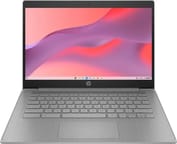 HP Chromebook 14a (ne Series) | |
| Price | List Price: Amazon Prices: Loading prices... Best Buy: Loading price... |
| Model number | 14a-ne1013dx |
| Performance Rating | 2.6 |
| Chromebook Plus | No |
| Processor | Dual-core 1.10 Ghz (max 2.80 Ghz) Intel Celeron Processor N4500 |
| RAM | 4 GB |
| Internal Storage | 64 GB eMMC |
| Screen Size | 14" |
| Screen Resolution | 1366x768 |
| Screen Type | TN |
| Touch Screen | No |
| Stylus / Pen | No Stylus Support |
| Dimensions width x length x thickness | 12.85 x 8.94 x 0.72 inches (326.39 x 227.08 x 18.29 mm) |
| Weight | 3.35 lbs (1.52 kg) |
| Backlit Keyboard | No |
| Webcam | 720p |
| WiFi | Wi-Fi 6 (802.11ax) |
| Bluetooth | Bluetooth 5.3 |
| Ethernet | No |
| Cellular Modem | No |
| HDMI | Full-Size HDMI |
| USB Ports | 2 USB 3, 1 USB-C 1x USB-C 3.1 with Power Delivery and DisplayPort 1.4, 2x USB-A 3.0 |
| Thunderbolt Ports | No |
| Card Reader | No Card Reader |
| Battery | 2 cell, 47Wh, Li-polymer |
| Battery Life | 10 hours |
| Fanless | No |
| Auto Update Expiration Date | June, 2033 |
Related Chromebooks
-
 HP Chromebook 14a (14a-nf series)The HP Chromebook 14a (14a-nf series) spans two tiers of the same chassis: an Amazon-exclusive…
 -
 HP Chromebook x360 14b (2024)The HP Chromebook x360 14b (2024) is a 14-inch convertible sold as a standard Intel N100 build and…
 -
 ASUS Chromebook C424The ASUS Chromebook C424 boasts a crisp 14-inch FHD anti-glare display, durable spill-resistant…
 -
 Acer Chromebook 314 (CB314-4H/4HT)A budget-friendly 14-inch Chromebook with Intel Alder Lake-N processors, WiFi 6E, and software…
 -
 ASUS Chromebook C425The ASUS Chromebook C425 is a fanless 14-inch ChromeOS laptop on an Intel Core m3 with a 1920x1080…
 -
 Acer Gateway Chromebook 314The Acer Gateway Chromebook 314 is a 14-inch ChromeOS laptop on Acer's Chromebook 314 chassis with…
A textured plastic shell with full-size HDMI and WiFi 6

The chassis measures 12.85 x 8.94 x 0.72 inches and weighs 3.35 pounds, which is reasonable for a 14-inch notebook. HP used all-plastic construction with a textured finish that resists fingerprints and holds a grip, and the micro-edge design trims the side and top bezels so the panel fills more of the lid. Rigidity holds up during normal handling.
The Intel Celeron N4500 is a dual-core processor running at 1.1GHz with boost up to 2.8GHz, paired with Intel UHD Graphics and 4GB of soldered RAM. That combination covers web browsing across a handful of tabs, document editing in Google Workspace, and streaming video. The 64GB of eMMC storage holds ChromeOS and apps, so anyone keeping significant local files leans on Google Drive or external storage. Memory runs out before the processor does, and several Android apps open alongside browser tabs will slow things down.
WiFi 6 covers current networks and helps in congested wireless environments, and Bluetooth 5.3 handles peripherals and audio devices. The port set is one USB-C 3.1 port with Power Delivery and DisplayPort 1.4, two USB-A 3.0 ports, a full-size HDMI 1.4b output, and a headphone/microphone combo jack. The HDMI port connects a monitor or projector without an adapter. There is no Ethernet jack, so a wired connection means a USB Ethernet adapter on one of the USB-A ports.
Reviewer Insights

Chrome Unboxed: the keyboard and trackpad hold up in the plastic chassis
Chrome Unboxed reviewed a related HP Chromebook 14A model (N100 variant) that shares the same chassis and design language. The reviewer praised HP’s approach to the plastic construction: “If you’re going to go plastic, you know, get creative. Why not?” referring to the unique textured finish. The reviewer singled out the keyboard, noting “HP does a great job on keyboards… even on their more affordable keyboards of just having great feel, great clickiness.” He found the trackpad stayed smooth and responsive even in humid conditions.
“This is a 1366x768 TN panel… I don’t have a lot of love for panels like this,” the reviewer stated, noting the color washout at vertical viewing angles typical of TN technology. He called the upward-firing speakers decent, with better low-end response than he expected. The webcam impressed for its class, delivering better dynamic range and sharpness than expected from a 720p sensor. The reviewer characterized the HP Chromebook 14A line as offering “a good keyboard, a good trackpad, a good camera, decent internals” while cautioning buyers to wait for sales rather than paying full price.
Customer Reviews
Across 12 ratings on Amazon, the HP Chromebook 14a (ne Series) averages 4.2 stars, and the ratings split between 5-star and 1-star with nothing in between. A verified buyer named Christie Boyer wrote, “This Item has worked wonderfully and has met all my expectations. It is doing everything I needed it to do.. the battery life is great the speed is exceptional great value for the money I paid.” Charles S. and Donnie Harry, both verified, left brief 5-star notes, with Donnie Harry simply saying it is “saving battery.”
A verified buyer named hiedi gave it 1 star and wrote, “It doesn’t even have a camera! I need a laptop with a camera,” although every configuration on this page carries a 720p webcam, so that unit or that buyer’s expectation was the exception. Only a handful of written reviews exist so far, which makes this an early sample.
Read more owner reviews on Amazon.
An entry-level machine with a long update window
Buy this one if the work is web-based and a 14-inch screen with a well-reviewed keyboard is worth more than screen quality. The 4GB memory ceiling and the 1366x768 TN panel are both fixed at purchase, so anyone running many tabs at once or working from an angle should price a Chromebook Plus model instead. ChromeOS updates through June 2033 give it a long service life either way.
It fits students who live in Google Workspace and families adding a second machine for children’s schoolwork. The Chromebook Comparison Chart lines its specs up against other 14-inch models.
Frequently Asked Questions
What processor does the HP Chromebook 14a-ne1013dx use?
The Intel Celeron N4500, a dual-core, two-thread chip with a 1.1GHz base clock and boost up to 2.8GHz. It scores approximately 1,807 on PassMark’s CPU benchmark, which is enough for web browsing, document editing, and video streaming.
Can I upgrade the RAM in the HP Chromebook 14a-ne1013dx?
No, the memory is soldered to the board. The 4GB configuration is what the machine keeps for its whole life, so choose accordingly at purchase.
What ports does the HP Chromebook 14a-ne1013dx have?
One USB-C 3.1 port with Power Delivery and DisplayPort 1.4, two USB-A 3.0 ports, one full-size HDMI 1.4b port, and a headphone/microphone combo jack. Charging runs through the USB-C port; an external display can use either the HDMI port or USB-C.
How long will the HP Chromebook 14a-ne1013dx receive updates?
Google set the Auto Update Expiration (AUE) date to June 2033, so ChromeOS updates, security patches, and new features continue until then.
Does the HP Chromebook 14a-ne1013dx support Android apps?
Yes, through the Google Play Store. Most Android applications install and run, though the 4GB of RAM constrains the more demanding ones, especially with browser tabs open at the same time.
Is the HP Chromebook 14a-ne1013dx good for students?
For Google Workspace coursework, yes. The keyboard drew praise in Chrome Unboxed’s review of the same chassis, the 10-hour battery life covers a school day, and 3.35 pounds is easy to carry between classes. Heavier local software is outside what 4GB and a Celeron N4500 handle well.