
HP Chromebook x360 14b (2024)
Updated on

Two configurations share the HP Chromebook x360 14b (2024) name. The standard model runs an Intel Processor N100, the Chromebook Plus model runs an Intel Core i3-N305, and both list somewhere between $399.99 and $599.99. They share the Sky Blue finish, the 360-degree convertible hinge, and Chrome OS support through June 2033. A student or a family buyer is choosing between the two on chip, memory, and screen.
What the extra money buys on the Plus build
| Feature | Standard (14b-cd0013dx) | Chromebook Plus (14b-cd0010nr) |
|---|---|---|
| Processor | Intel Processor N100 (4-core) | Intel Core i3-N305 (8-core) |
| RAM | 4GB LPDDR5 | 8GB LPDDR5 |
| Storage | 64GB eMMC | 128GB UFS |
| Display | HD 1366x768 IPS | FHD 1920x1080 IPS |
| Webcam | 720p HD | 1080p FHD |
| Keyboard | Standard | Backlit |
| Chromebook Plus | No | Yes |
| MSRP | $399.99 | $599.99 |
A long update runway and a flexible hinge against a dim screen and a flexy shell
| Pros | Cons |
|---|---|
| 360-degree hinge holds laptop, tent, stand, and tablet modes | Standard model limited to HD 1366x768 display |
| Chrome OS support through June 2033 | Chassis flex can cause ghost trackpad clicks when held from bottom |
| Plus variant pairs an 8-core i3-N305 with 8GB LPDDR5 | No SD card reader on either variant |
| Wi-Fi 6 and Bluetooth 5.3 wireless | 250-nit brightness struggles outdoors |
| Fast charging reaches 50% in 45 minutes | Shallow keyboard travel takes adjustment |
| Edge-to-edge touchscreen glass for tablet mode | Two USB-C ports and one USB-A, with no HDMI |
HP Chromebook x360 14b (2024) Comparison Chart
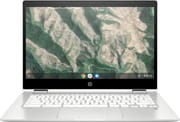 HP Chromebook x360 14b (2024) | HP Chromebook x360 14b (2024) | |
| Price | List Price: $479.99 Amazon Prices: Loading prices... | List Price: $599.99 Amazon Prices: |
| Model number | 14b-cd0013dx / A28Q7UA#ABA | 14b-cd0010nr / 9P989UA#ABA |
| Performance Rating | 2.9 | 5.9 |
| Chromebook Plus | No | No |
| Processor | Quad-core 3.40 Ghz (max 3.40 Ghz) Intel Processor N100 | Octa-core 1.80 Ghz (max 3.80 Ghz) Intel Core i3-N305 |
| RAM | 4 GB | 8 GB |
| Internal Storage | 64 GB eMMC | 128 GB UFS |
| Screen Size | 14" | 14" |
| Screen Resolution | 1366x768 | 1366x768 |
| Screen Type | IPS | IPS |
| Touch Screen | Yes | Yes |
| Stylus / Pen | No Stylus Support | No Stylus Support |
| Dimensions width x length x thickness | 12.72 x 8.28 x 0.81 inches (323.09 x 210.31 x 20.57 mm) | 12.72 x 8.28 x 0.81 inches (323.09 x 210.31 x 20.57 mm) |
| Weight | 3.32 lbs (1.51 kg) | 3.32 lbs (1.51 kg) |
| Backlit Keyboard | No | No |
| Webcam | 720p HD | 720p HD |
| WiFi | Wi-Fi 6 (802.11ax) | Wi-Fi 6 (802.11ax) |
| Bluetooth | Bluetooth 5.3 | Bluetooth 5.3 |
| Ethernet | No | No |
| Cellular Modem | No | No |
| HDMI | No HDMI | No HDMI |
| USB Ports | 1 USB 3, 2 USB-C Both USB-C ports support Power Delivery and DisplayPort 1.4 | 1 USB 3, 2 USB-C Both USB-C ports support Power Delivery and DisplayPort 1.4 |
| Thunderbolt Ports | No | No |
| Card Reader | No Card Reader | No Card Reader |
| Battery | 2 cell, 47 Wh, Li-ion Polymer | 2 cell, 47 Wh, Li-ion Polymer |
| Battery Life | 10 hours | 10 hours |
| Fanless | No | No |
| Auto Update Expiration Date | June, 2033 | June, 2033 |
Related Chromebooks
-
 HP Chromebook 14a (2021)The HP Chromebook 14a (2021) pairs a 14-inch touchscreen with a Celeron N4020, 4GB of RAM, 32GB of…
 -
 HP Chromebook x360 14aThe HP Chromebook x360 14a is a 14-inch convertible Chromebook with an Intel Celeron N4020, a…
 -
 ASUS Chromebook Flip CX1 (Touchscreen)The ASUS Chromebook Flip CX1 is a 14-inch Full HD convertible with a 360-degree touchscreen, an…
 -
 ASUS Chromebook Flip C434The 2019 ASUS Chromebook Flip C434 is a 14-inch convertible with a slim-bezel FHD touchscreen, an…
 -
 Acer Chromebook Spin 314The Acer Chromebook Spin 314 is a budget 14-inch convertible Chromebook with a 360-degree hinge, a…
 -
 Acer Chromebook 314 (CB314-4H/4HT)A budget-friendly 14-inch Chromebook with Intel Alder Lake-N processors, WiFi 6E, and software…
One 3.32-pound convertible body, two different sets of internals

Both variants ship in the same Sky Blue plastic shell, which holds the weight to 3.32 pounds (1.42kg for the Plus) and stays rigid enough for daily carrying, though it gives under a firm grip from underneath. At 12.72 x 8.28 x 0.81 inches, the body is thin enough to slide into a backpack alongside books without adding a noticeable brick to the load.
The 14-inch touchscreens use edge-to-edge glass with micro-edge bezels. The standard model’s IPS panel runs at 1366x768, enough for browsing, documents, and video. The Plus panel is 1920x1080, with sharper text and room for two windows side by side. Both panels are matte, so reflections and fingerprints stay manageable, and both peak at 250 nits: comfortable indoors, hard to read in direct sunlight.
The standard model’s Intel Processor N100 (4-core) handles typical ChromeOS workloads. The Plus build’s Intel Core i3-N305 (8-core, up to 3.8GHz Turbo Boost) has twice the cores, which shows in heavy multitasking and Android games. The Plus model also doubles the RAM to 8GB LPDDR5 and upgrades storage to 128GB UFS, which offers faster read/write speeds than the standard model’s 64GB eMMC.
Reviewer Insights
Related Videos

Both video reviews cover the Chromebook Plus variant. MergeDroid’s unboxing highlights the software support window through June 2033, providing several years of Chrome OS updates. However, the review also identifies build quality concerns, specifically that the plastic chassis exhibits flex when gripping from the bottom, which can trigger unintended trackpad clicks. MergeDroid also found the keyboard’s shallow key travel takes some getting used to.
Tailor Made Tech’s review positions the Chromebook Plus as a compelling iPad alternative at its $599.99 MSRP. The review demonstrates smooth gaming performance with titles like Solar Smash and Minecraft, while noting that the device stays cool and quiet during extended use. The 360-degree hinge receives praise for being “really sturdy” and reliable for frequent mode switching between laptop, tent, stand, and tablet configurations.
The Chromebook Plus certification unlocks Google’s enhanced AI features, including Google Gemini integration, “Help Me Write” AI assistant in Chrome, and Magic Eraser photo editing in Google Photos. Those tools ship only on certified machines, so the standard model does without them.
Customer Reviews
Across 34 ratings on Amazon, the HP Chromebook x360 14b (2024) averages 4.7 stars, with 81 percent of reviewers leaving five stars. Several of the positive write-ups describe the listing and the delivery more than long-term use: a verified buyer who goes by Plain Spoken called it “absolutely Like new” and a “Great value for for this lap top,” and a few short notes report buying it as a gift that the recipient was happy with. Reviewers in other markets single out the convertible design; a verified buyer named Thiara Cristina wrote that the 360-degree screen and touch display make watching videos and films much better.
The distribution is not uniformly glowing, though. About 2 percent of ratings sit at one star, and the most concrete complaints come from buyers who used the keyboard. A verified three-star reviewer, Andrew Ko, reported “there is a Problem with the ‘Downward Key’ on the Key Board,” describing it as slanting to the right and hard to press down. An unverified one-star reviewer, Texfan1996, was blunter, writing “This computer is terrible; unless you only need 1 screen at a time and have no need to scroll.” Worth knowing if you plan to multitask or type a lot.
Read more owner reviews on Amazon.
The Plus spends its extra money on the screen and the chip
The standard model at $399.99 MSRP is the pick when the lowest upfront cost decides it and the work stays at web browsing, document editing, and video. Its N100 and 4GB of memory cope with that, and the HD panel is the compromise you accept in return.
At $599.99 MSRP, the Chromebook Plus buys the Full HD panel, the 8-core chip, twice the memory, the backlit keyboard, and Google’s AI features. Both configurations carry the same June 2033 Auto Update Expiration date, so the update window is identical whichever one you buy.
The Chromebook Comparison Chart lines both configurations up against other current models by screen, chip, and update window.
Frequently Asked Questions
How long will the HP Chromebook x360 14b receive Chrome OS updates?
Both configurations are supported through June 2033. Until that Auto Update Expiration (AUE) date, the machine keeps getting security patches, bug fixes, and new ChromeOS features; after it, updates stop.
What’s the difference between the HP Chromebook x360 14b and the Chromebook Plus x360 14b?
The standard model (14b-cd0013dx) pairs an Intel N100 with 4GB of RAM, a 1366x768 HD display, and a 720p webcam. The Chromebook Plus (14b-cd0010nr) moves up to an Intel Core i3-N305, 8GB of RAM, a 1920x1080 Full HD display, a 1080p webcam, a backlit keyboard, and Google’s Chromebook Plus certification with AI features such as Magic Eraser and Help Me Write. Both carry 2 USB-C ports with Power Delivery and DisplayPort 1.4.
Can I upgrade the RAM in the x360 14b?
No. The memory is soldered to the motherboard on both configurations: 4GB LPDDR5-4800 on the standard model and 8GB LPDDR5-4800 on the Chromebook Plus. Buy the 8GB configuration up front if heavy multitasking is on the list.
Does the x360 14b have a touchscreen?
Both configurations have 14-inch touchscreens with edge-to-edge glass and multitouch support. The 360-degree hinge folds the screen back into tablet mode, which is where the touch input pays off for reading, note-taking, and Android apps.
What AI features does the Chromebook Plus x360 14b include?
Certification brings Google Gemini, “Help Me Write” suggestions in Chrome, Magic Eraser for pulling unwanted objects out of photos, and the extra editing tools in Google Photos. All of it is limited to Chromebook Plus certified machines, so the 14b-cd0010nr gets it and the standard model does not.
Is the x360 14b good for students?
The 2-in-1 design, the touchscreen, the 3.32-pound weight, and the fast charging all suit classwork, and the standard model has the speed for typical schoolwork. The Chromebook Plus is the better fit for a student who wants the sharper Full HD panel or the writing assistance for essays.
Does the x360 14b support Android and Linux apps?
Both run Android apps from the Google Play Store and Linux applications through the built-in Linux support in ChromeOS, which opens up development tools and desktop software. The touchscreen helps with Android apps, and the Chromebook Plus handles demanding Android games and Linux workloads more comfortably thanks to its faster chip and extra memory.