
ASUS Chromebook Flip CX1 (Touchscreen)
Updated on

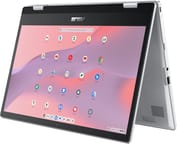
The ASUS Chromebook Flip CX1 (CX1400FKA) is a 14-inch 2-in-1 convertible aimed at students and everyday users. Its 360-degree hinge and Full HD touchscreen give it four modes (clamshell, tent, stand, and tablet), and the chassis is built to the MIL-STD 810H durability standard while weighing 3.59 pounds. The Intel Celeron N4500 inside is a budget dual-core chip, so this is a device for web, documents, and streaming rather than heavy multitasking. ASUS rates the battery for up to 11 hours, and ChromeOS updates run through June 2031.
Pros and Cons
| Pros | Cons |
|---|---|
| 360-degree convertible touchscreen with four usage modes | Dual-core N4500 struggles with heavy multitasking |
| MIL-STD 810H durability rating | eMMC storage is not upgradeable |
| Wi-Fi 6 and Bluetooth 5.2 | 720p webcam is basic for video calls |
| All-day battery life (rated up to 11 hours) | Heavy to hold for long in tablet mode |
| Spill-resistant keyboard with 1.4 mm key travel | No HDMI or Ethernet port |
| ChromeOS updates through June 2031 | No keyboard backlighting |
ASUS Chromebook Flip CX1 (Touchscreen) Comparison Chart
 ASUS Chromebook Flip CX1 (Touchscreen) | ASUS Chromebook Flip CX1 (Touchscreen) | |
| Price | List Price: $330.98 Amazon Prices: | List Price: $334.00 Amazon Prices: Loading prices... |
| Model number | CX1400FKA-DS01-CB | CX1400FKA-AS88FT |
| Performance Rating | 2.6 | 3.7 |
| Chromebook Plus | No | No |
| Processor | Dual-core 1.10 Ghz (max 2.80 Ghz) Intel Celeron Processor N4500 | Dual-core 1.10 Ghz (max 2.80 Ghz) Intel Celeron Processor N4500 |
| RAM | 4 GB | 8 GB |
| Internal Storage | 64 GB emmc | 128 GB emmc |
| Screen Size | 14" | 14" |
| Screen Resolution | 1920x1080 | 1920x1080 |
| Screen Type | FHD NanoEdge LED Backlit | FHD NanoEdge LED Backlit |
| Touch Screen | Yes | Yes |
| Stylus / Pen | No Stylus Support | No Stylus Support |
| Dimensions width x length x thickness | 12.85 x 9.01 x 0.73 inches (326.39 x 228.85 x 18.54 mm) | 12.85 x 9.01 x 0.73 inches (326.39 x 228.85 x 18.54 mm) |
| Weight | 3.59 lbs (1.63 kg) | 3.59 lbs (1.63 kg) |
| Backlit Keyboard | No | No |
| Webcam | 720p HD | 720p HD |
| WiFi | Wi-Fi 6 (802.11ax) | Wi-Fi 6 (802.11ax) |
| Bluetooth | Bluetooth 5.2 | Bluetooth 5.2 |
| Ethernet | No | No |
| Cellular Modem | No | No |
| HDMI | No HDMI | No HDMI |
| USB Ports | 2 USB 3, 2 USB-C | 2 USB 3, 2 USB-C |
| Thunderbolt Ports | No | No |
| Card Reader | microSD Card Reader | microSD Card Reader |
| Battery | 3 cell, 50WHrs, Li-ion | 3 cell, 50WHrs, Li-ion |
| Battery Life | 11.0 hours | 11.0 hours |
| Fanless | No | No |
| Auto Update Expiration Date | June, 2031 | June, 2031 |
Related Chromebooks
-
 ASUS Chromebook Flip C434The 2019 ASUS Chromebook Flip C434 is a 14-inch convertible with a slim-bezel FHD touchscreen, an…
 -
 ASUS Chromebook C424The ASUS Chromebook C424 boasts a crisp 14-inch FHD anti-glare display, durable spill-resistant…
 -
 HP Chromebook x360 14b (2024)The HP Chromebook x360 14b (2024) is a 14-inch convertible sold as a standard Intel N100 build and…
 -
 HP Chromebook x360 14aThe HP Chromebook x360 14a is a 14-inch convertible Chromebook with an Intel Celeron N4020, a…
 -
 Acer Chromebook 314 (CB314-4H/4HT)A budget-friendly 14-inch Chromebook with Intel Alder Lake-N processors, WiFi 6E, and software…
 -
 Samsung Galaxy Chromebook Go 14"The Samsung Galaxy Chromebook Go 14 is a budget 14-inch Chromebook with an Intel Celeron N4500, a…
A rugged convertible built around a low-power chip
The 360-degree hinge folds the 14-inch Full HD (1920x1080) touchscreen flat and back into tablet mode, with tent and stand modes in between for video or presentations. At about 12.9 x 9 x 0.7 inches and 3.59 pounds it is easy to carry, and ASUS tests the chassis to the MIL-STD 810H standard and runs its own panel-pressure, shock, and drop tests.
The Intel Celeron N4500 is an entry-level dual-core chip. It is comfortable with the workload Chromebooks are made for: web browsing, Google Workspace or Office on the web, email, and video streaming. A stack of browser tabs plus Android apps will feel slower, and the 4GB model slows down sooner than the 8GB model. The low-power chip helps battery life. ASUS rates the 50Wh battery for up to 11 hours in the Chromium OS power load test, which mixes standby with web browsing. Intel launched the Celeron N4500 in 2021, and newer budget chips such as the Intel N100 (2023) and N150 (2025) have since replaced it.
Connectivity covers two USB-C ports (USB 3.2 Gen 1, with display output and power delivery) and two USB-A ports, plus a microSD reader that is worth using since the eMMC storage cannot be upgraded. Charging is through USB-C with a 45W adapter in the box. Wireless is Wi-Fi 6 and Bluetooth 5.2; there is no HDMI or Ethernet jack, so wired networking needs a USB Ethernet adapter.
The keyboard is spill-resistant with 1.4 mm of key travel, but it has no backlight. The touchscreen has no active stylus support; the CX1400FKA is not on the ASUS list of USI-supported models, so it is not a good fit for handwritten notes. ASUS also fits a Titan C security chip.
Customer Reviews
The 8GB model averages 4.3 stars across 374 ratings on Amazon. Owners who like it point to the hinge and the flexibility. Victor Welliver wrote that “The flip mechanism is strong, the battery life is great,” and Mike Cohn, after two months of use, said “I like the touchscreen, and the keyboard has a good feel to it.” Pete in NY wrote that “the flip function is terrific” but added that “it is a little heavy and bulky, making it somewhat awkward to convert to flip or normal position.”
The complaints are about speed, battery life, and reliability. Lanai Lewis wrote that “The track pad is often very slow to respond” and that the Wi-Fi connection “is often like pulling teeth,” and on battery life: “It might go five or six hours before you feel the need to plug it in.” Kay in Philadelphia reported a unit that “started overheating and freezing” after a few uses and later “rarely turns on, overheats when charging and the screen freezes.”
Owners of the 4GB model left similar notes. Michael Harrison, a verified buyer reviewing in September 2025, wrote that “This is the second Asus Chromebook I’ve owned with the last one still working without flaw after 5 years,” adding “I absolutely love the touch screen and the solid feel of the hinges when I fold it fully open.” A verified buyer named Joli reported a unit that arrived with a non-working camera and effectively no battery: “Caméra ne fonctionnait pas et l’appareil n’avait aucune autonomie (s’éteignait aussitôt qu’il était débranché),” meaning the camera did not work and the device shut off the moment it was unplugged.
A durable pick for students who stay in the browser
The 8GB model with 128GB of storage is the one still sold new, and it is also the better choice if you keep many tabs open. The 4GB model with 64GB is no longer sold new; it suits lighter, single-task use if you find one or already own one. Both models are built for web and document work.
It is the wrong pick if you need to run demanding applications, keep large local files (the eMMC storage is small and not upgradeable), or expect tablet-mode comfort, since 3.59 pounds is heavy to hold for long. Anyone wanting more speed should step up to a Chromebook Plus model. Compare options with Starry Hope’s Chromebook Comparison Chart.
Frequently Asked Questions
Does the ASUS Chromebook Flip CX1 have a touchscreen?
Yes. It has a 14-inch Full HD (1920x1080) touchscreen on a 360-degree hinge, which supports four modes: laptop, tent, stand, and tablet.
How long will this Chromebook receive updates?
ChromeOS updates run until June 2031 under Google’s official Auto Update Expiration (AUE) schedule. After that date the machine keeps working but stops getting security and feature updates.
What’s the difference between the 4GB and 8GB RAM versions?
The 8GB version (128GB storage) stays smoother with several browser tabs open or Android apps running alongside Chrome. The 4GB version (64GB storage) fits basic browsing and document editing. RAM is not upgradeable on either.
Can I expand the storage on this Chromebook?
The internal eMMC storage cannot be upgraded, but you can expand storage using the built-in microSD card reader. You can also store files in Google Drive or other cloud storage services.
Is the ASUS Chromebook Flip CX1 good for students?
Yes. It is built to the MIL-STD 810H durability rating, is rated for up to 11 hours of battery life, and the touchscreen convertible design suits reading and typed notes. It has no stylus support, so it is a poor fit for handwritten notes. At 3.59 pounds it is easy to carry between classes. The main caveat is the entry-level N4500 chip, so keep tab counts reasonable on the 4GB model.
Does this Chromebook work with Microsoft Office?
Full desktop versions of Microsoft Office are not compatible with ChromeOS. You can use the web versions of Word, Excel, and PowerPoint in the browser. Google Workspace (Docs, Sheets, Slides) is also fully supported.
What ports does the ASUS Chromebook Flip CX1 have?
The Chromebook includes two USB 3.2 Gen 1 Type-C ports (with display output and power delivery), two USB 3.2 Gen 1 Type-A ports, a 3.5mm audio jack, and a microSD card reader. There is no HDMI port, but you can connect to external displays via USB-C with an appropriate adapter.
How heavy is the Chromebook Flip CX1 in tablet mode?
At 3.59 pounds (1.63 kg) it is about average for a 14-inch laptop but can feel heavy held as a tablet for long stretches. Shorter tablet sessions like reading or media work fine; dedicated tablets are lighter for all-day handheld use.