
ASUS Chromebook CM32 Detachable
Published on

The ASUS Chromebook CM32 Detachable is a 12.1-inch ChromeOS tablet that docks to a pogo-pin keyboard. Its 2560x1600 16:10 panel runs at 120Hz and is rated by ASUS at 600 nits with 98% DCI-P3 coverage under a Corning Gorilla Glass cover. Inside is the MediaTek Kompanio 540, an eight-core ARM part clocked at 2.0 GHz with boost to 2.6 GHz and Mali-G57 MC2 graphics. ASUS announced US availability on July 15, 2026, and because the Kompanio 540 is a new platform, Google lists Auto Update Expiration for the CM3206DM4A board as June 2036: a full ten years of ChromeOS updates from launch. ASUS lists the 2-in-1 at 1.41 pounds, with a single USB-C port and a combo audio jack, rated to the MIL-STD 810H durability standard.
It competes with the Lenovo Chromebook Duet line on screen size and brightness more than on speed. In the US, ASUS sells it in 4GB/64GB and 8GB/128GB configurations, both with soldered memory and eMMC storage, and there is no microSD slot to fall back on. The keyboard uses full-size chiclet keys with 1.35mm of travel and a spill-resistant deck, and the magnetic back cover doubles as an adjustable stand. Browser tabs and Android apps are what this hardware is sized for, and gaming and heavy local files sit outside that.
Pros and Cons
| Pros | Cons |
|---|---|
| 12.1-inch 2560x1600 touchscreen at 120Hz, rated 600 nits and 98% DCI-P3 | A single USB-C port handles charging, data, and external display |
| ChromeOS updates through June 2036 (ten years from launch) | No microSD slot, and eMMC storage is soldered |
| Outlasted a Lenovo Chromebook Duet 11 by 47 minutes in one reviewer’s looped video test | Base configuration ships with only 4GB of RAM and 64GB of storage |
| Detachable keyboard with 1.35mm travel and a spill-resistant deck | Keyboard has no backlight and uses a plastic deck |
| Magnetic back cover charges a USI 2.0 pen wirelessly | Both cameras are slow to shoot and mediocre in quality |
| MIL-STD 810H rating and Corning Gorilla Glass cover | No fingerprint reader, despite a power button that looks like one |
Related Videos
ASUS Chromebook CM32 Detachable Comparison Chart
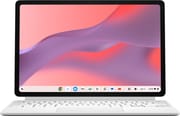 ASUS Chromebook CM32 Detachable | ASUS Chromebook CM32 Detachable | |
| Price | List Price: Amazon Prices: Loading prices... | List Price: $579.00 Amazon Prices: Best Buy: Loading price... |
| Model number | CM3206DM4A-YZ44T | CM3206DM4A-M8189 |
| Performance Rating | 1.9 | 3.0 |
| Chromebook Plus | No | No |
| Processor | Octa-core 2.00 Ghz (max 2.60 Ghz) MediaTek Kompanio 540 | Octa-core 2.00 Ghz (max 2.60 Ghz) MediaTek Kompanio 540 |
| RAM | 4 GB | 8 GB |
| Internal Storage | 64 GB eMMC | 128 GB eMMC |
| Screen Size | 12.1" | 12.1" |
| Screen Resolution | 2560x1600 | 2560x1600 |
| Screen Type | IPS | IPS |
| Touch Screen | Yes | Yes |
| Stylus / Pen | Supported | Supported |
| Dimensions width x length x thickness | 10.99 x 7.48 x 0.71 inches (279.15 x 189.99 x 18.03 mm) | 10.99 x 7.48 x 0.96 inches (279.15 x 189.99 x 24.38 mm) |
| Weight | 1.41 lbs (0.64 kg) | 1.41 lbs (0.64 kg) |
| Backlit Keyboard | No | No |
| Webcam | 5MP front and rear | 5MP front and rear |
| WiFi | Wi-Fi 6 (802.11ax) | Wi-Fi 6 (802.11ax) |
| Bluetooth | Bluetooth 5.4 | Bluetooth 5.4 |
| Ethernet | No | No |
| Cellular Modem | No | No |
| HDMI | No HDMI | No HDMI |
| USB Ports | 1 USB-C 1x USB-C with Power Delivery and DisplayPort | 1 USB-C 1x USB-C with Power Delivery and DisplayPort |
| Thunderbolt Ports | No | No |
| Card Reader | No Card Reader | No Card Reader |
| Battery | 2 cell, 42Wh, Li-ion | 2 cell, 42Wh, Li-ion |
| Battery Life | 12 hours | 12 hours |
| Fanless | Yes | Yes |
| Auto Update Expiration Date | June, 2036 | June, 2036 |
Related Chromebooks
-
 ASUS Chromebook CM30 DetachableThe ASUS Chromebook CM30 Detachable bundles a 10.5-inch WUXGA touchscreen tablet, a keyboard folio,…
 -
 Lenovo Chromebook Duet 11" (2024)
 -
 ASUS Chromebook Flip C214The ASUS Chromebook Flip C214 is a rugged 11.6-inch education convertible with an Intel Celeron…
 -
 Lenovo Flex 3i Chromebook 12.2"The Lenovo Flex 3i Chromebook 12.2 is a fanless 2-in-1 with a 12.2-inch 1920x1200 IPS touchscreen,…
 -
 Samsung Chromebook Plus v2The Samsung Chromebook Plus v2 is a fanless 12.2-inch convertible Chromebook with an Intel Celeron…
 -
 Acer Chromebook 712The Acer Chromebook 712 (C871) is a 12-inch education Chromebook with an Intel Celeron 5205U, a 3:2…
Fixed Memory Behind a Single USB-C Port
ASUS publishes different dimensions per configuration: its US spec table lists the 4GB/64GB model at 10.99 by 7.48 by 0.71 inches and the 8GB/128GB model at 10.99 by 7.48 by 0.96 inches, both at 1.41 pounds, and the thinnest row on its global tech specs (10.99 by 7.48 by 0.56 inches) is the slate with nothing attached. Those global tech specs give a starting weight of 1.34 pounds, and ASUS’s product page says the tablet and its keyboard together weigh less than a kilo. One USB-C port sits on the short right edge and covers power, data, and DisplayPort output, alongside a 3.5mm combo audio jack, a charge indicator LED, and one of the two speakers. The left edge holds the second speaker and the power button, the top edge carries volume buttons and a microphone, and the underside has the pogo-pin contacts the keyboard snaps onto. There is no HDMI, no microSD slot, and no second USB-C, so a hub is the answer for anyone who wants to charge and drive a display at the same time. ASUS also sells a screwed-on Impact Shield case aimed at schools and fleets, which is a different object from the magnetic snap-on back most retail units ship with.
Performance comes from the MediaTek Kompanio 540, eight ARM cores (Cortex-A78 plus Cortex-A55) at 2.0 GHz base and 2.6 GHz boost, with Mali-G57 MC2 handling graphics and a PassMark CPU Mark near 5,363. In ChromeOS terms that is a comfortable mid-tier ARM part: browsing, Google Docs, split-screen multitasking, and video all run without complaint. It is not a substitute for an Intel Core laptop, and the one reviewer who benchmarked it against a Lenovo Chromebook Duet 11 found the older Kompanio 838 in that machine still holding a slight edge. The 4GB configuration is the one to think hardest about, since ChromeOS with a dozen tabs and an Android app or two will use that up quickly and there is no way to add more later.
Wireless is worth checking on the specific listing, because ASUS’s own materials disagree. Its US product page markets the CM32 with WiFi 7 and optional LTE, but the per-SKU table in its US launch announcement lists Wi-Fi 6 (802.11ax) dual-band 2x2 with Bluetooth 5.4 for both US configurations, and its global tech specs carry both a WiFi 7 (802.11be) triple-band card and a WiFi 6 card with 4G LTE support in selected territories. The per-SKU table is the more specific source for what ships here. Both cameras are 5MP and record 1080p video, the front one without a privacy shutter but with an activity indicator light. The 42Wh two-cell battery is rated by ASUS at up to 12 hours, and charging runs over the same USB-C port from a 45W adapter.
Reviewer Insights
MergeDroid
MergeDroid spent roughly two months with the CM32 Detachable, first with a 4GB review sample from ASUS UK in the initial impressions video and later with an 8GB unit for the full review. “The 12.1 in IPS display is seriously bright with a claim brightness of 600 nits. So, I’ve had no issues wherever I’ve been using it,” he said of the screen, and in the earlier video he called it “the brightest Chromebook display I’ve ever tested on the channel.” He also verified the update window himself, noting that “having the Companio 540 in the CM32 also means it’ll see Chrome OS updates all the way through to June 2036,” against June 2034 for the older Kompanio 838 in the Duet 11.
Looping 1080p60 YouTube with sound muted, both devices at their out-of-box resolutions, with the Duet 11 at its full 400 nits and the CM32 dropped five brightness clicks to match, “the Lenovo lasted 4 hours and 34 minutes, at which point the ASUS CM32 still had 16% of its battery remaining and went on to the 5 hour and 21 minute mark.” He also measured a 30-minute top-up on a 45W USB-C charger at 43%. On benchmarks he was more measured, reporting that the Duet 11’s Kompanio 838 “does still have the slight edge over the CM32” in Geekbench and Speedometer 3.1, while adding that day to day he “never really felt it was held back.”
Coming from a Duet 11, he “found myself at times wishing that there was a second USBC port on the long edge. There isn’t. There’s just the one on the short edge on the right hand side.” He wanted a microSD slot on what is otherwise a media-friendly tablet, and he was blunt about the cameras: “I wasn’t blown away by the quality and for taking photos, there’s always a bit of delay.” On the other side, the audio surprised him, with “the side speakers have actually been pretty impressive for tablet speakers. They get plenty loud and have a bit of depth to them.”
Android Digest
Android Digest framed his review around the expectations that had built up for MediaTek’s newer ARM chips in ChromeOS, and he pushed back on them directly. “This tablet, it is not the savior that we have been looking for,” he said. “It’s not the tablet that all of us have been dreaming about, but it is a very, very good tablet on Chrome OS.” He noted that Geekbench on the CM32 “actually tests lower than you would find in budget Android tablets,” while pointing out that the score runs through an emulation layer and that ChromeOS itself needs less headroom than Android does.
He called the display “a 12.1 in 2.5K resolution” panel with brightness “around 600 nits, which is pretty good for a tablet,” and he made the ten-year update commitment central to his recommendation, contrasting it with budget Android tablets that ship with two years of OS updates. His summary of the right buyer was someone doing browser-based work: “If you’re buying a Chromebook, you’re really buying a Chromebook to do the basics, right? … This tablet will perform very, very well going back and forth between apps.”
The keyboard, in his description, “is going to be like a basic plastic keyboard” with no backlighting and “a little bit of flex,” which he rated good rather than great. The kickstand case drew a sharper note: “It is a little bit flimsy, I will say,” and he warned that adjusting it with too much force near the middle can pop it partly off the tablet. He also flagged that the power button “looks like it’s a fingerprint sensor, but it’s not,” and that games like Genshin Impact run only on very low settings.
Chrome Unboxed
Chrome Unboxed got hands on a pre-production unit at the ASUS booth at CES 2026, several months before US retail availability. The clip runs two minutes and no unit was tested. “This is the update to the CM30. Uh, it looks a lot like the CM30, but it’s a little bit bigger. 12in display this time around,” he said, with the newer MediaTek chip meaning “we should get a lot better performance than the last generation of this.” He singled out the keyboard, saying “ASUS says that they have made uh some moves on the keyboard, and that thing does feel really, really good,” and the stylus dock on the back cover: “What it’s holding here is a rechargeable stylus. So, yep, you drop that on there, it’s actually going to charge and that case is going to hold it in place.” No pricing or availability was set at the time.
The 8GB SKU Is the Easier One to Buy
The 8GB/128GB model (CM3206DM4A-M8189) is the one ASUS launched at Best Buy, which lists the color as Fog Silver, and the one ASUS quotes an MSRP for. The 4GB/64GB model (CM3206DM4A-YZ44T) reaches Amazon through a third-party reseller rather than Amazon itself, and that reseller’s price sits above ASUS’s list price for the better-equipped 8GB SKU. ASUS’s press materials also name a third 4GB/64GB SKU (CM3206DM4A-WS44) headed to Walmart. If you are choosing on specification alone, the 8GB configuration is the one that matches what reviewers tested and the one with room for ChromeOS to breathe over a ten-year update window.
What comes in the box depends on the retailer. ASUS lists the USI 2.0 ASUS Pen, the stand cover, and the protective case under optional box contents, and its own marketing footnotes call the stylus and the magnetic stand optional. Best Buy’s spec sheet for the 8GB SKU lists a stylus as included, while the Amazon listing for the 4GB SKU names only the Chromebook and an AC adapter. Read the specific listing before ordering rather than assuming the pen comes along.
A Bright Detachable with a Decade of Updates
This one suits a buyer who wants a tablet first and a small laptop second. Students taking handwritten notes and typing papers fit that, as do commuters who read and watch more than they compute on a 1.41-pound machine with a bright, fast-refresh screen. The June 2036 expiry leaves a decade of updates ahead of a buyer today, where the Lenovo Chromebook Duet 11 that MergeDroid tested it against runs out in June 2034, and a Chromebook’s useful life is bounded by that date more than by its hardware. Schools and fleets get an extra option in the screwed-on Impact Shield case.
Buyers who need more than one port, expandable storage, or a backlit keyboard should look elsewhere. Anyone whose workload includes serious Android gaming will be happier with a dedicated Android tablet, since the CM32 runs those titles through an emulation layer and reviewers found it needs low settings for demanding games. If a keyboard is the main event rather than an accessory, a touchscreen clamshell Chromebook will type better than any 12-inch detachable folio. The smaller, older ASUS Chromebook CM30 Detachable remains the cheaper entry point in the same family, with a 10.5-inch 1920x1200 screen and a shorter update window.
For side-by-side spec comparisons across ChromeOS hardware, the Chromebook comparison chart sorts current models together.
Frequently Asked Questions
What processor does the ASUS Chromebook CM32 Detachable use?
The CM32 Detachable runs the MediaTek Kompanio 540, an eight-core ARM processor (Cortex-A78 plus Cortex-A55) at 2.0 GHz with boost to 2.6 GHz, paired with Mali-G57 MC2 graphics. It scores roughly 5,363 on PassMark’s CPU Mark, which places it in the mid-tier of ARM ChromeOS silicon: comfortable for browsing, documents, streaming, and light Android apps, and behind Intel Core parts for anything heavier.
When does the ASUS Chromebook CM32 Detachable lose ChromeOS update support?
Google lists the Auto Update Expiration date for the CM3206DM4A board as June 2036, a full ten years of ChromeOS updates from the July 2026 US launch. After that date the device keeps working but stops receiving new ChromeOS versions and security patches.
Can I upgrade the RAM or storage in the ASUS Chromebook CM32 Detachable?
No. The LPDDR5X memory is soldered to the board and the eMMC storage is not removable, so the configuration you buy is the configuration you keep. There is also no microSD slot, which means extra capacity has to come from Google Drive or an external USB-C drive. Choose the 8GB/128GB model if you expect to keep many tabs and Android apps open.
What ports does the ASUS Chromebook CM32 Detachable have?
There is one USB-C port on the short right edge, handling charging, data, and DisplayPort video output, plus a 3.5mm combo headphone and microphone jack. The keyboard attaches over pogo-pin contacts rather than a port. There is no HDMI, no microSD slot, and no second USB-C, so a USB-C hub is useful if you want to charge and run an external display at once.
Does the ASUS Chromebook CM32 Detachable come with a stylus?
It depends on the SKU. The tablet supports a USI 2.0 pen and its magnetic back cover charges one wirelessly, but ASUS lists the pen, the stand cover, and the protective case as optional box contents. Best Buy’s spec sheet for the 8GB/128GB model lists a stylus as included, while the Amazon listing for the 4GB/64GB model names only the Chromebook and an AC adapter. Check the specific listing before you order.
Does the CM32 Detachable have WiFi 6 or WiFi 7?
ASUS’s own materials disagree, so check the listing. The per-SKU table in its US launch announcement lists Wi-Fi 6 (802.11ax) dual-band with Bluetooth 5.4 for both US configurations, while its US product page markets WiFi 7 with optional LTE and its global tech specs carry both a WiFi 7 (802.11be) triple-band option and a WiFi 6 option with 4G LTE in selected territories. The per-SKU table is the more specific source for a US purchase.
How long does the battery last on the CM32 Detachable?
ASUS rates the 42Wh two-cell battery at up to 12 hours of mixed use. In a looped 1080p60 YouTube test, MergeDroid measured the CM32 running to 5 hours 21 minutes against 4 hours 34 minutes for a Lenovo Chromebook Duet 11 at comparable brightness, and a 30-minute charge on a 45W USB-C adapter recovered 43%.
Can the ASUS Chromebook CM32 Detachable run Android and Linux apps?
Yes. ChromeOS on the CM32 supports the Google Play Store for Android apps and the Linux development environment for Debian packages. Light Android apps and command-line Linux work fit the Kompanio 540 well; demanding 3D Android games run through an emulation layer and need low settings, so treat gaming as a secondary use rather than a reason to buy.
Is the CM32 Detachable a Chromebook Plus?
No. ASUS does not brand the CM32 Detachable as a Chromebook Plus, and it is sold simply as an ASUS Chromebook. The 8GB/128GB configuration meets the memory and storage floor associated with that tier, but the badge and its bundled feature set are not part of this model.