
Acer Chromebook 311 C725
Published on

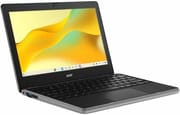
The Acer Chromebook 311 C725 is a small, rugged 11.6-inch Chromebook that Acer announced in January 2026 for schools. It suits a classroom fleet or a student who wants a laptop that survives a backpack and lasts the day. Outside school, the low-resolution screen and the 4GB base models, which Creative Bloq found sluggish, are the reasons to look elsewhere. All four reviews below credit its battery life. Trusted Reviews, Creative Bloq, and MergeDroid fault the 1366x768 resolution, and Tom’s Guide faults the panel’s color.
| Pros | Cons |
|---|---|
| MIL-STD 810H testing, with Acer rating it for 48-inch drops and 11-ounce keyboard spills | 1366x768 panel with weak color coverage in Tom’s Guide’s lab tests |
| 13 to 16 hours in two published video-loop battery tests at reduced brightness | Wide bezels around an already small screen |
| Keyboard and USB-C ports are replaceable, which helps school repair desks | 4GB model felt slow in Creative Bloq’s testing |
| Fanless and silent | No keyboard backlight and no card reader |
| ChromeOS updates through June 2036 | No Chromebook Plus features such as Help Me Read |
| USB-C and USB-A on both sides, with charging from either side | No HDMI; an external display runs over USB-C |
Related Videos
Acer Chromebook 311 C725 Comparison Chart
4 configurations
| Configuration | RAM | Storage | Screen | Performance | List price | Amazon price | Compare |
|---|---|---|---|---|---|---|---|
| C725-83N4 / NX.JW7AA.005 | 4 GB | 32 GB eMMC | 1366x768 | 1.9 | $549.99 | Loading... | Details
|
| C725-84ATNA / C725-813B / NX.JW7AA.004 | 4 GB | 64 GB eMMC | 1366x768 | 1.9 | $599.99 | Loading... | Details
|
| C725-87PF / NX.JW7AA.003 | 8 GB | 64 GB eMMC | 1366x768 | 3.0 | $729.99 | Loading... | Details
|
| C725T-841X / NX.JW8AA.002 | 8 GB | 64 GB eMMC | 1366x768 touch | 3.0 | $749.99 | Loading... | Details
|
Specs shared by every configuration
| Chromebook Plus | No |
|---|---|
| Processor | Octa-core 2.00 Ghz (max 2.60 Ghz) MediaTek Kompanio 540 |
| Screen Size | 11.6" |
| Screen Resolution | 1366x768 |
| Screen Type | IPS |
| Stylus / Pen | No Stylus Support |
| Dimensions width x length x thickness | 11.51 x 7.96 x 0.75 inches (292.35 x 202.18 x 19.05 mm) |
| Backlit Keyboard | No |
| Webcam | 1080p |
| WiFi | Wi-Fi 7 (802.11be) |
| Bluetooth | Bluetooth 5.3 |
| Ethernet | No |
| Cellular Modem | No |
| HDMI | No HDMI |
| USB Ports | 2 USB 3, 2 USB-C 2x USB-C 5Gbps with DisplayPort and charging, 2x USB-A 5Gbps |
| Thunderbolt Ports | No |
| Card Reader | No Card Reader |
| Battery | 3 cell, 45Wh, Li-ion |
| Battery Life | 15 hours |
| Fanless | Yes |
| Auto Update Expiration Date | June, 2036 |
Related Chromebooks
-
 Acer Chromebook 311 C723The Acer Chromebook 311 C723 is an 11.6-inch education Chromebook built to MIL-STD-810H durability,…
-
 Acer Chromebook 311 (CO731)The Acer Chromebook 311 (CO731) is a fanless 11.6-inch Chromebook with an Intel Celeron N4500, 4GB…
-
 HP Chromebook 11a (ARM)The HP Chromebook 11a offers an 11.6-inch anti-glare display, 720p HD webcam, and up to 15 hours 45…
-
 Dell Chromebook 11 (3100)The Dell Chromebook 11 (3100) is a ruggedized 11.6-inch education Chromebook with rubber bumpers, a…
-
 Lenovo 100e Chromebook Gen 4The Lenovo 100e Chromebook Gen 4 is a rugged, fanless 11.6 inch ARM Chromebook built for K-12…
-
 ASUS Chromebook CR11 (CR1104C)The ASUS Chromebook CR11 (CR1104C) is a ruggedized 11.6-inch Chromebook built for students and…
Build, ports, and repair

Acer’s announcement lists MIL-STD 810H compliance, an impact-resistant exterior with shock-absorbent bumpers, reinforced ports and corners, and a hinge rated for 25,000 open-close cycles. Acer rates it for drops up to 48 inches, and the spill-resistant keyboard drains up to 11 ounces of liquid. The non-touch models measure 11.5 x 8 x 0.75 inches and weigh about 2.6 pounds; the touch C725T weighs about 2.9 pounds. The lid opens 180 degrees and lies flat.
It has two USB-C ports that handle charging and DisplayPort, two USB-A ports at 5Gbps, a headphone jack, and a Kensington Nano lock slot. An external display connects over USB-C, and wired networking needs a USB Ethernet adapter. There is no microSD slot, which leaves the 32GB or 64GB of soldered eMMC as the only local storage. US models have Wi-Fi 7 and Bluetooth 5.3.
The keyboard comes off with two screws and the USB-C ports sit on replaceable modules, so a school can fix a damaged port without replacing the board. Acer also offers an optional 5MP world-facing camera on the lid, alongside the 1080p webcam with a privacy shutter.
Memory, storage, and the chip
The MediaTek Kompanio 540 is an eight-core Arm chip with two Cortex-A78 cores up to 2.6 GHz and six Cortex-A55 cores up to 2.0 GHz. It runs without a fan. Memory is LPDDR5X, soldered at 4GB or 8GB, and cannot be upgraded later. Acer’s announcement also names a 128GB storage option, the size Tom’s Guide and Trusted Reviews tested, though the US configurations in the chart above stop at 64GB.
What changed from the C723
The Acer Chromebook 311 C723 came before this model on a Kompanio 528. The C725 moves to the newer chip, Wi-Fi 7, a 1080p webcam in place of 720p, a second USB-A port, and a lower weight of about 2.6 pounds against about 3. Its update window runs three years longer, to June 2036 rather than June 2033. The C723’s microSD reader is gone, and the screen stays at 1366x768.
Reviewer Insights

Testers used different configurations, which makes their speed results hard to compare directly. Tom’s Guide and Trusted Reviews tested 8GB with 128GB; Creative Bloq and MergeDroid tested 4GB with 32GB.
Tom’s Guide
Tom’s Guide tested a touchscreen unit for a month and has the most lab numbers. The laptop scored 1,007 single-core and 2,168 multi-core in Geekbench 6, reached 225.8 nits, and covered 59.7% of sRGB. On color accuracy, the review says Delta-E “measured at 7.2 is abysmal, for lack of a better word.” The battery lasted 13 hours and 5 minutes playing HD YouTube at 150 nits. Light productivity held up, with stuttering showing only after 30 Chrome tabs. The review likes the keyboard’s short key travel and well-spaced keys. It dislikes the bezels: “The thick black bezels are too prominent for my liking, and make the laptop look clunky and cheap.” The review’s overall conclusion is that the price is hard to justify given those flaws.
Trusted Reviews
Trusted Reviews measured almost 16 hours on a Full HD video loop at around 50 percent brightness, longer than Acer’s 15-hour claim. Its Geekbench 6 results were similar to an Intel N100 in the Chromebook Spin 312, with the multi-core score lower than the reviewer expected. It found the machine capable of multiple Chrome tabs for documents and music without much slowdown, and summed up the purpose this way: “Its purpose is to be a portable and efficient laptop for light productivity loads, which it performs decently well.” It noted a bit of flex at the corners and on the keyboard deck, which the reviewer did not mind on a cheaper laptop. Its complaints include the low-resolution screen, the port selection, and a cramped trackpad: “The trackpad is on the smaller side, and owing to the lack of vertical space, can feel quite restrictive before too long.”
Creative Bloq
Creative Bloq tested a 4GB model and was the harshest on speed: “Performance was sluggish with a small but annoying second or two of delay on most operations, including launching, using, and switching apps.” It got nine to ten hours of battery in real use, which it still counted as enough for a full day. On the screen, the verdict was “It really is only sufficient for reading, web browsing and word processing, though it won’t look as sharp as a 1080p smartphone or larger laptop.” It also rated the webcam poorly and praised the two-screw keyboard removal and modular USB-C ports.
MergeDroid
MergeDroid tested a pre-release 4GB model on loan from Acer UK next to the convertible Spin 311, with Wi-Fi 6E rather than the Wi-Fi 7 on US models. He called them “absolutely fine for entry-level Chromebooks”, adding: “I haven’t been blown away by them, but that’s not really the point, is it?” He said it “certainly felt decent for everyday browsing and light Android gaming.” In his Speedometer 3.1 results, the Kompanio 540 ran around 47% ahead of numbers for the older Kompanio 520 but scored lower than an Intel N100. In his informal test streaming HD video at full brightness, the Spin lasted 7 to 8 hours and the clamshell ran 40 to 45 minutes longer. He expects decent battery life at lower brightness in general browsing, and he says the 1366x768 resolution feels dated in 2026. He tested only 4GB units and still says: “I’d definitely advise any buyers to go for the 8GB option to get the most out of them.” He found the speakers better than he expected and the webcam decent enough.
Should you buy it?
It fits a school buying a fleet that has to survive drops and spills and be repaired in house, with updates through June 2036. It also suits a student who mostly writes and browses, wants a very small laptop, and values battery life over screen quality. An 8GB model makes more sense for one person’s daily use: Creative Bloq found its 4GB unit sluggish, and MergeDroid, who found his 4GB units fine for entry-level use, still advises buying 8GB.
Skip it if you read or watch a lot on the screen, or edit photos. A sharper touchscreen and HDMI come with the Acer Chromebook Spin 312, a small convertible. The Lenovo Chromebook m 14 uses the same chip with a 1920x1200 panel if a 14-inch size works. Schools that want another rugged 11.6-inch option can look at the ASUS Chromebook CR11, built on an Intel N100. Our Chromebook comparison chart filters the rest by price, memory, storage, and processor.
Frequently Asked Questions
How long will the Acer Chromebook 311 C725 get ChromeOS updates?
Google lists an Auto Update Expiration date of June 2036 for the C725 and C725T, so both are still supported.
Does the Chromebook 311 C725 have a touchscreen?
The C725 models do not. The C725T adds a touchscreen and weighs about 2.9 pounds rather than 2.6. Neither one folds back into a tablet; that is the separate Chromebook Spin 311.
Can I add memory or storage later?
No. The LPDDR5X memory and eMMC storage are soldered, and there is no microSD slot. Extra space has to come from cloud storage or a USB drive.
Is it a Chromebook Plus?
No. Trusted Reviews confirms it does not carry the Chromebook Plus designation and misses features such as Help Me Read. It does include the newer Quick Insert key.
Can it connect to an external monitor?
Yes. Both USB-C ports support DisplayPort. An HDMI display needs a USB-C adapter or hub, since there is no HDMI port.