
Acer Chromebook Spin 312
Published on

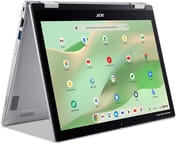
The Acer Chromebook Spin 312 is a 12.2-inch convertible built around the Intel Core i3-N305, an 8-core chip that covers everyday productivity, web browsing, and light multitasking. A 360-degree hinge turns it from a laptop into a tablet, and the WUXGA (1920x1200) IPS touchscreen sits behind Corning Gorilla Glass. MIL-STD 810H certification, a 1080p webcam with a privacy shutter, and WiFi 6E fill out a spec sheet aimed at students, educators, and mobile professionals. ChromeOS updates run through June 2033.
Pros and Cons
| Pros | Cons |
|---|---|
| Smooth OceanGlass trackpad | No keyboard backlighting |
| 16:10 aspect ratio adds vertical space | Only one USB-C port for charging and connectivity |
| 1080p webcam with physical privacy shutter | HDMI limited to version 1.4 for external displays |
| MIL-STD 810H certified for durability | Screen brightness limited to approximately 250 nits |
| Battery rated up to 13 hours | Not branded as Chromebook Plus despite meeting specs |
| ChromeOS updates through June 2033 | Speakers lack bass |
Related Videos
Acer Chromebook Spin 312 Comparison Chart
 Acer Chromebook Spin 312 | |
| Price | List Price: $449 Amazon Prices: Loading prices... Best Buy: Loading price... |
| Model number | CP312-1HN-34Z7 |
| Performance Rating | 5.9 |
| Chromebook Plus | No |
| Processor | Octa-core 1.80 Ghz (max 3.80 Ghz) Intel Core i3-N305 |
| RAM | 8 GB |
| Internal Storage | 128 GB eMMC |
| Screen Size | 12.2" |
| Screen Resolution | 1920x1200 |
| Screen Type | IPS |
| Touch Screen | Yes |
| Stylus / Pen | Supported |
| Dimensions width x length x thickness | 11.41 x 8.07 x 0.78 inches (289.81 x 204.98 x 19.81 mm) |
| Weight | 2.84 lbs (1.29 kg) |
| Backlit Keyboard | No |
| Webcam | 1080p 60fps |
| WiFi | Wi-Fi 6E (802.11ax) |
| Bluetooth | Bluetooth 5.2 |
| Ethernet | No |
| Cellular Modem | No |
| HDMI | Full-Size HDMI |
| USB Ports | 2 USB 3, 1 USB-C 1x USB-C 3.2 Gen 1 with DisplayPort and Power Delivery, 2x USB-A 3.2 Gen 1, 1x HDMI 1.4 |
| Thunderbolt Ports | No |
| Card Reader | No Card Reader |
| Battery | Li-ion |
| Battery Life | 13 hours |
| Fanless | No |
| Auto Update Expiration Date | June, 2033 |
Related Chromebooks
-
 Acer Chromebook Vero 514The Acer Chromebook Vero 514 blends sustainability with performance. Sporting a Full HD IPS…
 -
 Acer Chromebook Spin 513 (CP513-2H)The 2022 Acer Chromebook Spin 513 (CP513-2H) is a fanless 13.5-inch convertible with a MediaTek…
 -
 Acer Chromebook Spin 314 (2024)A 14-inch convertible Chromebook with a 16:10 WUXGA touch display, 360-degree hinge, and software…
 -
 ASUS Chromebook Vibe CX34 FlipThe ASUS Chromebook Vibe CX34 Flip is a cloud-gaming convertible Chromebook with a 12th Gen Intel…
 -
 Dell Latitude 3445 ChromebookThe Dell Latitude 3445 Chromebook is a 14-inch 16:10 business Chromebook sold with an AMD Ryzen 5…
 -
 Dell Latitude 5430 Chromebook 2-in-1The Dell Latitude 5430 Chromebook 2-in-1 is a 14-inch business convertible with 12th Gen Intel…
A rugged 12.2-inch convertible with one USB-C port

The chassis measures 11.41 x 8.07 x 0.78 inches and weighs 2.84 pounds, small enough to carry between classes or to work on the go. It is all plastic, though reviewers found it rigid, and Acer’s MIL-STD 810H certification covers the bumps and drops of daily use. The screen rotates a full 360 degrees through laptop, tent, stand, and tablet modes. Its 16:10 aspect ratio gives more vertical room than a 16:9 panel, which reviewers appreciated for document work and web browsing.
The Intel Core i3-N305 has 8 cores and 8 threads and boosts to 3.8 GHz, scoring approximately 9,577 on PassMark’s CPU benchmark. That covers ChromeOS workloads including multiple browser tabs, Android apps, and Linux applications. Memory is 8GB of LPDDR5 and storage is 128GB of eMMC, which handle typical productivity tasks smoothly, though reviewers note occasional slowdowns during heavy multitasking.
Wireless is WiFi 6E (802.11ax) plus Bluetooth 5.2 for peripherals. The ports are one USB-C 3.2 Gen 1 with DisplayPort and charging, two USB-A 3.2 Gen 1, an HDMI 1.4 output, and a 3.5mm combo audio jack. The single USB-C port limits expansion, but full-size HDMI and two USB-A ports cover common connections without an adapter. For wired networking, a USB Ethernet adapter plugs into either USB-A port. The OceanGlass trackpad draws consistent praise from reviewers for its smooth, glass-like feel despite being a plastic material.
Reviewer Insights

Chrome Unboxed’s Perspective
Chrome Unboxed worked through build quality, input devices, and display characteristics in a hands-on unboxing. The trackpad stood out: “I just love these [OceanGlass trackpads] in Acer’s more affordable Chromebooks. I mean for a little Chromebook that’s a good size trackpad, super duper smooth, feels like etched glass.”
The review highlighted the price as a strength when the device is on sale, noting “At 300 bucks, I can give or take quite a few things in a Chromebook and this is by far one of the better screens I’ve seen on a $300 Chromebook for sure.” The reviewer questioned why Acer doesn’t market this as a Chromebook Plus device given the hardware specifications: “I’m not completely sure why it’s not being marketed as a Chromebook Plus… I don’t know any part of this that isn’t Chromebook Plus worthy.” Criticisms included the lack of keyboard backlighting and the HDMI 1.4 port limitation.
MergeDroid’s Perspective
MergeDroid reviewed the machine after several months of daily use, including battery charging tests and performance analysis. The reviewer described the Spin 312 as “a fairly solid feeling Chromebook in the hand” weighing about 1.31 kg. Battery performance received strong praise, with the reviewer noting it “easily lasts into a second day” and reaches 90% charge in approximately one hour.
The review emphasized the practical benefits of the 16:10 aspect ratio: “The WUXGA resolution in this 16 by 10 aspect ratio lets you fit a lot on your display too.” The OceanGlass trackpad was described as “plastic [that] feels extremely smooth, well seated and it responds well to taps and clicks.” One notable positive is the long support life with updates until June 2033.
Laptop Mag
Thin keycaps and shallow audio are the main compromises Laptop Mag identified at this price point. The webcam was described as somewhat grainy despite its 1080p resolution.
Set against that, the review called the Spin 312 “a solid laptop for anyone on a tight budget, especially students or retirees,” and praised the display quality: “It captured every dark and moody or neon-lit scene in Beetlejuice 2 with clarity and vibrance.” The publication highlighted the balance between hardware features and the $450 price point, especially when on sale.
TechRadar
TechRadar noted that the Chromebook Spin 312 “handles most of them well, just not at the same time.” The review acknowledged the device performs individual tasks capably but struggles with heavy multitasking. That matches an 8GB configuration built for everyday use, and it is the ceiling to expect when many applications run at once.
Customer Reviews
Across 9 ratings on Amazon, the Spin 312 averages 3.7 stars, and the handful of written reviews split. The positive side centers on size, battery life, and that the Intel chip is fast enough to run Linux apps, which several convertible buyers specifically wanted. A verified buyer, Brianna805, was hunting for a small 2-in-1 with an Intel or AMD processor (not ARM) so Linux would work, and wrote of this model: “The screen is very sharp, and the processor is very fast with Chrome OS,” while also wishing it had a Micro SD slot. Another verified buyer, LetsTestStuff, came from an older convertible and valued the endurance: “I can leave them for days without a charge and use them for hours and still have hours left on the battery.”
The lower ratings name concrete problems. Verified buyer C. McCoy returned the unit, finding it “barely smaller than a 14” display Chomebook” and disliking the input hardware, noting the keyboard “is not backlit” and “feels very unpleasant and loud,” with a trackpad that “can only be clicked in certain places and with too much required force.” More seriously, David Dwiggins (not a verified purchase) reported a hinge that “broke” after five months of a child’s use and said Acer told him “any ‘physical problems’ are not covered under warranty.” Read more owner reviews on Amazon.
A durable classroom 2-in-1 with updates through June 2033
The Spin 312 suits students, educators, and mobile professionals who move around all day. A 12.2-inch 16:10 touchscreen, the Core i3-N305, the 360-degree hinge, and MIL-STD 810H durability line up with classroom use, video conferencing, note-taking, and light productivity work. The OceanGlass trackpad is the part reviewers keep returning to, and ChromeOS support runs to June 2033.
Buyers who need keyboard backlighting for dim rooms, who multitask heavily across many applications, or who want more than one USB-C port for peripherals should look at something else. The limited screen brightness and average speakers also make it worse for media than premium Chromebooks.
For those comparing options, see our Chromebook Comparison Chart to find the best match for your needs.
Frequently Asked Questions
What processor does the Acer Chromebook Spin 312 use?
The Intel Core i3-N305, with 8 cores and 8 threads, a base clock of 1.8 GHz, and boost up to 3.8 GHz. It scores approximately 9,577 on PassMark’s CPU benchmark, which is enough for web browsing, productivity apps, and light multitasking.
Can I upgrade the RAM in the Acer Chromebook Spin 312?
No. The LPDDR5 memory is soldered and cannot be upgraded after purchase. The device comes with 8GB of RAM, which should be sufficient for typical Chromebook workloads, so choose your configuration carefully at purchase time.
What ports does the Acer Chromebook Spin 312 have?
One USB-C 3.2 Gen 1 port with DisplayPort and power delivery support, two USB-A 3.2 Gen 1 ports, one full-size HDMI 1.4 port for external displays, and a 3.5mm combo audio jack for headphones and microphones.
How long will the Acer Chromebook Spin 312 receive updates?
Google has set the Auto Update Expiration (AUE) date for June 2033. ChromeOS updates, security patches, and new features arrive until then.
Is the Acer Chromebook Spin 312 a Chromebook Plus?
No. Despite meeting the hardware requirements for Chromebook Plus certification (Intel Core i3-N305 processor, 8GB RAM, 1080p webcam), Acer does not market the Spin 312 as a Chromebook Plus device, so it may not include certain Google AI features and software optimizations exclusive to Chromebook Plus models.
Does the Acer Chromebook Spin 312 have a backlit keyboard?
No, there is no keyboard backlighting. This is one of the cost-saving measures on this Chromebook, and users who frequently work in dim environments may find the omission inconvenient.
What is the battery life of the Acer Chromebook Spin 312?
Acer rates it at up to 13 hours on a single charge. Reviewers report the device lasting into a second day of light use, with fast charging that reaches 90% in approximately one hour.
Does the Acer Chromebook Spin 312 support a stylus?
The US version with the Intel Core i3-N305 processor (CP312-1HN-34Z7) supports USI stylus input according to Acer’s specifications, though a stylus is not included in the box. A compatible USI pen, purchased separately, allows handwritten notes and drawing in tablet mode.