
Dell Latitude 3445 Chromebook
Updated on

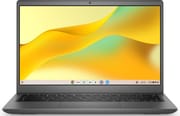
Dell’s Latitude 3445 Chromebook brought the AMD Mendocino processor family to the company’s enterprise ChromeOS line. Four chips are on the configuration list: the four-core Ryzen 5 7520C, the four-core Ryzen 3 7320C, the two-core Athlon Gold 7220C, and the two-core Athlon Silver 7120C. The 14-inch screen arrives as a 1920x1200 IPS panel on the Ryzen builds and a 1366x768 panel on the Athlon builds, and ChromeOS updates run through June 2033. Both USB-C ports carry Power Delivery and DisplayPort Alt Mode, so one cable can charge the laptop and drive an external display.
Pros and Cons
| Pros | Cons |
|---|---|
| ChromeOS updates run through June 2033 | No Chromebook Plus certification on any configuration |
| Mendocino chips pair 6nm manufacturing with a 15-watt rating | Athlon builds are stuck at 1366x768 |
| 16:10 panel on the Ryzen builds fits more of a document on screen | No Thunderbolt ports limit high-speed peripheral options |
| FHD webcam rather than a 720p one | WiFi 6 only, so the 6GHz band is unavailable |
| Fingerprint reader available for sign-in | Athlon Gold 7220C and Athlon Silver 7120C stop at two cores |
| Two USB-C ports with Power Delivery cover charging and docking | Soldered memory, so the 4GB Athlon Silver build stays at 4GB |
Dell Latitude 3445 Chromebook Comparison Chart
 Dell Latitude 3445 Chromebook | Dell Latitude 3445 Chromebook | Dell Latitude 3445 Chromebook | Dell Latitude 3445 Chromebook | |
| Price | List Price: Amazon Prices: | List Price: Amazon Prices: | List Price: Amazon Prices: | List Price: Amazon Prices: |
| Model number | Latitude 3445 | Latitude 3445 | Latitude 3445 | Latitude 3445 |
| Performance Rating | 3.6 | 2.9 | 2.7 | 1.5 |
| Chromebook Plus | No | No | No | No |
| Processor | Quad-core 2.80 Ghz (max 4.30 Ghz) AMD Ryzen 5 7520C | Quad-core 2.40 Ghz (max 4.10 Ghz) AMD Ryzen 3 7320C | Dual-core 2.40 Ghz (max 3.70 Ghz) AMD Athlon Gold 7220C | Dual-core 2.40 Ghz (max 3.50 Ghz) AMD Athlon Silver 7120C |
| RAM | 16 GB | 8 GB | 8 GB | 4 GB |
| Internal Storage | 256 GB NVMe SSD | 128 GB eMMC | 64 GB eMMC | 32 GB eMMC |
| Screen Size | 14" | 14" | 14" | 14" |
| Screen Resolution | 1920x1200 | 1920x1200 | 1366x768 | 1366x768 |
| Screen Type | IPS | IPS | IPS | IPS |
| Touch Screen | Yes | No | No | No |
| Stylus / Pen | No Stylus Support | No Stylus Support | No Stylus Support | No Stylus Support |
| Dimensions width x length x thickness | 12.74 x 8.68 x 0.8 inches (323.6 x 220.47 x 20.32 mm) | 12.74 x 8.68 x 0.8 inches (323.6 x 220.47 x 20.32 mm) | 12.74 x 8.68 x 0.8 inches (323.6 x 220.47 x 20.32 mm) | 12.74 x 8.68 x 0.8 inches (323.6 x 220.47 x 20.32 mm) |
| Weight | 3.37 lbs (1.53 kg) | 3.37 lbs (1.53 kg) | 3.37 lbs (1.53 kg) | 3.37 lbs (1.53 kg) |
| Backlit Keyboard | Yes | Yes | Yes | Yes |
| Webcam | 1080p FHD | 1080p FHD | 1080p FHD | 1080p FHD |
| WiFi | Wi-Fi 6 (802.11ax) | Wi-Fi 6 (802.11ax) | Wi-Fi 6 (802.11ax) | Wi-Fi 6 (802.11ax) |
| Bluetooth | Bluetooth 5.2 | Bluetooth 5.2 | Bluetooth 5.2 | Bluetooth 5.2 |
| Ethernet | No | No | No | No |
| Cellular Modem | No | No | No | No |
| HDMI | Full-Size HDMI | Full-Size HDMI | Full-Size HDMI | Full-Size HDMI |
| USB Ports | 1 USB 3, 2 USB-C 2x USB-C 3.2 Gen 1 with Power Delivery and DisplayPort Alt Mode, 1x USB-A 3.2 Gen 1 with PowerShare | 1 USB 3, 2 USB-C 2x USB-C 3.2 Gen 1 with Power Delivery and DisplayPort Alt Mode, 1x USB-A 3.2 Gen 1 with PowerShare | 1 USB 3, 2 USB-C 2x USB-C 3.2 Gen 1 with Power Delivery and DisplayPort Alt Mode, 1x USB-A 3.2 Gen 1 with PowerShare | 1 USB 3, 2 USB-C 2x USB-C 3.2 Gen 1 with Power Delivery and DisplayPort Alt Mode, 1x USB-A 3.2 Gen 1 with PowerShare |
| Thunderbolt Ports | No | No | No | No |
| Card Reader | microSD Card Reader | microSD Card Reader | microSD Card Reader | microSD Card Reader |
| Battery | 54Wh, Li-ion | 54Wh, Li-ion | 54Wh, Li-ion | 54Wh, Li-ion |
| Battery Life | 15.75 hours | 15.75 hours | 15.75 hours | 15.75 hours |
| Fanless | No | No | No | No |
| Auto Update Expiration Date | June, 2033 | June, 2033 | June, 2033 | June, 2033 |
Related Chromebooks
-
 Dell Latitude 5430 Chromebook 2-in-1The Dell Latitude 5430 Chromebook 2-in-1 is a 14-inch business convertible with 12th Gen Intel…
 -
 HP Chromebook 14a (2021)The HP Chromebook 14a (2021) pairs a 14-inch touchscreen with a Celeron N4020, 4GB of RAM, 32GB of…
 -
 Acer Chromebook Spin 314 (2024)A 14-inch convertible Chromebook with a 16:10 WUXGA touch display, 360-degree hinge, and software…
 -
 Acer Chromebook Spin 314The Acer Chromebook Spin 314 is a budget 14-inch convertible Chromebook with a 360-degree hinge, a…
 -
 Acer Chromebook Vero 514The Acer Chromebook Vero 514 blends sustainability with performance. Sporting a Full HD IPS…
 -
 ASUS Chromebook Flip CX1 (Touchscreen)The ASUS Chromebook Flip CX1 is a 14-inch Full HD convertible with a 360-degree touchscreen, an…
Four chip tiers, two panels, and nothing you can upgrade

The chassis measures 12.74 x 8.68 x 0.80 inches and weighs 3.37 pounds, mid-weight for a 14-inch notebook. Ports run to two USB-C 3.2 Gen 1 with Power Delivery and DisplayPort Alt Mode, one USB-A 3.2 Gen 1 with PowerShare for older peripherals, a full-sized HDMI output for presentations, a microSD card reader, and a 3.5mm combo jack for headsets. There is no Ethernet port, so wired networking goes through a USB Ethernet adapter on the USB-A port.
Display choice tracks the chip. The Ryzen 5 7520C and Ryzen 3 7320C builds ship the 14-inch 1920x1200 IPS panel in the 16:10 ratio, and the extra vertical pixels hold more of a document, spreadsheet, or web page before you scroll. Touch is limited to the Ryzen 5 7520C build, where it suits Android apps and casual tapping. The Athlon Gold 7220C and Athlon Silver 7120C builds drop to 1366x768, which leaves little room to work on a 14-inch panel and is worth avoiding for anything beyond light browsing.
The Ryzen 5 7520C runs four Zen 2 cores and eight threads from a 2.8 GHz base to a 4.3 GHz boost and scores roughly 8,104 on PassMark’s CPU benchmark. The Ryzen 3 7320C keeps the four cores and eight threads at lower clocks, while the Athlon Gold 7220C and Athlon Silver 7120C step down to two cores for basic workloads. All four sit on a 6nm process, rate 15 watts, and lean on AMD Radeon 610M integrated graphics. Dell rates the 54Wh battery at up to 15.75 hours on a charge.
Wireless is WiFi 6 (802.11ax) with Bluetooth 5.2. WiFi 6E is absent, so the 6GHz band is out of reach. The Ryzen 5 7520C build pairs 16GB of memory with a 256GB NVMe SSD; the other three use eMMC storage, noticeably slower on large file operations, with 8GB of memory on the Ryzen 3 7320C and Athlon Gold 7220C builds and 4GB on the Athlon Silver 7120C. The LPDDR5 memory is soldered and the storage is not user-serviceable.
Reviewer Insights

About Chromebooks on the AMD shift
About Chromebooks wrote that “newer AMD Ryzen processors” represent meaningful progress over prior AMD-based Chromebooks, with the 6nm process technology and low 15W TDP supporting better power efficiency. They advise skipping the 1366x768 display option, calling out the inadequate pixel density on a 14-inch screen.
The same piece sets this machine against earlier AMD Chromebooks such as the Acer Chromebook 315 and HP Pro c645, noting that “few of these Chromebooks with AMD inside were compelling” in earlier generations. The integrated Radeon 610M is the part that may pay off for buyers running Android games or graphics-heavy web applications.
An enterprise fleet machine without Chromebook Plus features
The Auto Update Expiration date is June 2033. Organizations that plan device purchases over several years, and want to stretch the gap between hardware refreshes, have that date to plan against when they weigh ChromeOS for a fleet.
AMD built the Mendocino family for the Chromebook market, pairing older Zen 2 cores with 6nm manufacturing and integrated graphics. The trade is battery efficiency and steady performance on typical ChromeOS workloads instead of the peak speed of mainstream laptop silicon. No configuration carries Chromebook Plus certification, so Google’s AI features are not preloaded here and Dell’s aim stays on business buyers.
Take the Ryzen builds, skip the Athlons
The Ryzen 5 7520C configuration, with 16GB of memory and a 256GB NVMe SSD, has the headroom for demanding multitasking, and the Ryzen 3 7320C build keeps the same four cores and the 1920x1200 panel. Either one fits education deployments, call centers, and general office work, and both carry the June 2033 update date.
The Athlon Gold 7220C and Athlon Silver 7120C builds are a harder sell. Two cores, a 1366x768 screen, and 4GB of memory on the Athlon Silver leave little room for the tab-heavy work ChromeOS invites. Buyers who need speed should start at the Ryzen 3 7320C. Missing Thunderbolt and Chromebook Plus certification cost the machine some appeal at the premium end, though neither weighs much on a bulk fleet order.
Our Chromebook Comparison Chart lists the Latitude 3445 next to other 14-inch models.
Frequently Asked Questions
What processor options are available for the Dell Latitude 3445 Chromebook?
Four AMD Mendocino chips: the AMD Ryzen 5 7520C (4 cores, 8 threads, up to 4.3 GHz), AMD Ryzen 3 7320C (4 cores, 8 threads, up to 4.1 GHz), AMD Athlon Gold 7220C (2 cores, 4 threads, up to 3.7 GHz), and AMD Athlon Silver 7120C (2 cores, 2 threads, up to 3.5 GHz). The two Ryzen chips handle multitasking and demanding workloads best.
How long will the Dell Latitude 3445 Chromebook receive ChromeOS updates?
Its Auto Update Expiration (AUE) date is June 2033. ChromeOS security updates, feature releases, and bug fixes are delivered until then.
Can I upgrade the RAM or storage in the Dell Latitude 3445 Chromebook?
No. The LPDDR5 memory is soldered and the storage is not user-upgradeable, so the configuration has to be chosen carefully at purchase time. 8GB or 16GB of RAM is the comfortable range for multitasking, and the 256GB NVMe SSD is the faster storage option.
What ports does the Dell Latitude 3445 Chromebook have?
Two USB-C 3.2 Gen 1 ports with Power Delivery and DisplayPort Alt Mode for charging and external displays, one USB-A 3.2 Gen 1 port with PowerShare for legacy devices, a full-sized HDMI output, a microSD card reader, and a 3.5mm combo audio jack for headsets.
Is the Dell Latitude 3445 Chromebook a Chromebook Plus device?
No. Neither the Ryzen 5 7520C nor the Ryzen 3 7320C configuration carries the certification, even though they meet many of Google’s Chromebook Plus requirements. Google’s AI features such as Magic Eraser and Help Me Write are therefore not preloaded.
What display options are available for the Dell Latitude 3445 Chromebook?
Two panels: a 14-inch FHD+ (1920x1200) IPS screen in the 16:10 ratio on the Ryzen configurations, and a 14-inch HD (1366x768) screen on the Athlon configurations. Productivity work belongs on the FHD+ panel, since 1366x768 feels cramped at 14 inches.
Where can I buy the Dell Latitude 3445 Chromebook?
Dell sells it mainly through enterprise channels to business and education customers, and it also turns up at retailers like Best Buy. The model is aimed at IT department procurement rather than retail shoppers.