
Dell Latitude 5430 Chromebook 2-in-1
Updated on

Dell returned to the enterprise Chromebook market with the Latitude 5430 Chromebook 2-in-1 after a three-year gap. The 14-inch convertible pairs 12th-generation Intel silicon with a business chassis, automatic enterprise enrollment, dual Thunderbolt 4 ports, and ChromeOS updates through June 2032. Pricing and the enterprise-only feature set point it at IT departments rather than retail shoppers. Buyers who can order through business channels get a capable machine for productivity workflows.
| Pros | Cons |
|---|---|
| Hybrid-core i5-1235U keeps heavy tab loads and Android apps moving | High starting price ($1,664 MSRP) limits consumer appeal |
| Dual Thunderbolt 4 ports support power delivery and DisplayPort Alt Mode | Display brightness limited to 250 nits on 2-in-1 model |
| Wi-Fi 6E and Bluetooth 5.2 wireless connectivity | At 3.67 lbs, heavy for a 14-inch convertible |
| ChromeOS updates run through June 2032 | Sold mainly through business channels |
| Reclaimed carbon fiber and bio-based materials in the shell | Only 60Hz refresh rate (90Hz available on clamshell only) |
| Automatic enterprise enrollment simplifies IT deployment | Touchscreen and backlit keyboard cost extra at MSRP |
Dell Latitude 5430 Chromebook 2-in-1 Comparison Chart
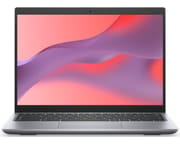 Dell Latitude 5430 Chromebook 2-in-1 | |
| Price | List Price: $478.43 Amazon Prices: Loading prices... |
| Model number | Latitude 5430 |
| Performance Rating | 7.5 |
| Chromebook Plus | No |
| Processor | Deca-core 3.30 Ghz (max 4.40 Ghz) Intel Core i5-1235U |
| RAM | 8 GB |
| Internal Storage | 256 GB NVMe SSD |
| Screen Size | 14" |
| Screen Resolution | 1920x1200 |
| Screen Type | IPS |
| Touch Screen | Yes |
| Stylus / Pen | No Stylus Support |
| Dimensions width x length x thickness | 12.36 x 9.15 x 0.75 inches (313.94 x 232.41 x 19.05 mm) |
| Weight | 3.67 lbs (1.67 kg) |
| Backlit Keyboard | Yes |
| Webcam | 720p HD |
| WiFi | Wi-Fi 6E (802.11ax) |
| Bluetooth | Bluetooth 5.2 |
| Ethernet | No |
| Cellular Modem | No |
| HDMI | Full-Size HDMI |
| USB Ports | 1 USB 3, 2 USB-C (2 Thunderbolt4/USB 3.2 Gen 2 Type-C port with Power Delivery and Display port Alt mode) |
| Thunderbolt Ports | 2 |
| Card Reader | SD Card Reader |
| Battery | 4 cell, 54 Wh, Li-ion |
| Battery Life | Unknown |
| Fanless | No |
| Auto Update Expiration Date | June, 2032 |
Related Chromebooks
-
 Dell Latitude 3445 ChromebookThe Dell Latitude 3445 Chromebook is a 14-inch 16:10 business Chromebook sold with an AMD Ryzen 5…
 -
 Acer Chromebook Spin 314 (2024)A 14-inch convertible Chromebook with a 16:10 WUXGA touch display, 360-degree hinge, and software…
 -
 Acer Chromebook Vero 514The Acer Chromebook Vero 514 blends sustainability with performance. Sporting a Full HD IPS…
 -
 ASUS Chromebook Vibe CX34 FlipThe ASUS Chromebook Vibe CX34 Flip is a cloud-gaming convertible Chromebook with a 12th Gen Intel…
 -
 HP Elite c640 G3 ChromebookThe HP Elite c640 G3 Chromebook is a 14-inch business Chromebook with an Intel Core i5-1245U vPro,…
 -
 Acer Chromebook Plus 514A 14-inch Chromebook Plus line sold in three board configurations: the AMD Ryzen 3 7320C CB514-3H,…
A business chassis around dual Thunderbolt 4 and a 250-nit panel

The chassis incorporates reclaimed carbon fiber and bio-based materials, which give it environmental credentials alongside durability for daily business use. At 12.36 x 9.15 x 0.75 inches and 3.67 pounds, it is not the lightest 14-inch convertible, and the weight goes with the sturdy construction enterprise buyers expect. The 360-degree hinge enables tablet mode, tent mode, and presentation configurations, though the weight makes extended tablet use less practical than on smaller convertibles.
The 14-inch FHD+ (1920x1200) IPS touchscreen uses a productivity-friendly 16:10 aspect ratio that adds vertical space for documents and spreadsheets. The panel tops out at 250 nits, adequate for office lighting but a struggle in brightly lit spaces or near windows. This is where the convertible gives ground to the clamshell model, which offers an optional 300-nit display and even a 2560x1600 90Hz panel. The touchscreen pairs with the convertible form factor, though Dell does not include a stylus in the box.
The Intel Core i5-1235U brings hybrid architecture with performance and efficiency cores, a step up from the previous-generation Latitude Chromebooks. This 12th-gen chip handles ChromeOS work such as dozens of browser tabs, Android apps, Linux containers for development, and music production DAWs. The 8GB of LPDDR5-4800 RAM is soldered, and the 256GB PCIe NVMe Gen4 SSD handles boot and app launches. Storage uses the M.2 2230 form factor, so upgrades require that specific drive size.
Dual Thunderbolt 4 ports carry Power Delivery for charging and DisplayPort Alt Mode for external displays, all through a single cable. A traditional USB-A 3.2 Gen 1 port accommodates legacy peripherals, while the full-sized SD card slot handles memory cards without dongles. The HDMI 1.4b output connects directly to monitors and projectors, at the older 1.4 standard rather than the newer 2.0. Intel AX211 provides Wi-Fi 6E support for the latest wireless networks, paired with Bluetooth 5.2 for accessories.
A full-sized keyboard with optional backlight sits above a precision touchpad. For security-conscious deployments, an optional fingerprint reader integrates into the keyboard deck, and the webcam can include an optional privacy shutter for video conferencing control. The 720p HD webcam handles video calls adequately for most business purposes, though the resolution shows its age next to the 1080p cameras common on consumer devices.
The 54Wh 4-cell lithium-ion pack powers the machine, and Dell offers an optional 64Wh upgrade for users who need extended unplugged operation. The hybrid Intel architecture routes light tasks to the efficiency cores while the device runs on battery. Either Thunderbolt 4 port charges, so the cable can come in from whichever side works best for your desk setup, and USB Power Delivery support means third-party USB-C chargers work for travel.
Reviewer Insights

As of mid-2026, no major outlet has published an independent hands-on review of the Latitude 5430 Chromebook 2-in-1 with measured battery runtime, display brightness, or benchmark results. The coverage that exists is announcement and preview reporting built from Dell’s spec sheets and a leaked recovery image, not lab testing. Dell also ships a Windows business laptop called the Latitude 5430 (plus a separate Latitude 5430 Rugged) that share this model number and have been measured in detail elsewhere. None of those Windows figures apply to this ChromeOS convertible, so every brightness and battery number below is a Dell specification rather than a tested result.
XDA got no battery-life claim out of Dell
XDA Developers (Arif Bacchus) is explicit that its coverage is a preview rather than a hands-on test. On endurance, the article states flatly that “Dell did not provide us with battery life claims,” so even the manufacturer’s own runtime estimate was missing at launch. XDA highlights the modern connectivity (dual Thunderbolt 4, Wi-Fi 6E) and the productivity angle of the Chrome Enterprise Upgrade, which lets a business “unlock the power to run Windows apps on your device with Parallels for ChromeOS.” It also flags trade-offs on the convertible. The 2-in-1 ships with a 250-nit panel, the LTE modem option is reserved for the clamshell, and on price, “Upgrading to the 2-in-1 model costs a full $103 more than the base model.” No measurements accompany these observations.
Chrome Unboxed spotted the lineup in a public recovery image
Chrome Unboxed (Gabriel Brangers) surfaced the device early from a public recovery image, writing that “these new Chromebooks were never announced and I can’t find any coverage about them from the usual outlets.” The piece lays out the configuration ladder, noting that “the processor options start on the low end with a Celeron 7305 and go all the way up to a Core i7-1255U,” and it calls out the convertible’s single screen choice: “the convertible Dell has but one, 250-nit anti-glare screen option,” against an optional 300-nit panel on the clamshell. It also confirms “a fingerprint sensor on the keyboard deck” and a webcam that “comes in the 720p or 1080p variety.” On availability, Brangers predicted, “I doubt we’ll see these Chromebooks in consumer channels and buying one directly from Dell will likely be a very expensive undertaking.” This too is drawn from specs and a recovery image, not testing.
A five-processor lineup came straight from Dell’s announcement
The launch reached NotebookCheck as a news item assembled from Dell’s official announcement, not a lab review. Their write-up confirms the five-processor lineup (Pentium Gold 8505, Core i3-1215U, Core i5-1235U, Core i5-1245U vPro, and Core i7-1255U), LPDDR5-4800 memory up to 16GB, PCIe NVMe Gen4 storage up to 512GB, and the choice of a 54Wh or 64Wh four-cell battery. It also lists the optional Qualcomm Snapdragon X12 LTE modem, a feature limited to the clamshell. NotebookCheck published no measured brightness, battery, or benchmark results for the 2-in-1.
June 2032 support and an i5 in mainstream laptop territory
Google lists the Latitude 5430 Chromebook with an Auto Update Expiration of June 2032, a long ChromeOS runway for organizations planning multi-year deployments. On raw compute, the Core i5-1235U carries a PassMark CPU Mark around 12,500 (multithread) with a single-thread rating above 3,000, which places it well clear of the Celeron and Pentium options at the bottom of the range and squarely in mainstream-laptop territory. That score reflects the silicon rather than this specific ChromeOS unit, but it explains why the i5 build manages heavy tab loads, Android apps, and Linux containers without strain. Dell’s display and battery figures (250 nits, 54Wh or 64Wh) remain vendor specifications until an independent reviewer puts a colorimeter and a stopwatch to the 2-in-1.
A fleet deployment machine at a fleet price
The Latitude 5430 Chromebook 2-in-1 fits enterprise ChromeOS deployments rather than consumer retail. Its 12th-generation Intel performance and long update window serve organizations standardizing on ChromeOS, and automatic enterprise enrollment keeps large rollouts manageable for IT departments.
The MSRP starting at $1,664 and the business-channel distribution mean most individual buyers should look elsewhere. The convertible also gives up the brighter display options and the LTE modem that the clamshell can take, in exchange for the 360-degree hinge. For consumers, the secondary market occasionally offers these machines at significant discounts.
For those weighing enterprise options side by side, our Chromebook Comparison Chart lets you filter and sort models by specs, ports, and support dates to find the right fit.
Frequently Asked Questions
How long will the Dell Latitude 5430 Chromebook receive ChromeOS updates?
The Dell Latitude 5430 Chromebook has an Auto Update Expiration (AUE) date of June 2032, counted from its 2022-2023 release. That is among the longest support periods available for any Chromebook.
Can the Dell Latitude 5430 Chromebook run Windows applications?
Yes. With the Chrome Enterprise Upgrade option, the Latitude 5430 runs Windows applications through Parallels Desktop for Chrome Enterprise. The option needs an additional subscription, and the Intel Core i5-1235U has the headroom for most productivity-focused Windows apps.
Is the Dell Latitude 5430 Chromebook 2-in-1 available for individual purchase?
Dell sells this model mainly through its enterprise channels to business customers, and does not market it through consumer retail. Individual buyers can occasionally find units on Amazon or through business surplus sellers, where pricing may sit well under the original MSRP of $1,664+.
How does the display brightness compare to other Chromebooks?
The 2-in-1 variant is limited to a 250-nit display, dimmer than many consumer Chromebooks that offer 300+ nits. That level works in controlled office environments but struggles in brightly lit spaces or outdoors. The clamshell version offers optional 300-nit and 90Hz QHD+ displays, and neither upgrade reaches the convertible.
What ports does the Dell Latitude 5430 Chromebook 2-in-1 have?
The 2-in-1 includes two Thunderbolt 4 ports (USB-C with Power Delivery and DisplayPort Alt Mode), one USB-A 3.2 Gen 1 port, one HDMI 1.4b output, a full-sized SD card slot, and a 3.5mm audio jack. The two Thunderbolt 4 ports cover docking, external displays, and high-speed data transfer.
Can the RAM or storage be upgraded on the Latitude 5430 Chromebook?
The RAM is soldered LPDDR5 and cannot be upgraded after purchase, so choose your configuration carefully (8GB or 16GB options). The M.2 2230 NVMe SSD is technically replaceable, but the smaller 2230 form factor limits compatible drive options compared to the more common 2280 size. Treat the storage size at purchase as effectively permanent.