
Samsung Chromebook Pro
Updated on

Note: This Chromebook has been discontinued and is no longer available for purchase new. Its Auto Update Expiration date was June 2023, meaning it no longer receives Chrome OS updates or security patches. The information below is kept for historical reference.
The Samsung Chromebook Pro launched in May 2017 as one of the most anticipated Chromebooks in the platform’s history. At $549, it was the first Chromebook to ship with Android app support and an included stylus, features that would later define the Chromebook Plus standard. Built around an Intel Core m3-6Y30 processor and featuring a 12.3-inch 2400x1600 display in a 3:2 aspect ratio, the Chromebook Pro represented Samsung’s bet that Chrome OS was ready for premium hardware. For users whose workflows combined web browsing with Android applications, it offered capabilities no other Chromebook could match at the time.
| Pros | Cons |
|---|---|
| 2400x1600 display with 235 PPI and 533 nits peak brightness | Non-backlit keyboard in a premium-priced device |
| Premium all-metal aluminum construction weighing just 2.38 pounds | Only 32GB storage (mitigated by microSD expansion) |
| Included Wacom EMR stylus (Samsung PEN) with battery-free operation | Bottom-firing speakers sound muffled in laptop mode |
| 360-degree hinge enables laptop, tent, and tablet modes | Cramped keyboard layout with narrower outer keys |
| First Chromebook with native Android app support | Stylus exhibits noticeable lag during rapid writing |
| Completely fanless, silent operation | Battery life fell short of 10-hour claims |
Related Videos
Samsung Chromebook Pro Comparison Chart
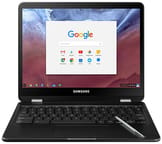 Samsung Chromebook Pro | Samsung Chromebook Pro | |
| Price | List Price: $549.00 Amazon Prices: | List Price: $599.00 Amazon Prices: |
| Model number | XE510C24-K01US | XE510C25-K01US |
| Performance Rating | 2.7 | 2.7 |
| Chromebook Plus | No | No |
| Processor | Dual-core 0.90 Ghz (max 2.20 Ghz) Intel Core m3-6Y30 Processor | Dual-core 0.90 Ghz (max 2.20 Ghz) Intel Core m3-6Y30 Processor |
| RAM | 4 GB | 4 GB |
| Internal Storage | 32 GB eMMC | 32 GB eMMC |
| Screen Size | 12.3" | 12.3" |
| Screen Resolution | 2400x1600 | 2400x1600 |
| Screen Type | Quad HD display with Gorilla Glass 3 | Quad HD display with Gorilla Glass 3 |
| Touch Screen | Yes | Yes |
| Stylus / Pen | Supported | Supported |
| Dimensions width x length x thickness | 8.72 x 11.04 x 0.55 inches (221.49 x 280.42 x 13.97 mm) | 8.72 x 11.04 x 0.55 inches (221.49 x 280.42 x 13.97 mm) |
| Weight | 2.38 lbs (1.08 kg) | 2.38 lbs (1.08 kg) |
| Backlit Keyboard | No | Yes |
| Webcam | 1280×720 | 1280×720 |
| WiFi | 802.11 a/b/g/n/ac 2x2 MU-MIMO (Marvell 88W8997) | 802.11 a/b/g/n/ac 2x2 MU-MIMO (Marvell 88W8997) |
| Bluetooth | Bluetooth 4.2 | Bluetooth 4.2 |
| Ethernet | No | No |
| Cellular Modem | No | No |
| HDMI | No HDMI | No HDMI |
| USB Ports | 2 USB-C up to 5Gbps, 4K display out with optional adapter | 2 USB-C up to 5Gbps, 4K display out with optional adapter |
| Thunderbolt Ports | No | No |
| Card Reader | microSD Card Reader | microSD Card Reader |
| Battery | 2 cell, 5140 mAh / 39 Wh, Li-Ion | 2 cell, 5140 mAh / 39 Wh, Li-Ion |
| Battery Life | 10.0 hours | 10.0 hours |
| Fanless | Yes | Yes |
| Auto Update Expiration Date | June, 2023 | June, 2023 |
Related Chromebooks
-
 Samsung Chromebook Plus v2The Samsung Chromebook Plus v2 is a fanless 12.2-inch convertible Chromebook with an Intel Celeron…
 -
 Samsung Galaxy Chromebook 2 360A budget convertible with a sharp 2560x1600 display well above its price class, paired with…
 -
 Lenovo 500e Yoga Chromebook (Gen 4)The Lenovo 500e Yoga Chromebook Gen 4 offers a versatile 12.2'' touch IPS display and a garaged USI…
 -
 Lenovo Flex 3i Chromebook 12.2"The Lenovo Flex 3i Chromebook 12.2 is a fanless 2-in-1 with a 12.2-inch 1920x1200 IPS touchscreen,…
 -
 Samsung Chromebook 4+The Samsung Chromebook 4+ is a fanless 15.6-inch FHD Chromebook with an Intel Celeron N4000, dual…
 -
 Acer Chromebook 311An 11.6-inch Chromebook with an Intel Celeron N4000, 4GB of RAM, a fanless chassis, and up to 10…
Hardware and Performance
The Samsung Chromebook Pro runs on the Intel Core m3-6Y30, a dual-core 6th-generation processor from Intel’s Y-series designed for fanless ultrabooks. This 4.5W TDP chip enabled completely silent operation while delivering solid performance for Chrome OS workloads. Chrome Unboxed’s testing found the device “simply kills it” with smooth scrolling and snappy UI animations, noting that it “does whatever I need it to do whenever I need it to.” Ubergizmo’s benchmarking measured Geekbench scores competitive with other Core m3 devices and concluded it “performs better (for web browsing) than a Windows laptop of the same price.”
The configuration paired the m3 processor with 4GB of LPDDR3 RAM and 32GB of eMMC storage. While the storage capacity was limited compared to some competitors offering 64GB, the included microSD card slot provided expansion options for media files and offline content. The full-size keyboard featured over 1mm of key travel with a 100x55mm glass trackpad that reviewers praised for its responsiveness, though the lack of keyboard backlighting drew criticism for a device at this price point.
Battery life proved contentious. Samsung claimed 10 hours of usage, but real-world testing varied significantly. Engadget’s review found approximately 7 hours in video looping at 66% brightness, with typical usage yielding only 4-5 hours. Android Authority reported 8-10 hours, while Ubergizmo measured approximately 6 hours of continuous use from the 39 Wh battery.
Display and Design
The 12.3-inch display was the Chromebook Pro’s standout feature. The 2400x1600 resolution in a 3:2 aspect ratio delivered 235 pixels per inch, providing more vertical space than typical 16:9 laptop screens. Ubergizmo measured peak brightness at 533 nits, while Chrome Unboxed found 400 nits average brightness with “razor sharp everything.” Gorilla Glass 3 protection added durability to the touchscreen panel.
The physical design prioritized portability and premium materials. The all-metal aluminum construction measured just 0.55 inches thin and weighed 2.38 pounds, making it highly portable. The 360-degree hinge enabled laptop, tent, stand, and tablet modes, with Android Authority noting the “natural handling” across configurations. However, reviewers consistently criticized the bottom-firing speakers, which Engadget described as sounding “terrible in laptop mode” when the sound directed into surfaces.
Connectivity was limited to essentials: two USB-C 3.1 ports (one on each side), a headphone jack, and a microSD card slot. Both USB-C ports supported charging and 4K display output with adapters. The absence of USB-A ports followed the industry trend toward USB-C standardization, though it required adapters for legacy peripherals and a USB ethernet adapter for wired networking.
The Samsung PEN Experience
The included Wacom EMR stylus was a defining feature, making the Chromebook Pro the first mainstream Chromebook with stylus support built into the price. The battery-free pen stored in a silo on the device’s underside and activated automatically when removed. Google Keep integration allowed annotation of screenshots directly with the pen.
However, reviewers noted significant limitations. Chrome Unboxed observed “pen lag noticeable during quick movements,” while Engadget reported “S Pen latency issues in handwriting applications.” The OCR handwriting recognition in Google Keep was described by Android Authority as “unreliable.” For detailed drawing work, the stylus experience fell short of what dedicated tablets like the iPad Pro offered.
Reviewer Insights
Professional reviews from 2017 consistently praised the hardware while noting the early-stage nature of Android app support on Chrome OS.
Chrome Unboxed
Robby Payne’s comprehensive review called the Chromebook Pro “perhaps, the most anticipated Chromebook release in Chromebook history.” He praised the display as “the shining star” where “razor sharp everything” delivered a viewing experience unprecedented for Chromebooks. The review highlighted smooth multitasking performance and fast USB-C charging. Key criticisms included the lack of keyboard backlighting, speaker quality described as “fair, but not great,” and large bottom bezels. Payne concluded: “The magic of this device is this: the parts it gets right, it gets REALLY right.”
Engadget
Nathan Ingraham’s review noted the Chromebook Pro comes “close to the ideal Chromebook, but only if you don’t value battery life.” The deputy editor praised the “exceptional all-black metallic design” and described the device as feeling “much more expensive than its $550 price.” However, his battery testing revealed the 10-hour claim was optimistic, with real-world usage yielding 4-5 hours. Additional criticisms included the cramped keyboard frame, problematic delete key placement, and speakers that “perform poorly in lap usage.” His verdict: “It’s not the king of the Chromebooks I was hoping for when it was first announced.”
Ubergizmo
Hubert Nguyen’s review awarded the Chromebook Pro 9/10, declaring “Samsung Chromebook Pro makes Chromebook history” as the first device with Android app support and stylus capability. The detailed technical review measured 533 nits peak brightness and praised the 3:2 aspect ratio as “better for vertical content.” He emphasized that it was worth the price at $549, concluding that “allowing Chromebooks to run Android apps is awesome.” Criticisms focused on the bottom-mounted speakers requiring maximum volume and noticeable ink lag during rapid writing.
Android Authority
Ankit Banerjee’s review examined Samsung’s collaboration with Google on bringing Android apps to Chrome OS. He praised the metal construction, 360-degree hinge, and all-day battery performance claims. However, the review noted that Android app support remained beta with performance issues: “many apps fail to load or run smoothly” and “orientation rotation problems with tablet mode” plagued the experience. The trackpad lacked pinch-to-zoom functionality, and weak speakers muffled easily. Despite limitations, the review concluded the device “successfully balances simplicity with enhanced capabilities.”
Historical Significance
The Samsung Chromebook Pro holds an important place in Chromebook history as the device that introduced several features now standard across the platform. Its native Android app support preceded the universal rollout to all Chrome OS devices. The included stylus and convertible form factor anticipated the Chromebook Plus branding that Google would later formalize with specific hardware requirements.
The Chromebook Pro influenced subsequent premium Chromebooks and demonstrated that the market existed for high-end Chrome OS devices with build quality rivaling Windows ultrabooks. Its 3:2 aspect ratio display, aluminum construction, and stylus integration became common features in the Chromebook Plus tier that emerged years later.
To see how it stacks up against current Chromebooks side by side, visit the Chromebook Comparison Chart.
Frequently Asked Questions
Q: Can I still use the Samsung Chromebook Pro in 2026?
A: While the Chromebook Pro can still physically function, it stopped receiving Chrome OS updates in June 2023. This means no security patches, no new features, and potentially incompatible websites as web standards evolve. Using it for any sensitive activities like online banking is not recommended.
Q: What processor does the Samsung Chromebook Pro use?
A: The Chromebook Pro uses the Intel Core m3-6Y30, a dual-core 6th-generation processor from Intel’s Y-series designed for fanless ultrabooks. The 4.5W TDP chip enables completely silent operation while delivering solid performance for Chrome OS workloads.
Q: Is the stylus included with the Samsung Chromebook Pro?
A: Yes, unlike many stylus-compatible devices, the Samsung PEN was included with the Chromebook Pro at no additional cost. The Wacom EMR stylus is battery-free and stores in a built-in silo on the device. However, reviewers noted noticeable input lag during rapid writing.
Q: How long does the Samsung Chromebook Pro battery last?
A: Samsung claimed 10 hours of battery life, but real-world testing by Engadget found 4-5 hours in typical use, while Android Authority reported 8-10 hours. The 39 Wh battery capacity and high-resolution display contributed to variable results depending on usage patterns.
Q: What ports does the Samsung Chromebook Pro have?
A: The Chromebook Pro has two USB-C 3.1 ports (one on each side), a 3.5mm headphone jack, and a microSD card slot. Both USB-C ports support charging and 4K display output with adapters. There are no USB-A ports or HDMI output.
Q: What is the difference between the Samsung Chromebook Pro and Plus?
A: The Chromebook Pro (XE510C24/XE510C25) featured the Intel Core m3-6Y30 processor, while the Chromebook Plus (XE513C24) used an ARM-based OP1 processor. The Pro offered better raw performance for web applications, while the Plus had longer battery life. Both shared the same display, build quality, and stylus support.