

Microsoft announced in late February 2026 that ASUS and Dell are building dedicated Cloud PC devices for Windows 365. The ASUS NUC 16 for Windows 365 is a 0.7-liter ultra-compact box that boots straight into Microsoft’s cloud. The Dell Pro Desktop is a fanless unit with Intel N-series silicon inside. Both arrive in the third quarter of 2026, and both run a locked-down operating system called Windows CPC that has no local apps, no local data, and no local admin access. They look like mini PCs, they sit on your desk like mini PCs, but they aren’t really PCs at all. They’re portals to a computer that lives in an Azure data center somewhere.
If you’ve been following technology long enough, this pitch might sound familiar. The idea that your computer should be a thin, cheap terminal connected to a powerful server has been “the future” since Sun Microsystems released the Sun Ray in 1997. Every few years, the concept gets a fresh coat of paint and a new round of breathless press coverage. This time, though, Microsoft is betting that its cloud infrastructure has matured enough to make the experience genuinely seamless. The question for anyone shopping for a desk-friendly computer in 2026 isn’t whether the technology works. It’s whether the math works.
What These Cloud PCs Actually Are
Microsoft’s first Cloud PC device, the Windows 365 Link, launched at $349 and is already available in 20 countries. It’s essentially a small box with an Intel N250 processor, 8GB of RAM, and 64GB of UFS storage, just enough hardware to handle the connection to your cloud desktop. The ASUS and Dell devices follow the same formula: minimal local specs, maximum cloud dependence.
The ASUS NUC 16 for Windows 365 packs DDR5 memory, Wi-Fi 6E, 2.5Gb Ethernet, Bluetooth 5.3, and support for up to three displays via HDMI and USB-C. At 0.7 liters, it’s smaller than most coffee mugs. Dell’s Pro Desktop offers similar connectivity with a fanless design aimed at quiet office environments, and will be available in 58 countries at launch. Neither company has announced pricing yet, though the Windows 365 Link’s $349 price point gives a reasonable floor.
What makes these different from regular mini PCs is the software. They run Windows CPC, a stripped-down operating system that exists solely to connect you to your Windows 365 Cloud PC. There’s no Windows desktop on the device itself, no ability to install software locally, and no way for users to store files on the device. From a security standpoint, this is the whole point. IT departments get endpoints that can’t be compromised by careless users because there’s nothing on them to compromise.
The Math That Matters
Here’s where the cloud PC pitch starts to look less compelling for anyone outside a corporate IT department. The hardware is only the beginning of the cost. A Windows 365 subscription starts at $32 per user per month for a basic 2 vCPU configuration with just 4GB of RAM and 64GB of storage. A more usable setup with 8GB of RAM and 128GB of storage runs about $45 per month. Enterprise users also need a Microsoft 365 license, which adds another $22 to $57 per month depending on the tier.
Let’s run the numbers for three scenarios over three years, assuming you need a basic productivity workstation for office tasks, web browsing, and video calls.
Scenario 1: Windows 365 Cloud PC. A $349 device plus a $45/month Windows 365 subscription totals $969 in the first year. By year three, you’ve spent $1,969. That’s before adding the Microsoft 365 license that enterprise users need, which pushes the three-year total north of $2,700.
Scenario 2: Budget mini PC with local Windows. An N100 or N150-based mini PC with 16GB of RAM and a 512GB SSD costs $200 to $300, and that’s it. Windows 11 comes preinstalled. There’s no monthly subscription. Electricity costs about $10 per year at typical US rates. Your three-year total: roughly $230 to $330.
Scenario 3: A Chromebook. A capable Chromebook costs $300 to $400 and comes with ChromeOS, which was designed from the start to be a cloud-first operating system. Google Workspace is free for personal use or $7.20 per user per month for business. Three-year total: $300 to $660 depending on whether you’re paying for business features.
The price gap is enormous. You could buy a new budget mini PC every single year for three years and still spend less than one year of the Windows 365 Cloud PC setup.
Why Thin Clients Keep Coming Back (And Why They Keep Staying Niche)
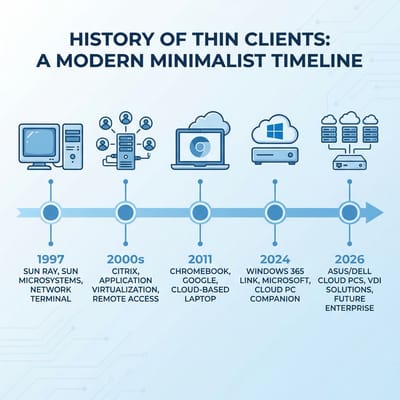
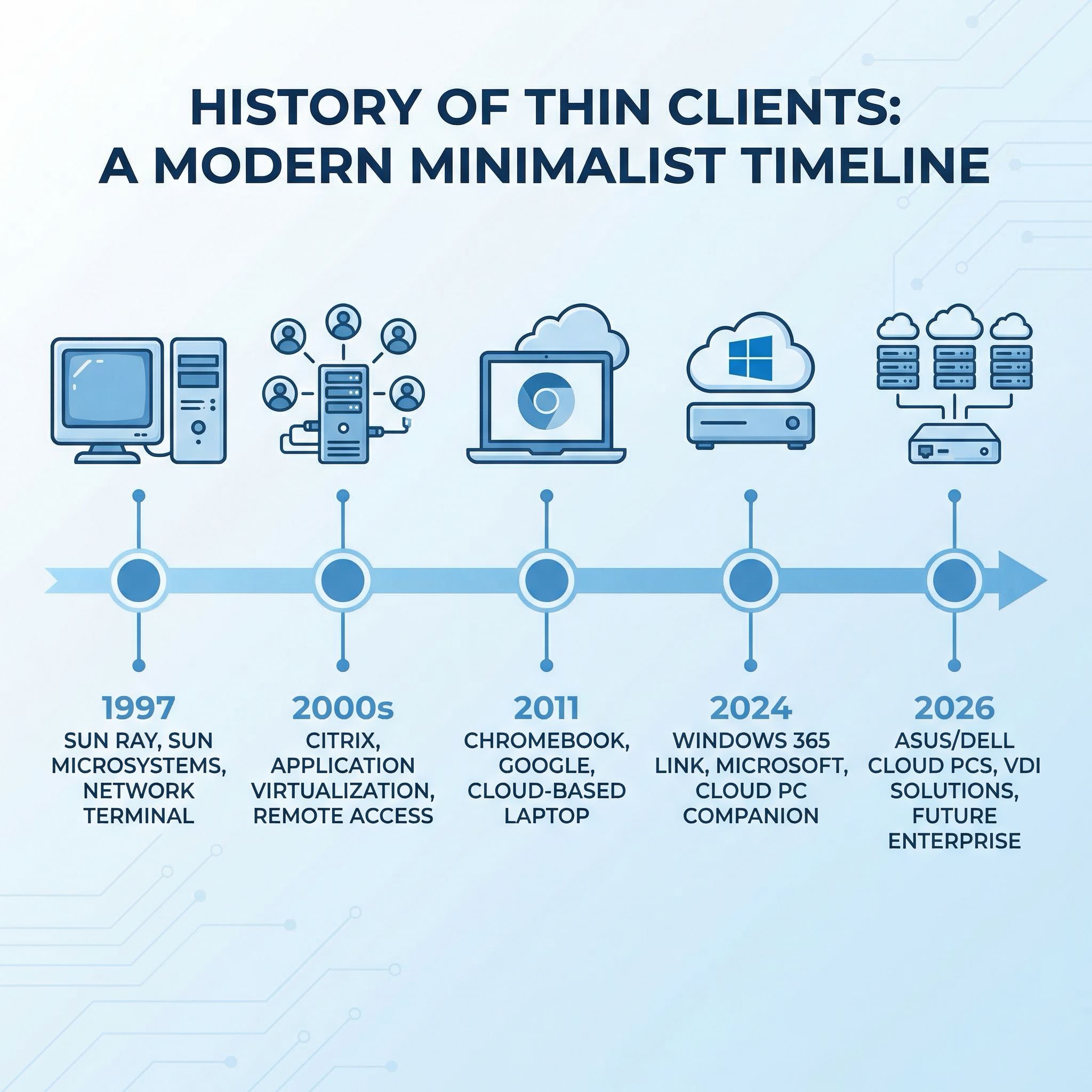
The pattern is remarkably consistent. In the late 1990s, Sun Microsystems and Oracle pushed network computers. In the 2000s, Citrix virtual desktops became the standard for specific enterprise environments. In 2011, Google launched Chromebooks on the premise that the browser was all you needed. Each wave made thin clients a little more practical, but none delivered the knockout blow to local computing that proponents predicted.
The Hacker News community had a spirited discussion about these new Cloud PCs, and the top-voted comment summed up the skepticism neatly: a 2 vCPU machine with 8GB of RAM costs $50 per month from Microsoft, while a similar physical machine from HP costs about $400 total. One commenter calculated that the bandwidth costs alone for streaming a desktop at 1080p60 for a typical work day would eat $28 per month in Azure egress fees. “Just very unclear who any of these services are for,” the commenter concluded.
Several respondents pointed out that this is essentially the same technology Citrix has been selling for decades, just repackaged as a Microsoft-managed service. One former Boeing subcontractor shared their experience with thin clients in 2010: “It was mostly fine-ish except for some annoyances like streaming audio being fairly sketchy for the era.” The technology has improved since then, but the fundamental tension remains. You’re trading the one-time cost of adequate hardware for an ongoing subscription to a service that depends entirely on network quality.
The recurring failure mode isn’t that thin clients don’t work. They do, for specific use cases. The failure mode is the persistent belief that they’ll replace general-purpose computers for everyone. They won’t, for the same reason they never have: most people prefer owning a machine that works without an internet connection.
Where Cloud PCs Genuinely Make Sense
Let me be fair to Microsoft here, because there are scenarios where a Cloud PC is genuinely the right call. Healthcare organizations running Epic on thousands of terminals across hospitals and clinics don’t need local processing. They need secure, centrally managed endpoints that nurses can walk up to, tap a badge, and start using. When a device breaks, IT swaps it for an identical box with zero configuration. When an employee leaves, there’s no hard drive to wipe. As one Hacker News commenter put it, “Hospitals are about to go for this product like catnip.”
Regulated industries with strict compliance requirements benefit from the fact that no data ever touches the local device. Hot-desking environments where employees float between stations need persistent desktops that follow the user, not the hardware. Call centers with high turnover get endpoints that are essentially disposable. These are real problems, and Cloud PCs solve them elegantly.
The key pattern is large organizations with dedicated IT teams, compliance requirements, and employees who use a fixed set of applications. If you’re running 500 identical workstations for data entry clerks, the simplified management might genuinely offset the subscription cost. The savings in IT labor, security incident response, and hardware lifecycle management are harder to quantify but real.
Where Cloud PCs Fall Apart
For everyone else, the limitations are hard to ignore. The most obvious is internet dependence. When your connection goes down, your cloud PC isn’t slow or degraded. It’s gone. You can’t open a spreadsheet, access your files, or even check your calendar. This isn’t a theoretical concern. Azure itself has experienced multiple significant outages, and even short disruptions are catastrophic when your entire desktop disappears.
Latency is the subtler problem. Microsoft’s own documentation recommends round-trip latency under 100 milliseconds for an acceptable experience. That’s achievable in most urban areas with fiber or cable, but start adding variables like Wi-Fi interference, a VPN, or just a mediocre ISP, and the experience degrades fast. Multi-monitor setups compound the bandwidth requirements. Video calls become exercises in frustration when you’re compressing your webcam feed to send to a data center that then compresses the meeting window to send back to you.
There’s also the question of what happens long-term. Microsoft controls the pricing, the features, and the roadmap. If they raise subscription costs next year, you have no negotiating leverage because your data and workflow are locked in their cloud. If they discontinue a tier or change the terms of service, your options are to accept it or migrate everything, a process that’s far more painful than swapping out a local PC.
The Chromebook Already Did This
It’s worth noting that Google solved the “cloud-first desktop” problem over a decade ago with a fundamentally different economic model. ChromeOS was designed from day one to be lightweight, cloud-native, and managed from a central console. A $300 Chromebook gives you a browser-based desktop with offline capabilities, automatic updates, built-in virus protection, and Google’s entire productivity suite at no additional monthly cost for personal use.
The difference in approach is instructive. Google made the cloud experience free (ad-supported, of course) and charged only for the hardware. Microsoft is charging for both the hardware and the cloud, creating a cost structure that makes sense for enterprises that need Active Directory integration and Windows-specific applications, but makes very little sense for anyone who just needs to send emails, edit documents, and browse the web.
If the cloud-first model appeals to you, but the Windows 365 price tag doesn’t, a Chromebook might be exactly what you’re looking for. ChromeOS handles the same basic productivity tasks without the monthly subscription. And unlike a Windows 365 Cloud PC, a Chromebook still functions offline for basic tasks like editing documents and reading email.
The Budget Mini PC Alternative
For most individuals and small businesses, the strongest argument against a Cloud PC is the existence of budget mini PCs. An Intel N100 or N150 mini PC with 16GB of RAM and a 512GB SSD runs local Windows 11, handles office work effortlessly, and costs less than four months of a Windows 365 subscription. You own the hardware outright, your data stays on your desk, and everything works whether your internet is up or not.
GMKtec G3 Plus
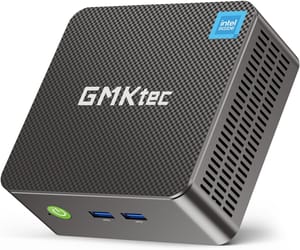
- +Under $200
- +tiny form factor
- +16GB RAM
- +2.5Gb Ethernet
- -Intel N150 is modest
- -no USB-C video
- -limited upgrades
The self-hosting community has been especially vocal about the advantages of local hardware. As we explored in our article on the self-hosting renaissance, the combination of cheap mini PCs and tools like Docker and Tailscale means you can run your own productivity stack at home for a fraction of cloud costs. The same N100 mini PC that replaces a Cloud PC can also run a local file server, a password manager, and a photo backup service, all while sipping 10 watts of electricity.
BOSGAME B100
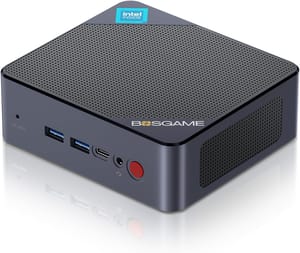
- +Dual 2.5-inch drive bays
- +16GB RAM
- +quiet operation
- -Slightly larger form factor
- -Intel N100 is entry-level
If you need more power for tasks like video editing or running local AI models, stepping up to a Ryzen-based mini PC in the $400 to $600 range still costs less than a year of Windows 365. The 5 things mini PCs can’t do in 2026 are all about GPU power and expandability, limitations that a Cloud PC doesn’t solve either since your cloud desktop is still running on shared server hardware.
Who Should Actually Consider a Cloud PC
After running the numbers and weighing the tradeoffs, the answer is fairly clear. Windows 365 Cloud PCs make sense if your organization already pays for Microsoft 365 Enterprise licensing, has a dedicated IT team managing Intune, operates in a regulated industry where data residency matters, or needs to deploy hundreds of identical terminals that employees can hot-desk between. If you check three or four of those boxes, the management simplification probably justifies the subscription premium.
For everyone else, the value proposition doesn’t hold up. A home office worker, freelancer, or small business owner is better served by a budget mini PC that costs less upfront, has zero ongoing subscription fees, works offline, and gives you full control over your data and software. If the cloud-first simplicity of a managed device appeals to you but the Windows 365 price tag doesn’t, a Chromebook does most of the same things for a one-time hardware purchase.
The most telling detail about these new Cloud PCs might be something Microsoft buried in the fine print. The ASUS NUC 16 for Windows 365 and Dell Pro Desktop are targeted at enterprise customers. They’ll be sold through commercial channels, managed through Intune, and require enterprise licensing. Microsoft isn’t even trying to sell these to consumers. They know the math doesn’t work for individuals. The question is whether enough IT departments will find the math compelling enough to justify turning their employees’ desks into dumb terminals. Based on 30 years of thin client history, the answer will probably be: some will, most won’t, and in five years we’ll have this same conversation again with a new product name.

