
GMKtec G3 Plus
Updated on

The GMKtec G3 Plus is a compact, budget mini PC built on Intel’s N150. It pairs 16GB of DDR4 (the platform maximum for the N150) with a 512GB NVMe SSD and a second M.2 SATA slot for more storage, running Windows 11 Pro. Connectivity is Wi-Fi 6, Bluetooth 5.2, and 2.5Gb Ethernet, and at 3.94 x 3.94 x 1.57 inches it tucks behind a monitor on the included VESA mount.
Dual HDMI outputs each run 4K at 60Hz, four USB 3.2 Gen 2 ports cover peripherals, and the fan stays quiet under load. Its gains over the earlier GMKtec G3 are incremental. For a first purchase in this price class it covers basic computing, light retro gaming, and home-lab experimenting.
| Pros | Cons |
|---|---|
| 3.94-inch-square chassis with the VESA mount in the box | Minimal performance gain over the original G3 |
| Quiet fan operation, even under load | No USB-C ports |
| Two M.2 slots, 2280 NVMe plus 2242 SATA, each taking up to 2TB | Wi-Fi 6 throughput no better than other cheap mini PCs |
| Ships with Windows 11 Pro and a 512GB NVMe drive | RAM is single-channel, limiting potential performance gains |
| Strong Linux compatibility and dual-boot support | Limited gaming performance for modern titles |
| Draws 12 to 14W at idle and 30 to 32W under load | 16GB of DDR4 is the platform ceiling, with no path above it |
Related Videos
GMKtec G3 Plus Comparison Chart
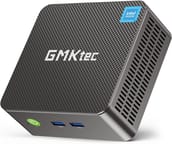
4 configurations
| Configuration | RAM | Storage | Performance | List price | Amazon price | Compare |
|---|---|---|---|---|---|---|
| 16GB/512GB/Intel N150 | 16 GB | 512 GB | 3.1 | $499.99 | Details
| |
| 8GB/256GB/Intel N150 (Black) | 8 GB | 256 GB | 2.7 | --- | Details
| |
| 16GB/512GB/Intel N150 (Black) | 16 GB | 512 GB | 3.1 | $499.99 | Details
| |
| 16GB/1TB/Intel N150 | 16 GB | 1 TB | 3.1 | --- | Details
|
Specs shared by every configuration
| Operating System | Windows 11 Pro |
|---|---|
| Processor | Quad-core 3.60 Ghz Intel Processor N150 |
| GPU | Integrated Intel UHD Graphics |
| Dimensions width x length x thickness | 3.94 x 3.94 x 1.57 inches (100.08 x 100.08 x 39.88 mm) |
| Weight | unknown |
| WiFi | Wi-Fi 6 (802.11ax) |
| Bluetooth | Bluetooth 5.2 |
| Ethernet | 1 Ethernet port at 2.5 Gbps |
| HDMI | 2 Full-Size HDMI Ports |
| DisplayPort | No DisplayPort |
| VGA | No VGA Ports |
| USB Ports | 4 USB 3 (All USB ports are USB 3.2 Gen 2) |
| Thunderbolt Ports | No |
| OCuLink | No |
| Internal SATA Ports | No SATA ports |
| Card Reader | No Card Reader |
| Headphone Jack | combo |
| Fanless | No |
| VESA Mount | Yes |
| In the Box | GMKtec G3 Plus Mini PC, power adapter and cable, HDMI cable, VESA mount with screws, user manual. |
| Expandability | RAM up to 16GB (platform maximum), storage expandable via M.2 2280 NVMe (up to 2TB) and M.2 2242 SATA (up to 2TB). |
Related Mini PCs
-
 GMKtec NucBox G3 UltraThe GMKtec NucBox G3 Ultra is a palm-sized office PC with a dual-core Intel Pentium Gold 7505, 16GB…
 -
 GMKtec Nucbox G3SThe GMKtec Nucbox G3S is a 0.57-pound mini PC built on the Intel N95 with 8GB or 16GB of RAM, two…
 -
 ACEMAGIC Vista V1The ACEMAGIC Vista V1 is an ultra-budget mini PC sold in several Intel configs (N95, N97, and…
 -
 ACEMAGICIAN T8 PlusThe ACEMAGICIAN T8 Plus is a compact mini PC for multi-display setups, with triple 4K HDMI output,…
 -
 Beelink MINI S12 ProThe Beelink MINI S12 Pro is a budget Intel N100 mini PC with up to 16GB of DDR4, a 512GB NVMe SSD,…
 -
 Beelink MINI S12The Beelink MINI S12 is a compact, low-power Intel N95 mini PC with dual 4K HDMI, four USB 3.2…
A 16GB ceiling, two storage slots, and no USB-C
Intel’s N150 is a quad-core chip built for low power rather than throughput, and with 16GB of DDR4 at 3200MHz it covers browsing, office work, and video without complaint. That 16GB is the platform maximum, so there is no memory headroom beyond what it ships with; if local AI is on your list, our guide to running Gemma on a mini PC shows what a box in this class handles. The 512GB NVMe drive arrives installed in the M.2 2280 slot, and the empty M.2 2242 SATA slot takes a second drive of up to 2TB.
Two HDMI 2.0 ports each output 4K at 60Hz, so a dual-monitor desk works without an adapter or a dock. Four USB 3.2 Gen 2 ports handle keyboards, drives, and other peripherals, and none of the four is Type-C. A combo headphone jack sits on the same panel, and the bundled VESA plate lets the machine hide behind a display in a home office or on a media-center shelf.
Power draw runs from 12W at idle to 32W under load, so it costs very little to leave powered on. That efficiency suits the small home servers covered in our self-hosting renaissance piece. The same wattage profile has made boxes like this one popular as always-on AI agent servers, where leaving a machine running around the clock is the whole point.
What reviewers found
No mainstream outlet has tested this model. The one hands-on review comes from Lon Seidman.
Lon Seidman bought the unit himself and called it a mini PC that “really punches above its weight.” He praised the cooling as “practically silent even when the system is under load,” measured low power draw (12 to 14W idle, 30 to 32W under load), and liked the easy access to the RAM and the two storage slots (NVMe plus M.2 SATA) and the clean Linux support for dual-booting alongside Windows 11 Pro. At “$159 as configured” he rated it a strong budget pick for home labs, retro gaming, and basic computing.
His main caveat was that the N150 is barely a step up from the N100: the clock bump is “not enough that most people will notice the difference,” and he found the Wi-Fi 6 only average, on par with other cheap mini PCs. Existing G3 owners, he said, have little reason to upgrade.
Customer Reviews
The Amazon listing that carried this model’s owner reviews has since been relisted by GMKtec as a different machine (the G3 PRO with an Intel Core i3-10110U), so the live star count there now mixes two products and is no longer a clean read on the N150 G3 Plus. The feedback below is from owners who were clearly describing the N150 G3 Plus.
The positive reviews cluster on the same points: a small, quiet, low-power box for basic computing, streaming, and light gaming with Windows 11 Pro. Peter, a verified buyer, wrote “Great low power PC that’s small, quiet, and powerful enough for basic tasks all day!” and uses it as a home theater PC. Several owners flag the same caveats: Bluetooth that did not work on first setup (texasute and Stoney both hit this), and ZElectronics, who rated it four stars, noted it “seemed to struggle with my 4K monitor running at 60 Hz.”
Multiple verified buyers reported units that failed outright. Len on the cob wrote that “my first unit went bad about 8 months after purchase” and would not boot, and Chris Munger’s unit locked up during a Windows update and boot-looped within the first day or two. Praise for GMKtec’s support runs alongside those complaints: Len gave the company “an A+++ for their response” after a free replacement, and Stoney described a similar prepaid-return and brand-new-replacement outcome.
A cheap always-on box with a reliability tail
It runs quietly, and the RAM and both storage slots are easy to reach, so it can sit in a cupboard or behind a TV. The Amazon listings we tracked for the N150 version have been relisted by GMKtec as a different model, so confirm the processor before you order. If you are buying it for a parent or a less tech-savvy family member, our guide on mini PCs for less tech-savvy users walks through the support and durability argument in detail. The Linux and dual-boot support also suits tinkerers running more than one operating system. If you came here cross-shopping a Raspberry Pi, our look at the mini PCs that replace the delayed Pi 6 puts a box like this in context.
Anyone who needs stronger performance, USB-C, or modern gaming should look elsewhere, and owners of the original GMKtec G3 will not find enough here to justify replacing a working machine. Related reading: the Mac Mini M4 value breakdown, the mini PC versus MacBook Neo comparison, which uses this box for its numbers, and the cloud PC vs mini PC breakdown. Starry Hope’s Mini PC Comparison Tool lines it up against other models spec by spec.
Frequently Asked Questions
Can the RAM be upgraded on the GMKtec G3 Plus?
16GB of DDR4 is the ceiling for the Intel N150 platform, so a 16GB unit cannot go higher. The 8GB configuration can be taken up to 16GB.
What storage options are available, and can they be expanded?
The M.2 2280 NVMe slot arrives filled with the 512GB drive, and the M.2 2242 SATA slot ships empty. Either slot takes a drive of up to 2TB.
Does the GMKtec G3 Plus support dual monitors?
Yes. Two HDMI 2.0 ports each drive 4K at 60Hz.
Is the GMKtec G3 Plus suitable for gaming?
Older and less demanding titles at low settings run, as does emulation for older consoles. Modern, graphically intensive games do not.
Does the Mini PC include a fan, and is it noisy?
It has a fan, and it stays quiet even under load. That is an improvement over the previous model, and it suits a noise-sensitive room.
What operating systems are supported?
Windows 11 Pro is pre-installed. Linux runs without hardware trouble, either dual-booted or on its own.
Does the G3 Plus have USB-C ports?
No. There are four USB 3.2 Gen 2 ports and no Type-C port of any kind.
What’s included in the box?
The mini PC, a power adapter and cable, an HDMI cable, a VESA mount with screws, and a user manual.
Is the G3 Plus energy-efficient?
It draws about 12-14 watts at idle and 30-32 watts under load, low enough to leave running around the clock.