

Listen to this article:
Editor’s Note (February 2026): The project has been renamed again, this time to OpenClaw. The new site is openclaw.ai.
Editor’s Note (January 2026): Since this article was published, Clawdbot has been renamed to Molt (now redirects to OpenClaw; see the February note above).
Developers on X are losing their minds over a project called Clawdbot, and it’s triggering a run on Apple’s smallest computer. Clawdbot promises an assistant that understands your life, remembers your preferences, and does things on your computer while you’re away.
The creator, Peter Steinberger, puts it bluntly: “Apps will melt away. The prompt is your new interface.” He’s the former CEO of PSPDFKit, who built that company over 13 years before selling it. Now he’s come out of retirement to help a cartoon lobster take over the world of personal computing.
Developers on X Are Comparing It to the iPhone Launch
Scroll through the #clawdbot hashtag on X and you’ll find a level of enthusiasm that feels almost cult-like. Developers are calling it an “iPhone moment” and comparing it to early AGI.
Dave Morin @davemorinView on XAt this point I don’t even know what to call @openclaw. It is something new. After a few weeks in with it, this is the first time I have felt like I am living in the future since the launch of ChatGPT.
When ChatGPT dropped in late 2022, it felt like magic because you could suddenly have intelligent conversations with a computer. Clawdbot goes further: those conversations can now trigger actions on your machine.
Nathan Clark @nathanclark_View on XImagine you take a smart model.
And then you give it eyes and hands and sit at the desk with a keyboard and mouse connected to that Mac mini.
Then you message it like a coworker from [telegram] and it can then do everything a person could do with that Mac mini…
That’s what you have now.
It behaves more like a remote employee than a chatbot, one that happens to live inside a small aluminum box on your desk. It works 24 hours a day and can be reached through WhatsApp while you’re walking your dog.
What Exactly Is Clawdbot?
Clawdbot is an open-source AI agent that runs on your own hardware. Unlike ChatGPT or Claude’s web interfaces, which process everything on remote servers, Clawdbot operates locally with a “gateway” that connects AI models to the apps and services you already use. It can talk to you through WhatsApp, Telegram, Discord, Slack, Signal, or even iMessage.
Given the right permissions, Clawdbot can browse the web, execute terminal commands, write and run scripts, manage your email, check your calendar, and interact with any software on your machine. Federico Viticci of MacStories burned through 180 million tokens on the Anthropic API using it, calling it “a tinkerer’s laboratory” that hints at an exciting future.
Clawdbot can also extend itself. Tell it you want a new capability, and it can often write its own “skill” (plugin) to make it happen. One user wanted access to university course assignments. He asked Clawdbot to build a skill for it. Clawdbot did, and then started using it on its own.
Chris Dietrich @chrisdietrView on XI just ordered some hardware.
That was a hiring decision, not a purchasing decision.
2026 is already the year of personal agents.
Follow @openclaw and @steipete to stay informed.
The lobster branding came from Claude. While Steinberger was developing the project, the AI suggested naming its persona “Clawdis” as a joke about a space lobster in a TARDIS. The name evolved into Clawdbot, and the crustacean theme stuck. There’s even a “Lobster Mode” where the bot becomes intentionally opinionated and cranky.
Why Developers Pick the Mac Mini
Clawdbot runs on any computer, and the Mac Mini has a few concrete advantages for it.
Apple Silicon’s unified memory architecture is efficient for AI workloads. Instead of the CPU and GPU communicating over a slower connection, the memory sits directly on the chip package. The full memory bandwidth is instantly available to AI models, so local inference runs faster than on traditional x86 systems with equivalent specs.
A one-time investment of $799 for a base Mac Mini M4 gets you a silent, low-power machine that can run continuously without racking up cloud GPU bills. Compare this to paying for API tokens or cloud compute, and the math quickly favors dedicated hardware for anyone using AI agents heavily.
Privacy is another major driver. Your agent needs to index your emails, files, and personal data to be useful. With Clawdbot on a Mac Mini at home, your data never leaves your physical control.
At 5 by 5 inches, the M4 Mac Mini is small enough to tuck away anywhere. It runs virtually silent during normal operation, so it works as an always-on home server. One user runs it on a 2013 iMac and reports it works flawlessly, though newer Apple Silicon runs local models faster.
People Delegate Email, Paperwork, and Coding to Clawdbot
Someone asked their bot to unsubscribe from unwanted emails. It did, systematically working through the inbox. Another user set up automated health reimbursement submissions. The agent finds the right documents on the hard drive and handles the paperwork.
Nat Eliason @nateliasonView on XYeah this was 1,000% worth it.
Separate Claude subscription + Clawd, managing Claude Code / Codex sessions I can kick off anywhere, autonomously running tests on my app and capturing errors through a sentry webhook then resolving them and opening PRs…
The future is here.
Developers are integrating Clawdbot with their coding workflows. One user has it controlling smart home devices, adjusting air purifier settings based on health metrics from their wearable.
One agent “accidentally started a fight” with an insurance company. The user’s Clawdbot misinterpreted a response and sent an email that caused the insurer to reinvestigate a claim that had been rejected. The agent’s assertiveness worked in the user’s favor.
Conrad Sasheen @conradsagewizView on X@steipete @openclaw is insane I’m literally on my phone in a telegram chat and it’s communicating with codex cli on my computer creating detailed spec files while out on a walk with my dog. 🤯 Wtffff
Because Clawdbot communicates through messaging apps you already use, you can direct your home computer from anywhere. One user built an entire website from their phone using voice messages while putting the baby to sleep.
Hardware Worth Buying for a Clawdbot Server
If you’re ready to join the lobster revolution, the Mac Mini M4 is the default recommendation.
Mac mini with M4 chip

- +$799 base price
- +silent operation
- +tiny footprint
- +16GB unified memory standard
- -No USB-A ports
- -non-upgradeable RAM and storage
- -limited to macOS
For users who want to run larger local models alongside Clawdbot, the 24GB configuration at $999 provides headroom. The M4 Pro variant at $1,399 supports up to 64GB of unified memory, which becomes relevant if you’re running quantized versions of models like Llama locally while still using cloud APIs for heavier reasoning tasks.
Since Clawdbot can run on a Raspberry Pi, you don’t need high-end hardware. If you prefer Linux (which Clawdbot actually supports better than Windows), these budget x86 mini PCs handle the task for a fraction of the Mac Mini’s price. Both ship with Windows and run Linux.
Beelink Mini S13
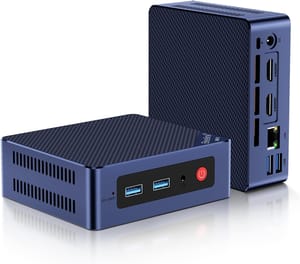
- +$219 list price
- +16GB RAM
- +about 7W at idle
- +two M.2 slots
- +runs mainstream Linux without driver fuss
- -Intel N150 is modest
- -no USB-C
- -Gigabit Ethernet only
If you want USB-C with video output for less money, the Trycoo WI-6 adds DisplayPort over USB-C at a $179.99 list price.
Trycoo WI-6 Mini PC

- +$179.99 list price
- +DisplayPort over USB-C
- +dual HDMI 2.0
- +VESA mount in the box
- -Wi-Fi 5 and Bluetooth 4.2 are dated
- -Gigabit Ethernet only
- -the M.2 slot runs at Gen 3 x1
If you’re on a tighter budget or want to experiment before committing, Clawdbot also runs on Raspberry Pi (one user set it up with Cloudflare and was building websites from their phone within minutes) and even older Intel Macs. The experience won’t be as smooth, but it works.
For more options, check our Mini PC comparison chart to filter by specs that matter for AI workloads.
Agent Permissions Are the Unsolved Part
The enthusiasm is warranted, but so is some skepticism. Giving an AI agent keyboard and mouse access to your computer means it can take incorrect actions on your behalf, like the insurance email above.
Steinberger has built in safeguards, and you can configure exactly what permissions your agent has. But the fundamental premise of letting an LLM execute commands on your machine requires trust in both the underlying AI models and the Clawdbot codebase. It’s open source, which helps if you read the code.
An agent that holds your credentials and reads your email can also be steered by a message crafted to look innocent while carrying adversarial instructions. That is not a solved problem.
How to Install and Run Clawdbot
A single command gets you running:
curl -fsSL https://clawd.bot/install.sh | bashFrom there, the onboarding process walks you through connecting your preferred chat applications and configuring permissions. The Clawdbot documentation is detailed, and the Discord community is active with users sharing skills and troubleshooting issues.
The GitHub repository is where development happens, and the pace of updates has been aggressive. Clawdbot was three weeks old when this was published.
Steinberger Wants Agents Talking to Each Other
Steinberger also wants your agent negotiating with someone else’s agent, handling scheduling conflicts and task coordination without human involvement. The prompt becomes the interface for that negotiation as well as for your own computer.
Karpathy is a former Tesla AI director and an OpenAI founding member.
Clawdbot may win outright or get absorbed into larger platforms.
For now, if you’ve been looking for an excuse to buy a Mac Mini, the crustacean overlords have provided one.
Frequently Asked Questions
Why are people buying a Mac Mini to run Clawdbot?
Apple Silicon keeps its memory on the chip package, so local inference runs faster on a Mac Mini than on an x86 box with the same specs. A $799 base M4 also runs silent around the clock without a cloud GPU bill, and the email and files it indexes never leave the house.
How much does a Clawdbot Mac Mini setup cost?
$799 for the base Mac Mini M4 with 16GB of unified memory, which covers most setups. Going to 24GB costs $999, and the M4 Pro at $1,399 takes up to 64GB for running larger local models alongside the agent. Budget x86 mini PCs that do the same gateway job start under $200.
Do you need a Mac Mini to run Clawdbot?
No. It runs on a Raspberry Pi, on older Intel Macs, and on budget mini PCs like the Beelink Mini S13 and the Trycoo WI-6, though slower hardware makes for a rougher experience. Those budget boxes ship with Windows and Clawdbot supports Linux better, so wiping the drive comes first.
How do you install Clawdbot on a Mac?
One shell command from the project’s install script. Onboarding then walks you through connecting the chat apps you want to message it from and setting the agent’s permissions. The project documentation and an active Discord community cover the rest.


