
Beelink Mini S13
Updated on

The Beelink Mini S13 is a budget Intel N150 mini PC, around $200, aimed at everyday computing in a small, low-power box. The quad-core N150 (up to 3.6GHz) handles web browsing, office work, and media well, and the unit ships with 16GB of DDR4 and a 512GB M.2 SSD. The S13 has two M.2 slots where the S12 had one M.2 plus a 2.5-inch SATA bay.
At 4.25 x 4.01 x 1.54 inches it is small, with Wi-Fi 6, Bluetooth 5.2, four USB 3.2 Gen 2 ports, and dual HDMI for two monitors. The trade-offs are no USB-C, a single 1Gbps LAN, no card reader, and an active (not fanless) cooler. For an HTPC, a thin client, or a light home server, the feature mix holds up at this price.
| Pros | Cons |
|---|---|
| Compact and lightweight design | Not fanless, though IT Pro measured the fan as “barely audible” under sustained load |
| Dual M.2 PCIe 2280 slots for flexible storage expansion (NVMe/SATA3) | No USB Type-C port |
| Includes 16GB of DDR4 RAM and a 500GB class M.2 SSD | Single SODIMM slot caps RAM at 16GB single-channel |
| Dual HDMI outputs handle two 4K 60 Hz displays for multi-monitor setups | No integrated card reader for SD or microSD |
| Modern connectivity with Wi-Fi 6 and Bluetooth 5.2 | Ethernet capped at 1Gbps, not 2.5GbE |
| Four USB 3.2 Gen2 ports plus quiet, low-draw operation (idle ~7W) | Stock NVMe is slow by modern standards (about 510 MB/s sequential read) |
Related Videos
Beelink Mini S13 Comparison Chart
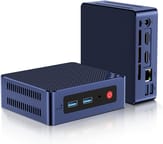 Beelink Mini S13 | Beelink Mini S13 | |
| Price | List Price: $219.00 Amazon Prices: Loading prices... | List Price: Amazon Prices: |
| Version | 16GB/512GB/Intel N150 | 16GB/1TB/Intel N150 |
| Performance Rating | 3.1 | 3.1 |
| Operating System | Windows 11 | Windows 11 |
| Processor | Quad-core 3.60 Ghz Intel Processor N150 | Quad-core 3.60 Ghz Intel Processor N150 |
| GPU | Integrated Intel UHD Graphics | Integrated Intel UHD Graphics |
| RAM | 16 GB | 16 GB |
| Internal Storage | 512 GB | 1 TB |
| Dimensions width x length x thickness | 4.25 x 4.01 x 1.54 inches (107.95 x 101.85 x 39.12 mm) | 4.25 x 4.01 x 1.54 inches (107.95 x 101.85 x 39.12 mm) |
| Weight | unknown | unknown |
| WiFi | Wi-Fi 6 (802.11ax) | Wi-Fi 6 (802.11ax) |
| Bluetooth | Bluetooth 5.2 | Bluetooth 5.2 |
| Ethernet | 1 Ethernet port at 1 Gbps | 1 Ethernet port at 1 Gbps |
| HDMI | 2 Full-Size HDMI Ports | 2 Full-Size HDMI Ports |
| DisplayPort | No DisplayPort | No DisplayPort |
| VGA | No VGA Ports | No VGA Ports |
| USB Ports | 4 USB 3 (Four USB 3.2 Gen2 (10Gbps) ports) | 4 USB 3 (Four USB 3.2 Gen2 (10Gbps) ports) |
| Thunderbolt Ports | No | No |
| OCuLink | No | No |
| Internal SATA Ports | No SATA ports | No SATA ports |
| Card Reader | No Card Reader | No Card Reader |
| Headphone Jack | combo | combo |
| Fanless | No | No |
| VESA Mount | No | No |
| In the Box | Mini PC, instruction manual, wall-mounted bracket, HDMI cable, adapter (12V/3A), one pack of screws. | Mini PC, instruction manual, wall-mounted bracket, HDMI cable, adapter (12V/3A), one pack of screws. |
| Expandability | Supports up to 16GB DDR4 RAM and dual M.2 SSDs (NVMe/SATA3). | Supports up to 16GB DDR4 RAM and dual M.2 SSDs (NVMe/SATA3). |
Related Mini PCs
-
 Beelink EQ mini (Intel N150)A small Intel N150 desktop for office work and media, with 12GB of soldered LPDDR5, two M.2 slots,…
 -
 Beelink EQ14The Beelink EQ14 is a budget Intel N150 mini PC with 16GB of DDR4, two M.2 slots (up to 8TB), dual…
 -
 ACEMAGIC S1 Mini PCThe ACEMAGIC S1 is a compact Intel N95 mini PC with 16GB of DDR4, dual M.2 slots, dual gigabit…
 -
 Bmax B6The Bmax B6 is a small 10th-gen Intel mini PC sold with a Core i3-1000NG4, i5-1030NG7, or…
 -
 GMKtec NucBox G5The GMKtec NucBox G5 is a palm-sized Intel N97 mini PC with 12GB of LPDDR5, dual HDMI 2.0 (4K60),…
 -
 MOREFINE M6S Mini PCThe MOREFINE M6S is a 2.83-inch-square Intel N100 mini PC with 12GB of DDR5, a 512GB NVMe drive in…
Hardware and connectivity
The Mini S13 runs the Intel Processor N150, a quad-core, four-thread Twin Lake CPU built for energy-efficient desktop and embedded use, with a maximum clock speed of 3.60 GHz. The 16GB of DDR4 keeps several apps open at once, though the single SODIMM slot holds memory bandwidth to single-channel. Rising DRAM prices have pushed N100/N150-class mini PCs higher than their 2024 pricing, so check current costs before buying. The integrated Intel UHD Graphics (24 EU) covers video playback and light casual gaming. Independent benchmarks from IT Pro put the N150 around 1,242 single and 3,029 multi on Geekbench 6, with PCMark 10 at 2,984; modern AAA gaming and 3D rendering are beyond it.
The unit ships with a 500GB class M.2 SSD. IT Pro measured that drive at roughly 510/480 MB/s sequential read and write, serviceable but well below current gen-4 NVMe speeds. For more capacity, the dual M.2 PCIe 2280 slots each accept NVMe or SATA SSDs. That flexibility makes the S13 a practical small NAS or HTPC base, where the S12’s single 2.5-inch SATA bay forced a compromise.
Wi-Fi 6 and Bluetooth 5.2 cover wireless and peripherals. Four USB 3.2 Gen 2 ports run at 10 Gbps for external drives, and the dual HDMI outputs drive two 4K displays at 60 Hz. IT Pro named the missing USB Type-C port one of the S13’s two design corners; it limits modern docks, single-cable monitors, and many newer accessories. Ethernet is a single 1Gbps port rather than the 2.5GbE that sibling Beelink models such as the EQ14 now ship with.
Reviewer Insights
IT Pro’s Hands-On Testing
Alun Taylor at IT Pro put a UK review unit through a full benchmark suite and a 12-hour sustained stress test. The Mini S13 returned Geekbench 6 scores of 1,242 single and 3,029 multi-core, Cinebench R23 at 948 single and 2,890 multi, and PCMark 10 at 2,984. Graphics scores in GFXBench were modest: 26 fps in Car Chase and 56.5 fps in Manhattan 1080p. The factory NVMe measured 510 MB/s read and 480 MB/s write, which Taylor flagged as slow for a 2025 drive but acceptable for a budget unit. Most notably, after twelve hours with both the CPU and GPU pegged at 100%, the unit did not throttle and the fan stayed almost silent. Taylor called the missing USB-C port and single SODIMM the two notable design corners, and concluded: “The Mini S13 is no powerhouse but as a workhorse for HTPC, thin client or NAS use it has a lot to offer and is solid value.”
EVO Tech’s S12 vs S13 Comparison
EVO Tech opens the chassis on camera and shows the second M.2 PCIe 2280 slot sitting where the S12 had a 2.5-inch SATA bay. As the reviewer puts it, “On the S13, we have now two M.2 slots, and that makes it a lot better of an option.” The video also discusses the N150’s clock-speed bump over the N100, but is candid that the real-world delta is small and that buyers willing to spend more would see a bigger jump from an AMD-based mini PC. For the price, EVO Tech recommends the S13 as the better buy for storage in Beelink’s entry tier.
Sean’s Tech Talk Posts Independent Benchmarks
Sean’s Tech Talk bought the Mini S13 at a sale price near $170 and measured Geekbench 6 at 1,189 single / 2,916 multi, SSD throughput at 507/398 MB/s, plus a Counter-Strike 2 run and some light video editing. The video confirms the official spec sheet (dual HDMI, four USB-A 3.2 Gen 2, Wi-Fi 6, BT 5.2, 1 Gbps LAN, 4.25 x 4.01 x 1.54 inch chassis) and shows the wall-mount bracket in the box. Sean’s framing positions the S13 as the “traditional desktop alternative” to a high-end tablet: capable of office work, light editing, and streaming, but not a fit for heavier creative work.
Where Coverage is Thin
TechRadar, Tom’s Hardware, ServeTheHome, and NotebookCheck have not published full reviews of the Mini S13; coverage at that tier stops at launch-news stubs from December 2024 (Liliputing, NotebookCheck, How-To Geek). MiniPC-Review.com published a longer 2025 write-up with thermal and noise figures (45C idle / 31 dBA, 66C under load / 36 dBA, ~7W idle and ~13W sustained), though the piece is partly aggregated rather than entirely independent testing.
The storage edge over the S12 makes it the entry-tier buy
The dual M.2 slots give the Mini S13 a storage edge over the older S12. The three reviews above land on the same buyer: home theater, thin client, NAS, or a desktop for office work and streaming. The same reasoning runs through why a mini PC can be the better computer for your parents. Readers weighing this against a used corporate box should check our used mini PC buyer’s worksheet first; the S13 is one of the new-box alternatives we recommend when a used listing’s hidden costs close the gap.
It is not the right pick if you need a completely silent fanless design, USB-C, faster-than-1Gbps Ethernet, or a card reader. Those gaps rule it out for some photographers and high-speed-network use. Beelink owners curious about the brand’s AI direction can read about the first OpenClaw mini PCs it ships pre-installed. To compare it with other models, use Starry Hope’s Mini PC Comparison Chart.
Frequently Asked Questions
Can the RAM in the Mini S13 be upgraded?
The Mini S13 has a single user-accessible DDR4 SODIMM slot capped at 16GB. IT Pro’s review confirmed the slot is easy to reach after removing the base plate, but since stock units already ship with the 16GB module installed, there is no upgrade path beyond replacing it with another 16GB stick. The system runs in single-channel mode.
What type of storage expansion does the Mini S13 support?
The Mini S13 has dual M.2 PCIe 2280 slots, and each one takes an NVMe or SATA SSD.
Does the Mini S13 support dual monitors?
Yes. Two HDMI Type-A ports drive two displays at once.
Is the Mini S13 fanless?
No. The Mini S13 has a fan rather than a passive heatsink.
Does the Mini S13 come with a VESA mount?
Beelink ships a wall-mount bracket in the box rather than a true VESA monitor-back bracket, so the unit can be fixed to a wall but is not designed to mount directly behind a VESA-pattern display.
What’s included in the box with the Mini S13?
The package includes the Mini PC itself, an instruction manual, a wall-mounted bracket, an HDMI cable, a 12V/3A adapter, and a pack of screws.
What operating system does the Mini S13 run?
The Mini S13 ships with Windows 11 Pro pre-installed. Like most N-series Intel mini PCs it also runs mainstream Linux distributions without driver fuss; many owners install Debian, Ubuntu, or Proxmox for home-server, HTPC, or NAS use.
Does the Mini S13 have a built-in card reader?
No. Adding SD or microSD support means an external card reader.
Does the Mini S13 have a USB-C port?
No. The Mini S13’s rear and front I/O is built around four USB 3.2 Gen 2 Type-A ports and dual HDMI; there is no USB Type-C connector. That rules out USB-C docks, single-cable monitor setups, and many newer accessories.
How does the N150 in the Mini S13 perform in benchmarks?
IT Pro measured Geekbench 6 at 1,242 single / 3,029 multi, Cinebench R23 at 948 / 2,890, and PCMark 10 at 2,984. After a 12-hour 100% CPU and GPU stress test, the unit did not thermally throttle and the fan stayed nearly inaudible. The N150 is roughly a small step above the older N100 and a meaningful jump over the N5095, but it is still an entry-level Intel chip rather than a productivity workhorse.