

A GitHub commenter named physhster summed up the modern used-mini-PC purchase in one sentence after walking through an HP EliteDesk 800 G6 BIOS bypass on a community blog post (the discussion thread is on GitHub): “I can’t thank you enough. This saved my G6 Mini from a complicated eBay return!” He was one of dozens of buyers in the same comment thread, each of them describing the same experience: shipping arrived, machine powered on, BIOS asked for an admin password the seller did not have, and the listing said nothing about it. Another commenter, jnew1213, was unusually candid about how he got there: “I acquired the machine via eBay. I knew it was BIOS locked at the time. I just figured the ProDesk and EliteDesk would be very similar. Nope!” The bypass he was hoping for did not work on the ProDesk 400 G6 Mini.
The used corporate mini PC market is cheap, good, and full of listings that look identical in the photos but ship with one of five buyer-trap problems that turn a $130 bargain into either a return labor nightmare or a small black brick on the shelf. ServeTheHome’s Project TinyMiniMicro built the modern homelab case for these boxes back in 2020 and has been refining it ever since; Lon.TV has been reviewing the same SKUs one at a time on YouTube for almost as long. This checklist mirrors the shape of our Used Chromebook Worksheet, but the five gotchas are completely different on the mini PC side, and the stakes are higher because there is no fleet-management portal to reset.
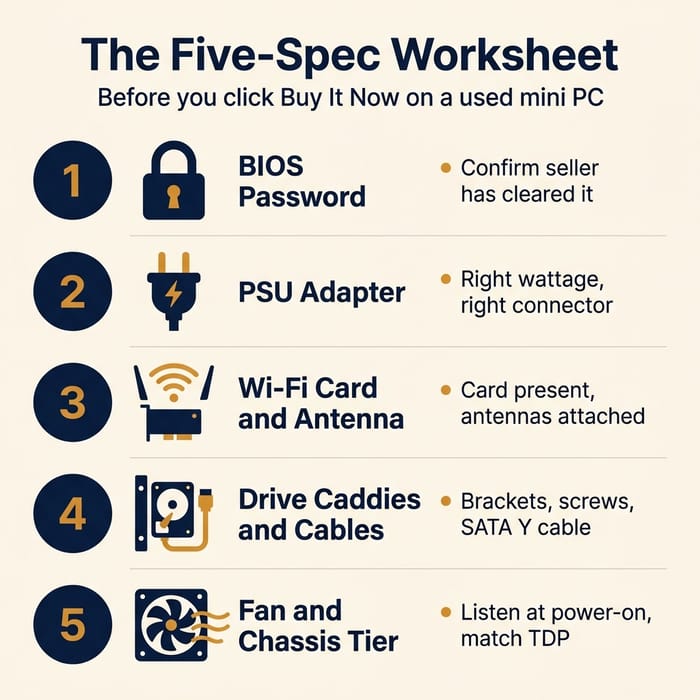
Read the five-spec worksheet below once, keep the screenshot handy, and run any listing through it before you commit money.
Why this market exists in 2026
Three- and five-year corporate refresh cycles have been feeding inventory into the resale channel for almost a decade, and the post-pandemic homelab and self-hosting wave turned that supply into demand. A new whitebox N100 mini PC costs roughly $180 to $240 in mid-2026. For the same money, an off-lease HP EliteDesk 800 G5 Mini can deliver a six-core 35W Coffee Lake i5, two M.2 slots, vPro remote management, and a 2.5-inch drive bay. Wi-Fi 6 was a configure-to-order option on these chassis rather than a standard inclusion, so a meaningful share of the off-lease inventory shipped wired-only with no card in the slot; do not assume the listing has Wi-Fi unless the seller has confirmed the card is present. The chassis is metal and the fan is replaceable; the OEM warranty has expired, but the build quality earned its reputation. Patrick Kennedy at ServeTheHome framed it early: “There are a ton of these corporate mini/ micro desktops. Customers for them do regular upgrade/ refresh cycles plus there are events such as bankruptcies that lead to a constant supply on secondary markets… The build quality of these devices is fairly good and they are easy to service. Allegedly, some even come with active onsite warranties.”
The same trends are pulling the DRAM and storage tax sharply higher on new builds. A $200 N100 box with 16GB and 512GB looks attractive on paper until you add the price of replacing soldered storage three years from now. Used corporate boxes were built when DIMM and M.2 upgrades were assumed, and that assumption is what makes them survive a second life. They were also built when the IT department, not you, owned the asset.
Spec 1: The BIOS supervisor password
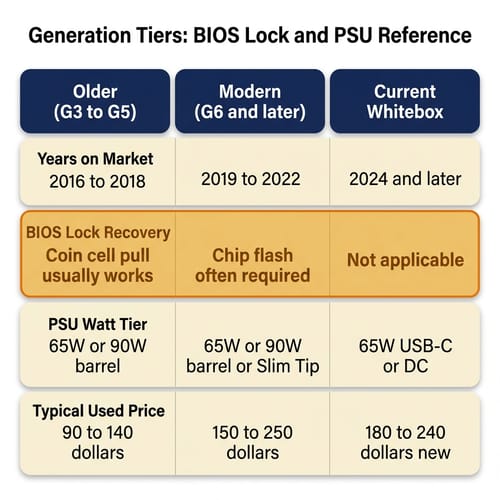
The most expensive failure on a used corporate mini PC is paying for a machine whose previous IT team set a BIOS supervisor password and did not clear it before the box hit the resale channel. The padlock survives a Windows reinstall, a CMOS battery pull, and (on newer chassis) every documented community technique short of physically reflashing the SPI chip. On a 2016 to 2018 HP EliteDesk G3 or G4 Mini, popping the coin cell and waiting fifteen minutes will usually clear the password. On a 2020-and-later G6 chassis (and the equivalent Dell 7080 Micro and Lenovo M90q Tiny generations), it almost certainly will not. A GitHub commenter named jakemelon put it bluntly: “we’ll probably see a lot of these G6 machines pop up on ebay where you cannot reset the pw with any method except for replacing/flashing the bios.” That is the failure mode you want to avoid paying for.
What to ask before you buy: send the seller a single message asking them to confirm in writing that “the BIOS has no admin or supervisor password set, and the machine boots into setup with no password prompt.” Reasonable corporate-liquidator sellers (the ones whose listings include the words “wiped” or “factory reset to OOBE”) will answer yes. Hobbyist sellers on eBay will either dodge the question or admit they did not check.
How to read the listing photos: if the seller has posted a photo of the actual POST screen with the HP / Dell / Lenovo splash visible and the system clock readable, the BIOS is almost certainly not locked at the splash level. (That does not rule out an admin password protecting setup itself, but it rules out the worst case where you cannot even reach the boot menu.) If the only photos are of the chassis exterior with no power-on screen, treat the BIOS status as unknown. On generations where the lock is recoverable, factor in $0 of cost and an evening of work. On G6 and later HP, on Lenovo M75q / M90q Gen 2 and newer, and on Dell 7080 Micro and newer, factor in either a chip-level reflash service (roughly $40 to $100 depending on the provider) or write the listing off entirely.
Spec 2: The PSU watt rating, connector, and presence
Corporate mini PCs do not ship with internal power supplies. They use external bricks, and the bricks are the most commonly missing accessory in the used market because IT departments routinely separate them at decommission and palletize them in a different bin. The brick is also where vendors diverge the most: HP EliteDesk Mini uses a barrel connector at 65W, 90W, or 120W depending on the CPU tier (refurbisher guidance maps a 35W board to a 65W adapter, a 65W board to a 90W, and a 95W K-chip board to a 120W), Lenovo ThinkCentre Tiny uses the proprietary “Slim Tip” rectangular connector at 65W or 90W, and Dell OptiPlex Micro ships with a 90W or 130W barrel depending on the CPU and the chassis variant per the Dell OptiPlex 7080 parts list (90W on 35W Micro boards, 130W on 65W Micro boards; the 180W bricks listed in that thread are for the OptiPlex 7080 Tower and SFF variants, not the 1L Micro). The wrong adapter does not always physically refuse to plug in. The wrong adapter sometimes works long enough to brown out the machine under a sustained CPU load, and that intermittent crash is the worst possible debugging problem to have on a new-to-you box.
The two failure cases that matter: a listing that ships with no PSU at all, and a listing that ships with the wrong-watt PSU for the CPU tier inside. A 35W TDP i3 / i5 chip in an EliteDesk 800 G4 Mini will run on a 65W brick. A 65W TDP i7 or 95W TDP K-chip in the high-performance version of the same chassis will not. ServeTheHome’s review of the HP EliteDesk 800 G6 Mini covers the 35W vs 65W chassis tier distinction; the relevant point for a buyer is that the chassis are externally identical but the cooling assembly and the PSU requirement are different. A high-performance unit running on a 35W chassis power budget will thermal-throttle continuously, and one with no brick at all will sit on your desk doing nothing until you order one for $30 to $50 from an OEM supplier.
What to ask: “Does the listing include the original [vendor] AC adapter rated at [watts]W, and if so, is it the genuine HP / Dell / Lenovo unit or a third-party replacement?” A reputable seller will tell you straight: genuine, third-party, or none. The third-party answer is fine for the 65W tier if you trust the seller. The “none” answer means you are spending another $30 to $50 immediately, so factor that into the bid before you place it.
How to read the listing photos: if the photos show the machine on a desk with a cable trailing off the back, zoom in on the brick. A black puck-shaped brick with a Lenovo logo and the words “Slim Tip” near the connector is the correct ThinkCentre Tiny supply. A boxier brick with the HP smart-pin barrel connector is the correct EliteDesk Mini supply. If the brick is silver, generic, or labeled with a brand you do not recognize, the seller bought a replacement and you should ask which one.
Spec 3: The Wi-Fi card and the antenna pigtails
The third trap is the one that catches the most homelab buyers who plan to use these boxes as Proxmox nodes or as a small router/firewall. Corporate mini PCs ship with a slot dedicated to a Wi-Fi card, but the slot is not always populated, the card is not always present even when the listing says “Wi-Fi 6,” and the two antenna pigtails inside the chassis are not always still connected. IT departments sometimes pull the Wi-Fi card at decommission because the box was wired in production. Resellers sometimes pull the Wi-Fi card to sell separately. And occasionally a buyer who needs Wi-Fi will install the card themselves only to find that the antenna pigtails were also removed and never re-routed to the rear I/O.
A Dell community thread on the OptiPlex 7080 Micro made the point about M.2 wireless slot wiring crisply: “Not all M.2 slot for wireless are wiring the same. On some systems, the M.2 slot supports PCIe wireless cards. While other system will support CNVio and CNVio2.” If you were planning to drop a 2.5GbE M.2 NIC into the Wi-Fi slot to upgrade the box for homelab use, check first whether the slot on your specific chassis is wired with PCIe lanes (it might be), and check whether the chassis has the rear cutout for the second NIC (it might not). HP’s “Flex Port” mechanism on the EliteDesk 800 G6 supports an optional 2.5GbE NIC as a factory-installed module; aftermarket installs into the Wi-Fi slot are not the same path and the results vary.
What to ask: “Is a Wi-Fi card and both antenna pigtails present and connected, and does the rear I/O have the two small antenna nubs installed?” The card identity matters too. Wi-Fi was a CTO option across these generations, so many units shipped wired-only and arrive with no card at all; when the slot is populated, it is usually an Intel AX2xx (AX201, AX210, or AX211) module that works cleanly with Linux, but a few corporate orders went out with Realtek or Mediatek cards that have weaker open-source driver support, which is worth knowing before you commit to a Proxmox install.
How to read the listing photos: zoom in on the rear I/O. A factory-installed Wi-Fi machine has two small black antenna nubs above the USB ports on the back of the chassis. If the nubs are missing and there are two small round blanks in their place, the antennas were removed and the card status is unknown. The card itself is hidden inside the chassis and you cannot see it from outside, so the rear nubs and the seller’s confirmation are your only pre-purchase signals.
Spec 4: The 2.5-inch drive caddy, screws, and SATA Y cable
These chassis ship with a single M.2 slot (or two, on later generations) plus a 2.5-inch drive bay that can hold an additional SATA SSD or a 7mm spinning drive. The 2.5-inch bay needs three small parts to work: a specific plastic-and-metal caddy that snaps into the chassis, the four mounting screws that hold the drive into the caddy, and a vendor-specific SATA “Y” cable that combines data and power into a single connector to the motherboard. None of those three parts have any obvious resale value on their own, so IT decommission processes treat them as consumables. They are often missing from the resale unit.
ServeTheHome’s Patrick Kennedy hit the same wall during his own bulk buy for Project TinyMiniMicro: “EliteDesk 800 G3 Mini arrived. This did not come with the SSD mounting brackets so the Samsung SSD was flopping around.” If the listing photos show the inside of the chassis at all, the empty 2.5-inch bay is visible above the M.2 slots. A bay with the caddy in place looks busy; an empty bay reads as a deep rectangular hole. A photo of the inside with no SATA cable visible is a strong signal that the cable was decommissioned too.
What to ask: “Does the unit include the 2.5-inch drive caddy, the four mounting screws, and the SATA data and power cable?” Aftermarket OEM-style replacements are available on eBay for $10 to $25 per part, so the missing caddy is not a deal-breaker on a $100 base unit. It is a deal-breaker if you were planning to run dual-drive ZFS on a $130 listing and you have to source three small parts from three different sellers to do it.
How to read the listing photos: if the seller has posted an interior shot, the bay is the rectangular cavity above the M.2 slots, opposite the CPU. A black plastic frame with four screw posts is the caddy. A loose ribbon-and-power cable bundled near the front of the chassis is the SATA Y cable. If neither is in the photo, both are probably gone.
Spec 5: The fan and the chassis cooling tier
A five-year-old corporate mini PC that ran 24/7 in a warm office closet has a fan with a known number of bearing-revolutions left in it, and that number is closer to the end of the curve than the beginning. The chassis cooling tier is a separate problem that compounds it: HP, Dell, and Lenovo all ship the same external chassis in two thermal tiers (35W and 65W on the EliteDesk Mini side; equivalent splits on the Dell and Lenovo lines). The two tiers are externally identical but use a different heatsink and a different fan curve. A 65W TDP CPU dropped into a 35W chassis (which sellers occasionally do as a “free upgrade” when they part out the higher-tier unit) will run hot, throttle continuously under any sustained load, and shorten the fan’s life further.
What to ask: “Has the chassis been opened or modified since the original deployment, and is the original heatsink and fan still installed?” Ask separately for the CPU model and the chassis tier, and cross-reference both against the OEM spec sheet for that platform. The HP EliteDesk 800 G4 Mini, for example, was sold in a “35W” and a “65W” variant; the chassis is the same shape but the heatsink is taller in the 65W version and the fan is rated higher. A G4 Mini with an i7-8700K (95W TDP K-chip) is not a stock config, and unless the seller documents the modification, it should be a walk.
How to read the listing photos: the fan itself is not visible without opening the chassis, but the cooling tier is sometimes hinted at by a model-number sticker on the bottom. The clearer test is to listen at power-on. Ask for a 10-second video of the boot sequence. A healthy fan in any of these chassis is nearly silent at idle and emits a steady (not grinding, not clicking) ramp under load. If the seller refuses to record a boot video, you are buying a fan that nobody has listened to, and at five years of age that is its own red flag.
The worksheet
Open the listing in one tab, this article in another, and tick each row before you bid.
| # | Spec to verify | What to ask the seller | What to look for in photos |
|---|---|---|---|
| 1 | BIOS supervisor password cleared | ”Boots into setup with no password prompt?” | A POST screen with the vendor splash and the clock readable |
| 2 | Correct PSU brick, right wattage, present | ”Genuine OEM adapter at [65 or 90]W included?” | A vendor-logo brick of the right shape and connector |
| 3 | Wi-Fi card and both antennas in place (if needed) | “Is any Wi-Fi card actually installed, and are both pigtails connected?” | Two antenna nubs above the rear USB ports |
| 4 | 2.5-inch caddy, screws, and SATA Y cable | ”Drive caddy, four screws, and SATA cable included?” | A plastic caddy frame visible in the interior photo |
| 5 | Fan health and chassis tier matches CPU | ”Send a 10-second boot video; CPU TDP matches chassis tier?” | Stock heatsink visible, no aftermarket cooler |
If four or more rows come back clean and the price is in the right range for that generation, the listing is worth buying. If two or more rows come back wrong, unanswered, or unverifiable, walk away. The discount the listing offers over a current-generation alternative is not worth the labor of debugging an unknown chassis remotely.
When the worksheet says walk away (and the new box wins)
A reader spending under $200 and unwilling to do any of the homework above is better served by a current-generation whitebox. Modern N100 / N150 boxes in 2026 idle around 6 to 8 watts, ship with a current PSU in the box, have no BIOS-lock surface area, carry a one-year warranty, and run a current Wi-Fi 6 card with antennas already connected. The idle-power difference between a 2018 EliteDesk G4 Mini (around 12 to 14 watts bare, higher once you add drives and services) and a current N150 box (6 to 8 watts) is roughly a 6-watt delta. At $0.18 per kilowatt-hour and 24/7 uptime, that delta costs about $9 to $13 per year (around $14 to $19 over 18 months), which is not enough to close a $50 used-vs-new price gap by itself: the math only catches up over roughly four to five years of always-on use. On its own, power should not flip a buying decision over an 18-month horizon, but it does tilt the long-haul picture toward the newer chip if you are still running the box in 2030.
Beelink Mini S13
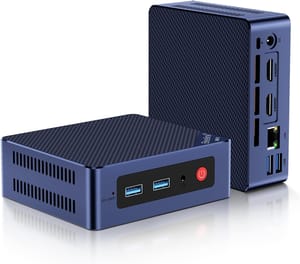
- +Current PSU and warranty in the box
- +no BIOS-lock risk
- +modern Wi-Fi 6 with antennas attached
- +around 6 to 8 watts idle
- +dual M.2 slots for storage expansion
- -No USB-C
- -single 1GbE port
- -no vPro remote management
- -plastic chassis instead of metal
The used market also stops winning when the listing is approaching the chassis’s effective end of useful life. An OptiPlex 9020 Micro with a fourth-generation Intel CPU is cheap because nobody wants one; the chassis is fine, but the platform predates the current generation of meaningful power-management improvements, and the idle power draw alone makes it a poor 24/7 homelab choice. Two-generations-back is usually where the value sits, and three-generations-back is where the math starts breaking down.
The seller-rating meta-spec
The seller’s return policy and rating change the risk math on every row. An eBay “Top Rated Plus” seller with a 30-day return window is a different purchase than a no-returns liquidator with a “described as-is” disclaimer in the listing text, even when the chassis is identical. The same is true of B&H Photo Refurbished (consistent SKU disclosure and a return path), NewEgg Refurbished (mixed seller quality, but a clear return process), and the corporate-liquidator pages on PCLiquidations and similar dedicated channels.
A Top Rated Plus seller with a 30-day return on a $150 EliteDesk lets you treat the worksheet as a return checklist rather than a pre-purchase checklist. If the BIOS turns out to be locked when the box arrives, you ship it back and try another listing. A no-returns liquidator listing the same chassis at $90 looks cheaper but inverts the labor: the worksheet has to be complete and correct before you bid, and any wrong answer costs you the full $90. Either purchase path can be the right one.
What to do after the box arrives
Three first-boot checks before the return window closes: open the BIOS setup with no password, verify the chassis serial in the BIOS matches the sticker on the bottom, and run a five-minute CPU load test (Prime95 small-FFTs on Windows, stress-ng on Linux work fine) while watching CPU temperature and clock speed. If the BIOS accepts no password, the serial matches, and the CPU holds its sustained boost clock for five minutes without throttling, the five-spec worksheet you ran before bidding has paid for itself. Reinstall the OS of your choice, drop the box into your rack or onto your shelf, and move on.
For a closer look at one of the most reliable used chassis to start with, the Lenovo ThinkCentre M700 Tiny is a frequent recommendation for first-time homelab buyers thanks to its Skylake-era reliability, dual-display output, and roughly $90 to $130 going rate. And if the comparison you are actually running is “should I buy used at all, or is a new box with soldered RAM the bigger trap,” our companion piece on the soldered-RAM mini PC trap covers the opposite end of the same buyer question.


