

A post on the Google Support Community sums up the problem in one sentence: “If I had known Chromebooks auto expire I never would have bought one.” The poster had owned their Chromebook for five years before discovering that security updates were ending, and their frustration is not unusual. That same surprise is at the heart of the New York Times’ “Chromebook remorse” coverage, which traced how expiration dates blindsided districts and families alike. Over on Reddit’s r/chromeos, a thread about the original Pixelbook approaching end of life drew dozens of comments from owners weighing their options: keep using an unsupported device, or find something new without spending a fortune?
The answer, increasingly, is the used market. Enterprise fleet refreshes and school district surplus programs are sending thousands of Chromebooks into resale channels every quarter, and rising new-Chromebook prices are pushing budget shoppers toward secondhand listings. The problem is that most of those listings hide the one number that determines whether a deal is actually a deal: the Auto Update Expiration date.
This article is a worksheet. By the end of it, you will know how to look up any Chromebook’s AUE, run the dollar-per-update-year calculation, and spot the red flags that separate a genuine bargain from a machine that will stop receiving security patches next year.
The One Number That Matters
If you are not familiar with AUE, the short version is this: Google guarantees ChromeOS security and feature updates for each Chromebook model until a specific date. After that date, the device still works, but it stops getting patches for newly discovered vulnerabilities, and eventually some web services and Android apps will stop working too. Our full AUE explainer covers the details, but for this worksheet, the only thing you need to know is how many update years remain on the model you are considering.
Google extended its update policy in 2024. Any Chromebook platform released from 2021 onward now gets a full ten years of updates, up from the original six to eight. That extension is the dividing line in the used market. A 2022-era Chromebook has roughly six years of support left in mid-2026. A 2019-era Chromebook might have one or two years left, or might already be past its date. The gap between those two listings might be only $50, but the value difference is enormous.
The Dollar-Per-Update-Year Calculation
Here is the metric that makes the math visible, and it is surprisingly simple once you see it. Take the asking price, divide it by the number of full update years remaining, and compare the result across listings. A lower number means you are paying less for each year of supported use. No reseller currently uses this metric in their product cards, which is part of why so many buyers end up overpaying for devices that are near the end of their supported life.
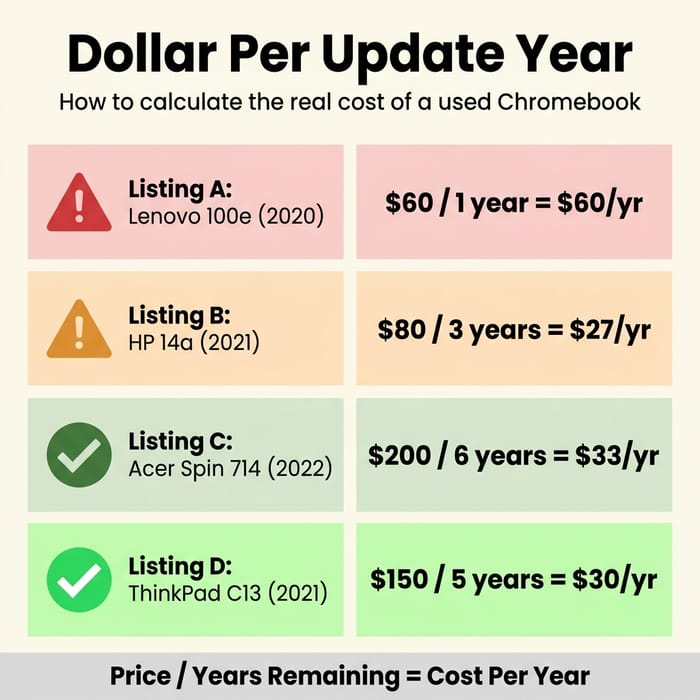
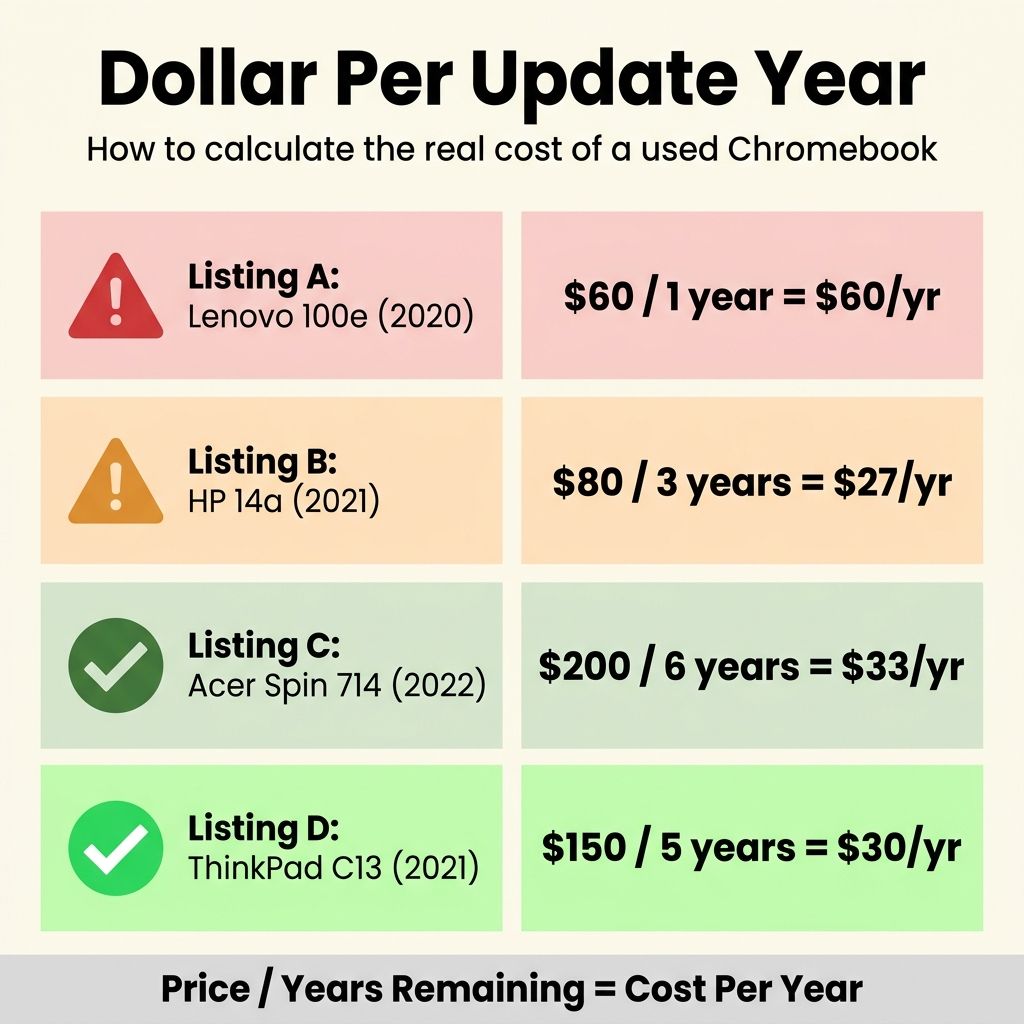
The formula is simple: Price / Years of AUE Remaining = Cost Per Update Year. A $149 Chromebook with six years of updates left costs about $25 per year of supported use. An $89 Chromebook with one year left costs $89 per year for the same thing. The cheaper listing is actually more than three times as expensive on a per-year basis.
This is not theoretical. Resellers like Back Market and Swappa routinely list 2019 and 2020 models at $60 to $100, right next to 2022 models at $120 to $180. Without the AUE context, the older listing looks like a steal. With the math, it looks like what it is: a device nearing the end of its supported life.
The Worksheet: Five Sample Listings
Here is what the calculation looks like applied to five real-world scenarios you might encounter in mid-2026. These are representative listings based on current resale patterns, not specific offers (prices shift daily).
| Listing | Model Year | Price Range | AUE Date | Years Left | $/Year |
|---|---|---|---|---|---|
| A: Off-lease Lenovo 100e | 2020 | $50-$70 | Jun 2027 | ~1 | $50-$70 |
| B: School surplus HP 14a | 2021 | $70-$90 | Jun 2029 | ~3 | $23-$30 |
| C: Off-lease Acer Spin 714 | 2022 | $180-$250 | Jun 2032 | ~6 | $30-$42 |
| D: Refurb Lenovo ThinkPad C13 | 2021 | $130-$170 | Jun 2031 | ~5 | $26-$34 |
| E: New Acer Chromebook Plus 514 | 2024 | ~$400 | Jun 2033 | ~7 | ~$57 |
Listing A is the trap. At $50, it looks like the cheapest option on the page, but you are buying roughly one year of updates. Listing D is the sweet spot: a mid-tier enterprise machine with five years of support left, coming in under $35 per year. Even the new Acer Plus 514 at $400 lands around $57 per year, which means a well-chosen used model can beat new on value, as long as you pick the right model year.
HP Chromebook 14a (14a-nf series)
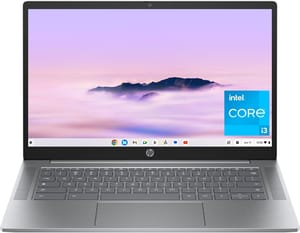
- ✓Chromebook Plus tier with AI features
- ✓8-core Intel Core i3-N305 with 8GB RAM
- ✓14-inch Full HD IPS display
- ✓1080p webcam
- ✓AUE through June 2033
- ✗No HDMI port
- ✗no touchscreen
- ✗keyboard is not backlit
Which Resellers Show AUE Dates?
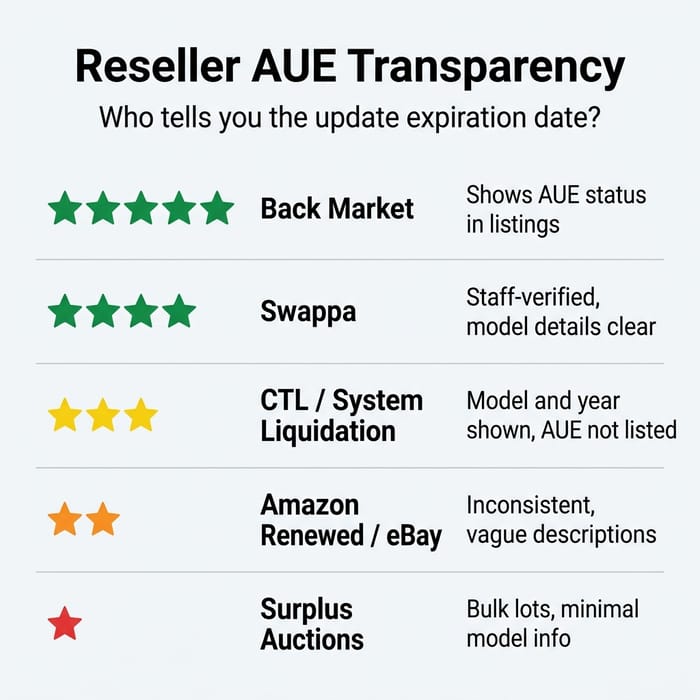
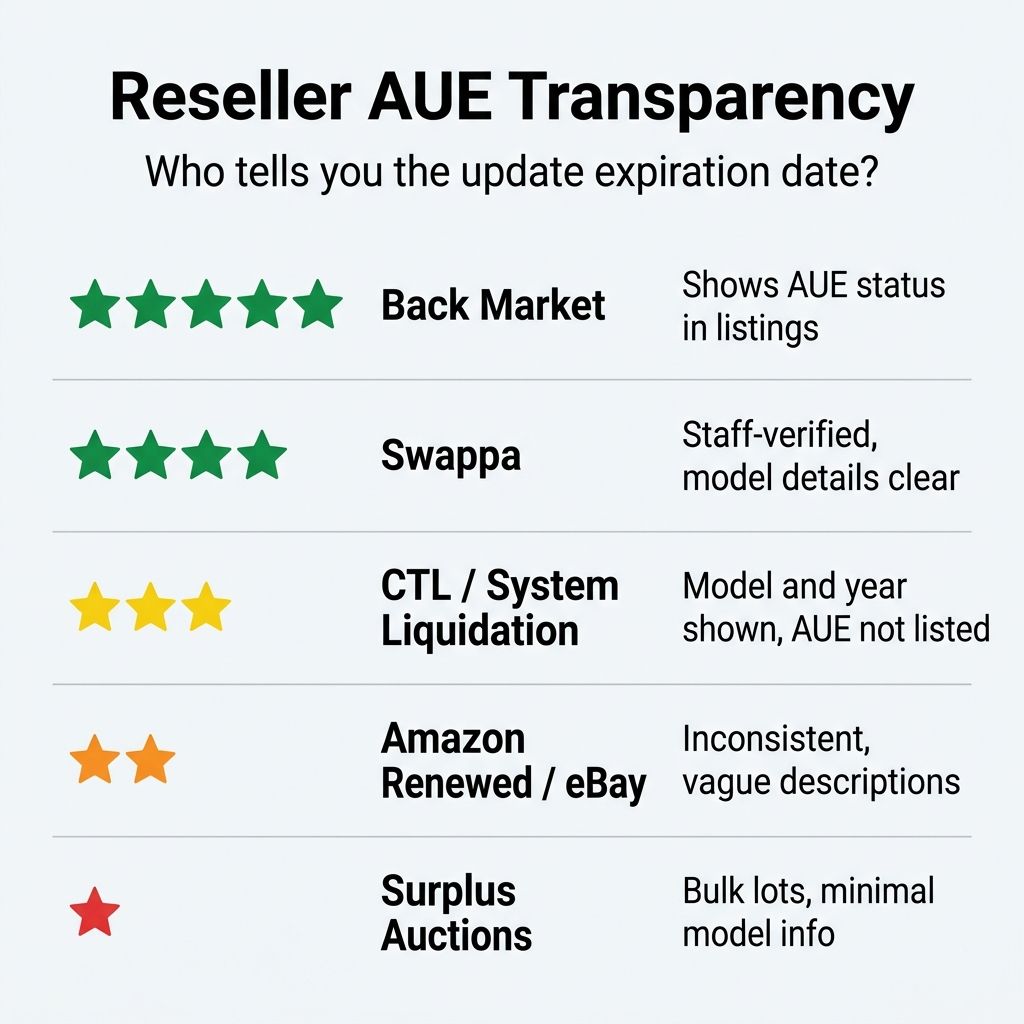
Not all resellers are equally transparent about how much supported life a Chromebook has left. This is the single biggest information gap in the used Chromebook market, and it is worth knowing which platforms help you and which leave you to figure it out yourself.
Back Market earns the top spot for transparency. Most Chromebook listings include the model’s update support status, and the platform’s one-year warranty provides an additional safety net. Swappa is similarly strong: staff-verified listings and a community that generally expects sellers to disclose device age and condition accurately. Both platforms make it straightforward to identify the exact model number, which is all you need to look up the AUE date yourself.
System Liquidation and CTL’s refurbished store list the model name and year clearly, but neither consistently shows remaining AUE in years. You will need to cross-reference with Google’s AUE list yourself. The information is there, but it requires an extra step.
eBay, Amazon Renewed, and PC Liquidations are the most inconsistent. Listings may use vague descriptions like “2020 Chromebook” without specifying the exact model variant, which makes looking up the AUE date harder than it should be. On eBay in particular, search for the exact model number in the listing rather than trusting the title. Some sellers are thorough; many are not.
GovDeals and school district surplus auctions are a special case. These platforms move bulk inventory from districts that are refreshing their fleets, and the pricing can be extremely low. But the listings are often sparse, sometimes just “pallet of 30 HP Chromebooks,” and you may not know the exact model until the devices arrive. If you are buying for a family rather than a fleet, this channel introduces more risk than it is worth.
How to Find the Model Number in a Vague Listing
The dollar-per-year calculation only works if you can identify the exact model, and many resellers make that harder than it needs to be. A listing that says “HP Chromebook 14, 2020, refurbished” could be one of at least four different HP Chromebook 14 variants, each with a different AUE date. The model number you need is the full alphanumeric string, something like HP Chromebook 14a-na0023cl or Acer Chromebook Spin 714 CP714-1WN. That string maps to a specific platform on Google’s AUE list.
If the listing does not include the full model number, look for photos of the bottom of the device. Most Chromebooks have a label with the regulatory model number, which you can cross-reference on Google’s AUE policy page. On eBay, check the “Item specifics” section, which sometimes includes the part number even when the title does not. On Back Market and Swappa, the model number is usually in the listing itself because the platform requires it.
When you cannot find the model number at all, consider that a red flag. A seller who does not know what model they are selling may not know whether the device is enterprise-enrolled, what condition the battery is in, or whether any keys are missing from the keyboard. The less information in the listing, the more likely you are inheriting someone else’s problem.
Two Checks Before the Math
The dollar-per-year metric is the centerpiece of this worksheet, but there are two pass-fail checks you should run before you even get to the math.
Enterprise enrollment lock. Chromebooks deployed by schools and businesses are often enrolled in Chrome Enterprise management. If the previous organization did not unenroll the device before selling it, you will hit a lock screen at setup that you cannot bypass. This is not a theoretical concern: it is one of the most common complaints in used Chromebook forums, and there is no consumer-accessible workaround. Ask the seller explicitly whether the device has been unenrolled, and verify at first boot before your return window closes. Certified refurbished sellers like Back Market and CTL typically handle unenrollment as part of their process, but private sellers on eBay or Craigslist may not. If the seller cannot confirm unenrollment in writing, pass on the listing.
Battery health. A Chromebook with five years of AUE remaining is not much of a deal if the battery only holds 40 minutes of charge. ChromeOS shows battery health in the Diagnostics app (search “Diagnostics” in the launcher), and you want to see at least 70% of original capacity for a device you plan to use untethered. Enterprise off-lease machines that spent three years plugged into a charging cart at a school may have decent battery health because they were rarely deep-cycled, and that kind of longevity is part of why the reliability data favors Chromebooks over Windows laptops across a multi-year span, but consumer trade-ins are a coin flip. If the listing does not mention battery health, factor in the possibility that you will be using it plugged in most of the time, or budget $40 to $60 for a replacement battery if one is available for that model.
When Buying New Wins
The used market is not always the right call, and understanding when to skip it is just as important as knowing how to navigate it. There are three scenarios where buying new gives you a better return, even though the sticker price is higher.
A new Acer Chromebook Plus 514 lands around $430 right now and comes with seven years of updates (AUE June 2033), a fresh battery, a manufacturer warranty, and zero risk of enrollment lock. That works out to about $61 per update year. For shoppers who want a premium display and the longest support runway in the lineup, the Lenovo Chromebook Plus 14 OLED stretches to nine years (AUE June 2035) with an OLED panel and a fanless build. Its per-year cost is higher, but the display quality and overall build make it a different class of machine than anything in the off-lease market.
Acer Chromebook Plus 514
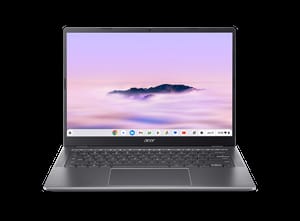
- ✓Seven years of updates
- ✓fresh battery
- ✓manufacturer warranty
- ✓no enrollment risk
- ✗Higher upfront cost than used
- ✗entry-level performance
If a used listing’s per-year cost is approaching $50 or more, the new option wins. You get a warranty, a full battery, guaranteed unenrollment, and you know exactly how long the device will be supported. The used market wins when you find a 2021 or 2022 model at $100 to $180 with five or more years of AUE remaining, because that pushes the per-year cost down into the $25 to $35 range, which no new Chromebook can match.
The 2027-2029 AUE Cliff
One pattern worth understanding is the wave of Chromebook models expiring between 2027 and 2029. These are devices built on platforms released in 2019 and 2020, before Google extended its update policy to ten years. Many of them were deployed in school districts and enterprise fleets during the pandemic-era Chromebook surge, and they are now entering the resale market in large numbers as organizations refresh their inventory. The pricing on these models can look attractive: $50 for a Lenovo 100e, $70 for an HP 14a, $90 for a Dell 3100. But with only one to three years of updates remaining, the per-year cost makes them poor value for anyone who expects their device to last.
The exception is if you are buying a device for a specific short-term use and you know exactly what you are getting into. A college student who needs a cheap backup machine for one semester might reasonably buy a $60 Chromebook with eighteen months of AUE remaining. A parent buying a “first laptop” for a seven-year-old who will need the device through middle school should not. Match the remaining AUE to your actual use timeline, and the cliff becomes a feature of the market rather than a trap.
For parents shopping a kid’s first laptop on a budget, the math often favors used if you are willing to do the homework this worksheet describes. For Pixelbook owners looking for a premium replacement, the off-lease enterprise tier (Acer Spin 714, HP Elite Dragonfly) offers the closest experience at a fraction of the original retail price. And for anyone who just wants to browse the web and does not want to think about it, the deals page often surfaces new Chromebooks at clearance prices that beat the used market outright.
The Checklist
Before you commit to any used Chromebook listing, run through these steps in order:
- Find the exact model number in the listing. If it is not there, check the photos for a bottom-case label or ask the seller directly.
- Look up the AUE date on Google’s AUE policy page. Search by manufacturer and model.
- Calculate the years of updates remaining from today’s date to the AUE date.
- Divide the asking price by that number. This is your dollar-per-update-year cost.
- Compare the result. Below $35 per year with three or more years remaining is a genuine deal. Above $50 per year, walk away or negotiate. In between, compare against new options in the $300 to $450 range to see which gives you more years per dollar.
- Confirm unenrollment. Ask the seller whether the device has been removed from enterprise or school management. Get the answer in writing if buying from a private seller.
- Ask about battery health. You want at least 70% of original capacity. If the seller does not know, make sure you have a return window.
A listing that clears all seven steps is worth buying. A listing that fails on AUE, enrollment, or battery is not worth the risk no matter how low the price. The used Chromebook market in 2026 is full of real value, but it is also full of devices that look cheap and turn out to be expensive. The difference between the two is one number, and now you know how to find it.


