

For nearly a decade, the answer to “what’s the best premium Chromebook?” was simple: get a Pixelbook. Google’s own hardware set the standard for build quality, keyboard feel, and that hard-to-define sense that someone who cared about design had signed off on every detail. That era is over. Google shuttered its in-house Chromebook division in 2022, the original Pixelbook’s auto-update support runs out in August 2027, and the Pixelbook Go follows in August 2029. There is no successor coming from Mountain View.
The community knows it, too. Threads on r/chromeos from Pixelbook owners whose machines are “still running strong” but whose auto-update expiration looms regularly draw the same response: “I’m in the same boat, what do I buy?” The replacement market has fragmented across four very different bets from three manufacturers. None of them is a Pixelbook clone, and that turns out to be a good thing: each one serves a specific kind of power user better than the Pixelbook ever did.
What the Pixelbook Got Right
Before we compare replacements, it helps to name what made the Pixelbook worth replacing in the first place. The original 2017 model was impossibly thin at 0.4 inches, weighed just 2.4 pounds, and had a 12.3-inch 2400x1600 touchscreen with pen support. The keyboard was quiet and precise in a way that most Chromebook keyboards still are not. The glass-and-aluminum chassis felt like a product that justified its $999 price tag, and Google’s software team gave it preferential treatment for new ChromeOS features.
The Pixelbook Go, released two years later, traded some of that premium feel for a lower starting price and better battery life. Both machines shared a philosophy: a Chromebook should feel like it belongs in the same bag as a MacBook Pro, not like a compromise you settled for because you wanted Chrome. That philosophy is what the four replacements below need to match, each in their own way.
For the Hybrid Worker: Acer Chromebook Plus Spin 714


HP’s Elite Dragonfly Chromebook, which 9to5Google called “Google’s Pixelbook reborn,” is no longer sold new, so the pick for a Pixelbook owner who spends the workday on calls and docked to a monitor is the Acer Chromebook Plus Spin 714. It runs the Intel Core Ultra 5 115U, an 8-core chip with an NPU that powers Google’s Gemini features in ChromeOS. The 1440p webcam has a physical privacy shutter, and MergeDroid called it “a real step up.” Aluminum forms the top and bottom panels, and the 360-degree hinge moves the 14-inch 1920x1200 touchscreen between laptop, tent, and tablet positions.
Two Thunderbolt 4 ports handle external displays, fast storage, and 65W charging, and a full-size HDMI 2.0 port connects a meeting-room screen without an adapter. A garaged USI stylus stores and charges inside the chassis. The trackpad is a large Gorilla Glass surface, freed up by moving the speakers to the sides of the keyboard, and Chrome Unboxed found “no wiggle” in the backlit keys. WiFi 6E and Bluetooth 5.2 round out the wireless side, and ChromeOS updates run through June 2034.
Acer Chromebook Plus Spin 714
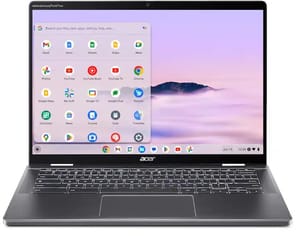
- ✓1440p webcam with privacy shutter
- ✓Intel Core Ultra 5 115U
- ✓two Thunderbolt 4 ports plus HDMI
- ✓garaged USI stylus
- ✓AUE June 2034
- ✗8GB of soldered RAM
- ✗keyboard deck feels like plastic
- ✗no microSD reader
- ✗both USB-C ports on the left side
The trade-offs are memory and weight. The 8GB of LPDDR5 is soldered, so it cannot grow with your workload, and the 256GB SSD pushes large file libraries to the cloud. At 3.21 pounds it is heavier than the Pixelbook’s 2.4. MergeDroid wished the keyboard deck were aluminum like the rest of the shell, and his review unit failed to sleep correctly and crashed during testing. There is no fingerprint reader on the US retail build and no microSD slot.
For the Creative Who Needs Flexibility: Acer Chromebook Spin 714
The Acer Chromebook Spin 714 fills a gap the Pixelbook left wide open: a convertible premium Chromebook with a real port selection. It has a 14-inch touchscreen that flips 360 degrees, a built-in stylus that stows in the chassis, and an HDMI port alongside two Thunderbolt 4 connections and a USB-A port. That mix of creative flexibility and traditional connectivity is hard to find at any price in the Chromebook world.
The Spin 714 comes in several configurations. The base model pairs an Intel Core i5-1335U with 8GB of RAM and a 1920x1200 display at a starting price around $700. The step-up moves to an Intel Core i7-1355U with the same 8GB and a sharper 2560x1600 panel for $999, which is the sweet spot if display quality matters more to you than RAM. The 16GB builds, with either the i5 or the i7, are the right pick if your workload leans on dozens of browser tabs and Linux containers more than raw single-thread performance. Battery life sits around 10 hours in real-world use, which is solid for an Intel-based convertible.
Acer Chromebook Spin 714

- ✓Built-in stylus
- ✓360-degree convertible
- ✓HDMI + Thunderbolt 4
- ✓multiple configurations
- ✗IPS display lacks OLED vibrancy
- ✗the standard 340-nit panel limits outdoor use
- ✗AUE June 2032
Where the Spin 714 falls short of the Pixelbook ideal is the display. At 340 nits on the IPS panel, outdoor readability suffers compared to the OLED richness of the Lenovo option below. The stylus garages inside the chassis, so it cannot fall out in a bag and is always charged when you grab it. The Chromebook Plus Spin 714 above shares that design with a newer Core Ultra chip; this older Spin 714 is the one to choose for the sharper 2560x1600 panel or a 16GB configuration. If you sketch, annotate, or regularly use your Chromebook as a tablet, a garaged pen is the design to want. The 360-degree hinge also makes it a capable desktop replacement if you want one device to serve at a desk and in your hands.
For the Developer Who Wants Raw Power: ASUS ExpertBook CX54 Chromebook Plus


The ASUS ExpertBook CX54 Chromebook Plus is the performance argument. It runs an Intel Core Ultra 5 115U processor, the first Intel Core Ultra chip to land in a Chromebook, and pairs it with a 14-inch 2560x1600 display that refreshes at 120Hz. That refresh rate makes scrolling, window animations, and cursor movement noticeably smoother than any other Chromebook on the market. The 500-nit brightness comfortably handles indoor use and most coffee-shop window seats, and Chrome Unboxed praised its speedy internals and performance headroom.
The port selection is extensive. Two Thunderbolt 4 USB-C ports, two USB-A 3.2 Gen 2 ports, full-size HDMI 2.1, and a microSD card reader give developers and IT professionals the connectivity they need without a dock. At 2.87 pounds and 0.67 inches thick, the aluminum chassis is light enough for daily commutes while housing a sizeable 63Wh battery. The 8MP webcam is among the sharpest on any Chromebook, and the fingerprint reader adds biometric convenience.
The base model lists at $699.99 with 8GB RAM and 128GB storage, which feels tight for a developer workstation. The 16GB RAM and 256GB touch model sold through Best Buy is the configuration worth buying. The CX54’s AUE date of June 2034 gives you eight years of guaranteed ChromeOS updates, and its Chromebook Plus certification means access to Google’s premium AI features, including on-device processing through the Core Ultra’s built-in NPU.
For the Long-Term Investor: Lenovo Chromebook Plus 14 OLED
The Lenovo Chromebook Plus 14” OLED is the Chromebook that most reviewers have called the true Pixelbook successor, and the numbers explain why. Its 14-inch OLED touchscreen delivers the kind of contrast and color accuracy that IPS panels cannot match: true blacks, Lenovo-rated 100% DCI-P3 coverage, and viewing angles that stay consistent edge to edge. The MediaTek Kompanio Ultra 910 processor is entirely fanless, which means the machine operates in complete silence, just like the Pixelbook did. At 2.78 pounds and 0.62 inches thick in a 14-inch chassis, it strikes a tighter footprint balance than any other 14-inch Chromebook on the market.
Battery life is the headline stat. Lenovo rates it at 17 hours, and reviewers at Chrome Unboxed confirmed all-day use spanning two full workdays between charges. The 60Wh battery combined with the efficient ARM processor means you can leave your charger at home for a day trip. WiFi 7 support future-proofs the wireless connectivity, and the 5MP QHD webcam handles video calls clearly.
Lenovo Chromebook Plus 14" OLED
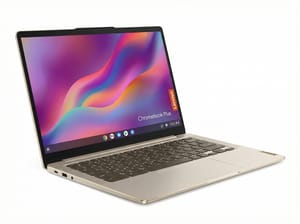
- ✓OLED display
- ✓17-hour battery
- ✓fanless and silent
- ✓WiFi 7
- ✓AUE June 2035
- ✗No Thunderbolt (USB-C 3.2 only)
- ✗no HDMI
- ✗MediaTek may lack some Linux app compatibility
The trade-offs are real but specific. The Lenovo lacks Thunderbolt, offering USB-C 3.2 Gen 1 instead, which limits external display bandwidth and peripheral throughput. There is no HDMI port, so you will need a USB-C adapter for presentations. And the MediaTek processor, while fast for ChromeOS tasks, may have compatibility gaps with certain Linux applications that expect x86 architecture. For the majority of Chromebook users, though, none of these limitations will matter in daily use.
The Lenovo’s strongest argument is time. Its AUE date of June 2035 gives you nine years of guaranteed ChromeOS updates from today, the longest of any device on this list. If you bought a Pixelbook in 2017 hoping it would last, and it did for seven years, the Lenovo promises to outlast it by a comfortable margin.
How the AUE Dates Stack Up
Auto-update expiration is the clock that matters most when buying a Chromebook for the long term. Here is how the four replacements compare to the devices they are replacing:
| Device | AUE Date | Years from Today |
|---|---|---|
| Google Pixelbook | August 2027 | ~16 months |
| Google Pixelbook Go | August 2029 | ~3.3 years |
| Acer Chromebook Spin 714 | June 2032 | ~6 years |
| ASUS ExpertBook CX54 | June 2034 | ~8 years |
| Acer Chromebook Plus Spin 714 | June 2034 | ~8 years |
| Lenovo Chromebook Plus 14 OLED | June 2035 | ~9 years |
The gap between the soonest replacement to expire (Acer Spin 714, June 2032) and the longest-lived (Lenovo, June 2035) is three years. That is not nothing, but every machine on this list will still receive security updates well past the point either Pixelbook taps out. If longevity is your single most important factor, the Lenovo wins; the ASUS and the Acer Chromebook Plus Spin 714, both at June 2034, are close behind.
Should You Wait for Google to Come Back?
There are persistent rumors that Google is developing a new Pixel laptop, and court documents from Google’s antitrust case have confirmed that ChromeOS will eventually merge with Android under a project codenamed Aluminium OS. That transition is not expected to complete until 2034, and a new Pixel laptop remains unconfirmed as of April 2026.
Waiting for vaporware is always a gamble, and in this case the odds are not in your favor. Even if Google announces a Pixel laptop tomorrow, it would need to ship, prove reliable, and build the ecosystem support that the four options above already have. Any Chromebook purchased today with an AUE date of 2034 or later will be fully supported through the ChromeOS-to-Aluminium OS transition. You are not buying into a dead platform; you are buying into one that is evolving. For a closer look at which Chromebook tier to buy given the Googlebook news, the specifics behind those purchase decisions are worth reading before you buy.
For a side-by-side look at specs, ports, and AUE dates across the full Chromebook lineup, the Chromebook Comparison Chart lets you sort and filter every current model in one place.
The Bottom Line
If you are a Pixelbook owner looking for a single recommendation, the Lenovo Chromebook Plus 14” OLED is the closest match to the Pixelbook: silent operation, OLED display, and a weight that disappears in your bag. Its nine-year update runway means you will not be back in this position until 2035.
If your needs are more specific, let the archetype guide you. The Acer Spin 714 is the creative’s convertible at consumer prices. The ASUS ExpertBook CX54 is the developer’s workhorse. The Acer Chromebook Plus Spin 714 is the hybrid worker’s pick, with a 1440p webcam and Thunderbolt 4 docking for a day of calls. The Pixelbook is gone, but the premium Chromebook category it created is healthier than ever. If you are still weighing whether ChromeOS fits your workflow at all, the 2026 buyer’s decision guide walks through the five questions that separate a good Chromebook buyer from a frustrated one.


