

The question lands in r/chromeos and every other tech forum at least once a month: is a Chromebook enough as my main computer? The question is evergreen, but the 2026 answer is different from the one you would have gotten two years ago. Chromebook Plus devices now ship with Intel Core i3 12th-generation processors or AMD Ryzen 3 7000 silicon, 8 to 16 GB of RAM, Full HD IPS displays (some models offer OLED upgrades), 1080p webcams, and Google’s commitment to ten years of automatic updates from the platform’s release date. These are not the $200 educational Chromebooks that burned people in 2019.
But “the hardware got better” is not the same as “it’s the right computer for you.” The Reddit threads asking this question draw dozens of replies because the answer depends on five things: where your work lives, what software you cannot replace, whether you sit at a desk or roam, how long you plan to keep the machine, and how much you are willing to spend. This piece walks you through those five questions and lands you on a recommendation: a Chromebook Plus, a MacBook, or a mini PC with a monitor.
Where Does Your Work Live?
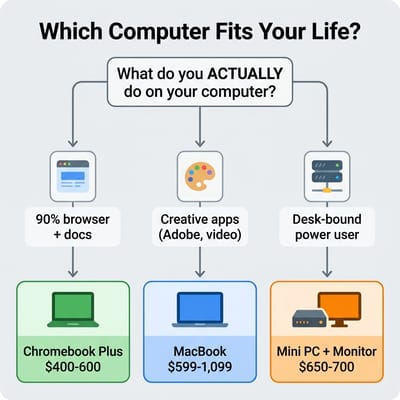
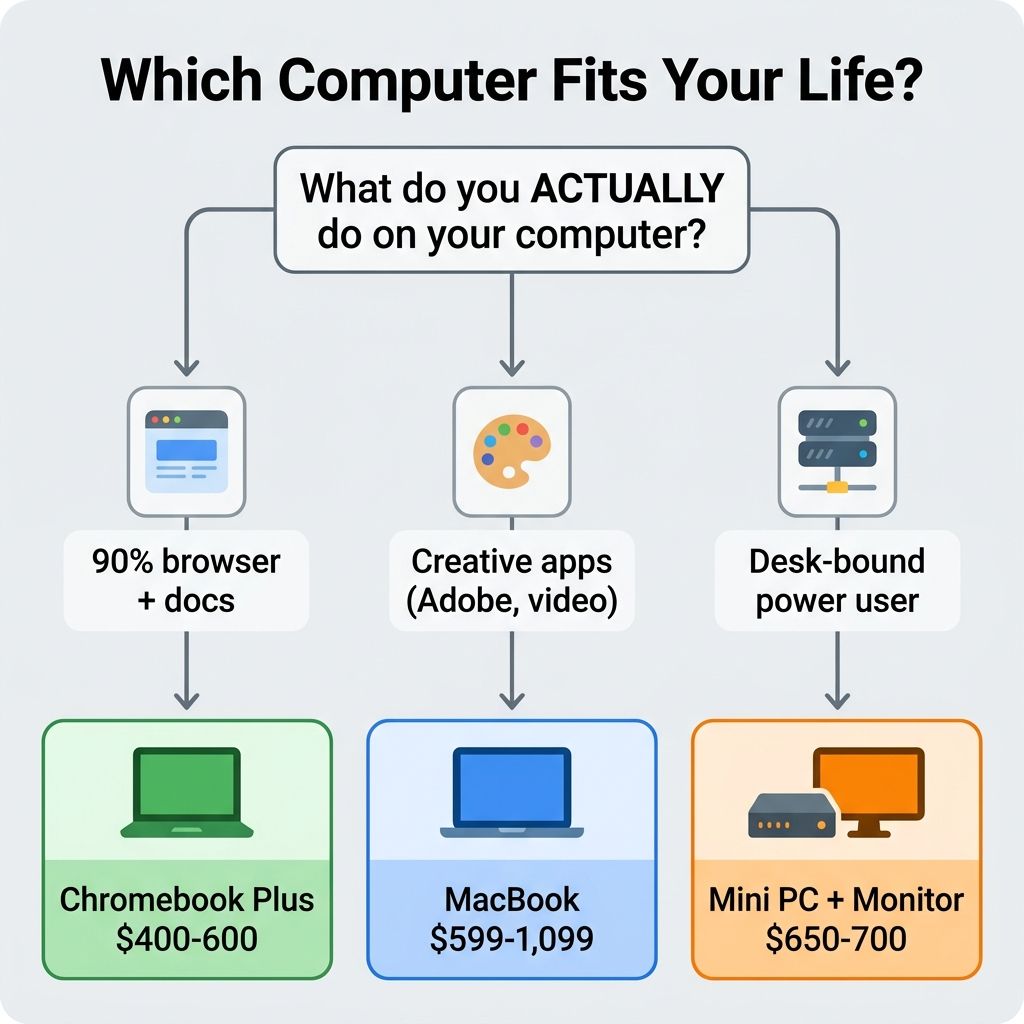
The single strongest predictor of Chromebook happiness is whether your critical workflow already runs in a browser. Google Docs, Sheets, Slides, Gmail, Calendar, Notion, Figma, Canva, Slack, Teams, Zoom: all of these are full-featured in Chrome and run identically on a Chromebook Plus and a $2,000 MacBook Pro. If you spend 90 percent of your computing day in browser tabs and the other 10 percent in Android apps for quick tasks, a Chromebook Plus at $400 to $600 gives you the same functional outcome as a machine costing twice as much, with the added benefit of near-zero maintenance.
There is a familiar arc in r/chromeos: someone who bounced between Windows and Mac for years tries a Chromebook Plus on a whim and realizes that their actual daily computing (email, documents, web research, media streaming) has been browser-based for half a decade without them noticing. A $400 machine ends up doing everything a $1,200 Windows laptop did, but boots in eight seconds and never asks them to update a driver. That low-maintenance reputation is backed by data; the Chromebook reliability numbers favor ChromeOS over Windows laptops across a multi-year span.
ChromeOS also now runs Linux applications through a built-in container called Crostini. Developers who work in VS Code, terminal tools, Python environments, or Node.js can get real work done without dual-booting. The Linux support is not perfect: it runs in a virtual machine with a small performance overhead, GPU acceleration is limited, and audio routing can be finicky. But for a web developer or a data analyst who primarily needs a terminal and a code editor, it works well enough that the Chromebook Plus tier has become a legitimate option for technical workflows.
The Five Scenarios Where a Chromebook Is Not the Right Answer
Honesty is more useful than cheerleading. There are clear situations where spending $400 on a Chromebook Plus is the wrong call, regardless of how good the hardware has become.
Adobe Creative Cloud power users. Photoshop, Illustrator, Premiere Pro, and After Effects do not run natively on ChromeOS and likely never will. Adobe’s web-based Photoshop covers basic editing, but if your work involves complex layer compositions, video color grading, or multi-artboard Illustrator files, you need macOS or Windows. A MacBook Air M5 starting at $1,099 or even the $599 MacBook Neo handles these workflows with hardware-accelerated performance that no Chromebook can match.
Professional video editors. DaVinci Resolve, Final Cut Pro, and Premiere Pro require native GPU acceleration and large local storage that ChromeOS does not support at a professional level. If you cut video for a living or as a serious hobby, a Chromebook Plus is not a compromise; it is a non-starter.
Windows-only desktop software. AutoCAD, specific accounting packages, proprietary industry tools, legacy enterprise applications: if your job requires software that only exists as a Windows .exe, there is no workaround on ChromeOS that matches running it natively. Cloud-based virtual desktops exist, but they add latency, cost, and complexity that defeats the simplicity argument for ChromeOS.
AAA gaming. Cloud gaming services like GeForce NOW work reasonably well on a Chromebook with good internet, but if you want to install and run games locally at high settings, you need a Windows machine or a dedicated gaming setup. A Chromebook Plus handles casual Android games and browser-based titles, but it is not a gaming computer.
People who want maximum software freedom. If you regularly install applications from random sources, need to run virtual machines, or want full control over your operating system’s internals, ChromeOS will feel restrictive even with Linux support enabled. A mini PC running Ubuntu or Fedora gives you everything ChromeOS’s Linux container offers, plus full hardware access, unrestricted package management, and no Google dependency.
When a MacBook Makes More Sense
Apple’s entry into the budget-laptop market changed the Chromebook calculus in March 2026. The MacBook Neo at $599 puts full macOS with the A18 Pro chip at a price point that overlaps directly with premium Chromebook Plus models. We wrote extensively about this when it launched, but the short version for a buyer deciding today is this: if you need native macOS applications (Final Cut, Logic Pro, Xcode, the full Adobe suite), the MacBook Neo at $599 is better value than any Chromebook at any price. The Apple Silicon performance advantage is substantial and the software ecosystem is simply larger.
The MacBook Air M5 starting at $1,099 extends this further with a better display, more storage, and MagSafe charging. For anyone whose work straddles creative applications and browser-based tools, the Air remains the laptop to beat in its class.
But there is a reason this article is not titled “just buy a MacBook.” The Mac ecosystem extracts ongoing costs: iCloud storage, Apple-tax on peripherals, the assumption that you will eventually want an iPhone and an iPad to complete the integration story. A Chromebook Plus at $400 with Gemini AI built in does everything a casual-to-moderate user needs without the Apple premium, and ChromeOS’s automatic update and maintenance model means less time managing the computer and more time using it. For someone who lives in a browser, spending $600 on a MacBook Neo because it can theoretically run Final Cut is paying for capability they will never use. And the MacBook Air at $1,099 represents an even larger premium over a Chromebook Plus that handles the same browser-based workflows for a third of the price.
The Mini PC Alternative: When You Live at a Desk
If you work primarily at a desk and already have a monitor (or are willing to buy one), a mini PC running Linux or Windows gives you significantly more computing power per dollar than any laptop in the $300 to $600 range. A Beelink SER8 with an AMD Ryzen 7 8745HS, 32 GB of DDR5 RAM, and a 1 TB SSD lists at $859 and delivers workstation-class performance for development, media editing, home server duties, or anything else that benefits from a powerful eight-core processor and ample memory. That costs more than a MacBook Neo, and it brings significantly more processing power, more RAM, and more storage.
The math works like this: $499 for the mini PC plus $150 to $200 for a decent 27-inch 1440p monitor puts your total at $650 to $700, and you get a desktop machine that runs circles around any laptop in the same price bracket. Add a $30 keyboard and a $20 mouse and you have a complete workstation for under $750 that can handle tasks a $1,099 MacBook Air would struggle with: compiling large codebases, running local AI models, hosting game servers, editing 4K video in DaVinci Resolve.
The trade-off is no portability. If you need to work from coffee shops, airports, and couches, a mini PC is not for you. But if you think clearly about your usage and 90 percent of your computing happens at the same desk, the mini PC route gives you more machine for less money. And if you do occasionally need portability, a $300 budget Chromebook as a secondary travel device still costs less combined than a single MacBook Air.
The Aluminium OS Question
Anyone buying a Chromebook in 2026 deserves to know what is happening to the platform. Google confirmed in late 2025 that ChromeOS and Android are merging into a unified operating system codenamed Aluminium OS. The transition is expected to begin rolling out on new hardware in late 2026 or early 2027, with existing Chromebooks receiving the update over time based on hardware compatibility.
What this means for a buyer today is uncertain. Google has committed to maintaining the ten-year update window for existing Chromebooks, which means a Chromebook Plus purchased in May 2026 should receive security updates through at least 2036 regardless of whether Aluminium OS materializes on time or gets delayed. Google VP John Maletis has stated publicly that ChromeOS “is here to stay” as a supported platform even as the merge proceeds. But whether a device bought today will run Aluminium OS smoothly, run a frozen version of ChromeOS, or land somewhere in between is an open question with no firm answer.
Our take: if the ten-year update commitment holds (and Google has not broken it yet) a Chromebook Plus purchased today remains a safe buy for its intended use case. You are buying a computer that works well today and will continue to receive security patches for a decade. The Aluminium OS transition may eventually bring Android app performance improvements and better hardware integration, which would be upside, since the native Android app move means apps will run directly on the OS rather than inside a container. The risk is that Google fumbles the transition and creates a period of instability, but the base commitment of “your device stays updated and secure” appears solid. If you are a belt-and-suspenders buyer who wants absolute certainty about platform direction for the next five years, a MacBook eliminates that variable entirely. Apple’s track record on long-term macOS support is strong.
The Decision, Plainly Stated
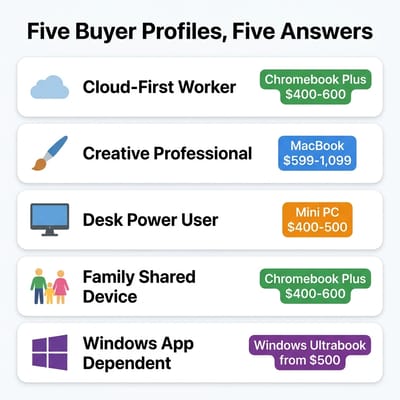
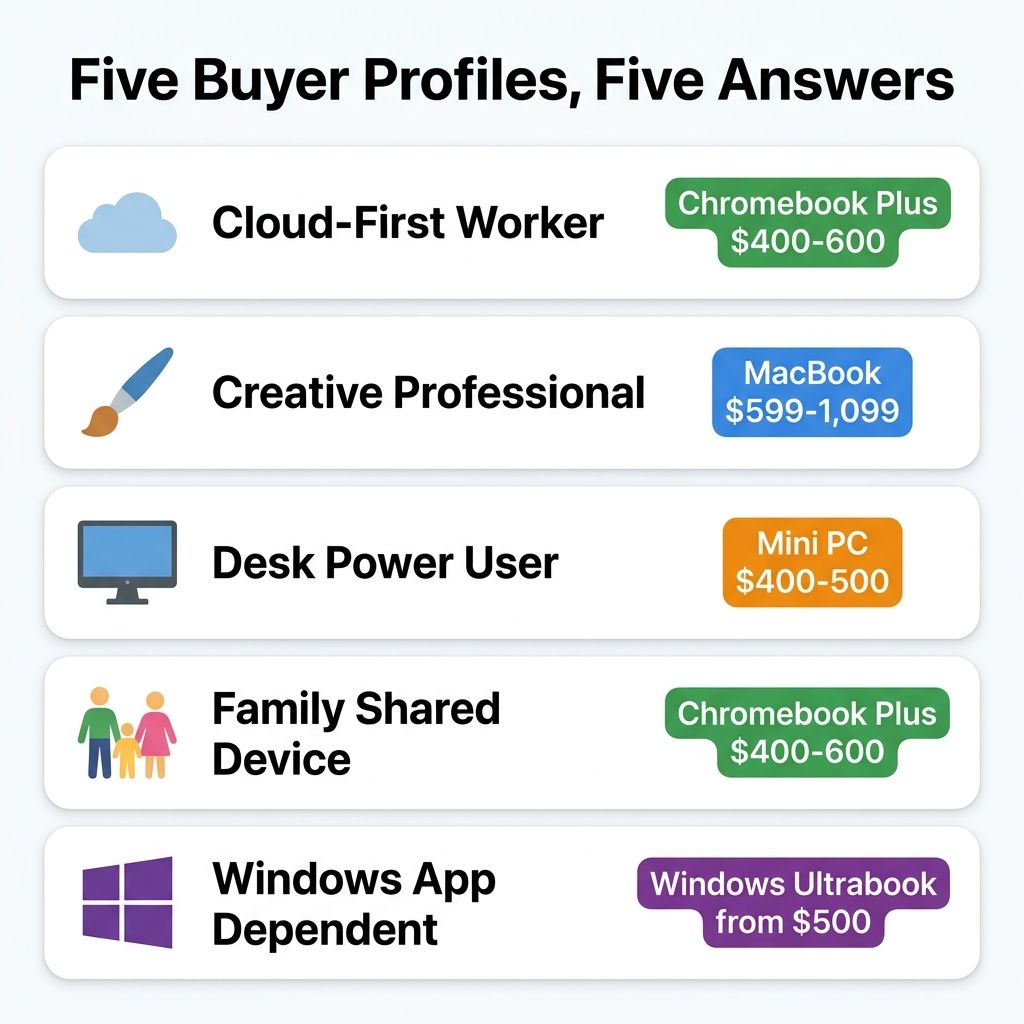
After filtering through the Reddit threads, the spec sheets, and the real-world use cases, here is where each buyer profile lands in May 2026:
The cloud-first worker who lives in Google Workspace, Notion, Slack, and browser-based tools: buy a Chromebook Plus in the $400 to $600 range. You are paying for simplicity, speed, security, and ten years of worry-free updates. The Lenovo Chromebook Plus 14” OLED at the premium end or the Acer Chromebook Plus Spin 714 for a versatile 2-in-1 are both excellent choices. You will not miss what you are not using.
The creative professional who needs Adobe CC, Final Cut, Logic, or DaVinci Resolve: buy a MacBook. The Neo at $599 for casual creative work, the Air M5 starting at $1,099 for serious workflows. The software ecosystem gap between ChromeOS and macOS is real and unlikely to close.
The desk-bound power user who wants maximum performance and Linux freedom: buy a mini PC. A Beelink SER8 or Minisforum equivalent at $400 to $500 paired with a monitor gives you workstation performance at laptop prices. If you also need occasional portability, add a $300 basic Chromebook as a travel companion.
The family shared-device buyer looking for something the kids, the partner, and the occasional guest can all use without you playing IT support: buy a Chromebook Plus. The automatic updates, sandboxed security, fast boot times, and multiple Google account support make ChromeOS the least-maintenance option for a household device. A recurring pattern in r/chromeos discussions: a parent shopping for a teenager almost defaults to a MacBook Neo, asks the question publicly, and ends up with a Chromebook Plus once the teenager admits they live in Docs, YouTube, and Discord.
The “I want a normal Windows laptop” buyer who needs specific Windows applications and a portable form factor: buy a Windows ultrabook. This article is not really for you, but we are mentioning it because some people arrive at the “should I get a Chromebook?” question when what they actually need is a $500 Lenovo IdeaPad or HP Pavilion running Windows 11. If your workflow depends on Excel macros, Access databases, or industry-specific Windows software, a Chromebook is not a rebellion against the status quo; it is a compatibility problem waiting to happen.
What We Would Buy Today
If you made us spend $500 on our next primary computer in May 2026 and the only requirement was “general adult who works, browses, streams, and occasionally needs to be productive on the go,” we would buy a Chromebook Plus. Specifically, something like the Acer Chromebook Plus Spin 714 or the Lenovo Chromebook Plus 14” OLED: a 14-inch display, an Intel Core or Core Ultra processor, 8 to 16 GB of RAM, a backlit keyboard, and a build quality that does not feel disposable. The combination of instant boot, zero-maintenance updates, built-in Gemini AI, ten-year support, and a price that leaves $500 to $600 in your pocket compared to a MacBook Air is hard to argue with for the vast majority of computing tasks that people actually do every day.
The crucial caveat is that “general adult” qualifier. If you know you need specific software that does not run in a browser or on Android, no amount of ChromeOS hardware improvement changes that fundamental constraint. Buy the tool that runs your tools. But if you have been assuming you need a Mac or a Windows laptop because that is what you have always bought, and your actual assessment of last month’s computer usage is “browser tabs, Google Docs, streaming, and email,” a Chromebook Plus in 2026 might be the $400 answer to a question you have been overpaying $700 or more to solve.


