

A disclosure: Starry Hope covers Chromebooks extensively, and we have an obvious rooting interest in ChromeOS doing well. This is our assessment of Apple’s new MacBook Neo, including the parts where it outclasses anything in the Chromebook lineup.
Apple announced the MacBook Neo on March 4, 2026. A full Mac starting at $599, dropping to $499 for schools, powered by the same A18 Pro chip found in the iPhone 16 Pro, wrapped in four colors with a 16-hour battery. On paper, this looks like the moment Apple finally prices itself into the territory that Chromebooks have owned for a decade. Tom’s Hardware called it Apple’s most disruptive hardware play since the original iPad. TechCrunch described it as Apple’s colorful answer to the Chromebook. One update since launch: on June 25, 2026, Apple raised prices across its lineup as memory costs surged, and the Neo now starts at $699, with the education price at $599. The figures below reflect the current pricing.
The MacBook Neo is clearly a good laptop. For parents, students, and anyone considering a budget laptop right now, the choice between a Mac at this price point and a Chromebook depends on how you use a laptop more than it depends on benchmark scores.
The MacBook Neo Hardware You Get for $699
The MacBook Neo’s spec sheet reads like it was designed to make Chromebook Plus models look overpriced. Apple’s A18 Pro processor, originally built for the iPhone 16 Pro, delivers roughly 3.3 times the single-core performance of the Intel N100 chips powering most mid-range Chromebooks, based on Geekbench 6 scores. The 13-inch Liquid Retina display runs at 2408x1506 pixels with 500 nits of brightness, which is sharper and brighter than anything you’ll find on a Chromebook under $700. Apple claims 16 hours of battery life for video streaming, and if it follows the pattern of previous Apple Silicon machines, real-world battery life should come reasonably close to that number.
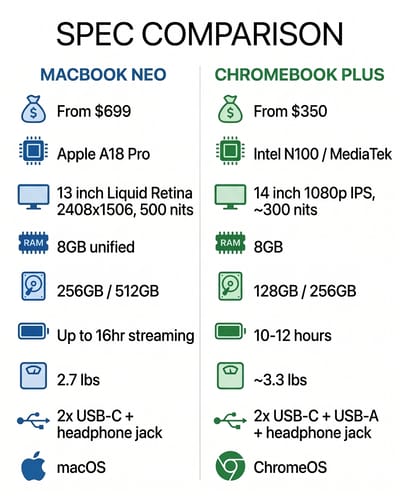
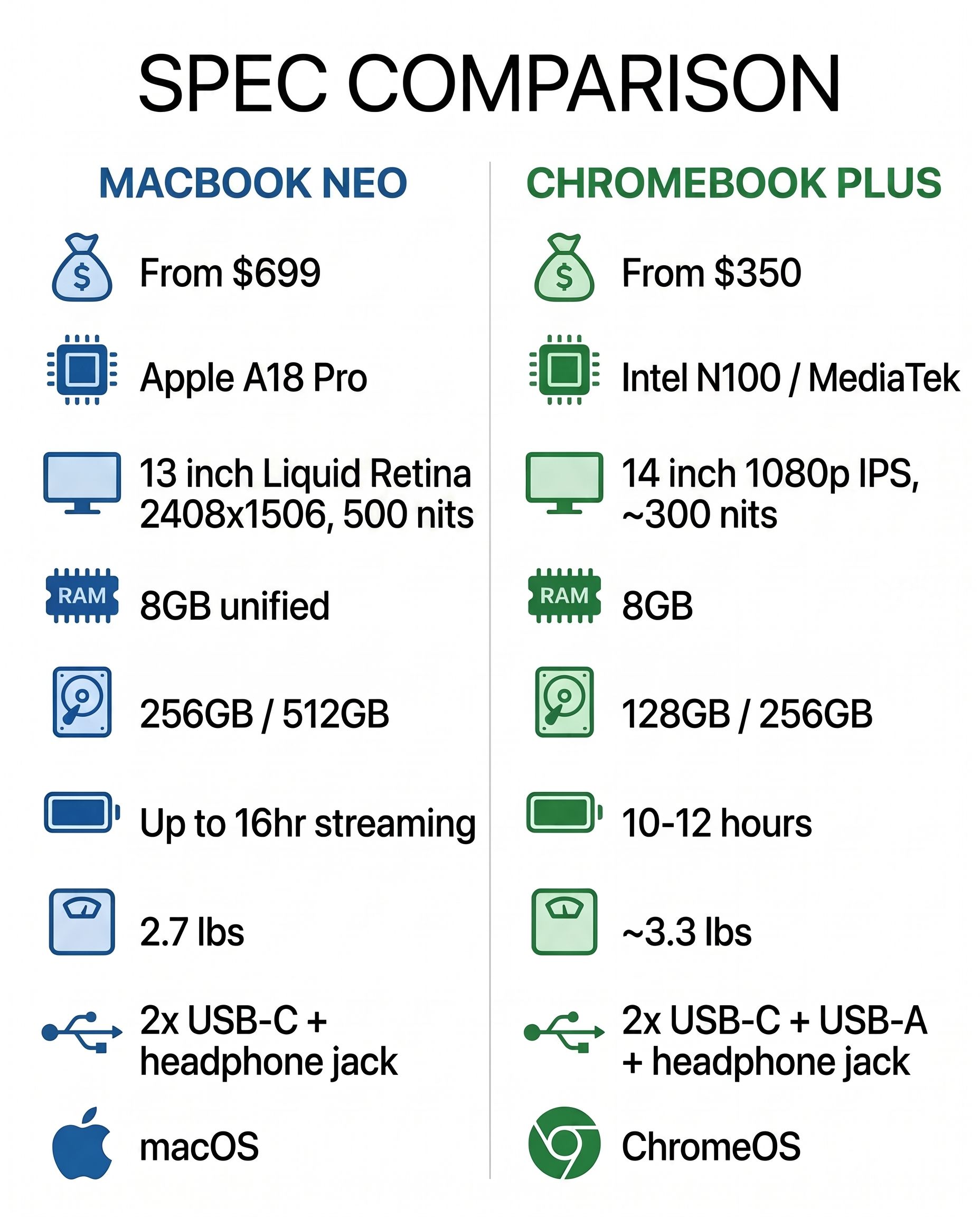
The design is unmistakably Apple. At 2.7 pounds in an aluminum body available in silver, blush, citrus, and indigo, it feels like Apple studied the original colored iMacs and the M2 MacBook Air, then asked what a student-friendly version of that formula would look like. There’s a 1080p FaceTime camera, Wi-Fi 6E, Bluetooth 6, and Apple Intelligence baked in for on-device AI features. The Neo runs full macOS, which means access to GarageBand, iMovie, Pages, and the entire Mac App Store on day one.
Four compromises come with that price:
- The base $699 model ships with 256GB of storage and no Touch ID on the keyboard. The fingerprint sensor arrives only on the $799 512GB model.
- Both models are stuck at 8GB of unified memory with no option to upgrade.
- There are two USB-C ports, one of which only supports USB 2.0 speeds, plus a headphone jack.
- There’s no keyboard backlight on any model.
The $599 education price requires purchasing through Apple’s education store as an eligible institution, so a parent walking into an Apple Store will pay $699.
If Your Student Lives in Google Docs, a Chromebook Is Enough
If your child’s school runs on Google Workspace for Education, and 93 percent of US school districts purchased Chromebooks in 2025, the MacBook Neo is an extraordinarily powerful machine for opening browser tabs. Google’s long game in schools, building a pipeline of future users, made ChromeOS the default well before any student picks a device. The vast majority of K-12 schoolwork happens in Google Docs, Slides, Classroom, and a web browser. For that workflow, the A18 Pro chip is like strapping a jet engine to a bicycle.
A $300 Chromebook Plus handles Google Workspace. It opens, saves, and syncs documents, runs Google Meet for video calls without stuttering, and loads Canvas, Schoology, and every other learning management system that schools actually use. The experience is fast and simple because ChromeOS was built for work that happens in a browser. Our Chromebook vs iPad comparison found that web-first workflows are where Chromebooks consistently outperform more expensive alternatives, and that logic extends to the MacBook Neo.
ChromeOS boots in seconds, updates silently in the background, and cannot accumulate the kind of system cruft that makes every laptop slower over time. A Chromebook purchased for a sixth grader in 2026 will feel just as responsive in 2032 as it does today, because the operating system refreshes itself with every restart. macOS is a more capable operating system, but capability comes with complexity, and complexity introduces more things that can go wrong on a device used by a teenager who will never voluntarily run Disk Utility.
If Your Student Wants to Create, the MacBook Neo Wins
The gap is the software library. GarageBand alone turns the MacBook Neo into a music production starter kit, something Chromebook owners have been trying to replicate with workarounds and web apps that never quite feel complete. iMovie provides real video editing. The full desktop versions of apps like Affinity Photo, DaVinci Resolve, and Logic Pro can run natively on the A18 Pro chip.
If your child is showing interest in filmmaking, music production, photography, graphic design, or software development, the MacBook Neo at $699 is the cheapest path into the Mac creative ecosystem. A year ago that meant an $1,100 MacBook Air, and the Air now starts at $1,299. Today the entry ticket is $699. For a high school student building a portfolio for art school applications, or a middle schooler who’s outgrown the creative limitations of web-based tools, this is a meaningful shift. No Chromebook can match it for this specific use case.
The question is whether your student actually needs these capabilities or just thinks they sound cool. A student who pursues creative work will hit ChromeOS’s limitations quickly. If your child has been making videos on their phone for a year and is frustrated by the limitations, the MacBook Neo is a natural next step. If they mostly want a cool laptop that comes in citrus, a Chromebook Plus will serve them better for half the price.
Repair Costs Add to the MacBook Neo Sticker Price
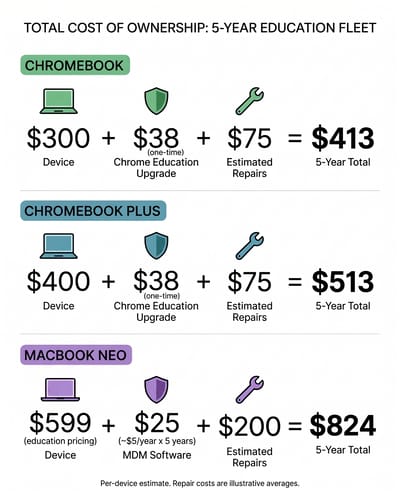
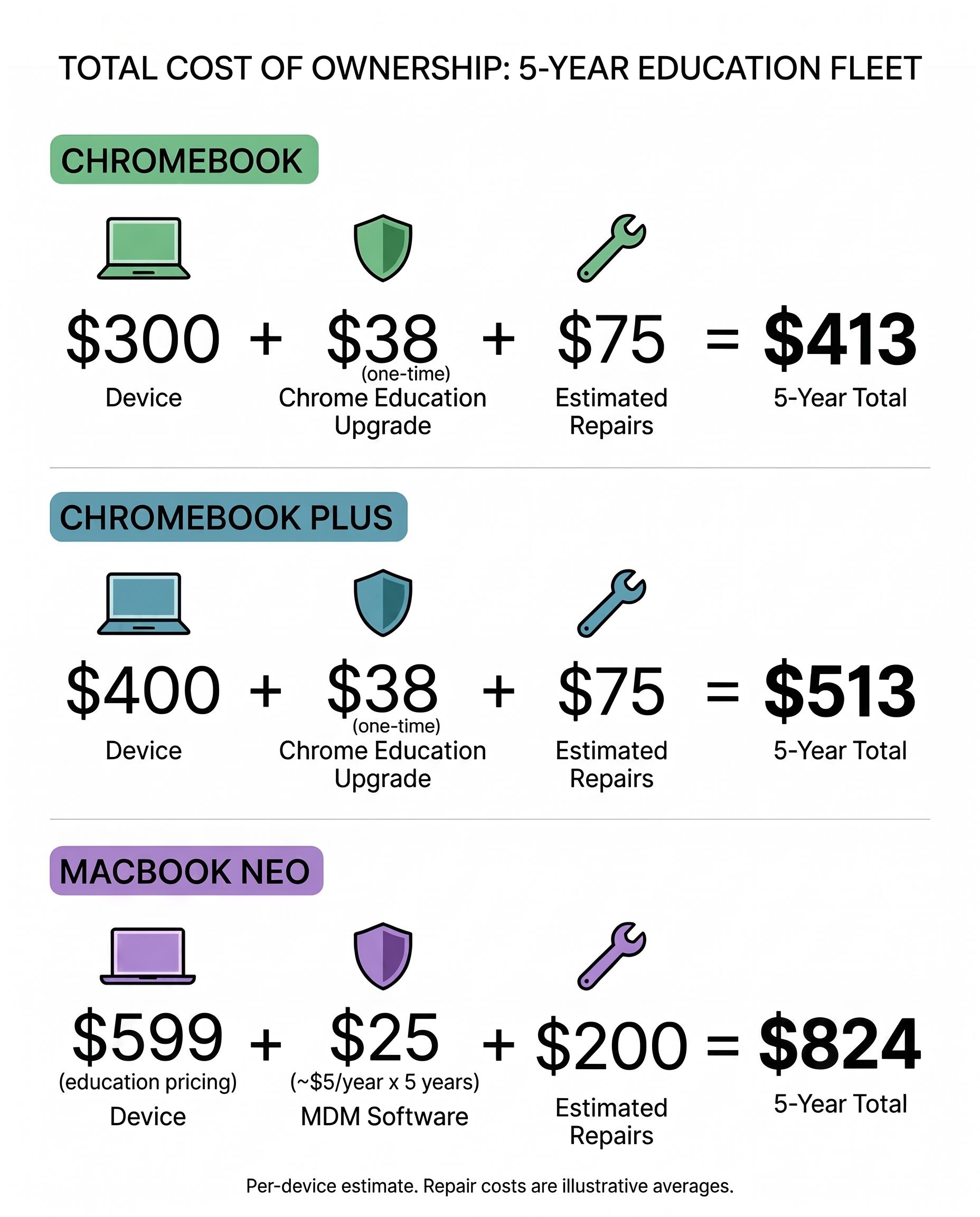
Apple’s pricing narrative places the MacBook Neo directly against Chromebook Plus models, and viewed through that narrow lens the comparison seems favorable. A well-equipped Chromebook Plus runs $350 to $450. The MacBook Neo starts at $699. That’s a $250 to $350 gap for a vastly more powerful machine running a full desktop operating system.
But the total cost of owning a student laptop extends well beyond the sticker price. When a Chromebook’s screen cracks, which happens with startling regularity in the hands of middle schoolers, the repair typically costs $50 to $100 at a local shop. Many education-focused Chromebooks are specifically designed with reinforced corners, spill-resistant keyboards, and screens chosen partly for affordable replacement. Apple hasn’t published repair pricing for the MacBook Neo, but the company’s historical approach to repairs doesn’t inspire confidence in the budget category. The MacBook Air screen repair runs $449 through Apple, and even with a cheaper panel on the Neo, we’d be surprised if an official screen replacement cost less than $200.
The MacBook Neo Ages Out Faster: No Update Guarantee, No Memory Upgrade
Google guarantees 10 years of automatic updates for new Chromebooks, a policy that extends security patches and feature additions through 2036 for a Chromebook bought today. Apple has historically provided macOS support, typically five to seven years, but there’s no formal commitment comparable to Google’s explicit expiration date framework. For a device bought for a student entering middle school, the difference between guaranteed support through high school graduation and probable support through high school graduation matters to budget-conscious families.
Eight gigabytes is adequate for macOS today, but Apple Intelligence features are just getting started, and Apple has been steadily increasing memory requirements for its AI features. ChromeOS runs efficiently on 8GB because the operating system is lighter and cloud-oriented by design. macOS with Apple Intelligence, a web browser, and a few native apps open simultaneously will test that 8GB ceiling within a couple of years, and there’s no upgrade path.
Ongoing MDM Fees on Apple Versus Google’s One-Time License
Schools don’t buy laptops one at a time. They buy hundreds or thousands of devices, deploy them across buildings, manage them remotely, lock them down for testing, and maintain them for years on tight budgets.
Google’s education ecosystem is built around this reality. The Chrome Education Upgrade license costs roughly $38 per device as a one-time perpetual fee, and it unlocks fleet management through the Google Admin Console, which integrates directly with Google Workspace for Education that schools already use. The entire pipeline from unboxing to classroom-ready deployment can happen without a technician touching the device.
Managing 5,000 Macs Costs $75,000 to $200,000 Over Five Years
Apple offers Apple School Manager for free, which handles zero-touch enrollment. But the actual device management requires third-party MDM software like Jamf or Mosyle, which typically runs $3 to $8 per device per year as an ongoing subscription. For a district deploying 5,000 devices, that’s $15,000 to $40,000 annually in management costs alone, compared to a one-time $190,000 for Chrome Education Upgrade licenses. Over a five-year deployment cycle, the recurring Apple MDM costs add up to $75,000 to $200,000 versus the fixed Google cost.
The $599 education price does not change this math. As we covered when Windows 11 SE died, the fleet management story is where Chromebooks consistently defeat challengers, regardless of spec sheets. We broke the numbers down further in our education procurement guide for administrators weighing the switch.
On-Device AI Is Roughly Even for Student Work
The MacBook Neo ships with Apple Intelligence, which handles writing assistance, image generation, notification summaries, and Siri integration. It’s capable and well-integrated into macOS, though some features are still rolling out and availability varies by region.
Chromebook Plus models ship with Google’s Gemini integration, which provides similar writing tools, a “Help me write” feature across ChromeOS, and image generation through the Magic Editor in Google Photos. Gemini’s strength is its deep integration with Google Workspace, meaning the AI features work naturally within Google Docs, Gmail, and the other apps that students already live in.
For most student workflows, the AI features on both platforms are roughly equivalent: helpful for drafting emails and summarizing content, occasionally useful for creative tasks, and not yet essential enough to swing a purchasing decision. The A18 Pro’s 16-core Neural Engine gives the Neo more raw AI processing power, but that advantage matters primarily for running local models and advanced photo and video AI features. For a student writing essays and making presentations, Gemini on a Chromebook Plus does everything Apple Intelligence does, within the Google ecosystem where the work already happens.
Who Should Buy a Chromebook and Who Should Buy the MacBook Neo
If your student’s school runs on Google Workspace and the device will primarily handle schoolwork and web browsing, a Chromebook remains the right call. This is especially true if you’re buying for a child in elementary or middle school who doesn’t yet have defined creative interests, or if you value a device that is cheap to repair. A $250 to $350 Chromebook will do everything they need, last a decade with guaranteed updates, and survive being shoved into a backpack five days a week. Parents sorting through the broader school-device debate may also find our coverage of the Chromebook opt-out movement useful context.
The MacBook Neo earns its price for students with creative ambitions that ChromeOS can’t support. If they’re heading to high school or college and you want a device that can grow with them beyond web-based work, or if your family is already invested in the Apple ecosystem where continuity features like AirDrop and iMessage add daily value, the MacBook Neo at $699 is worth it even with its compromises.
School IT administrators should wait. The management costs, repair economics, and integration requirements need real-world data from early adopters before any district should commit procurement dollars. The Chromebook ecosystem has earned its dominance through a decade of solving education-specific problems, from the nationwide scale of programs like Japan’s GIGA School rollout down to building-level deployment. A lower sticker price doesn’t erase that overnight.
Adult buyers weighing this decision for themselves rather than for a student will find a full breakdown in our 2026 Chromebook buyer’s guide.
Apple Has Re-entered the Budget Market
The MacBook Neo is a product that Apple should be proud of. Apple has finally acknowledged, after years of ceding the budget market, that not every laptop buyer wants to spend $1,000 or more.
The MacBook Neo proves that powerful hardware at accessible prices is possible, and it raises the bar for what a $699 device should deliver. Google and its Chromebook partners now have clear pressure to improve display quality, build materials, and creative software support to maintain the value that has served students and budget buyers for years.
The Chromebook’s advantages in simplicity, fleet management, repairability, and total cost of ownership are durable. They’re also boring compared to “it comes in citrus and runs GarageBand.” For those comparing specific models side by side, the Chromebook Comparison Chart lets you sort and filter the current lineup to find the right fit.
Frequently Asked Questions
Which is better for a student, a Chromebook or the MacBook Neo?
For a school day spent in Google Docs, Classroom, and a browser, a $350 to $450 Chromebook Plus does everything the student needs. The MacBook Neo earns the extra $250 to $350 when the student is heading into filmmaking, music production, photography, graphic design, or software development, which ChromeOS cannot support.
Why is the MacBook Neo cheaper than other Macs?
It uses the A18 Pro chip Apple originally built for the iPhone 16 Pro, ships with 8GB of unified memory that cannot be upgraded, and limits you to two USB-C ports, one of them at USB 2.0 speeds, with no keyboard backlight on any model. Those tradeoffs are what separate the $699 MacBook Neo from the $1,299 MacBook Air.
What is the MacBook Neo good for?
Creative software: GarageBand, iMovie, and the full desktop versions of apps like Affinity Photo, DaVinci Resolve, and Logic Pro all run natively on the A18 Pro chip, which makes $699 the cheapest entry into the Mac creative ecosystem for a student building a portfolio.
Should schools switch from Chromebooks to the MacBook Neo?
Not yet. A Chrome Education Upgrade license is a one-time fee of roughly $38 per device, while managing Macs adds a third-party MDM subscription of $3 to $8 per device per year, which for a 5,000-device district runs $75,000 to $200,000 over five years. Districts should also wait for repair pricing and real-world deployment data from early adopters.


