
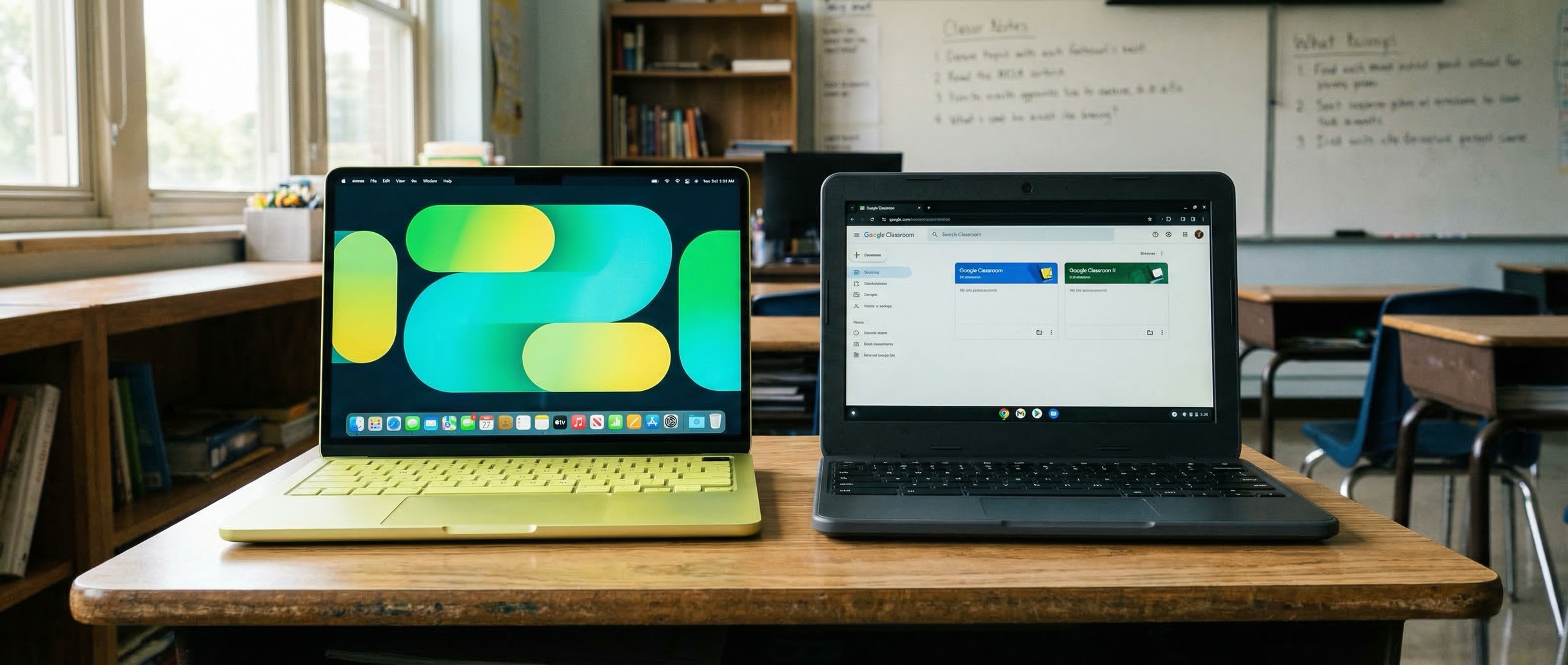
A disclosure before we begin: Starry Hope covers Chromebooks extensively, and we have an obvious interest in ChromeOS succeeding. What follows is our assessment of what the MacBook Neo means for schools, including the parts where Apple’s new laptop is compelling.
When Apple announced the MacBook Neo on March 4, the social media consensus formed within hours: Chromebooks are finished. A viral post asking “who would buy a Chromebook now?” racked up over 1,700 likes. Yahoo Finance ran a headline warning that Google and Microsoft should worry. Evercore ISI analyst Amit Daryanani called it Apple’s move to “go on the offensive in the PC market.” And at $599 retail or $499 for schools, the MacBook Neo is the most disruptive laptop Apple has ever built. We covered the consumer implications the day it launched.
But the “Chromebook killer” narrative collapses the moment you zoom out from individual devices to district-level procurement. Schools don’t buy one laptop at a time. They buy thousands, manage them remotely, and maintain them for years on budgets that leave no room for error.
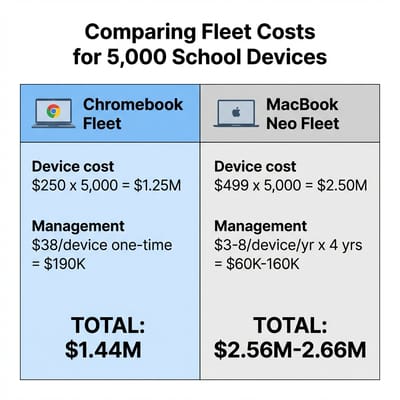
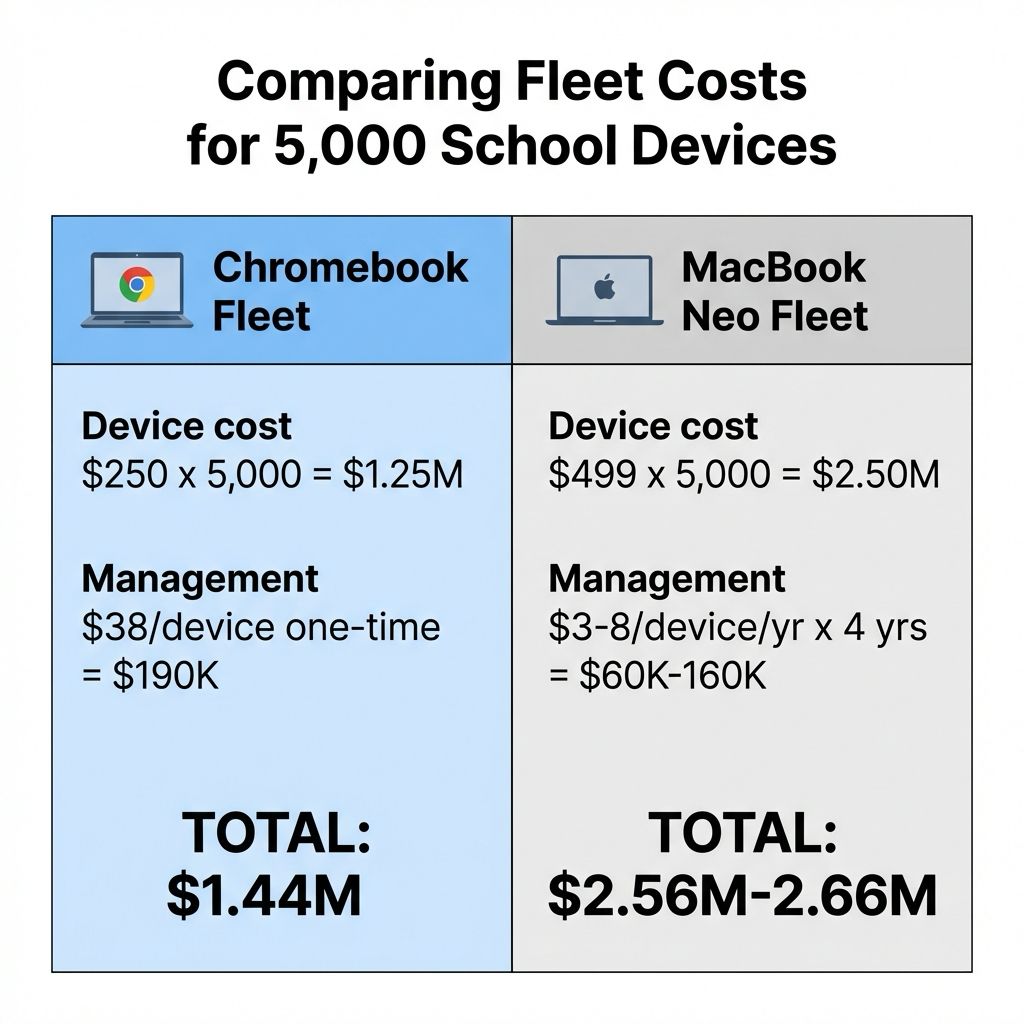
A 5,000-Device MacBook Neo Fleet Costs $1.25 Million More
Even with the $499 education discount in Apple’s education store, the MacBook Neo costs roughly double the $230 to $280 entry-level Chromebooks that make up the bulk of school fleets. When a district is deploying 5,000 devices for a 1:1 program, that $250-per-unit difference is a $1.25 million budget gap, and as Chrome Unboxed pointed out, most districts simply cannot justify that jump for devices that students will treat with what can generously be described as moderately abusive care.
According to EdWeek Market Brief data, 68 percent of districts now purchase laptops, Chromebooks, and tablets through local and state operating revenue, up from 52 percent the year before. This shift from pandemic-era federal relief dollars to sustainable local funding means schools are more budget-conscious. The districts that spent ESSER funds on Chromebook fleets in 2021 are now replacing those devices out of their own operating budgets, and every dollar matters more when it comes from local taxpayers rather than federal stimulus. That squeeze is only tightening as Chromebook fleet prices themselves climb, which narrows the budget headroom a district would need to even consider a pricier Apple alternative.
This isn’t a problem Apple can solve with education discounts alone. To compete on price with the Chromebooks that dominate K-12 fleets, Apple would need to sell the Neo at roughly $250, half its current education price. There’s no margin math that makes that work for an aluminum laptop with Apple silicon.
Apple Education MDM Matches on Licensing, Not on Admin Time
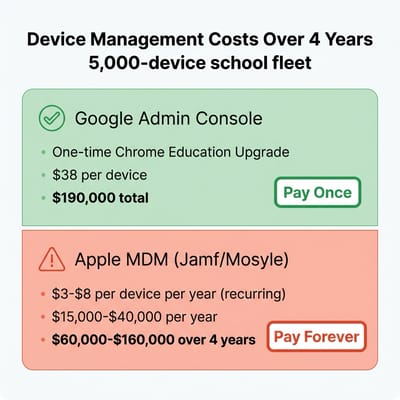
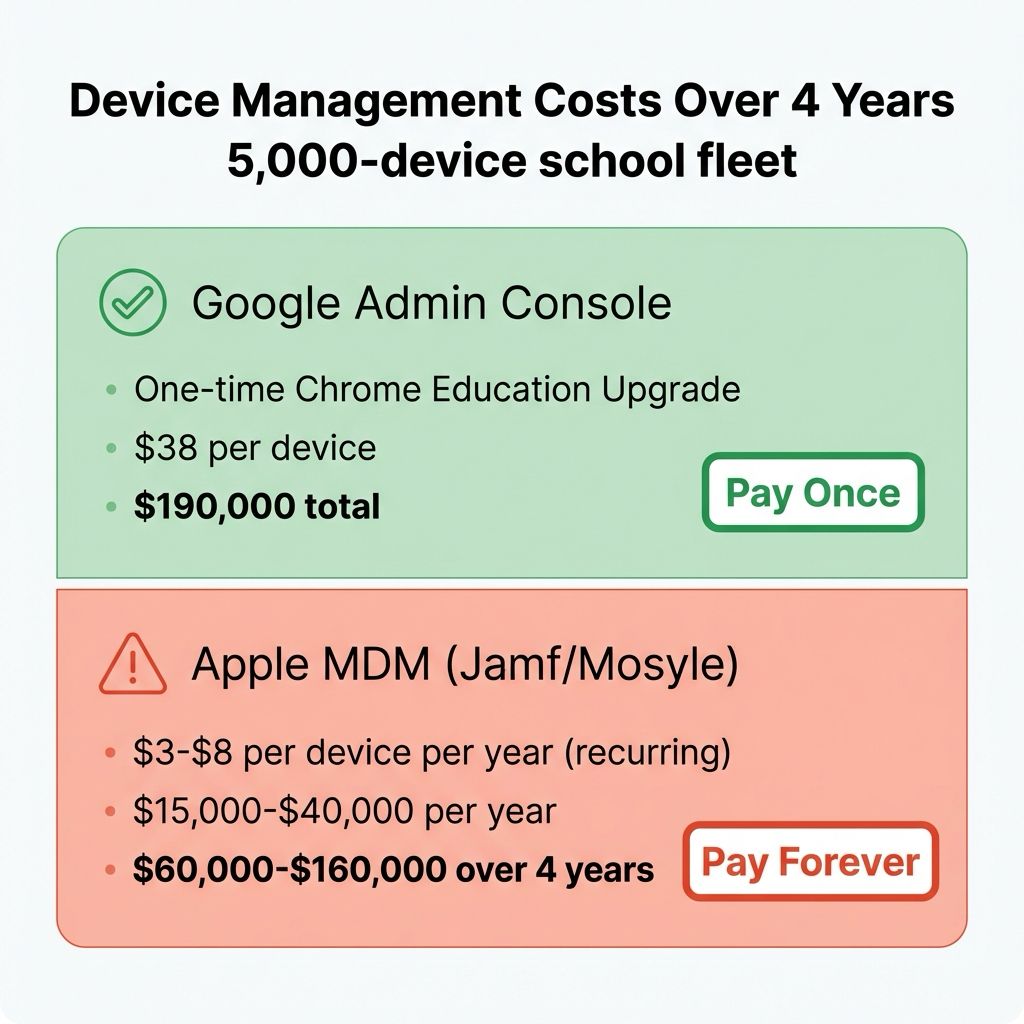
Price is the most visible barrier, but management is the harder one for a competitor to match. Google’s Chrome Education Upgrade license costs roughly $38 per device as a one-time fee, and it unlocks fleet management through the Google Admin Console. An overworked school IT administrator can take a pallet of 500 Chromebooks, enroll them in minutes with zero-touch deployment, and have them classroom-ready with every policy, app restriction, and security setting locked down. If a student breaks a device, they grab a loaner, sign in, and pick up exactly where they left off.
Apple offers Apple School Manager for free, and MDM solutions like Jamf and Mosyle have improved. But the management still requires a third-party subscription that typically runs $3 to $9 per device per year. For a 5,000-device fleet over a four-year deployment, that’s $60,000 to $180,000 in recurring management costs, which undercuts the one-time $190,000 a district pays for Chrome Education Upgrade licenses. Licensing is not where Apple loses this comparison; the gap is in what one administrator can do with each console.
ChromeOS was designed for fleet deployment. The entire pipeline from unboxing to classroom works without a technician touching individual devices. As K-12 technology specialist Andy Lombardo noted in his detailed TCO analysis of the Neo, the per-student cost math is more nuanced than the sticker price suggests. But even favorable TCO modeling doesn’t address the operational complexity of managing a mixed-platform fleet. Schools running Google Workspace for Education already have their entire curriculum, student accounts, and teacher workflows built on the Google ecosystem. Adding Mac devices to that environment means managing two platforms instead of one, and for school IT departments that are typically understaffed and underfunded, that’s a meaningful burden.
Locked-Down Web Apps Are What Districts Want
Schools don’t want a device that can install local applications, manage complex file systems, and run professional-grade software. They want a device that opens Google Classroom, runs Google Docs, loads assessment platforms, and does nothing else.
Ninety-three percent of US school districts indicated plans to purchase Chromebooks in 2025, a nine-percentage-point increase from 2023. ChromeOS holds roughly 60 percent of the global education device market, and over 170 million students and educators use Google Workspace for Education worldwide. National programs like Japan’s GIGA School Chromebook rollout show how durable that entrenchment is at a country-wide scale. That isn’t an installed base you disrupt with a prettier laptop at twice the price. The K-12 curriculum is built on web applications, and Chromebooks were designed to run web applications on cheap hardware. Our Chromebook vs iPad comparison for schools reached the same conclusion about education workflows.
The MacBook Neo runs full macOS, which means it can do things no Chromebook can. That’s simultaneously its greatest strength for consumers and its biggest liability for school IT administrators. Full macOS brings support tickets, configuration complexity, and more ways for students to get off-task.
The MacBook Neo TCO Case Rests on Untested Resale Estimates
Lombardo’s detailed TCO modeling shows a three-year deployment costing roughly $130 per student per year including AppleCare, which he says is competitive with the Windows fleet his district currently deploys. He reports that buyback vendors are already quoting $180 to $210 for three-year-old MacBook Neos, which would offset a significant portion of the initial purchase price. And Apple’s track record of supporting machines with macOS updates for five to seven years means the Neo could plausibly serve longer than budget Chromebooks that districts typically cycle every three to four years.
The Neo is a brand-new product category with zero resale history, so those buyback estimates are projections based on MacBook Air values, not demonstrated market prices. The $130-per-student figure doesn’t appear to account for the higher breakage costs inherent to aluminum devices in the hands of middle schoolers: when a Chromebook screen cracks, the repair typically costs $50 to $100 thanks to modular designs built for customer-replaceable units. Apple hasn’t published Neo repair costs, but historical MacBook screen replacements run $200 or more. And the longer lifecycle assumption, while plausible, requires that 8GB of non-upgradeable RAM remain adequate as macOS and Apple Intelligence features grow more demanding, something that Apple’s own admission that 8GB isn’t enough for Xcode’s AI features gives reason to question.
Google counters with a formal commitment that Apple doesn’t match: 10 years of automatic updates for new Chromebooks, with an explicit expiration date framework that lets procurement officers plan with certainty. A Chromebook purchased in 2026 will receive security updates through 2036, guaranteed. Apple has historically supported machines for five to seven years, but there’s no equivalent formal commitment, and that distinction matters when you’re planning a five-year procurement cycle.
Windows 11 SE’s End Favors ChromeOS Over macOS
The shift underway in education is Microsoft abandoning the field. Windows 11 SE loses support in October 2026, and Microsoft has made no indication it will release a successor. After years of trying to build a lightweight education operating system by stripping down Windows, Microsoft has pivoted to an AI-first education strategy built around Copilot tools that run on standard Windows 11.
This creates an opening in the market, but it favors ChromeOS more than macOS. Schools running Windows 11 SE are already invested in web-based curricula and cloud-based management, exactly the workflow that ChromeOS was built for. The transition path from a locked-down Windows device running Google Workspace to a Chromebook running Google Workspace requires no platform migration. The path from Windows 11 SE to macOS requires a platform migration, new management infrastructure, retraining for IT staff, and roughly double the hardware cost. For the relatively small number of schools affected by the Windows 11 SE end-of-life, Chromebooks are the natural successor.
The Neo Wins with Creative Programs, Teachers, and College Students
High school media arts, film production, and music programs need software that ChromeOS cannot run. GarageBand, iMovie, Logic Pro, DaVinci Resolve, and the full Adobe Creative Suite all run natively on macOS and the A18 Pro chip. For these specialized programs, the Neo drops the entry price. A year ago, the cheapest path into the Mac creative ecosystem was a $1,100 MacBook Air. Today it’s $599.
The same holds for teacher deployments. Lombardo’s analysis models a Mac Mini paired with a MacBook Neo at $988, less than his district’s previous $1,010 Dell laptop-and-dock setup, while giving teachers both a desktop workstation and a mobile device. That eliminates the need for purchasing separate substitute teacher laptops. For staff who need to run gradebook software, create multimedia lessons, and work from home, the Neo’s performance-per-dollar is strong.
Higher education is where the Neo’s value is strongest. College students own their devices, need creative and STEM software, and benefit from the Apple ecosystem integration that includes AirDrop, iMessage, and iPhone continuity features. Deepwater Asset Management’s Gene Munster estimated that 5 million education units could sell over three years, and the bulk of that adoption is more likely to come from higher-ed and individual student purchases than K-12 fleet deployments.
Google’s Project Aluminium Now Has to Match the Neo’s Build
Chrome Unboxed’s Robby Payne laid out the stakes in his analysis of the Neo’s impact on Google’s Project Aluminium: if Google and its hardware partners launch Aluminium devices in the $600 range with plastic chassis, dim screens, or subpar speakers, it will be a massive failure when held up against the Neo’s aluminum build, Liquid Retina display, and 16-hour battery life. Apple has raised the bar for what a $599 laptop should deliver, and Google’s answer needs to match that standard in the consumer space even if the education base remains secure.
The pressure extends to Chromebook Plus as well. At $499 for education, the Neo directly competes not with $250 base Chromebooks but with the $350 to $500 Chromebook Plus models that Google has been positioning as premium options. A school considering a Chromebook Plus for teacher devices or 1:1 programs at upper grade levels now has to weigh it against a full Mac at a similar price point. Google needs to ensure that the Chromebook Plus tier delivers enough additional value through Gemini AI integration, better displays, and longer lifespans to justify its existence in a world where the Mac alternative starts at the same price.
Chromebooks Still Win the K-12 1:1 Fleet
For school IT administrators making fleet purchasing decisions right now, the math hasn’t changed as dramatically as the headlines suggest. The MacBook Neo deserves consideration for specialized programs, teacher devices, and upper-grade deployments where creative software matters. But for the core K-12 1:1 fleet (the thousands of devices that get distributed to every student in a district) Chromebooks remain the rational choice on acquisition cost, management overhead, repairability, and ecosystem integration.
The districts that should pay closest attention to the Neo are those already running or planning creative arts programs, those with existing Apple infrastructure, and those in higher education where students own their devices. For everyone else, the Chromebook’s advantages in simplicity, fleet management, and total fleet cost remain durable. They’re also boring advantages compared to “it comes in citrus and runs GarageBand,” but boring is exactly what a school IT department needs when it’s responsible for 5,000 devices and the budget to match.
Apple has finally acknowledged that not every laptop buyer wants to spend $1,000 or more. Google and its partners now have clear motivation to improve Chromebook hardware quality, display technology, and creative app support.
Frequently Asked Questions
Will the MacBook Neo have an education discount?
$499 is the education price, against $599 at retail. That is about twice what a district pays for the $230 to $280 Chromebooks it buys by the thousand.
Is the new MacBook Neo good for school students?
For most students in a district-wide 1:1 program, a Chromebook is the better device: cheaper to buy, faster to enroll, and cheaper to fix. Students in creative arts programs, and older students who need macOS software, are the ones the Neo serves.
Can a MacBook Neo be used for college?
College is the Neo’s strongest case. Students buy their own machines and need the creative and STEM software that ChromeOS cannot run.
Can I do school work on a MacBook Neo?
Yes. It runs full macOS, so GarageBand, iMovie, Logic Pro, DaVinci Resolve, and the full Adobe Creative Suite all run natively, which no Chromebook can do. On a district-issued unit that same openness also means more support tickets and more ways for students to get off-task.


