
MOREFINE M6S Mini PC
Updated on

The MOREFINE M6S Mini PC represents a feat of miniaturization, packing a complete Windows 11 Pro system into a 2.83-inch cube that fits in the palm of your hand. Powered by Intel’s 12th Gen Alder Lake N100 processor and equipped with 12GB of DDR5 RAM, this pocketable computer delivers surprising performance for productivity tasks, media streaming, and retro gaming emulation. While the M6S may not replace a desktop workstation, its ultra-compact form factor makes it an intriguing option for users who need a portable computing solution or a dedicated media center without sacrificing too much processing power.
| Pros | Cons |
|---|---|
| Ultra-compact 2.8” cube form factor fits anywhere (Robtech review) | Higher-pitched fan noise at 38dBA under load (Robtech benchmarks) |
| 12GB DDR5 RAM at 4800MHz provides snappy multitasking | Soldered RAM prevents future upgrades |
| BIOS tweaking can boost performance by 20% (25W to 30W mode) | WiFi 5 only, no WiFi 6 support |
| Dual HDMI 2.0 ports support 4K@60Hz output | Bluetooth 4.2 connectivity reported as inconsistent (Mini PC Reviewer) |
| Fast NVMe Gen3 x2 storage with upgrade potential | Higher power consumption (41W max) vs competitors |
| Windows 11 Pro included with lifetime activation | Some longevity concerns in long-term user reports |
Related Videos
MOREFINE M6S Mini PC Comparison Chart
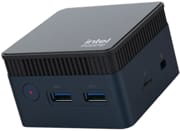 MOREFINE M6S Mini PC | |
| Price | List Price: $159.99 Amazon Prices: |
| Version | 12GB/512GB/Intel N100 |
| Performance Rating | 4.5 |
| Operating System | Windows 11 Pro |
| Processor | Quad-core 3.40 Ghz (max 3.40 Ghz) Intel Processor N100 |
| GPU | Integrated Intel UHD Graphics |
| RAM | 12 GB |
| Internal Storage | 512 GB |
| Dimensions width x length x thickness | 2.83 x 2.83 x 1.77 inches (71.88 x 71.88 x 44.96 mm) |
| Weight | unknown |
| WiFi | Wi-Fi 5 (802.11ac) |
| Bluetooth | Bluetooth 4.2 |
| Ethernet | 1 Ethernet port at 1 Gbps |
| HDMI | 2 Full-Size HDMI Ports |
| DisplayPort | No DisplayPort |
| VGA | No VGA Ports |
| USB Ports | 3 USB 3, 1 USB-C Type-C port is for charging |
| Thunderbolt Ports | No |
| OCuLink | No |
| Internal SATA Ports | No SATA ports |
| Card Reader | microSD Card Reader |
| Headphone Jack | combo |
| Fanless | No |
| VESA Mount | No |
| In the Box | mini PC, manual, HDMI and power supply |
| Expandability | Upgradeable M.2 SSD |
Related Mini PCs
-
 MOREFINE M6 (2024)The MOREFINE M6 (2024) is an ultra-compact, pocket-sized mini PC built on the Intel N200, with 16GB…
 -
 MOREFINE M9 Mini PCThe MOREFINE M9 is a compact Intel N100 mini PC with Windows 11 Pro, Wi-Fi 6, 2.5G Ethernet, dual…
 -
 ACEMAGIC S1 Mini PCThe ACEMAGIC S1 is a compact Intel N95 mini PC with 16GB of DDR4, dual M.2 slots, dual gigabit…
 -
 Beelink Mini S13A roughly $200 mini PC built around the Intel N150 with 16GB DDR4, dual M.2 PCIe 2280 slots, dual…
 -
 Bmax B6Powerhouse in a pint-size package: the Bmax B6 Mini PC boasts an Intel Core i3 processor, 12GB RAM,…
 -
 GMKtec Nucbox G5The GMKtec NucBox G5 is a palm-sized Intel N97 mini PC with 12GB of LPDDR5, dual HDMI 2.0 (4K60),…
Detailed Insights into the MOREFINE M6S Mini PC

The MOREFINE M6S immediately stands out for its compact design. Measuring just 2.83 x 2.83 x 1.77 inches and weighing only 1.19 pounds, this is one of the smallest fully-functional Windows PCs on the market. The aluminum alloy chassis serves dual purposes: it provides a premium feel while acting as a passive heat spreader that works in conjunction with the internal cooling system. Despite the diminutive size, MOREFINE has managed to include a respectable port selection with dual HDMI 2.0 outputs, three USB 3.0 ports, Gigabit Ethernet, and a microSD card reader. The USB-C port, while present, is designated for charging rather than data transfer, which may disappoint some users expecting full USB-C functionality.
Performance from the Intel N100 processor proves adequate for the M6S’s intended use cases. In Cinebench R23 testing conducted by Robtech, the system achieved multi-core scores of 2,439 at the default 25W power limit, which can be boosted to 2,955 by adjusting the BIOS to allow 30W operation. This represents a meaningful 20% performance improvement for users willing to accept slightly higher temperatures and fan noise. The quad-core, quad-thread N100 handles office productivity, web browsing with multiple tabs, and 4K video playback with AV1 codec support without breaking a sweat. Retro gaming enthusiasts will appreciate its capability to emulate PlayStation 2, GameCube, and Wii titles at playable framerates.
The connectivity options tell a story of deliberate trade-offs. WiFi 5 (802.11ac) and Bluetooth 4.2 represent the previous generation of wireless standards, and while functional for most use cases, the lack of WiFi 6 may be noticeable in congested network environments. The dual HDMI 2.0 ports enabling dual 4K displays at 60Hz provide excellent flexibility for productivity setups or multi-monitor entertainment configurations. Storage expansion is handled through a single M.2 2242 slot that accepts both NVMe and SATA drives, allowing users to upgrade beyond the included 512GB SSD. The lack of a 2.5-inch drive bay is understandable given the compact chassis, but the M.2 upgrade path provides a reasonable alternative for those needing more storage.
Thermal management deserves particular attention in such a compact enclosure. Under sustained load at the default 25W setting, CPU temperatures peak around 78°C, rising to 85°C when pushed to 30W in BIOS. The cooling solution produces approximately 38dBA of noise under load, which Robtech characterized as having a slightly higher pitch than larger N100 mini PCs. For a device this small, these thermal results are respectable, though users in quiet environments may notice the fan during intensive tasks. The aluminum casing helps dissipate heat passively, contributing to manageable temperatures during light workloads.
The M6S excels in specific use case scenarios that benefit from its unique form factor. As a digital signage player or kiosk computer, the tiny footprint allows installation in spaces where traditional PCs simply cannot fit. Home theater enthusiasts appreciate the ability to tuck the unit behind a television or mount it directly to a VESA arm alongside a monitor. Travelers who need a portable Windows environment for presentations, development work, or accessing legacy Windows applications find the M6S fits easily in a laptop bag without adding significant weight. The included Windows 11 Pro license with pre-activation adds value for business users who require Pro features like BitLocker encryption or group policy support.
Reviewer Insights on the MOREFINE M6S Mini PC

Robtech’s Perspective
Robtech approaches the M6S from the perspective of a retro gaming and emulation enthusiast, immediately drawn to its uniquely pocketable form factor. Throughout the review, Robtech emphasizes that “it’s really impressive we can have a PC this pocketable,” highlighting how the 2.8-inch cube challenges preconceptions about what a Windows computer can be. The hands-on testing reveals the M6S as “a really nice retro gaming emulation box” capable of running PlayStation 2, GameCube, and Wii titles at playable speeds, positioning it as an ideal dedicated emulation machine that can easily travel between locations.
The technical deep-dive uncovers interesting optimization opportunities. Robtech demonstrates that accessing the BIOS and increasing the power limit from 25W to 30W yields approximately 20% better multi-core performance, a significant boost for users comfortable with minor configuration changes. This comes with trade-offs in the form of increased temperatures and power consumption, but the option exists for those who need extra headroom. The reviewer also notes that “considering its small size, I think the port selection is decent,” acknowledging the engineering challenges of fitting meaningful I/O into such a compact chassis.
Despite the positive overall assessment, Robtech identifies several compromises inherent to the ultra-compact design. The fan produces a higher-pitched noise compared to larger N100 mini PCs, which may be noticeable in quiet settings. Power consumption peaks at 41W under load, higher than some competitors in the N100 segment. The WiFi 5 module, while functional, represents older technology. Nevertheless, Robtech concludes that “the M6S is a unique miniature mini PC and it’s great,” recommending it for users who prioritize portability and novelty over raw performance per watt.
Mini PC Reviewer’s Assessment
According to Mini PC Reviewer, the M6S positions itself as a “compact power hub” suitable for remote workers, students, and home theater enthusiasts. The publication highlights the DDR5 RAM running at 4800MHz as a meaningful performance advantage over competitors using slower memory, contributing to responsive multitasking in productivity scenarios. The dual 4K display support receives praise for enabling productive multi-monitor workflows despite the system’s diminutive size.
The review raises important reliability concerns that prospective buyers should consider. Bluetooth connectivity is flagged as inconsistent, with multiple users reporting connection drops and pairing issues. More concerning are reports of device failures occurring after three to four months of light use for some buyers, raising questions about long-term durability. The publication suggests that the aggressive miniaturization may push thermal and component limits in ways that affect longevity. While many users report positive experiences, these documented issues warrant consideration, particularly for buyers expecting multi-year service life from their investment.
Customer Reviews of the MOREFINE M6S Mini PC
Across 50 ratings on Amazon, the MOREFINE M6S Mini PC averages 4 stars, and the spread is wider than that number suggests: 58 percent of raters give it 5 stars while 14 percent give it 1 star. The positive reviews come from owners using it as a low-power home server or a basic desktop. A verified buyer named TT, who runs it as a Plex media center, wrote “After it parks its CPU cores it idles at a very low energy draw and it serves perfectly for the current use case.” Michael Patterson, a verified buyer who bought one to replace his parents’ old PC, called it “a powerful computer for the price and size” but flagged the limits plainly: “there are only 2 USB ports and its not good for modern gaming.” Other verified owners use it for streaming, Zoom, and simple games on large displays, and one (Poul) described it as an “Awesome replacement for old mac-mini.”
The negative reviews name specific, real problems rather than vague complaints. Verified buyer Mark Thompson reported his unit failed within a year: “it didn’t even last a year, as it just now quit on me. The blue light comes on, but there is no display.” A 3-star reviewer, DiCaprio, hit two issues: the preinstalled Windows 11 Pro would not activate without a school or work Microsoft account, and over a long uptime test “the machine shut down itself multiple times,” plus “significant lags” connecting Bluetooth peripherals. So the picture is genuinely mixed: low idle power for light-duty and server use, weighed against a 14 percent share of 1-star ratings and reports of early failure and finicky setup.
Read more owner reviews on Amazon.
Conclusion
The MOREFINE M6S Mini PC succeeds in its primary mission of delivering a truly pocketable Windows computing experience. For users who prioritize portability above all else, whether for traveling presentations, a dedicated media center, or a compact retro gaming setup, the M6S offers unique portability that few competitors can match. The combination of Intel’s efficient N100 processor with fast DDR5 memory creates a responsive system that handles everyday computing tasks with ease, all within an enclosure smaller than most external hard drives. The Intel N100 processor provides adequate performance for productivity and entertainment tasks, while the 12GB DDR5 RAM and upgradeable NVMe storage ensure the system can handle moderate multitasking demands.
Prospective buyers should approach with realistic expectations. This is not a replacement for a full desktop or even larger mini PCs, and the ultra-compact design necessitates real compromises in cooling capacity, upgrade potential, and wireless specifications. The documented Bluetooth issues and occasional reliability concerns warrant consideration, particularly for buyers expecting extended service life. At its typical price point around $160, the M6S commands a premium over larger N100 alternatives, with that premium justified primarily by the form factor novelty. For the right user with the right expectations, the MOREFINE M6S represents an engineering achievement that proves big computing can come in very small packages. When size matters above all else, the M6S delivers. To see how it stacks up alongside other compact Windows machines, the Mini PC Comparison Chart puts all key specs side by side.
Frequently Asked Questions
Can I upgrade the RAM in the MOREFINE M6S?
No, the 12GB LPDDR5 RAM in the MOREFINE M6S is soldered to the motherboard and cannot be upgraded. This is a common design choice in ultra-compact systems to minimize size. If you anticipate needing more than 12GB of RAM, consider a larger mini PC with socketed memory modules, such as the Beelink EQ12.
Is the MOREFINE M6S good for gaming?
The M6S handles retro gaming and emulation well, running PlayStation 2, GameCube, and Wii emulators at playable framerates according to Robtech’s testing. However, it is not suitable for modern AAA gaming due to the integrated Intel UHD Graphics. Light indie games and older titles run acceptably, but demanding modern games will struggle.
How many monitors can the MOREFINE M6S support?
The M6S supports dual 4K displays at 60Hz through its two HDMI 2.0 ports. Both outputs can be used simultaneously for an extended desktop configuration.
What storage upgrade options are available?
The MOREFINE M6S includes one M.2 2242 slot that accepts both NVMe and SATA drives up to 2TB. The included 512GB SSD can be replaced with a larger capacity drive. Note that the smaller 2242 form factor is less common than standard 2280 drives, so ensure compatibility when purchasing upgrade storage.
How does the MOREFINE M6S compare to other Intel N100 mini PCs?
The M6S prioritizes compact size over other factors. While competitors like the Beelink EQ12 or GMKtec NucBox G2 offer similar N100 performance with better cooling, more ports, and lower prices, none match the M6S’s 2.8-inch cube form factor. You pay a premium for the ultra-portable design, making it best suited for users who specifically need the smallest possible footprint.
Is Bluetooth reliable on the MOREFINE M6S?
Bluetooth connectivity has been reported as inconsistent by some users and reviewers. The M6S uses Bluetooth 4.2, and some buyers have experienced connection drops with wireless peripherals. If reliable Bluetooth is essential for your use case, consider having wired alternatives available or testing Bluetooth functionality within the return window.