
Beelink EQ14
Updated on

The Beelink EQ14 is a budget Intel N150 mini PC aimed at low-power, everyday computing. The N150 (“Twin Lake”) is a small step up from the popular N100, with a higher 3.6 GHz turbo clock and Intel UHD graphics, though the measured real-world gain stays small. It ships with 16GB of DDR4, a 512GB M.2 SATA SSD, dual HDMI, dual Gigabit Ethernet, Wi-Fi 6, and a 10Gbps USB-C, which suits office work and 4K media far better than gaming.
A built-in power supply keeps an external brick off the desk. The two M.2 slots take up to 8TB of storage (4TB each), but the RAM is a single DDR4 stick (single-channel), even though the N150 itself can run DDR5.
| Pros | Cons |
|---|---|
| Built-in power supply; no external brick | N150 is only a marginal step up from the N100 |
| Two M.2 slots, up to 8TB (4TB each) | Single-channel DDR4 (one DIMM); no DDR5 |
| Quiet and low power; good for an always-on server | Entry-level graphics; not for real gaming |
| Dual HDMI, dual Gigabit Ethernet, 10Gbps USB-C | No VESA mount |
| Runs Windows 11 and Linux | Bundled SSD is the slower SATA type |
| Wi-Fi 6 and Bluetooth 5.2 on board | Second M.2 is a slower PCIe 3.0 x1 slot |
Related Videos
Beelink EQ14 Comparison Chart
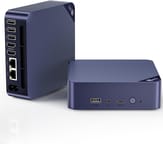 Beelink EQ14 | |
| Price | List Price: $259.00 Amazon Prices: Loading prices... |
| Version | 16GB/512GB/Intel N150 |
| Performance Rating | 4.9 |
| Operating System | Windows 11 |
| Processor | Quad-core 3.60 Ghz Intel Processor N150 |
| GPU | Integrated Intel UHD Graphics |
| RAM | 16 GB |
| Internal Storage | 512 GB |
| Dimensions width x length x thickness | 4.92 x 4.92 x 2.91 inches (124.97 x 124.97 x 73.91 mm) |
| Weight | unknown |
| WiFi | Wi-Fi 6 (802.11ax) |
| Bluetooth | Bluetooth 5.2 |
| Ethernet | 2 Ethernet ports at 1 Gbps |
| HDMI | 2 Full-Size HDMI Ports |
| DisplayPort | No DisplayPort |
| VGA | No VGA Ports |
| USB Ports | 1 USB 2.0, 3 USB 3, 1 USB-C (USB-C is 10 Gbps) |
| Thunderbolt Ports | No |
| OCuLink | No |
| Internal SATA Ports | No SATA ports |
| Card Reader | No Card Reader |
| Headphone Jack | combo |
| Fanless | No |
| VESA Mount | No |
| In the Box | Beelink Mini PC EQ14 N150, power cable, HDMI cable, user manual. |
| Expandability | Dual M.2 slots (one PCIe 3.0 x4 and one PCIe 3.0 x1), single DIMM slot for RAM, supports up to 8TB storage (4TB per slot). |
Related Mini PCs
-
 Beelink Mini S13A roughly $200 mini PC built around the Intel N150 with 16GB DDR4, dual M.2 PCIe 2280 slots, dual…
 -
 Beelink EQR5The Beelink EQR5 is a compact AMD mini PC (Ryzen 5 5650U or Ryzen 7 5825U) with Radeon graphics,…
 -
 BOSGAME E2The BOSGAME E2 is a budget mini PC with an AMD Ryzen 5 3550H (Radeon Vega 8), 16GB of DDR4 (to…
 -
 CHUWI LarkBox X (2023)The CHUWI LarkBox X (2023) is an ultra-compact Intel N100 mini PC with 12GB of soldered LPDDR5, a…
 -
 FREAPP M6GE
 -
 HIGOLE GOLE 2 PROThe HIGOLE GOLE 2 PRO is a Celeron N5095 mini PC with a built-in 5.5-inch touchscreen and battery,…
Up to 8TB of storage on a single-channel DDR4 box
The N150 is a quad-core chip up to 3.6 GHz with Intel UHD graphics (clocked at 1,000 MHz), enough for web browsing, 4K media, and basic productivity but not demanding games. The 16GB of DDR4-3200 runs single-channel on a single DIMM, so it misses the multitasking boost dual-channel would give.
Two M.2 slots (one PCIe 3.0 x4, one PCIe 3.0 x1) take up to 8TB total (a reviewer fitted two 4TB drives), though the bundled 512GB drive is the slower SATA type. Connectivity covers dual HDMI (4K at 60Hz), dual Gigabit Ethernet, Wi-Fi 6, Bluetooth 5.2, and a 10Gbps USB-C, which is why reviewers point to it as a small home server or firewall as much as a desktop.
At 4.92 x 4.92 x 2.91 inches with a built-in power supply, it stays tidy on a desk, and the cooling is quiet under load. It has no VESA mount, so it sits on the desk instead of behind a monitor.
Reviewer Insights
ETA Prime: good as a first mini PC, skip it if you own an N100
ETA Prime rated it a solid sub-$200 pick for browsing, 4K media, and light tasks, liking the quiet cooling and built-in power supply. He measured the higher 3.6 GHz clock and 1,000 MHz GPU but said the real-world gap to the N100 is minimal, knocked the DDR4 (rather than DDR5) memory, and found gaming limited to lighter titles. His verdict: good for a first mini PC, not an upgrade if you already own an N100 box.
Robtech found the price a tough sell against N100 boxes
Robtech was more critical, calling it a “premium budget” mini PC. He saw slight single-core gains but no real multi-core or GPU improvement over the N100, flagged the missing DDR5, and noted awkward internal access. He found it fine for simple 1080p projects and documents, but argued its higher price than N100 boxes makes it a tough value sell.
Elevated Systems reads the DDR4 and SATA choices as cost-saving
Elevated Systems focused on real-world use, finding it quiet and efficient and a good fit for web browsing, networking, and office work, where Geekbench 6 put it about 6% ahead of the EQ12. He read Beelink’s DDR4-and-SATA choices as deliberate cost-saving, and agreed the GPU gains over the N100 are slim.
Technically Unsure: modest silicon, fine as an entry-level box
Technically Unsure did a teardown and confirmed the storage ceiling first-hand, fitting two 4TB drives for 8TB total (SSD speed is capped by the second slot’s single PCIe lane). He saw smooth 4K playback, ran both Windows 11 and Ubuntu, and rated the N150 modest but a fine entry-level box.
Lifting Linux points beginners to the EQ13 for kernel support
Lifting Linux tested it under Linux and found document exporting and spreadsheet sorting faster than on Windows, especially on a lightweight distro like Arch. The catch is that full hardware support needs kernel updates, so he steered beginners toward the EQ13 for smoother out-of-the-box Linux.
TechMishka measured under 20 fps in Counter-Strike 2
TechMishka framed the N150 “Twin Lake” as an incremental bump over the N100, well suited to office work, 4K media, and networking duties like a firewall or home server (helped by the dual LAN). On gaming he was blunt: Counter-Strike 2 at 1080p lowest averaged below 20 fps. The quiet operation, built-in power supply, and low power draw were the highlights.
Customer Reviews
Amazon buyers most often praise the size, the low power draw, and how well it works as an always-on home server. Andres G., a verified buyer, wrote that “its remarkably low power consumption combined with its strong transcoding capabilities mean it effortlessly handles everything I throw at it,” and J.W. (also verified) said it runs Home Assistant and Docker containers and “has been running very cool.” Several owners run Linux on it: verified buyer Bruce Jackson deleted Windows and installed Linux Mint, calling the setup “Seamless and easy,” though he had to extend the USB receiver for his wireless keyboard and mouse on a 1-meter dongle because the antennas crowded into the small case caused interference.
Verified buyer Irand Denton gave it three stars after the unit “is shutting down intermittently” roughly five months in, and described a support process where Beelink had him flash the BIOS at his own expense and then return the unit on his own dime rather than with a prepaid label. A one-star review from verified buyer Abakar Bechir reports the unit arrived broken: “Not properly functioning. Came defection. Had to dispose of it.”
Worth it for a quiet home server, hard to justify beside an N100 box
Owners running Home Assistant and Docker on it are the happiest, helped by the dual Gigabit Ethernet, the two M.2 slots (to 8TB), and the built-in power supply. For what that low draw costs to run around the clock, see our mini PC power cost breakdown.
Gaming and heavy multitasking are the wrong jobs for this machine, with entry-level UHD graphics and one channel of DDR4. The N150 is also only a marginal step over the N100, so if you already own an N100 box the upgrade is not worth paying for, and a cheaper N100 unit may be the better value. For more power or dual-channel memory, look at a Ryzen or Core-based box instead. To compare options, use Starry Hope’s Mini PC Comparison Chart.
Frequently Asked Questions
Can the Beelink EQ14 handle gaming?
Only lightly. The Intel UHD graphics run older and casual titles at low settings, but Counter-Strike 2 at 1080p lowest averaged below 20 fps in testing, so demanding and AAA games are out of reach.
Does the EQ14 support dual-channel RAM?
No. There is one DIMM slot, so the 16GB of DDR4 runs single-channel and there is no second stick to add. Memory-heavy multitasking is where that shows up.
Can I upgrade the storage on the EQ14?
Both M.2 slots are open to the owner (one PCIe 3.0 x4, one PCIe 3.0 x1), and a reviewer fitted two 4TB drives for 8TB total. The pre-installed 512GB M.2 SATA SSD can be replaced or joined by a second drive.
Is the EQ14 compatible with Linux?
Linux runs on it, though full hardware support for the N150 can need a newer kernel. A rolling-release distribution such as Arch keeps up most easily, and one reviewer pointed beginners to the EQ13 for a smoother out-of-the-box install.
Does the EQ14 have a VESA mount?
No VESA mount is included, so it cannot hang behind a monitor. At 4.92 x 4.92 x 2.91 inches it takes up little desk space on its own.
What comes in the box?
The mini PC, a power cable, an HDMI cable, and a user manual. Because the power supply is built in, there is no brick to find room for.
How quiet is the EQ14 in use?
Fan noise stays low even under load, quiet enough for a home office or a media center.