

The mini PC category split in two over the last couple of years. On one end sit 12-watt Intel N100 boxes that disappear into a fanless shell behind a monitor. On the other sit Ryzen AI Max and Core Ultra machines that can pull more than 150 watts when you lean on them. Shopping a Beelink, a GMKtec, or a Mac mini for always-on duty raises the obvious question. If I leave this thing plugged in and running every hour of the year, what does it add to my electric bill?
Here it is, built from wall-draw figures that independent reviewers measured at the wall and from the most recent US residential electricity rate. No estimates pulled from a manufacturer’s TDP slide, no 2024 rate that will be stale by autumn.
High-end mini PCs idle close to budget boxes
A 60-watt idle for a high-end mini PC like a Strix Halo machine would make it an expensive houseguest even when it is doing nothing. When ServeTheHome put the GMKtec EVO-X2, built on AMD’s Ryzen AI Max+ 395, on a meter, the system idled in the 8 to 14 watt range. That is a few watts above a budget N100 box, not ten times it. The integrated Radeon 8060S and the wide LPDDR5X memory bus keep the floor from dropping to single digits the way Apple’s silicon does, but a 60-watt resting draw does not show up on the desktop.
At true idle, the entire mini PC category is compressed into a narrow band. ServeTheHome measured the Beelink SER8 and its Ryzen 7 8845HS at a 7 to 10 watt system idle. NotebookCheck, using a Metrahit Energy meter at the wall, recorded the base Apple Mac mini M4 at about 2.6 watts with the display off, while ServeTheHome saw 4 to 6 watts in light desktop use. CNX Software metered a Beelink EQ12 (Intel N100) at around 12 watts idle in Windows. Top to bottom, that is a spread of a few watts. The chip that costs three times as much does not cost three times as much to leave idle.
Yearly cost is watts times hours times your rate
The formula is watts times 8,760 hours, divided by 1,000, times your price per kilowatt-hour. The SER8 at a 9-watt idle works out to 9 times 8,760 divided by 1,000, which is 78.8 kilowatt-hours, and at the current US average that is about fifteen dollars for the year. Run that for every box, both at a pure 24/7 idle and at a more realistic mixed day of 16 hours idle plus 8 hours of load, and you get the table below. The rate is the US average residential price of 18.56 cents per kilowatt-hour from the EIA Electric Power Monthly for March 2026, the most recent release. Figures are rounded to the nearest five dollars, because the source measurements are ranges, not laboratory constants. Every load figure in the table traces to a measured review: ServeTheHome for the SER8 and EVO-X2, NotebookCheck and ServeTheHome for the Mac mini, CNX Software for the EQ12, and igor’s LAB for the EQ14, with both N-series boxes metered in the mid-to-high 20s of watts under a sustained stress run. The EVO-X2’s load number is the midpoint of ServeTheHome’s measured 147 to 180 watt span, which runs from 70-billion-parameter inference at the low end to gaming at the high end, rather than a single reading.
| Mini PC | Chip | Idle (W) | Load (W) | Idle 24/7 ($/yr) | Mixed 16h+8h ($/yr) |
|---|---|---|---|---|---|
| Mac mini M4 | Apple M4 | ~5 | ~60 | $10 | $40 |
| Beelink EQ12 | Intel N100 | ~12 | ~28 | $20 | $30 |
| Beelink EQ14 | Intel N150 | ~12 | ~26 | $20 | $25 |
| Beelink SER8 | Ryzen 7 8845HS | ~9 | ~78 | $15 | $50 |
| GMKtec EVO-X2 | Ryzen AI Max+ 395 | ~11 | ~165 | $20 | $100 |
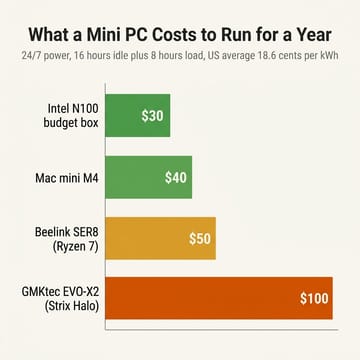
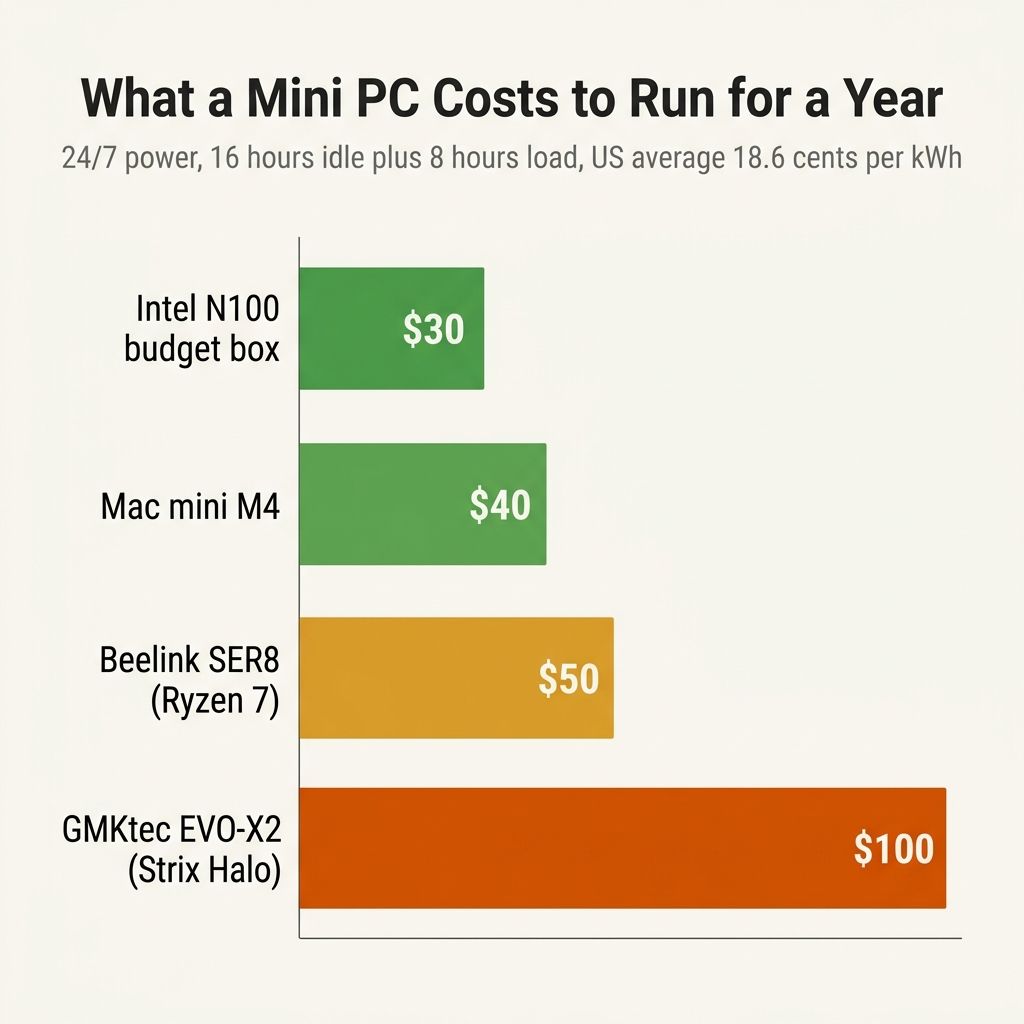
Look at the idle column first. Every machine here costs between ten and twenty dollars a year to leave running and doing nothing. For a box whose entire job is to sit there and serve files, run pfSense, or wait for a Plex client to wake it, the difference between the cheapest and the most expensive option is about ten dollars over twelve months. That is not a number worth optimizing. Buy the ports, the RAM ceiling, the noise profile, or the looks you want, and ignore idle draw.
Idle is not one number
Real idle depends on the operating system, the BIOS power settings, and how many of the box’s radios and ports are lit. The EQ12’s draw climbed from about 12 watts on one Ethernet link to roughly 14 watts in Ubuntu with both 2.5-gigabit ports active, per CNX Software’s testing. The newer Beelink EQ14 tells the same story from the other direction: igor’s LAB measured 11.8 watts at a Windows desktop idle, while a homelab reviewer running it as a Proxmox host under Linux saw about 6.2 watts. Same hardware, nearly half the draw, decided entirely by software.
For the always-on crowd, that gap matters more than the chip choice. A box that idles at 6 watts on a tuned Linux install costs about ten dollars a year; the same box left in a Windows high-performance profile with every radio awake costs twice that. None of this shows up on the product page, and none of it is captured by the TDP number the manufacturer prints. If your machine will live as a server, measure the draw on your own install, with your own services running.
The dollar gap lives under load
The moment you ask these chips to work, they separate hard. The SER8’s Ryzen 7 climbs to a measured 77 to 79 watts under a full stress run. The EVO-X2’s Ryzen AI Max+ 395 pulls 147 to 160 watts running a 70-billion-parameter model and 170 to 180 watts in a game, per ServeTheHome. The Mac mini M4 tops out near 60 watts, with NotebookCheck recording a 62.5-watt peak that settled to the high 50s. An N100 box never gets above the high 20s no matter how hard you push it.
That is why the mixed-use column fans out the way it does. Give each box a realistic day of sixteen idle hours and eight hours of load, and the EVO-X2 lands near one hundred dollars a year while the N100 box stays around thirty. The Mac mini, despite a higher load ceiling than the budget boxes, comes in around forty because it spends most of the day at its very low idle and only sips during the eight working hours. The difference between a Strix Halo box for local inference and a Mac mini running the same kind of always-on agent is a sixty-to-seventy-dollar-a-year decision once you keep them busy, not at rest.
Owners who put a meter on their own gear tell the same story. One r/homelab member running a Ryzen 7 8845HS build summed up a metered stack this way:
“60w idle, UPS, Fritzbox Router (7w!), DIY NAS with 3 8TB HDD no spin down, Ryzen 7 8845hs, 1TB Nvme and 256GB SSD with proxmox. Base cost should be around €17 per month.”
That 60 watts is the whole rack, three spinning 8-terabyte drives and a router included, not the mini PC alone. The chip is a small slice of a real always-on setup, and the drives and peripherals often cost more to spin than the computer does. At the other extreme, a different owner in the same r/homelab idle-draw thread reported their entire machine:
“2w. Just a n100”
Two watts is roughly three dollars a year. The Mac end of the range checks out too: a Mac mini M4 Pro owner metering on a Kill-A-Watt clone on r/pcmasterrace reported it “Idles at ~16-18W” and hit “80-95W when emulating” a demanding game, a little higher than the base M4 because the Pro carries more GPU cores, but squarely in the pattern the reviewer benches predict.
Your state changes the answer more than your chip
Where you live swings the bill harder than which mini PC you buy. The 18.56-cent US average hides an enormous spread. EIA’s March 2026 table puts Hawaii at 42.23 cents per kilowatt-hour and California at 33.35, while North Dakota sits at 11.95 and Idaho, Utah, and Nebraska all hover around 13. The same heavily-loaded EVO-X2 that costs about one hundred dollars a year at the national average costs roughly two hundred and thirty in Hawaii, around one hundred and eighty in California, and about sixty-five in North Dakota. The Mac mini’s forty-dollar mixed-use figure becomes about eighty-five in Hawaii and twenty-five in North Dakota.
The power cost of a mini PC is a multiple of your local rate, so a Californian running an inference box hard all day has a real reason to care about efficiency that a North Dakotan running the identical box mostly does not. The EIA’s short-term outlook expects the national residential average to drift up a few percent across 2026, so if anything these figures are a floor rather than a ceiling.
How to measure your own box
None of this replaces measuring your own hardware, which is easy. A Kill-A-Watt-style meter or a smart plug that reports watts costs about twenty-five dollars and reports the wall draw a spec sheet does not list. Plug the box in, let it settle into its normal duty for a day, read the kilowatt-hours, and multiply by your rate from your own utility bill. If you would rather work from a single reading, take the watts the plug shows, multiply by 8,760, divide by 1,000, and multiply by your price per kilowatt-hour. That is your annual cost.
Not every always-on box needs to be on at three in the morning. If your use case tolerates it, wake-on-LAN or a scheduled sleep window can cut a machine’s runtime by a third without you noticing, which does more for the bill than agonizing over a few watts of idle draw ever will.
Heat and fan noise are the other cost
A box pulling 150 watts for eight hours is warming a small room and spinning a fan you can hear, while a Mac mini M4 or an N100 machine doing light work stays cool and effectively silent. If the computer lives in a living room or a bedroom rather than a closet, that comfort difference is part of what “running it 24/7” costs, even though it never appears on a meter. This is the same physics covered in our look at fanless versus actively cooled mini PCs: the watts you spend under load have to go somewhere, and in a high-draw box they go into the air and the acoustics of the room.
Buy on features unless the box runs hot all day
If the mini PC you are eyeing will spend its life mostly idle, the power bill is not a deciding factor and you should stop letting it be one. Twelve dollars here or twenty there over a year is noise next to the price of the machine, so buy the box that fits your shelf, your ports, and your patience for fan noise.
Mac mini with M4 chip
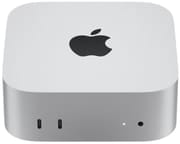
- +Lowest measured idle in the category (about 2.6W)
- +near-silent
- +efficient even under load
- -Limited base storage
- -macOS-only
- -fixed RAM at purchase
If instead the box will earn its keep running compute for hours every day, a local model, a render queue, a busy dev environment, then efficiency under load is worth paying attention to, and the lower-idle, lower-load machines pay you back. A Mac mini M4 or a low-TDP Intel N-series box doing eight hours of daily work costs roughly half what a Strix Halo machine does at the same duty cycle, and over the eighteen-to-twenty-four months most people keep a mini PC, that gap can cover a meaningful slice of the purchase price.
Beelink SER8
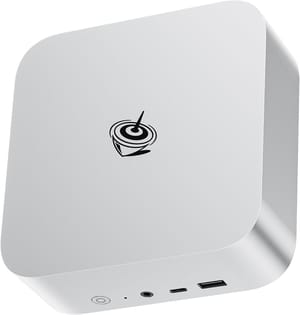
- +Strong all-round Ryzen 7 performance
- +7-10W idle
- +sensible price for the power
- -Pulls nearly 80W under full load
- -so heavy daily use adds up
GMKtec EVO-X2
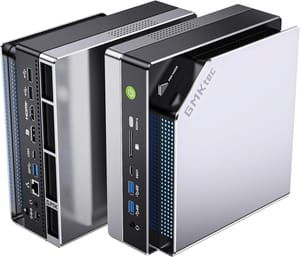
- +Ryzen AI Max+ 395 with 128GB unified memory
- +idle is a tame 8-14W
- -150-180W under load makes it the most expensive box here to run hard
- -plus real heat and fan noise
Measure your own box, plug in your own rate, and you have your number. For most always-on use cases that number is small enough to forget. If you want the broader buyer-decision context on the lowest-idle option, our take on whether the Mac mini M4 is worth it walks through the rest of that trade.


