

You bought the mini PC for the consolidation. One small box on the shelf was going to replace the old tower, the network drive, and the Raspberry Pi that kept falling over, so now it runs Jellyfin for the living room, a Proxmox node or two, Home Assistant, and maybe a small language model that answers questions at three in the morning. You pulled it out of the box, saw it came with a 1TB or 2TB SSD already installed, and moved on to the fun part. That bundled drive is the part nobody stops to look at, and on a budget Beelink, GMKtec, ACEMAGIC, or Kamrui box it is almost always the cheapest component the vendor could legally call an SSD.
That is not a scandal on a desktop. It becomes one the moment the box stops being a desktop and starts being a server that never sleeps. The drive that shipped in your mini PC was specified for a single user opening Chrome and saving the occasional file, and the workload you just gave it writes constantly, quietly, all day, every day. There is exactly one number that tells you whether that mismatch matters for your setup, and it is printed on every drive’s spec sheet: TBW, terabytes written.
Budget mini PCs commonly ship with QLC SSDs
To hit a low price, white-label and budget mini PCs commonly ship with a QLC drive, the four-bits-per-cell NAND that packs the most capacity into the lowest cost. There is no public tally of exactly which drive lands in which box, and vendors swap suppliers constantly, so treat any specific model as illustrative rather than a promise about your unit. A representative example of the class is the Samsung 870 QVO, which Samsung rates at 360 TBW for every terabyte of capacity: 360 TBW on the 1TB model, 720 on the 2TB, 1,440 on the 4TB, all backed by a three-year warranty. Work that rating back across three years and a terabyte and it lands at roughly a third of a full drive-write per day. For a person who writes a few gigabytes between breakfast and bedtime, that endurance budget is effectively infinite; you will replace the whole machine long before you exhaust it.
QLC earns that capacity by trading away write endurance, and the trade is structural, not a defect you can patch. Tom’s Hardware’s running roundup of the best SSDs makes the split plain across its endurance columns: the QLC budget tier sits well under its TLC siblings on rated writes at the same capacity. Newegg’s 2026 explainer on NAND types and write endurance frames QLC as the right pick for “high-capacity secondary storage, media archives, and budget-focused builds,” which is a precise description of what it is good at and a quiet warning about what it is not. The drive in your box was chosen to be the cheapest thing that boots Windows and stores a Steam library. It was not chosen to host VMs.
Why a 24/7 server eats the budget the desktop never touched
A server writes for reasons a desktop never does, and the multiplier that turns a trickle into a flood is write amplification. Proxmox is the clearest example, and its own community keeps documenting the problem. In one long thread on extreme SSD wearout, the distinguished member Dunuin lays out the math: “Here I got an average of factor 20. So writing 1TB of data inside a VM will cause 20TB of combined writes to the SSDs. So here the SSDs will die 20 times faster because of the exponential overhead / write amplification.” He goes on to explain why a copy-on-write filesystem like ZFS makes it worse: the overheads at each layer multiply rather than add, so a chain of small inefficiencies balloons not to 16x but to 240x. On a consumer drive with no power-loss protection and a thin spare area, that multiplication is what quietly burns the endurance budget.
The wearout reports in those threads are concrete enough to be useful. One user, Taomyn, ran a pair of Samsung QVO drives and reported, “After about 9-10months mine are at around 12/13%.” Project that line forward and a consumer QLC drive on a busy node burns a meaningful slice of its life every year. Another, xlemassacre, reported two Kingston NVMe drives at 36 percent after a single year, though that case carries a caveat worth repeating: the user later traced most of it to a runaway script hammering the Proxmox API and writing nearly 2TB a day, which they eventually cut to about 250GB. The lesson is not that every Proxmox box dies in a year. It is that server software writes in ways you do not see, and a thin endurance budget gives you no margin when something misbehaves.
Plex and Jellyfin add their own write load. Every time the server transcodes a file it did not have in the right format, it spills thousands of temporary chunks to disk, and unless you tell it otherwise those chunks land on the same drive that boots the OS. A surveillance recorder writing camera streams around the clock, a ZFS pool keeping its journal, a database flushing its write-ahead log: each of these is a steady drip onto a drive that was rated for a trickle. None of it is exotic. It is just the normal behavior of the always-on box this category was bought to become.
The one number, and the tiers that read it
TBW is the manufacturer’s promise of how many terabytes you can write to the drive before the warranty stops covering wear. Divide it by the drive’s capacity and you get TBW per terabyte, a clean figure you can compare across any two drives regardless of size. That single number is the whole game, and the useful way to read it is against your workload rather than in the abstract.
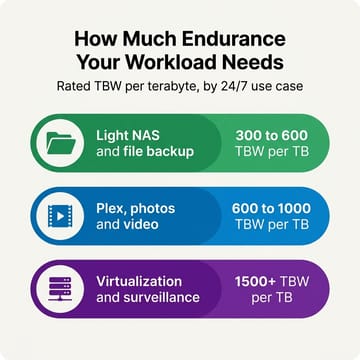
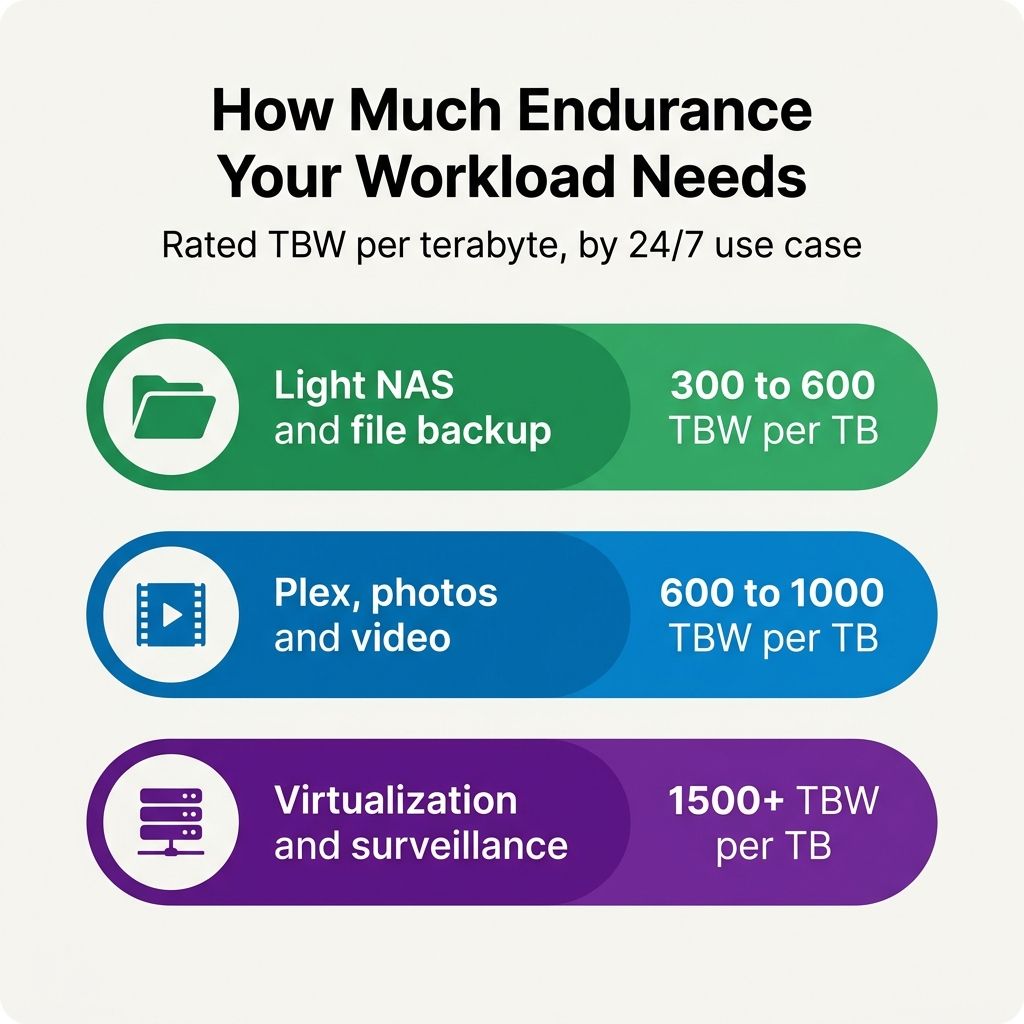
The NAS-drive vendor KingSpec offers one widely-cited rule of thumb in its best-SSD-for-NAS guide. It is a vendor blog rather than an industry standard, but the bands line up with what the Proxmox and Plex communities have learned the hard way. By that guide, light home NAS and file backup are fine on “300 to 600 TBW per TB,” photo and video storage and Plex streaming sit closer to “600 to 1000 TBW per TB,” and heavy multi-user work like surveillance and virtualization calls for “1500+ TBW per TB,” with the guide suggesting at least 600 TBW per terabyte as a baseline for anything you would call a NAS drive. Treat those as a sensible starting point rather than a certified spec. Hold them next to the roughly 360 TBW per TB of a typical consumer QLC drive and the mismatch is no longer a feeling; it is arithmetic. Such a drive clears the lightest band and falls short of everything above it.
This is the missing leg of a stool Starry Hope has been building. The 24/7 mini PC has already been measured for what it costs to run around the clock and weighed for whether fanless or active cooling fits the workload. Endurance is the spec that decides how long the storage inside it survives that duty, and it is the one the box’s own spec sheet is quietest about.
Does 2026 QLC close the gap? It narrows the speed gap, not the endurance gap
It is fair to ask whether newer QLC has caught up, because the NAND has improved. Newegg’s explainer highlights SK Hynix bringing 321-layer QLC into mass production with up to 56 percent better write performance than the previous generation. That is real progress, and it is worth being precise about what kind: those are throughput and latency gains, not endurance gains. The same piece offers no jump in rated program-erase cycles or TBW to go with the speed, and the published endurance numbers on shipping QLC drives have not moved to match TLC. Newer QLC writes faster. It does not, on the spec sheets that matter here, write longer. Treat the marketing about next-generation NAND as a speed story and keep reading the TBW line.
What to swap to, and what it buys you
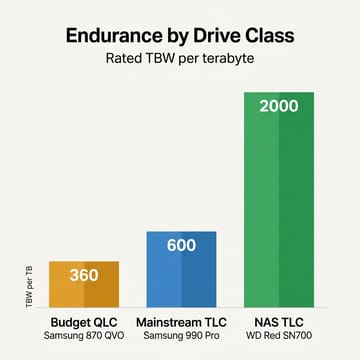
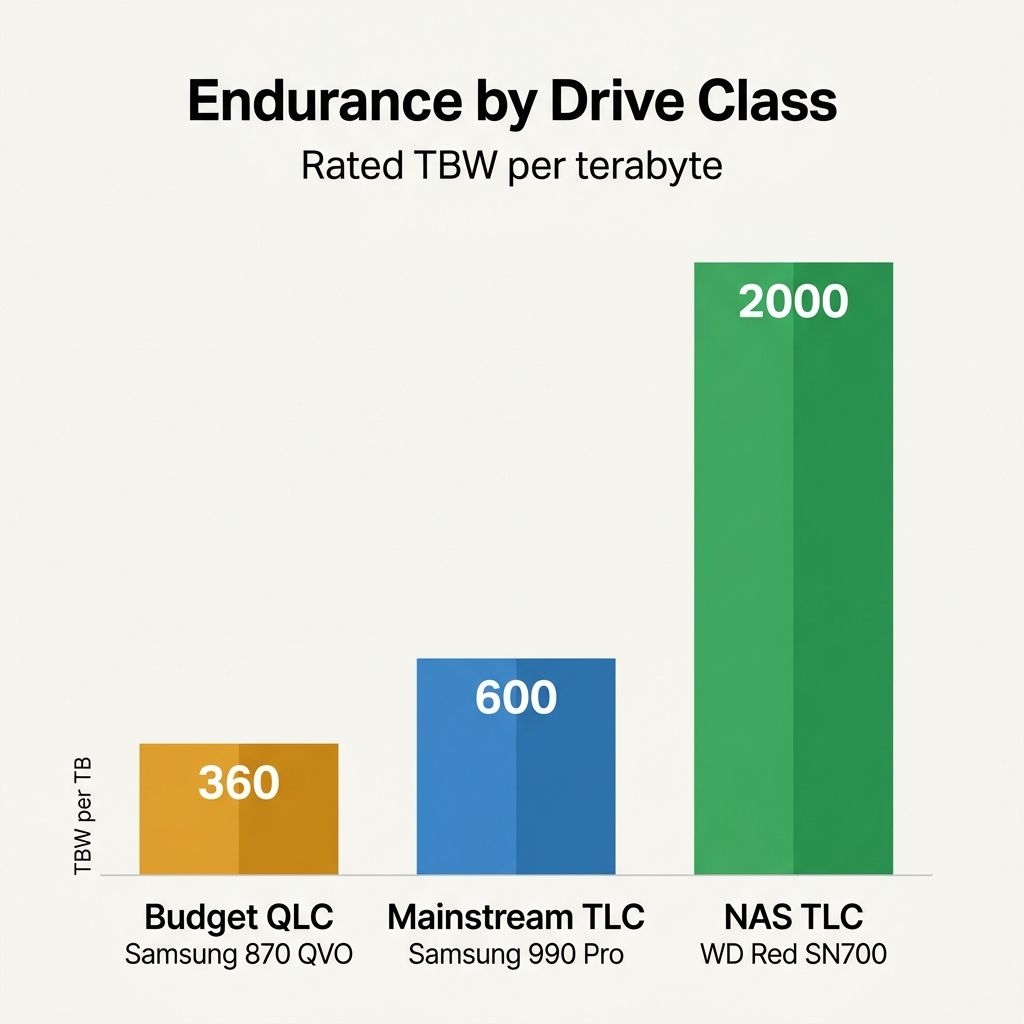
If your workload sits above the lightest tier, the fix is a TLC NVMe drive, and the gap in rated endurance is large enough to be worth the modest cost. A Samsung 990 Pro is rated at 600 TBW per terabyte; a Crucial T705 and a WD Black SN850X land at the same 600; and the NAS-targeted WD Red SN700 is rated by Western Digital at 2,000 TBW for its 1TB model, which is the kind of margin a virtualization host actually wants. (Western Digital’s own figure is 2,000 TBW; one well-regarded review measured the rating differently, so treat 2,000 as the manufacturer’s number rather than a lab result.) Against a 360 TBW per TB bundle, even the mainstream TLC options buy you most of a doubling, and the NAS drive buys you roughly five times the headroom.
| Drive | Class | Rated TBW per TB |
|---|---|---|
| Samsung 870 QVO | Budget QLC (typical bundle) | 360 |
| Samsung 990 Pro | Mainstream TLC | 600 |
| Crucial T705 | Mainstream TLC | 600 |
| WD Black SN850X | Mainstream TLC | 600 |
| WD Red SN700 | NAS TLC | 2,000 |
The rule of thumb that falls out of the table is simple. For a media library or a single-purpose file server, a mainstream TLC drive at 600 TBW per TB lands you squarely in the right tier. For a box that runs virtual machines, containers, or camera recording, reach for the NAS-class drive and stop worrying about the counter. This is a separate question from the SSD and DRAM price climate that has made every drive cost more this year: endurance is about what the drive can survive, not what it costs at checkout, and the few extra dollars for TLC are cheap insurance against rebuilding a server in eighteen months.
The mini PCs that make the swap painless
Half the value of buying right is buying a box you can actually open and upgrade, ideally one with more than one M.2 slot so you can keep the operating system on one drive and put the write-heavy pool on another. That separation is the practical payoff of everything above: a boot drive that mostly reads can stay on whatever the box shipped with, while the VMs, the camera streams, or the transcode scratch get a high-endurance TLC drive sized to the tier they fall in. Three machines in the catalogue make that easy at three very different scales.
MINISFORUM MS-01
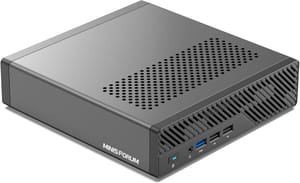
- +Triple M.2 slots (one Gen4x4 plus two more)
- +dual 10GbE SFP+
- +up to 96GB DDR5
- +U.2 drive support
- -Runs warm under sustained load
- -fans become audible
- -premium price for the class
Beelink ME Mini

- +Six M.2 PCIe 3.0 slots for up to 24TB
- +NAS-shaped chassis
- +low idle draw
- -RAM is soldered
- -PCIe 3.0 only
- -five of the six slots run at x1
MINISFORUM MS-S1 MAX
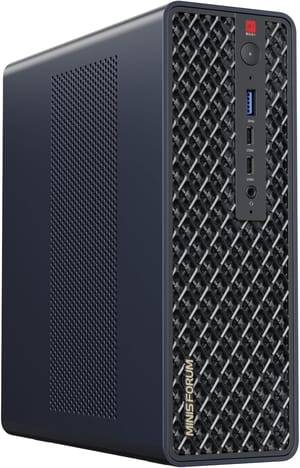
- +Ryzen AI Max+ 395
- +128GB unified memory
- +dual 10GbE
- +PCIe 4.0 M.2 slots
- -Expensive
- -memory is soldered
- -far more machine than a simple file server needs
If you cannot swap yet, make the bundle last
Sometimes the swap has to wait, and there are real, sourced ways to slow the bleed in the meantime. For Plex and Jellyfin, the biggest single lever is moving transcoding into RAM. CoreLab’s Plex optimization guide describes transcoding as generating thousands of temporary files and calls leaving them on the OS drive a “speed vs. lifespan” trade-off that leads to massive SSD wear. It points users with 32GB or more of memory to mount the transcode directory in RAM, where the writes cost the SSD nothing. On a Docker setup that means pointing the transcode path at shared memory and giving it room; on bare metal it means setting the transcoder’s temporary directory to a RAM-backed mount.
Proxmox has its own well-worn mitigations, collected in a thread on reducing SSD wearout. User readyspace gives the blunt version: “Move logs, swap, and RRD data off the SSD or into tmpfs/ramdisk to cut small writes.” Keeping the SSD for the OS and active VMs while pushing the chatter elsewhere is the whole idea. User cryptonym64 adds a specific tool: “Use log2ram. That virtually eliminates the minute logging entries that eat SSD.” It buffers logging in memory and flushes it on a schedule instead of writing every line straight to flash. None of these turn a QLC bundle into a NAS drive, but together they can cut the write volume enough to buy you the months you need before the replacement arrives.
Whatever you run, the move is the same and it is cheap: check the drive you already own before you trust it with the job. Most NVMe drives report a “Percentage Used” value through smartctl -a, an estimate of how much of the rated endurance is gone. Read it once a month for the first few months under your real workload. If it barely moves, the bundle is fine and you can leave it alone. If it is climbing a point or more every month, the drive in the box is telling you, in the one number that matters, that it was not built for the job you gave it, and now you know exactly what to swap it for.


