

The network port is the one spec on a home server that you cannot change cheaply later. RAM can be added, a second NVMe drive slots in, a bigger SSD replaces a smaller one. The NIC is soldered to the board, the chassis has room for two or maybe four jacks, and the expansion slot covers less of the gap than it appears to (its limits get their own section below). Whatever ports the box ships with are mostly the ports it will have in three years.
So the 2.5GbE-versus-10GbE choice is about lock-in. The question is whether the machine you are building will ever move data fast enough to notice, and what it costs to fix if the answer turns into yes two years from now. For a lot of home labs, 2.5GbE never becomes the bottleneck. For a smaller group, it becomes the bottleneck the first week an all-flash pool goes live, and this guide is about telling the two apart before the money is spent. If you are still working out the broader shape of the machine, our five questions to settle before you pick a mini PC covers the rest of the decisions.
A 2.5GbE link carries about 295 MB/s
Start with the number, because everything downstream depends on it. Network marketing quotes gigabits while storage tools report megabytes per second, so the two need translating before they can be compared. In XDA’s June 2026 breakdown of 10GbE on home NAS boxes, Ty Sherback lays out the practical figures: gigabit Ethernet delivers “roughly 113 MB/s of real throughput”, 2.5GbE lands at “280-295 MB/s in the real world”, and 10GbE sustains “well above the 1,000MB/s mark”.
Gigabit to 2.5GbE roughly triples your throughput; 2.5GbE to 10GbE roughly quadruples it again. Those multipliers only matter if something on either end of the wire can produce or consume data at that rate for longer than a few seconds.
What passes 2.5GbE at home, and what never does
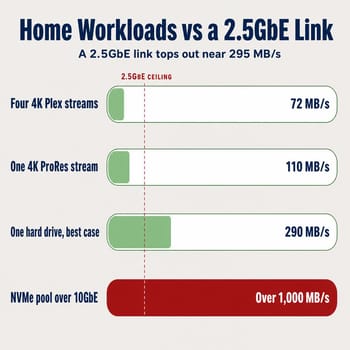
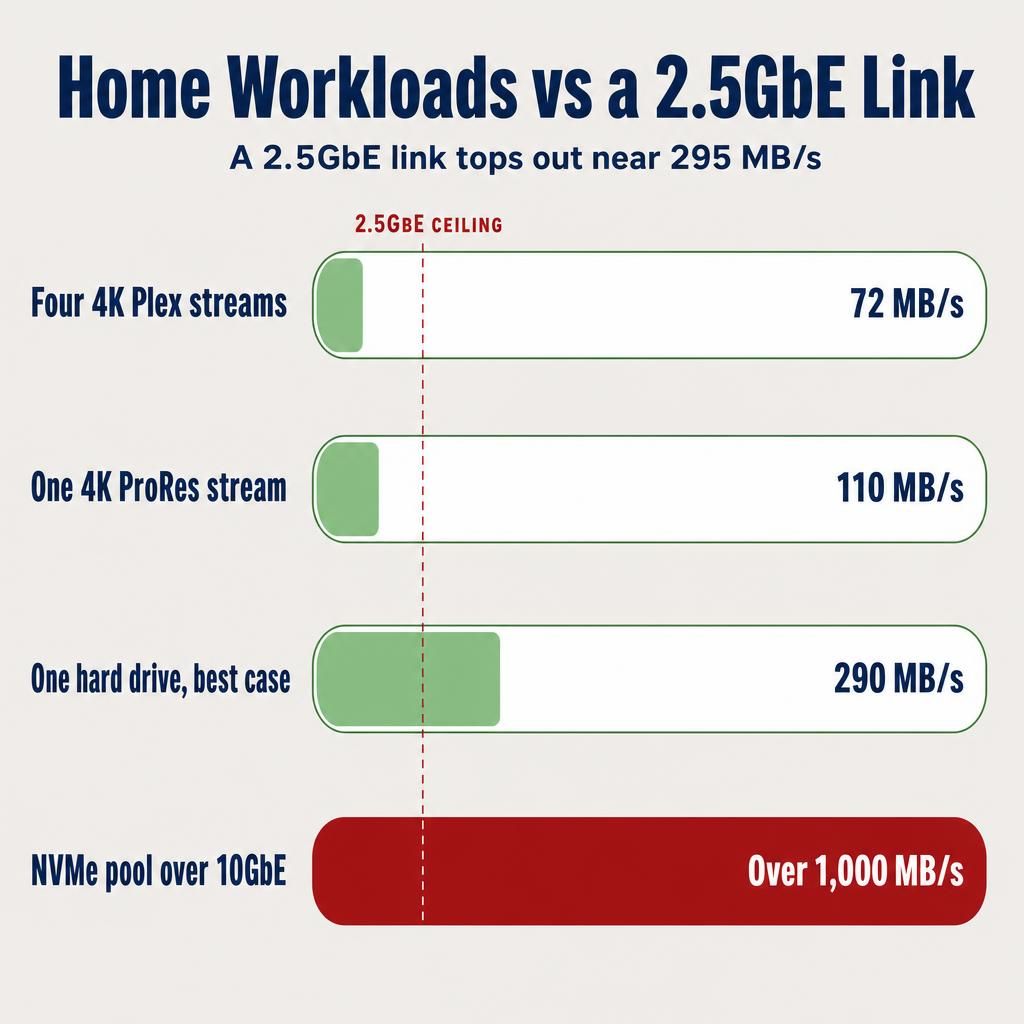
Take media streaming first. A 4K remux played back without transcoding is essentially the disc’s own stream, and the Ultra HD Blu-ray specification tops out at 144 Mbit/s of data rate, or 18 MB/s. Four people in the house watching four separate 4K remuxes at once lands near 72 MB/s, roughly a quarter of a 2.5GbE link. Sherback’s numbers agree from the storage side: “A single 4K ProRes 422 HQ stream runs about 110 MB/s, which is well below the requirements of that sort of link.” A Plex library is a random-read workload with long idle gaps.
Spinning disks do not get there either. A modern 7,200 rpm drive “peaks at roughly 260-290 MB/s” on its outer tracks and sags to “around 120-160 MB/s” as the heads work inward, which means a single hard drive “on its very best day, only just brushes 2.5GbE and comes nowhere near 10GbE”. Two or three drives in a mirror do not change that conclusion much. Container hosting, Home Assistant, a Pi-hole, incremental backups of a laptop, a Nextcloud instance for a family: none of these move enough sustained data to touch the ceiling.
The workloads that do pass 2.5GbE move one large block of data as fast as both ends allow. A full-image backup of a workstation to an all-flash pool is the common one. Restoring that image is the other half, and the restore is where the wait hurts, because a restore happens on a bad day. Editing video directly off the server is the case Sherback singles out: “One of the only tasks that’s worth a 10GbE link is video editing directly from a NAS,” with high-bitrate formats like ProRes RAW or 6K and 8K sources. And in a multi-node lab, Proxmox live migration is a memory-sized transfer with nothing to slow it down. One poster in a 2021 Proxmox forum thread on live migration performance reported 300 to 400 MiB/s in the secure migration mode and around 1.6 GiB/s in the insecure mode, which on a 32GB guest is the difference between roughly 95 seconds and roughly 20 seconds. The hardware is unstated and the thread is five years old, so treat the figures as a rough scale rather than a benchmark.
Moving a 32GB guest’s memory across a 2.5GbE link takes about 110 seconds of pure transfer time no matter how fast the nodes are. On 10GbE the same transfer is roughly 30 seconds. Whether 80 seconds matters depends on how often you migrate.
The PCIe slot is a poor plan for adding 10GbE later
The obvious plan is to buy a box with an expansion slot and add a 10GbE card later if the need shows up. The MINISFORUM MS-01 is the best test of that plan, because its slot has been tried against more add-in cards in public than any other mini PC’s.
When ServeTheHome reviewed the MS-01, Patrick Kennedy pushed a long list of add-in cards through that low-profile, single-slot, x8-wired slot. Most cards worked. A NICGIGA Aquantia AQC113C 10GBASE-T adapter “worked no problem,” a Mellanox ConnectX-4 Lx dual 25GbE card “worked without issue,” and a Broadcom LSI SAS 3008, a MikroTik CCR2004 router card, and an AMD E9173 GPU all went in fine.
A QNAP QM2-2P2G2T, exactly the kind of card a NAS builder would pick because it adds M.2 slots and 2.5GbE in one go, stopped the machine from starting: “Sadly, the system would not boot with this card installed.” An NVIDIA BlueField-2 DPU and a 16-port Broadcom SAS controller did not work either. Two more only fit after partial disassembly, since Intel’s quad-port X710-da4 “had an issue with the cover and retention mechanism…that interfered with the top SFP+ cage,” and a Broadcom BCM9574 “was a few mm too long for the chassis” until the front faceplate came off. So the slot works with most cards, refused to boot with one, and needed the case taken further apart than the manual suggests for two others.
The physical constraints are getting tighter as the line evolves. Minisforum’s own specification for the newer MS-03 lists a full-length x16 physical slot wired for PCIe 4.0 x4, half-height single-slot cards, maximum length 170mm. That is half the electrical width of the MS-01’s x8 slot. Covering the MS-03’s announcement, ServeTheHome’s Ryan Smith noted that “Minisforum is big on PCIe expandability with the MS-01, and they are again on the MS-03,” and the slot is real. It is also narrower than the connector implies: a x4 Gen4 link halves the electrical headroom the MS-01 had, and half-height single-slot rules out a full-height card no matter how much room the x16 physical connector suggests.
The retrofit also shows up on the power bill. Scott Laird measured a pair of MS-01 units and found them idling at 13.2W and 14.4W on their built-in networking. Adding discrete Mellanox NICs to the slots pushed the pair to 59.2W combined, and he noted “the datasheet for the NICs says that they draw around 20W each.” Onboard 10GbE is included in a box’s normal idle figure; a bolted-on enterprise NIC is not, and on a machine that runs every hour of every year, 20 watts is real money. He also flagged that one unit was linked over fiber and the other over direct-attach copper, and that the fiber connection “should have added about 6W to the total”; more on cabling below.
The slot is still useful for a storage controller, an OCuLink card, or a GPU you have confirmed fits. It is a bad way to postpone the networking decision.
The boxes that ship 10GbE on the board
The practical answer is to buy the ports up front, and in 2026 the list of mini PCs that ship them is short but no longer a single model.
The MINISFORUM MS-01 is still the entry point. Two SFP+ ports run on an Intel X710 NIC, two 2.5GbE RJ45 ports run on Intel i226 silicon, and all of it fits in a 196 by 189 by 48mm chassis of about 1.78 liters. Kennedy called the port layout “the big feature, of course,” describing the SFP+ pair as “10GbE ports powered by an Intel X710 NIC, a well-supported network interface today.” The CPU is the dated part: the top tier is an Intel Core i9-13900H, a 2023-era Raptor Lake-H mobile chip, which carries a small lab comfortably but sits several generations behind current mobile silicon. HomeTechOps lands on the same shortlist in its Proxmox mini PC buyer’s guide, routing readers to the MS-01 if “you move large files or want a fast NAS/Proxmox box on 10GbE without add-in cards.”
MINISFORUM MS-01
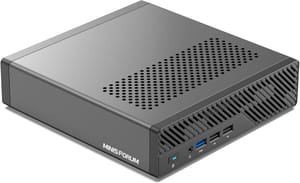
- +Dual 10GbE SFP+ on an Intel X710
- +dual 2.5GbE
- +PCIe 4.0 x8 slot
- +three M.2 slots
- -2023-era mobile CPU
- -audible fan under load
- -higher idle draw than a plain 2.5GbE box
The MINISFORUM MS-A2 is the same idea with a much stronger processor. It pairs an AMD Ryzen 9 9955HX (16 cores, 32 threads) with the same dual SFP+ X710 configuration in a 1.78-liter chassis, and its x16 slot runs at PCIe 4.0 x8 with splitting support. Kennedy’s verdict was that “with the Minisforum MS-A2, we get what is going to be an almost perfect homelab system for many of our readers,” but the same review flags one complication: Minisforum mixed an Intel i226-V and a Realtek RTL8125 for the two 2.5GbE jacks alongside the X710, so “you need three different NIC drivers from two vendors to get the rear wired networking to work.” On a mainstream Linux distribution that is a non-event. On a stripped-down hypervisor image or an older BSD-based firewall build, it is a thing to check first.
MINISFORUM MS-A2
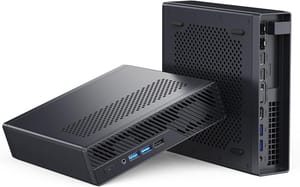
- +16-core Ryzen 9 9955HX
- +dual 10GbE SFP+
- +splittable PCIe 4.0 x8 slot
- +three M.2 slots including U.2
- -Three NIC drivers from two vendors
- -minimal integrated graphics
- -240W external brick
- -audible fan under sustained load
The newest entry is the MS-03, and it adds a port the other two lack: alongside two 10GbE SFP+ ports on an Intel X710, it ships one 10GbE RJ45 port on a Realtek RTL8127 and one 2.5GbE RJ45 on an Intel i226-LM. The copper 10GbE jack lets a machine join a 10GBASE-T network without a transceiver or a switch change. Smith had flagged the gap in ServeTheHome’s preview coverage, writing that “the use of 2.5GbE for the RJ45 jacks is a surprise when proper 10GBASE-T 10GbE has come down so much.” The tradeoff is the narrower x4 slot noted above. If the MS-03 is the box you want, treat it as a 2026 purchase decision on its own merits rather than an MS-01 with better ports.
Two more boxes sit at the edges of this decision. The MINISFORUM MS-S1 MAX takes the copper route with dual 10GbE RJ45 ports on Realtek RTL8127 controllers, which suits a house already wired with Cat6. The MINISFORUM MS-02 Ultra skips past this article’s question entirely with dual 25GbE SFP28 ports plus a 10GbE and a 2.5GbE jack, in a 4.8-liter chassis.
SFP+ or 10GBASE-T
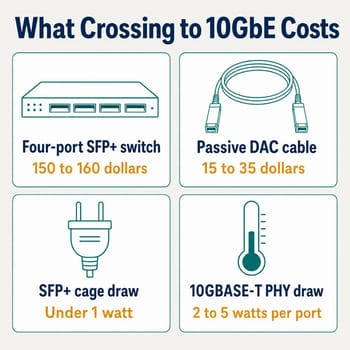
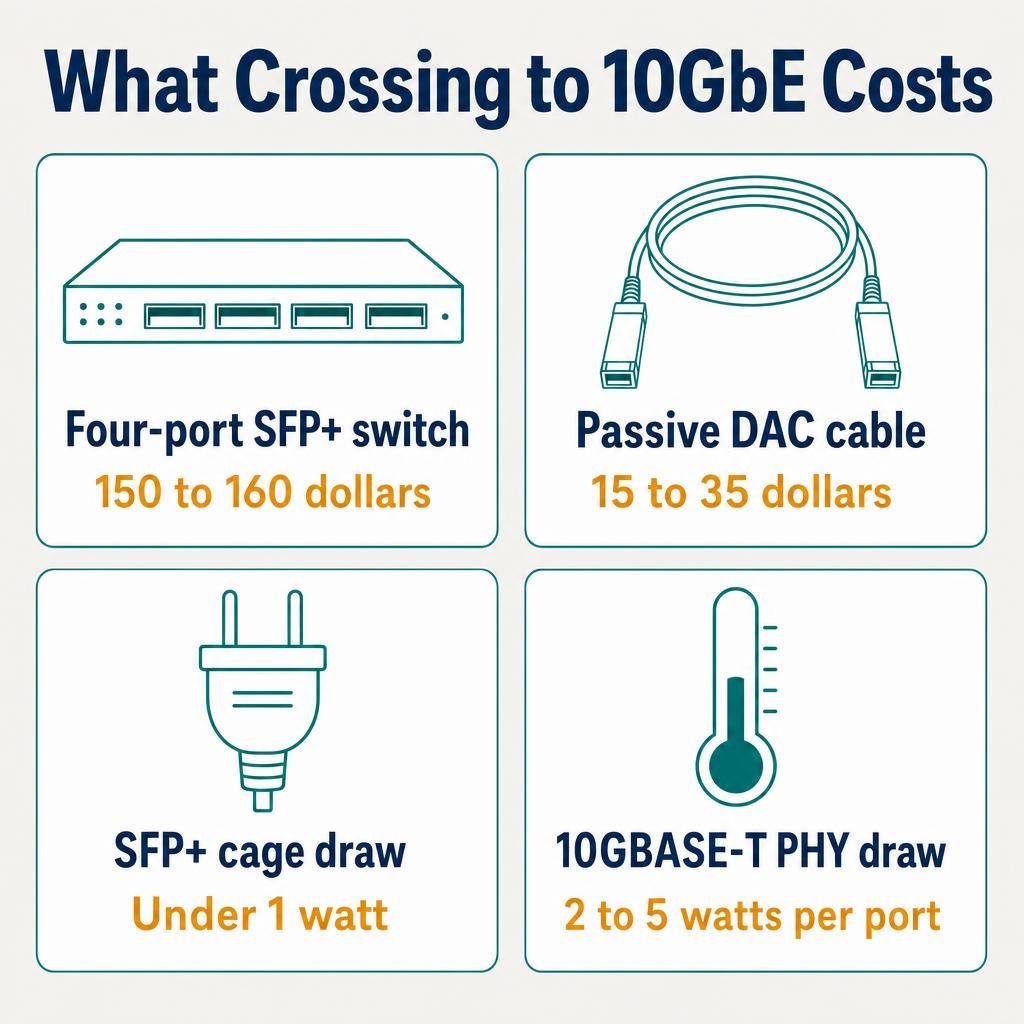
Buying the ports is half the cost; the other half is everything the ports plug into, and the copper-versus-optics question decides most of it. TechFuelHQ’s 2026 budget guide to 10GbE at home prices the two routes plainly. A four-port MikroTik CRS305-1G-4S+IN lists at $149 on MikroTik’s own spec page and about $157 in the guide’s survey, its eight-port sibling runs about $280, and an eight-port 10GBASE-T switch like the TP-Link TL-SX1008 sits near $400. Cabling favors SFP+ by a wide margin too, since “3m passive 10G DACs sit around $15-$20 generic, $25-$35 name brand” and a direct-attach cable needs no transceiver on either end.
Power costs continue after the purchase. The same guide notes that “RJ45 10GBASE-T PHYs run hot,” typically drawing 2 to 5 watts per port, while an SFP+ cage on a passive DAC draws under a watt. The cage is not the whole picture, since the NIC controller behind it draws its own 5 to 7 watts depending on the silicon, so the gap is narrower than a cage-to-PHY comparison makes it look. It is still a gap, and multiplied across a switch running continuously the copper route costs more per year than the sticker difference suggests. Their conclusion is blunt: buy SFP+ if you have any choice, for “cheaper hardware, bigger ecosystem, smaller power bill, and the used market keeps it that way.”
The counterargument is distance and convenience. Passive DAC cables top out around 5 meters and active ones around 10, so an SFP+ link works when the server and the switch share a rack or a closet and gets complicated when they do not. If your server lives in a basement and your desk is two floors up over existing Cat6, 10GBASE-T is the route that does not involve pulling fiber, and the MS-S1 MAX or the MS-03’s copper jack exist for exactly that house. Our pfSense and OPNsense router guide covers the same NIC-choice reasoning from the firewall side, where port count matters more than port speed.
Two things worth trying before you spend the money
If you already own a 2.5GbE box and suspect you have outgrown it, there are two cheaper moves to test first.
The first is SMB Multichannel, and it costs nothing to try. Microsoft’s documentation says it is “enabled by default” and describes the mechanism directly: SMB “creates multiple TCP/IP connections for a single session” across available interfaces, so a client and server that each have two 2.5GbE ports can use “the combined network adapter bandwidth that is available” for one transfer. Two 2.5GbE links working together land near 590 MB/s, which is not 10GbE but is double where you were, and two ports is standard equipment on both the MS-class boxes and the cheap NAS cubes.
The second is knowing what link aggregation will not do, since bonding two ports is the cheaper-looking move. LACP hashes each flow onto one physical link, so a single large file copy between one client and one server runs at the speed of one member link no matter how many you bond. Aggregation raises total throughput when several clients pull at once and adds redundancy if a cable fails; it does not make one backup job finish sooner.
What buying into 10GbE costs you
The 10GbE boxes carry three real downsides.
Running cost is the first. TechFuelHQ’s homelab roundup argues this is the axis that should decide a 24/7 machine at all: “The two axes that actually decide it are idle power (what it costs you every hour of every day) and capability.” Laird’s 13.2W and 14.4W idle figures on stock MS-01 units show onboard SFP+ is not a large power sink, but it is still above what a small N150 NAS cube draws at idle, and the number climbs fast the moment a discrete NIC or a full stack of drives joins the box.
Noise and heat are the second. These are actively cooled workstation chassis with a lot of silicon in a small volume, and they get audible under sustained load in a way a fanless or lightly cooled N150 does not. If the server lives in a bedroom or an office, listen to one before you commit.
Price is the third, and it is not just the box. Both MS-class machines sell as barebones as well as configured systems, priced by CPU tier, and the barebone is not automatically the cheaper start. The homelab roundup cited above calls the problem the barebone trap: DDR5 pricing through 2026 has run high enough that a preconfigured machine sometimes costs less than a barebone plus the memory to fill it. Price the complete configuration, tier by tier, rather than assuming the empty box wins. Then add the switch and the cables from the section above, roughly another $165 to $195 before a single drive goes in, none of which applies to a Beelink ME Mini plugged into a 2.5GbE switch you already own.
Beelink ME Mini
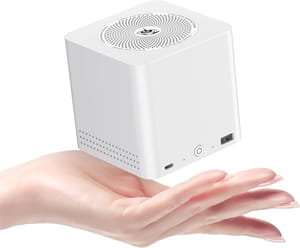
- +Six M.2 slots for up to 24TB
- +dual 2.5GbE
- +tiny 99mm cube
- +low idle draw
- -No 10GbE and no expansion slot
- -soldered RAM
- -N150 CPU
- -five of six M.2 slots run at PCIe 3.0 x1
How to decide
Write down the single biggest file operation your server will perform in a normal month. If it is “stream a movie” or “back up two laptops overnight,” 2.5GbE is enough, and the 10GbE premium buys a spec you will not use. Put the savings into drives, and read our piece on why bundled mini PC SSDs are wrong for 24/7 duty before you pick them.
If that operation is “restore a 2TB image,” “cut 6K footage off the server,” or “migrate a VM between two nodes while it is running,” buy the ports now. The retrofit path through a mini PC’s PCIe slot is narrower than it looks, costs 20 watts of idle draw when it works, and by then you will have already lived with the slow version for a year.
If you are unsure, the tiebreaker is whether the machine will ever have a second node beside it. Single-box home servers rarely outgrow 2.5GbE. Two-node clusters that migrate guests between them outgrow it almost immediately, and that second workload is the one these boxes are shaped for: four NICs, an expansion slot, and enough cores to run guests rather than just serve files. If a cluster is anywhere in the plan, the ports are a prerequisite.
For the wider field of what each box offers at each price, our mini PC comparison chart lists the LAN configuration for every model and filters down to the ones carrying 2.5GbE or better, and the mini PC as a NAS guide covers the storage and software side of the same purchase.


