
MINISFORUM MS-03
Updated on

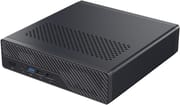
The MINISFORUM MS-03 drops Intel’s Panther Lake silicon into the same sub-2-liter chassis the MS-01 uses, and points it at home labs, edge servers, and virtualization hosts rather than at a desk. Minisforum sells it in two CPU tiers: a 12-core Core Ultra 5 336H and a 16-core Core Ultra 9 386H, both vPro-enabled parts from Intel’s Core Ultra Series 3 family. Two 10G SFP+ cages on Intel X710 controllers sit alongside a 10GbE RJ45 and a 2.5GbE RJ45, which is one more 10-gigabit interface than the MS-01 carried. Storage moves to three M.2 slots with the first two wired for PCIe 5.0 x4, and an M.2-to-U.2 adapter ships in the box so an enterprise NVMe drive can go in instead. The physical PCIe x16 slot survives from the MS-01, though Minisforum wired this one at PCIe 4.0 x4 rather than x8.
Pros and Cons
| Pros | Cons |
|---|---|
| Three 10-gigabit ports (2x SFP+, 1x RJ45) plus a vPro-enabled 2.5GbE port | PCIe expansion slot dropped from the MS-01’s x8 to PCIe 4.0 x4 |
| Two PCIe 5.0 x4 M.2 slots, the second also fitting 22110 drives | Third M.2 slot runs at PCIe 4.0 x1, so it is not a peer of the other two |
| M.2-to-U.2 adapter included for enterprise 2.5-inch NVMe drives | Fan noise under sustained CPU load is high in the default balanced mode |
| vPro on both CPU tiers, so out-of-band power and console control | 10GbE copper port uses a Realtek controller rather than Intel |
| Measured power draw roughly half the MS-01’s under full CPU load | 240W external power brick, and no USB-C Power Delivery input |
| Up to 128GB DDR5 across two SO-DIMM slots, barebone SKUs available | SO-DIMM slots sit under the CPU cooler, so a RAM swap means unscrewing it |
Related Videos
MINISFORUM MS-03 Comparison Chart
6 configurations
| Configuration | Processor | RAM | Storage | OS | List price | Amazon price | Compare |
|---|---|---|---|---|---|---|---|
| Barebone/Core Ultra 5 336H | Core Ultra 5 336H | None | None | No OS | $949.00 | Details
| |
| 32GB/1TB/Core Ultra 5 336H | Core Ultra 5 336H | 32 GB | 1 TB SSD | Windows 11 Pro | $1649.00 | Details
| |
| 64GB/2TB/Core Ultra 5 336H | Core Ultra 5 336H | 64 GB | 2 TB SSD | Windows 11 Pro | $2199.00 | Loading... | Details
|
| Barebone/Core Ultra 9 386H | Core Ultra 9 386H | None | None | No OS | $1249.00 | Loading... | Details
|
| 32GB/1TB/Core Ultra 9 386H | Core Ultra 9 386H | 32 GB | 1 TB SSD | Windows 11 Pro | $1899.00 | Details
| |
| 64GB/2TB/Core Ultra 9 386H | Core Ultra 9 386H | 64 GB | 2 TB SSD | Windows 11 Pro | $2499.00 | Details
|
Specs shared by every configuration
| GPU | Integrated Intel Graphics |
|---|---|
| Dimensions width x length x thickness | 7.72 x 7.44 x 1.89 inches (196.09 x 188.98 x 48.01 mm) |
| Weight | 3.09 lbs (1.4 kg) |
| WiFi | Wi-Fi 7 (802.11be) |
| Bluetooth | 6 |
| Ethernet | 4 Ethernet ports at 10 Gbps |
| HDMI | 1 Full-Size HDMI Port |
| DisplayPort | DP 2.1 Alt Mode via 2 USB4 ports |
| VGA | No VGA Ports |
| USB Ports | 2 USB 2.0, 3 USB 3, 2 USB-C (2 USB4) Front: 1x USB-A 10Gbps, 2x USB 2.0. Rear: 2x USB-A 10Gbps, 2x USB4 (40Gbps) |
| Thunderbolt Ports | No |
| OCuLink | No |
| Internal SATA Ports | No SATA ports |
| Card Reader | No Card Reader |
| Headphone Jack | combo |
| Fanless | No |
| VESA Mount | No |
| In the Box | Main unit, 240W power adapter, power cord, HDMI cable, SSD heatsink, M.2-to-U.2 adapter and screws, manual |
| Expandability | Up to 128GB DDR5 across 2 SO-DIMM slots. 3x M.2 NVMe (2x PCIe 5.0 x4, 1x PCIe 4.0 x1), U.2 drives via the included adapter. PCIe x16 physical slot wired at PCIe 4.0 x4 for half-height single-slot cards up to 170mm. |
Related Mini PCs
-
 MINISFORUM 795S7The MINISFORUM 795S7 is a 7-liter small form factor PC built around the 16-core AMD Ryzen 9 7945HX…
 -
 MINISFORUM MS-A1A unique mini workstation featuring a socketed AMD AM5 desktop CPU, four M.2 NVMe storage slots,…
 -
 Minisforum AtomMan G1 ProThe Minisforum AtomMan G1 Pro pairs a 16-core Ryzen 9 8945HX with a low-profile desktop NVIDIA RTX…
 -
 ACEMAGIC F5AA one-liter AMD Ryzen AI 9 HX 470 mini PC with Radeon 890M graphics, dual USB4, an OCuLink eGPU…
 -
 ASUS Ascent QN10The ASUS Ascent QN10 is a 0.7-liter Windows on Arm desktop built on the 18-core Snapdragon X2…
 -
 Beelink SER9The Beelink SER9 runs AMD's 12-core Ryzen AI 9 HX 370 (Strix Point) with Radeon 890M graphics, 32GB…
Panther Lake silicon in a two-liter box
The chassis measures 196 x 189 x 48 mm and weighs 1.4 kg, and it is visually identical to the MS-01 and MS-A2 that share the shell. The front face carries a power button, a 3.5mm combo jack, one USB-A 3.2 Gen 2 port and two USB 2.0 Type-A ports. The rear adds two more USB-A 3.2 Gen 2 ports, two USB4 Type-C ports rated at 40Gbps with DisplayPort 2.1 Alt Mode, an HDMI 2.1 FRL output good for 4K at 120Hz, the four network interfaces, and a barrel jack for the 240W adapter. Cooling is a two-heatpipe heatsink with an 83mm turbo fan and phase-change thermal material, with a second small fan over the Gen 5 SSD slots; Minisforum rates the balanced profile at 32dB to 45dB from 50cm in its own anechoic-chamber testing, and offers a quieter profile in the BIOS that lowers both power limits to 45W.
Both CPU tiers are Panther Lake parts that Intel launched in the first quarter of 2026 on its 18A process, and both drop simultaneous multithreading entirely. The Core Ultra 9 386H has 16 cores and 16 threads (four performance cores boosting to 4.9 GHz, eight efficient cores, and four low-power efficient cores) with 18MB of cache, a 50 TOPS NPU and a four-core Intel Graphics iGPU rated at 40 TOPS. The Core Ultra 5 336H trims that to 12 cores and 12 threads at up to 4.6 GHz, with a 47 TOPS NPU and a 37 TOPS iGPU. Intel rates both at 25W base power; Minisforum runs the 386H at 70W PL1 and 80W PL2 in balanced mode and the 336H at 65W for both limits. For scale against the box this replaces, PassMark puts the 386H at roughly 36,200 against 29,600 for the i9-13900H in the MS-01, a gain of about 22 percent in multi-threaded throughput from a chip Intel rates at 25W base and 80W turbo against the older part’s 45W base and 115W turbo.
Three M.2 slots sit inside: one 2280 slot on PCIe 5.0 x4 that also accepts a U.2 drive through the bundled adapter, a second 2280 or 22110 slot on PCIe 5.0 x4, and a third 2280 or 22110 slot wired at PCIe 4.0 x1. That third slot is worth knowing about before you plan a three-drive array, because it has a fraction of the bandwidth of the other two. The PCIe x16 physical slot takes half-height single-slot cards up to about 6.7 inches long and 0.8 inches thick but is electrically PCIe 4.0 x4, half the lanes the MS-01 offered. Memory is two DDR5 SO-DIMM slots supporting 5600, 6400 and 7200 MT/s and up to 128GB, though Minisforum ships the configured SKUs at 5600. The Amazon title for the 336H configuration advertises “5X SSD Slot”, while the same listing’s own description, Minisforum’s spec sheet and both reviewers describe three. The retail metadata also lists the model as “DeskMini”, which is not a name Minisforum uses for this machine.
Reviewer Insights
Robtech
Robtech’s MS-03 versus MS-01 comparison benchmarks a prebuilt 386H unit with 32GB and a 1TB SSD against its predecessor, repeating the run across the balanced and quiet power modes and again with a second memory stick fitted. He describes it as “Minisforum is back with the MS03, a dedicated workstation mini PC built for serious workloads.” Walking the rear panel, he counts off the barrel jack, dual USB-A, HDMI 2.1, dual USB4, the 10-gigabit and 2.5-gigabit LAN ports and the two SFP cages, and concludes “Yep, networking is definitely a strong point.”
The prebuilt he received shipped single-channel: “Unfortunately, this one comes with just a single 32 GB DDR5 5600 RAM stick instead of 2 x 16, which will affect both CPU and iGPU performance.” He re-ran the suite with a second stick installed to quantify it. In Cinebench single-core the MS-03 came in 22 percent ahead of the MS-01 regardless of memory configuration, and 36 percent ahead in multi-core out of the box, with quiet mode costing about 11 percent of that multi-core result. Geekbench single-core rose 15 percent over the MS-01, but multi-core out of the box fell behind the older machine and only moved ahead by 15 percent once the second stick went in. Graphics scaled hardest of all: 3DMark Time Spy improved 22.5 percent with one stick and 54 percent with two, and Steel Nomad improved 59 percent and 94 percent respectively, which he summarized as “So, easily a multi-generational improvement in the iGPU.”
Fan noise went the other way: “fan noise out of the box is loud when the CPU is stressed”, the highest of the mini PCs in his comparison set, with quiet mode described as much more reasonable and the bottom fan tunable through the BIOS because it is PWM. He measured idle power draw well below the MS-01 and a lower maximum, and found peak CPU temperature slightly better than the older box. He also flagged the bundled power supply and the lack of a USB-C charging path, saying “The power brick is ginormous and USB C PD is not an option.” His value verdict was “The build quality is nice. The price is not”. He still landed on the machine being hard to substitute, noting “there aren’t exactly a huge amount of options if this is what you need for your usage case.” Separately, he confirmed Ubuntu ran with all network ports, HDMI audio, Wi-Fi and Bluetooth working, that Windows 11 Pro on the prebuilt came back clean on a malware scan, that an external GPU over USB4 worked, and that the BIOS exposes no RAID option.
VirtualizationHowto
Brandon Lee’s hands-on review at VirtualizationHowto approaches the MS-03 from the Proxmox side, on a review unit supplied by Minisforum, and against a fleet of MS-01s he has run since early 2024. He writes that “The MS-03 feels like THE evolution of the MS-01” and that “The networking is one of the definite strong suits of the MS-03”. He notes the MS-03 gains a 10-gigabit interface over the MS-01 by replacing one of the older machine’s 2.5GbE ports, and reports that a fresh Proxmox 9.2 install recognized all four adapters without intervention.
Running the MS-03 at full CPU load, he recorded that “With the MS-03, under 100% CPU load, I saw 75.9 watts of power draw, almost half of what I saw with the MS-01.” Idle sat a little over 13.3 watts on his meter, with no VMs running and only the 2.5GbE port connected. He also calls vPro one of the sleeper features of these Intel CPUs, having built out-of-band power and console management across five Proxmox nodes on his MS-01 cluster, where it “has actually turned out to be a killer feature for me in the home lab”; the 386H is a vPro part, so the same path is available here.
He singles out the third M.2 slot’s single PCIe lane as a detail that is easy to miss when planning a three-drive ZFS pool, and points out that the expansion slot’s drop from x8 on the MS-01 to x4 halves the bandwidth available to an add-in card. He would rather see Intel silicon on the 10GbE copper port than the Realtek RTL8127 Minisforum used, and says that is the part he intends to watch under Linux over a longer run. The fans ramp up and down noticeably, and were audible under the full-load test in a way his MS-01s are not.
His video version of the same review frames the machine against the five MS-01 nodes he already runs, and puts the CPU gain at “roughly 24% faster while also being considerably more power efficient” than the i9-13900H. He repeats the idle figure on camera (“I measured just a little over 13 watts”) and is more pointed about noise than the written piece: “I’ve noticed that the fans tend to ramp up and down quite a bit”, and at 100 percent utilization “the fans got to be very noticeable”, though he calls the box extremely quiet at idle. On price he cautions that “this definitely isn’t an impulse buy mini PC”. His closing answer to whether he would rebuild the five-node cluster on MS-03s: “based on what I’ve seen so far, I think for me, I probably would.”
ETA PRIME
ETA PRIME’s first look is the only one of the three that puts a graphics card in the expansion slot, an Intel Arc B50 with 16GB of VRAM carried over from his MS-02, and then games on it. His framing is that “they call this a mini workstation, but you can definitely game on it because this does support a full-size PCIe slot internally.” He recorded Geekbench 6 scores of 2,727 single-core and 15,323 multi-core on the 386H, a 3DMark Time Spy total of 8,512 with the B50 fitted, and then ran Cyberpunk 2077, Forza Horizon 6, Crimson Desert, Mortal Kombat 1 and Red Dead Redemption 2 at 1440p, several of them leaning on Intel’s XeSS frame generation. On the integrated graphics he is blunt: “For the built-in iGPU, unfortunately, it’s not going to be on par with something like the B390”, and the dual-slot card he used does not fit the machine as shipped, since “the cover of the MS03 won’t fit on here”, so he swapped in a taller 3D-printed lid. One caution on his spec commentary: he describes the internal slot as PCIe 5.0 x8 and all three M.2 slots as PCIe 5.0, where Minisforum’s spec sheet, Robtech and Brandon Lee all put the expansion slot at PCIe 4.0 x4 and the third M.2 at PCIe 4.0 x1.
A home-lab node built around its networking
A Proxmox cluster node, a high-speed NAS front end, an edge server or a software router are the jobs the three 10-gigabit ports, vPro on both CPU tiers and a measured full-load draw around half the MS-01’s are built for. Barebone SKUs on both CPU tiers matter given what memory and storage cost in 2026, and the two SO-DIMM slots mean nothing is soldered down.
The expansion slot lost half its lanes, the third M.2 slot runs at PCIe 4.0 x1 instead of matching the other two, the 10GbE copper port uses a Realtek controller, and both Robtech and Brandon Lee found the fans clearly audible under sustained load, with Robtech noting the bottom fan is PWM and its curve can be dropped in the BIOS. The four-core Intel Graphics iGPU is the smaller of the two Panther Lake graphics configurations, so gaming sits outside what this box does well despite the large gain over the MS-01. If graphics matter more than networking, the GMKtec EVO-T2 pairs an X-series Panther Lake chip with the much larger Arc B390, and our overview of the Panther Lake NUCs and their Arc B390 graphics covers that side of the lineup. If you want more PCIe lanes and a full desktop GPU slot in the same family, the MS-02 Ultra is the bigger and hotter answer.
For those comparing options, see our Mini PC Comparison Chart.
Frequently Asked Questions
What processor options does the MINISFORUM MS-03 come in?
Minisforum’s US store lists six MS-03 SKUs across two chips. The Core Ultra 9 386H has 16 cores and 16 threads (4 performance, 8 efficient, 4 low-power efficient) boosting to 4.9 GHz, an 18MB cache and a 50 TOPS NPU; the Core Ultra 5 336H has 12 cores and 12 threads (4 performance, 4 efficient, 4 low-power efficient) boosting to 4.6 GHz with a 47 TOPS NPU. Both are vPro-enabled Panther Lake parts rated by Intel at 25W base power. Liliputing’s announcement coverage reported a choice of at least three chips, adding a Core Ultra 7 356H tier, but that configuration is not among the SKUs Minisforum’s US store sells as of August 2026.
How many M.2 slots does the MS-03 have, and are they all the same speed?
Three, and no. The first is an M.2 2280 slot on PCIe 5.0 x4 that also accepts a U.2 enterprise SSD through the M.2-to-U.2 adapter included in the box. The second takes 2280 or 22110 drives on PCIe 5.0 x4. The third takes 2280 or 22110 drives but is wired at PCIe 4.0 x1, so it has a small fraction of the bandwidth of the other two. Minisforum rates each slot for drives up to 8TB. Ignore the “5X SSD Slot” phrasing in one Amazon listing title; the same listing’s description, the manufacturer spec sheet and reviewer teardowns all show three.
What networking does the MINISFORUM MS-03 have?
Four wired interfaces: two 10G SFP+ cages on an Intel X710 controller, one 10GbE RJ45 on a Realtek RTL8127, and one 2.5GbE RJ45 on an Intel i226-LM with vPro enabled. Wireless is Wi-Fi 7 on an Intel BE211 module with Bluetooth 6. That is one more 10-gigabit port than the MS-01 offered; the MS-03 gets there by trading away one of the older machine’s two 2.5GbE jacks. Brandon Lee at VirtualizationHowto reported that a clean Proxmox 9.2 install saw all four adapters without any manual driver work.
Can I install a GPU or expansion card in the MS-03?
There is a physical PCIe x16 slot that takes half-height, single-slot cards up to about 6.7 inches long and 0.8 inches thick, but it is electrically PCIe 4.0 x4. The MS-01 wired the same physical slot at PCIe 4.0 x8, so an add-in card here has half the bandwidth it would have had on the older machine. In practice that suits a network card, an HBA, a storage controller or a small accelerator better than a graphics card. Robtech also confirmed that an external GPU connected over one of the USB4 ports works.
How much power does the MS-03 draw, and how loud is it?
Brandon Lee measured 75.9 watts at the wall under 100% CPU load on the 386H, roughly half what his MS-01 draws under the same test, and a little over 13.3 watts at idle with no VMs running. Noise is the tradeoff. Minisforum rates the balanced profile at 32dB to 45dB from 50cm in its own lab, and both Robtech and Brandon Lee found the fans clearly audible under sustained load, with Robtech calling the out-of-box fan noise the loudest in his comparison group. The BIOS quiet mode drops both power limits to 45W and is much calmer, and the bottom fan is PWM so its curve can be tuned separately.
Should I buy the barebone MS-03 or a configured one?
Both CPU tiers are sold barebone, with no memory, no SSD and no operating system, and both are sold with 32GB plus 1TB or 64GB plus 2TB installed. Robtech’s prebuilt review sample arrived with a single 32GB DDR5-5600 stick rather than two 16GB modules, and running single-channel cost measurable performance in his multi-core and graphics tests. If you buy configured, confirm how the memory is populated, and budget for a matched second stick if it ships with one.
How much RAM does the MINISFORUM MS-03 support?
Up to 128GB of DDR5 across two SO-DIMM slots. Minisforum lists support for 5600, 6400 and 7200 MT/s modules and ships the configured SKUs at 5600. The slots sit underneath the CPU cooler, so upgrading means removing three screws and lifting the heatsink out of the way rather than popping a bottom panel off. Both slots should be populated: the integrated graphics share system memory, and running a single stick measurably lowered both CPU and iGPU results in Robtech’s testing.