
ASUS Ascent QN10
Published on

The ASUS Ascent QN10 is a small Windows desktop for developers, office work, and always-on AI jobs, built on Qualcomm’s 18-core Snapdragon X2 Elite, an Arm chip, instead of Intel or AMD. The 2026 chip has an 80 TOPS neural processor. In reviews it outran an x86 ASUS NUC 14 Pro on most CPU tests while its fan stayed quiet. Programs without a native Arm build run through emulation, so check your software list before buying. The 32GB of memory is soldered and cannot be upgraded.
Pros and Cons
| Pros | Cons |
|---|---|
| 18-core Snapdragon X2 Elite beat a Core Ultra 7 NUC 14 Pro on most CPU tests | Memory is soldered and tops out at 32GB |
| 80 TOPS NPU ran Phi and Llama language models with the CPU idle in testing | x86-only apps run through emulation, more slowly |
| Fan stops at idle and stays quiet under load | Little game support, and no NVIDIA eGPU drivers for Windows on Arm |
| Three USB4 ports plus HDMI 2.1 drive four displays | Shipping SSD is a slower PCIe 4.0 drive |
| Free PCIe 5.0 M.2 slot for a second SSD | No VESA mount, and the BIOS has few options |
| Wi-Fi 7, Bluetooth 6.0, and 2.5Gb Ethernet | Linux support is still incomplete |
Related Videos
ASUS Ascent QN10 Comparison Chart
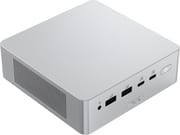 ASUS Ascent QN10 | |
| Price | List Price: $1,699.00 Amazon Prices: Loading prices... |
| Version | 32GB/512GB/Snapdragon X2 Elite |
| Performance Rating | 6.5 |
| Operating System | Windows 11 Home |
| Processor | Eighteen-core Qualcomm Snapdragon X2 Elite X2E-88-100 |
| GPU | -- |
| RAM | 32 GB LPDDR5X (LPDDR5X-8533, soldered) |
| Internal Storage | 512 GB NVMe SSD |
| Dimensions width x length x thickness | 5.12 x 5.12 x 1.57 inches (130.05 x 130.05 x 39.88 mm) |
| Weight | 1.65 lbs (0.75 kg) |
| WiFi | Wi-Fi 7 (802.11be) |
| Bluetooth | 6.0 |
| Ethernet | 1 Ethernet port at 2.5 Gbps |
| HDMI | 1 Full-Size HDMI Port |
| DisplayPort | Video out on all 3 USB4 ports; 4 displays total |
| VGA | No VGA Ports |
| USB Ports | 1 USB 2.0, 3 USB 3, 3 USB-C (3 USB4) Front: 2x USB4, USB-A 10Gbps, USB-A 2.0. Rear: USB4, 2x USB-A 10Gbps |
| Thunderbolt Ports | No |
| OCuLink | No |
| Internal SATA Ports | No SATA ports |
| Card Reader | No Card Reader |
| Headphone Jack | combo |
| Fanless | No |
| VESA Mount | No |
| In the Box | 180W power adapter, power cord, warranty card, safety guide |
| Expandability | RAM soldered, 32GB maximum. Two M.2 2280 slots: PCIe 4.0 (512GB SSD fitted) and an empty PCIe 5.0 slot |
Related Mini PCs
-
 Beelink SER9The Beelink SER9 runs AMD's 12-core Ryzen AI 9 HX 370 (Strix Point) with Radeon 890M graphics, 32GB…
 -
 MINISFORUM MS-02 UltraThe MINISFORUM MS-02 Ultra is a 4.8-liter box sold with an Intel Core Ultra 9 285HX or 275HX (or a…
 -
 ASUS ROG GR70The ASUS ROG GR70 packs an AMD Ryzen 9 9955HX3D with 3D V-Cache and an NVIDIA GeForce RTX 5070…
 -
 ASUS ROG NUC 16The ASUS ROG NUC 16 packs a refreshed Intel Core Ultra 9 290HX Plus and an NVIDIA RTX 5080 or RTX…
 -
 BOSGAME VTA-439The BOSGAME VTA-439 pairs AMD's Ryzen AI 9 HX 470 (Gorgon Point) with Radeon 890M graphics in a…
 -
 ACEMAGIC F2AA 5-inch-square ACEMAGIC mini PC sold with either Intel's Core Ultra X7 358H and Arc B390 graphics…
Ports, storage, and build

The QN10 is a silver aluminum box about 5.1 inches square and 1.6 inches tall, and ASUS lists it at 1.65 pounds. The front carries two USB4 Type-C ports at 40Gbps, a 10Gbps USB-A port, a USB 2.0 port, a combo audio jack, and the power button. The back adds a third USB4 port, two more 10Gbps USB-A ports, HDMI 2.1, 2.5Gb Ethernet, and the barrel jack for the 180W power adapter. HDMI and the three USB4 ports together drive up to four 4K displays. Wi-Fi 7 and Bluetooth 6.0 are on board. There is no SD card reader, and Tom’s Guide reports the case has no VESA mount.
Memory is LPDDR5X-8533 soldered next to the processor. ASUS builds the QN10 with 16GB or 32GB, and this 32GB model is the ceiling. Storage is upgradable. Inside are two M.2 2280 slots: a PCIe 4.0 slot holding the 512GB SSD and an empty PCIe 5.0 slot with its own small cooling fan. The unit ships with Windows 11 Home for Arm.
The Snapdragon X2 Elite X2E-88-100 pairs 12 Prime cores and 6 Performance cores (18 threads, no SMT) with Adreno X2-90 graphics and a Hexagon NPU rated at 80 TOPS. Qualcomm lists memory bandwidth up to 152 GB/s for this chip; the QN10’s LPDDR5X-8533 on the 128-bit bus works out to about 136 GB/s. On PassMark the chip scores about 37,800.
Reviewer Insights

StorageReview
Dylan Bryan at StorageReview tested the 32GB build against an ASUS NUC 14 Pro with a Core Ultra 7 165H and a Lenovo ThinkCentre Neo 50q on the previous Snapdragon X. In Geekbench 6 the QN10 scored 3,667 single-core and 19,884 multi-core against the NUC’s 2,517 and 12,477. Cinebench 2026 gave 639 single-thread and 6,476 multi-thread, a 76% multi-thread lead over the NUC. The Adreno X2-90 posted 4,014 in 3DMark Time Spy and 1,042 in Steel Nomad. The conclusion opens with “The ASUS Ascent QN10 is the first Arm mini PC we have tested that outruns its x86 class instead of trading performance for efficiency.”
The x86 machine still won some tests. The NUC took the single-thread point in 3DMark’s CPU Profile (1,002 to 857) and finished the memory-heavy y-cruncher runs about twice as fast. Blender rendered on the CPU only, because the Adreno is not a supported Blender render device. In UL Procyon on the NPU, Stable Diffusion 1.5 image generation scored 5,457, and text generation ran at 35.7 tokens per second on Phi and 25.2 on Llama with the CPU left idle. The fans stopped at idle and stayed close to silent through sustained load. ASUS rates the cooling fan at 53 dBA at full speed.
StorageReview put the soldered 32GB ceiling first among its reservations, writing that “fixed memory is a hard sell at this price because it turns the purchase into a decision the buyer can’t change in the future.” The 512GB SanDisk SN5100S is a PCIe 4.0 drive that scored below the Neo 50q in 3DMark Storage, a milder complaint in the review. The review named signage, kiosks, edge inference, desk-side assistants, and developers on the Qualcomm AI Hub as the roles it suits.
Level1Techs
Wendell at Level1Techs tested the 32GB QN10 on Windows on Arm and found it “surprisingly snappy.” He called Windows on Arm “a shockingly polished experience given my experience with Windows on x86,” and said Visual Studio Code on a Dev Drive and the Windows Subsystem for Linux basically all worked. x86 programs ran okay under emulation, though not fast, and he said anyone who depends heavily on x86 binaries should look elsewhere.
NVIDIA does not publish Windows on Arm drivers, so he could not fully test a GeForce card in what he called an external Thunderbolt enclosure, and games were not part of the review: “This is a productivity machine.” He described the NPU as an INT8 engine and said 32GB is not enough for running local AI models through Vulkan. The BIOS is minimal, with no HDMI-CEC settings, and fast boot has to be turned off before the machine will boot from USB. Network boot did not work in his tests, and Linux support was not yet cohesive, with an experimental Canonical build and kernel patches still in progress.
ComputerBase
ComputerBase (in German) listed very high office performance, very low power use in daily work, a fan that stops at idle, and easy SSD swaps among its positives. Its negatives were a sometimes steep performance drop in older applications and driver updates that arrive only through Windows Update. The review noted that ASUS preinstalls no software of its own and offers only a BIOS update on its download page. It also confirmed the second small fan over the SSD area and the 180W barrel-plug adapter.
Tom’s Guide
Tom’s Guide saw the QN10 in person at Computex 2026 and could not test it yet, so it covers design rather than performance. Anthony Spadafora wrote that “this mini PC has a phenomenal mix of front and rear connectivity.” He noted that “you can’t VESA-mount this mini PC.” By his account, the case needs a screwdriver to open, and there is no fingerprint reader.
Who the QN10 suits
Developers whose tools run natively on Arm get the most from it, along with office users who want a quiet machine that drives four displays, and fixed installs like signage or kiosks, where the NPU can run small models all day. StorageReview, Level1Techs, and ComputerBase all found it fast for that kind of work.
Skip it if you need x86-only software at full speed, want to game, plan to add an NVIDIA graphics card, or expect to need more than 32GB of memory. For CUDA development, ASUS sells the Ascent GX10 on NVIDIA’s GB10 chip. For full x86 compatibility and memory you can upgrade, the ASUS NUC 15 Pro is the same maker’s x86 line. To compare more options, use the Mini PC Comparison Chart.
Upgrades
Accessories that fit the ASUS Ascent QN10's USB4 or Thunderbolt ports.

Core X V2
A Thunderbolt 5 enclosure that Razer lists as working with Thunderbolt 4 and USB4 hosts; it fits a four-slot card and needs an ATX power supply.

DEG2 eGPU Dock
Connects over USB4 or Thunderbolt 5, with an OCuLink input behind a switch, and adds an M.2 slot; it needs an ATX or SFX power supply.

Breakaway Box 850 T5
Has an 850W power supply built in, so only the graphics card is extra, and works with Thunderbolt 4 and USB4 Windows PCs.

TS4 Thunderbolt 4 Dock
An 18-port dock that CalDigit lists for Thunderbolt 4 and USB4 hosts, with 2.5GbE and a DisplayPort 1.4 output.

TBT4-UD5 Thunderbolt 4 Dock
Two HDMI ports drive two 4K60 monitors from one Thunderbolt 4 or USB4 port on a Windows PC.

Revodok Max 208 Thunderbolt 4 Dock
Adds three Thunderbolt 4 ports for dual 4K60 displays plus gigabit Ethernet; it has no HDMI port, so monitors connect over USB-C or an adapter.
Frequently Asked Questions
What processor does the ASUS Ascent QN10 use?
It uses the Qualcomm Snapdragon X2 Elite X2E-88-100, an Arm chip with 12 Prime and 6 Performance cores that boosts to 4.7GHz. It has Adreno X2-90 graphics and a Hexagon NPU rated at 80 TOPS. It scores about 37,800 in PassMark’s CPU benchmark.
Can I upgrade the RAM in the ASUS Ascent QN10?
No. The LPDDR5X memory is soldered to the board, and 32GB is the largest configuration ASUS builds. Choose the memory size you need at purchase.
Can I add a second SSD to the ASUS Ascent QN10?
Yes. The board has two M.2 2280 slots. The 512GB SSD sits in the PCIe 4.0 slot, and a PCIe 5.0 slot with its own cooling fan ships empty. You need a screwdriver to open the case.
What ports does the ASUS Ascent QN10 have?
The front has two 40Gbps USB4 Type-C ports, a 10Gbps USB-A port, a USB 2.0 port, and a combo audio jack. The back has a third USB4 port, two 10Gbps USB-A ports, HDMI 2.1, 2.5Gb Ethernet, and the power input. HDMI and the three USB4 ports can drive four 4K displays at once.
Will my x86 Windows programs run on the ASUS Ascent QN10?
Most run through Windows on Arm emulation, but more slowly than native Arm apps. ComputerBase saw steep slowdowns in some older applications, and Level1Techs advised anyone who depends heavily on x86 software to choose an x86 machine. Check that your key tools have Arm builds first.
Is the ASUS Ascent QN10 good for gaming?
Not really. The Adreno X2-90 scored 4,014 in 3DMark Time Spy in StorageReview’s testing, but game and driver support on Windows on Arm is limited, and NVIDIA does not publish drivers for an external graphics card on this platform. Level1Techs treated it as a productivity machine.
Can the ASUS Ascent QN10 run Linux?
Not well yet. Canonical has an experimental build and kernel patches are in progress, but Level1Techs found the Linux experience not yet cohesive. The Windows Subsystem for Linux worked well inside Windows in the same review.
What’s included in the box with the ASUS Ascent QN10?
The box holds the QN10, a 180W power adapter with its power cord, a warranty card, and safety documents. There is no VESA bracket, and the case cannot be VESA-mounted.