
MINISFORUM MS-A2
Updated on

The MINISFORUM MS-A2 puts a 16-core, 32-thread AMD Ryzen 9 9955HX into a 1.7-liter chassis with four network ports and a PCIe x16 slot. It is built for virtualization and homelab duty rather than light office work. It follows MINISFORUM’s MS-01 and swaps that machine’s Intel platform for AMD’s Zen 5 architecture.
Pros and cons
| Pros | Cons |
|---|---|
| 16-core/32-thread CPU performance (2.5x faster than MS-01) | No USB4 or Thunderbolt support |
| Dual 10G SFP+ ports for enterprise-grade networking | Integrated Radeon 610M graphics are weak for GPU tasks |
| Triple 8K display output via HDMI 2.1 and dual USB-C | Fans are audible under load (~50 dBA) |
| PCIe x16 slot supports discrete GPUs up to 75W | Large 240W external power brick |
| Supports up to 96GB DDR5-5600 RAM | Premium pricing for configured models |
| Push-button tray slides out without tools | Higher idle power (25-30W) due to Intel X710 NIC |
Related Videos
MINISFORUM MS-A2 Comparison Chart
5 configurations
| Configuration | Processor | RAM | Storage | Performance | List price | Amazon price | Compare |
|---|---|---|---|---|---|---|---|
| Barebone | Ryzen 9 9955HX | None | None | 7.6 | $839.90 | Loading... | Details
|
| 32GB/1TB | Ryzen 9 9955HX | 32 GB | 1 TB | 8.0 | $1699.90 | Loading... | Details
|
| 64GB/1TB | Ryzen 9 9955HX | 64 GB | 1 TB | 8.1 | $1348.90 | Details
| |
| Barebone/Ryzen 9 8945HX | Ryzen 9 8945HX | None | None | 7.3 | $559.00 | Loading... | Details
|
| 96GB/2TB | Ryzen 9 9955HX | 96 GB | 2 TB | 8.1 | $2,079.00 | Loading... | Details
|
Specs shared by every configuration
| Operating System | Windows 11 Pro |
|---|---|
| GPU | Integrated AMD Radeon 610M |
| Dimensions width x length x thickness | 7.44 x 7.72 x 1.89 inches (188.98 x 196.09 x 48.01 mm) |
| Weight | 3.2 lbs (1.45 kg) |
| WiFi | Wi-Fi 6E (802.11ax) |
| Bluetooth | Bluetooth 5.3 |
| Ethernet | 4 Ethernet ports at 2.5 Gbps |
| HDMI | 1 Full-Size HDMI Port |
| DisplayPort | 2 DisplayPorts (Via USB-C DisplayPort Alt Mode (8K@60Hz)) |
| VGA | No VGA Ports |
| USB Ports | 2 USB 2.0, 6 USB 3, 2 USB-C 2x USB 3.2 Gen1 front, 2x USB 3.2 Gen1 rear, 2x USB 3.2 Gen2 rear, 2x USB-C with DP Alt Mode |
| Thunderbolt Ports | No |
| OCuLink | No |
| Internal SATA Ports | No SATA ports |
| Card Reader | SD |
| Fanless | No |
| VESA Mount | No |
| Expandability | PCIe x16 slot (x8 bandwidth, PCIe 4.0) for discrete GPU or expansion cards. Supports split into 2x PCIe 4.0 x4 for dual cards. Up to 96GB DDR5-5600 RAM via dual SO-DIMM slots. |
Related Mini PCs
-
 MINISFORUM 795S7The MINISFORUM 795S7 is a 7-liter small form factor PC built around the 16-core AMD Ryzen 9 7945HX…
 -
 MINISFORUM 139D7An 8.5-liter upright desktop with a 24-core Core i9-13900HX, a PCIe 5.0 x16 slot, and an internal…
 -
 Minisforum AtomMan G1 ProThe Minisforum AtomMan G1 Pro pairs a 16-core Ryzen 9 8945HX with a low-profile desktop NVIDIA RTX…
 -
 ASUS ROG GR70The ASUS ROG GR70 packs an AMD Ryzen 9 9955HX3D with 3D V-Cache and an NVIDIA GeForce RTX 5070…
 -
 ASUS ROG NUC 16The ASUS ROG NUC 16 packs a refreshed Intel Core Ultra 9 290HX Plus and an NVIDIA RTX 5080 or RTX…
 -
 ACEMAGIC M1A Pro+Cube-shaped Strix Halo mini PC with the AMD Ryzen AI Max+ 395, Radeon 8060S, and 128GB of soldered…
Dual 10G SFP+ networking is the standout piece of hardware
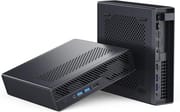
The all-metal chassis measures 196mm x 189mm x 48mm, roughly the size of a thick hardcover book. Press a button and the internal tray slides out without tools, though a few screws on the RAM and SSD side still call for a screwdriver. The dual-fan cooler and its four heat pipes hold the Ryzen 9 9955HX at sustainable temperatures, at the cost of noticeable noise under heavy load. The footprint suits a desk or a rack shelf in a homelab.
Dual 10G SFP+ ports run off an Intel X710 NIC, and dual 2.5G RJ45 ports use Intel I226-V and Realtek RTL8125 controllers. Four ports leave room for a virtualization cluster or software-defined storage without an add-in card. Craft Computing measured nearly 2.5 times the MS-01’s multi-threaded Cinebench R23 score.
Three M.2 slots handle storage, one of them a U.2 slot that takes enterprise SSDs up to 15TB. All of them run at PCIe 4.0 x4, and the two 2280/22110 slots hold drives up to 4TB each. The PCIe x16 slot carries x8 bandwidth, enough for a discrete card up to 75W TDP, though it has to be half-height to fit. WiFi 6E and Bluetooth 5.3 cover wireless, and HDMI 2.1 plus two USB-C ports with DisplayPort Alt Mode drive up to three 8K displays.
Reviewer Insights
ServeTheHome: idle draw starts around 24W
ServeTheHome called the MS-A2 “the absolute perfect home lab node” for many buyers, pairing a 16-core AMD chip with 10G SFP+ and 2.5G networking and a PCIe slot. The reviewer named serviceability as one of his favorite features: push a tab and the internals slide out of the case. He also wished the memory side and the SSD side had no screws, since both still need a screwdriver once the tray is out. On power, STH measured about 24 to 25W at idle at the low end, rising to 35 to 45W depending on configuration, and pointed to the older, server-class Intel X710 NIC as the reason idle draw sits above the usual mini PC range.
Level1Techs ran 128GB of DDR5-5600 past the official ceiling
Level1Techs delivered an enthusiastic review, declaring the MS-A2 “the most powerful, mighty Mini PC” and, after benchmarking it, a record holder for machines in his office. Their testing confirmed that the system can handle up to 128GB of DDR5-5600 RAM with proper configuration, exceeding the official 96GB specification. The reviewer showed Geekbench 6.4 scores of 3,183 single-core and 17,845 multi-core. They noted that thermal management keeps the CPU around 70C during normal operation, spiking to 92C under stress testing. For users planning to run this as a mini server, Level1Techs called it “hugely powerful and very power frugal,” while noting that it idles at about 25 to 30W, mostly because of the X710.
Craft Computing: the barebone build is the value pick
Craft Computing focused on the value of the MS-A2 and noted that the AMD Ryzen 9 9955HX is “basically the exact same silicon from the Ryzen 9950x desktop CPU just tuned down a bit to 75 watts.” In Cinebench R23, the MS-A2 posted nearly 2.5 times the MS-01’s multi-threaded score. The reviewer recommended the barebone configuration at $869 as the best value, allowing users to source their own DDR5 RAM and NVMe storage for substantial savings. They concluded that the MS-A2 is “light years faster and more efficient than either of the previous models” while remaining competitively priced.
Written reviewers back the CPU and fault the graphics
According to ServeTheHome’s written review, the MS-A2 delivers on its promise as a homelab-focused workstation, though they noted the need for three different network drivers due to the mixed Intel and Realtek controllers. NotebookCheck awarded a 65% score, acknowledging the strong CPU performance while criticizing the weak integrated Radeon 610M graphics and thermal throttling under sustained loads. They emphasized that serious workstation users should plan to install a discrete GPU. NASCompares gave it 8.4/10 and positioned it alongside the MS-01 rather than as a replacement, for buyers who prioritize multi-threaded performance and dense internal storage. NASCompares also notes that the MS-A2 does not support ECC memory.
Customer Reviews
Across 9 ratings on Amazon, the MINISFORUM MS-A2 averages 4.6 stars, with 93 percent of them at four or five stars and the rest at three stars. The praise centers on raw CPU performance, quiet operation, and unusually easy internal access for a mini PC. Speedy Geek, a verified buyer running a home lab, wrote “I am blown away at the performance.” Jenk’s Reviews, also a verified purchaser who bought the barebones version, summed up the build by saying “It runs quiet, does not get too hot, and feels well designed for a compact workstation,” and several owners single out the push-button chassis that slides open for RAM and storage upgrades. The barebones model ships without RAM or a storage drive, which belongs in the cost you budget.
picgla, a verified buyer, reported a hardware fault: “the 3.5 mm audio jack on this ms-a2 is non-functional,” along with a BIOS (rev 1.02) that would not register a SATA SSD on the included sled after a reboot unless the machine sat powered off for at least 30 seconds. Other owners note the compact case cannot fit much of a graphics card and that graphics performance is modest, and the three-star reviewer flagged the absence of USB4 and Thunderbolt ports plus upside-down port placement.
Read more owner reviews on Amazon.
Buy the barebone build and bring your own RAM
The barebone configuration at $839.90 is the cheapest way onto this platform, and it leaves you free to fit DDR5 SO-DIMMs and NVMe drives you choose yourself. The pre-configured 32GB/1TB, 64GB/1TB, and 96GB/2TB models skip that work for a higher outlay. All of the 9955HX builds run the same 16-core Ryzen 9 9955HX, the same dual 10G SFP+ networking, and the same PCIe x16 slot, so the choice comes down to how much assembly you want to do.
The integrated Radeon 610M is the limit on graphics work, so budget for a half-height discrete card if rendering or gaming is part of the job. Fan noise under load rules the machine out of a room that has to stay quiet. Starry Hope’s Mini PC Comparison Chart lines this box up against other models in the class.
Frequently Asked Questions
What processor does the MINISFORUM MS-A2 use?
The main builds use the AMD Ryzen 9 9955HX, a 16-core, 32-thread Zen 5 part. MINISFORUM also sells a lower-priced barebone with the Ryzen 9 8945HX, a 16-core Zen 4 chip. It works inside a 75W thermal envelope, which is why Craft Computing described it as the desktop Ryzen 9 silicon tuned down.
Can you install a graphics card in the MS-A2?
Yes. The PCIe x16 slot runs at x8 bandwidth (PCIe 4.0) and takes half-height discrete cards up to 75W TDP, which is the way past the integrated Radeon 610M for graphics work.
How much RAM does the MS-A2 support?
Two SO-DIMM slots take an official maximum of 96GB of DDR5-5600. Level1Techs ran 128GB in their testing, above that specification. ECC support is unclear: NASCompares says the MS-A2 does not support ECC memory, while ServeTheHome got 96GB of ECC memory only “somewhat working.”
What networking options does the MS-A2 have?
Networking runs four ports, dual 10G SFP+ on an Intel X710 NIC and dual 2.5G RJ45 on Intel I226-V and Realtek RTL8125 controllers. That is enough for a virtualization cluster or software-defined storage without an add-in NIC.
Is the MS-A2 fanless or silent?
No. A dual-fan cooler with four heat pipes handles the 16-core processor, measuring roughly 38-39 dBA at idle and around 50 dBA under load. It stays audible, and it holds temperatures steady through demanding workloads.
How does the MS-A2 compare to the MS-01?
In multi-threaded work the MS-A2 lands about 2.5 times ahead of the Intel-based MS-01, on the strength of the Ryzen 9 9955HX’s 16 cores. Networking is comparable across the two, so the gap comes from the Zen 5 architecture and the newer thermal design.
What storage options are available in the MS-A2?
Three M.2 slots are available: one U.2/M.2 slot for enterprise drives up to 15TB, and two M.2 2280/22110 slots for drives up to 4TB each. All of them run at PCIe 4.0 x4, for up to 23TB of total capacity.
Is the barebone MS-A2 worth it?
It suits anyone comfortable sourcing their own DDR5 RAM and NVMe storage, at $839.90 for the chassis and CPU. Buying the parts separately often lands better specifications for less than a pre-configured model costs, provided you are willing to install Windows or another operating system yourself.