
ACEMAGIC M1A Pro+
Published on

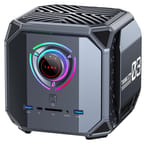
The ACEMAGIC M1A Pro+ takes AMD’s Strix Halo silicon, the Ryzen AI Max+ 395, and drops it into a chunky “Tank” cube that looks nothing like the flat pucks most mini PCs ship in. The armored gunmetal chassis is roughly a 6.5-inch cube with an X-pattern top vent and, on the front face, a large RGB control dial that doubles as a physical power-mode switch. Inside sit 16 Zen 5 cores, an integrated Radeon 8060S built on RDNA 3.5, and 128GB of soldered LPDDR5X-8000 unified memory that the CPU, GPU, and NPU all draw from the same pool. That combination points the M1A Pro+ squarely at local AI development, where being able to hand up to 96GB of that memory to the graphics processor lets it hold models that would otherwise need a discrete card with expensive dedicated VRAM. The machine is priced and positioned as a premium workstation.
Soldered 128GB and a 2.5GbE ceiling
| Pros | Cons |
|---|---|
| Ryzen AI Max+ 395 with 16 Zen 5 cores and a 40-CU Radeon 8060S iGPU | Priced well above mainstream mini PCs |
| 128GB unified LPDDR5X, up to 96GB assignable as GPU memory for local LLMs | Memory is soldered and cannot be upgraded after purchase |
| Three M.2 2280 PCIe 4.0 slots for up to 12TB of storage | Networking tops out at 2.5GbE, with no 5GbE or 10GbE option |
| Front RGB dial switches between 70W, 100W, and 140W power modes | Large 300W external power brick instead of a slim adapter |
| WiFi 7, Bluetooth 5.4, dual 2.5GbE, USB4, and up to four displays | No USB-C port on the rear; the single USB4-C sits on the front |
| A free M.2 slot can accept an OCuLink or 10GbE adapter for expansion | Early production units shipped with a disclosed motherboard bug |
Related Videos
ACEMAGIC M1A Pro+ Comparison Chart
 ACEMAGIC M1A Pro+ | |
| Price | List Price: $3299.00 Amazon Prices: Loading prices... |
| Version | 128GB/2TB/Ryzen AI Max+ 395 |
| Performance Rating | 8.1 |
| Operating System | Windows 11 Pro |
| Processor | Sixteen-core 3.00 Ghz (max 5.10 Ghz) AMD Ryzen AI Max+ 395 |
| GPU | Integrated AMD Radeon 8060S |
| RAM | 128 GB LPDDR5X, 4-channel (128GB soldered, up to 96GB as VRAM) |
| Internal Storage | 2 TB NVMe SSD |
| Dimensions width x length x thickness | 6.56 x 6.57 x 6.33 inches (166.62 x 166.88 x 160.78 mm) |
| Weight | 4.4 lbs (2 kg) |
| WiFi | Wi-Fi 7 (802.11be) |
| Bluetooth | Bluetooth 5.4 |
| Ethernet | 2 Ethernet ports at 2.5 Gbps |
| HDMI | 2 Full-Size HDMI Ports |
| DisplayPort | 1 DisplayPort (DP 2.0; 4 displays via 2x HDMI, DP, USB4) |
| VGA | No VGA Ports |
| USB Ports | 6 USB 3, 1 USB-C (1 USB4) 2x USB-A 10Gbps, 4x USB-A 5Gbps, 1x USB4-C |
| Thunderbolt Ports | No |
| OCuLink | No |
| Internal SATA Ports | No SATA ports |
| Card Reader | SD Card Reader |
| Headphone Jack | combo |
| Fanless | No |
| VESA Mount | No |
| In the Box | Mini PC, 300W power adapter, HDMI cable, manual |
| Expandability | 128GB LPDDR5X is soldered (not upgradeable). Three M.2 2280 PCIe 4.0 slots (up to 12TB total); a free M.2 slot can take an OCuLink or 10GbE adapter. |
Related Mini PCs
-
 BOSGAME M5The BOSGAME M5 puts the 16-core AMD Ryzen AI Max+ 395 and its Radeon 8060S graphics in a metal…
 -
 GMKtec EVO-X2The GMKtec EVO-X2 is a 3.6-pound upright mini PC built on the AMD Ryzen AI Max+ 395 with Radeon…
 -
 Mac Studio (2026)Apple's 7.7-inch square pro desktop with memory fixed at purchase. The M5 Max model covers photo,…
 -
 NIMO Mini PC AMD Ryzen AI Max+ 395The NIMO Mini PC packs the flagship AMD Ryzen AI Max+ 395 with 16 Zen 5 cores and Radeon 8060S…
 -
 ACEMAGIC F2AA 5-inch-square ACEMAGIC mini PC sold with either Intel's Core Ultra X7 358H and Arc B390 graphics…
 -
 HP Z2 Mini G1aProfessional-grade compact workstation with AMD Ryzen AI Max+ PRO processors and unified memory…
Three M.2 slots and a 140W power dial
The M1A Pro+ measures about 6.56 by 6.57 by 6.33 inches and weighs roughly 4.4 pounds, so it is a substantial cube closer to the size of a small toaster than the palm-sized boxes ACEMAGIC usually builds. The front face carries two USB-A ports at 10Gbps, a single USB4 Type-C, an SD card slot, a 3.5mm audio jack, the power button, and the illuminated multifunction dial. The rear adds four more USB-A ports at 5Gbps, two HDMI 2.1 outputs, a DisplayPort 2.0, a second audio jack, the DC input, and the two 2.5 Gigabit Ethernet jacks. Between the HDMI, DisplayPort, and USB4 outputs the machine can drive up to four displays. There is no USB-C on the back, so the only Type-C port lives on the front, an awkward spot for a permanently docked accessory.
The AMD Ryzen AI Max+ 395 is a 16-core, 32-thread Zen 5 processor that boosts to 5.1 GHz, paired with the integrated Radeon 8060S and its 40 RDNA 3.5 compute units. ACEMAGIC quotes a combined AI throughput of up to 126 TOPS, 50 of which come from the XDNA 2 NPU, and rates the whole package for a 140W ceiling in its top power mode. Because this is a unified-memory design, the 128GB of LPDDR5X-8000 is shared across the CPU, GPU, and NPU, and up to 96GB of it can be allocated as graphics memory. For hands-on numbers and software setup with this class of hardware, our Strix Halo local LLM inference guide walks through what these chips can hold and how fast they run. That memory is soldered to the board and cannot be upgraded.
Three M.2 2280 slots run at PCIe 4.0 x4 and accept up to 12TB of NVMe in total, with the review unit shipping a 2TB drive. Connectivity covers WiFi 7 and Bluetooth 5.4 for wireless, plus the two 2.5GbE ports for wired networking. Cooling runs through a multi-heatpipe layout and three fans, and the front dial lets you drop the chassis into a quieter 70W or 100W profile when you do not need the full 140W. A quick-release side panel opens the box without tools for drive swaps, and a spare M.2 slot can host an adapter such as OCuLink or a 10GbE card for buyers who want to push beyond the built-in ports. If you are weighing whether to buy a Strix Halo box now or hold out for the next refresh, our take on why Gorgon Halo is largely a Strix Halo rename is worth a read first.
Reviewer Insights
ServeTheHome
Patrick Kennedy of ServeTheHome opened his review with the front dial. “The number one coolest feature is what happens when you start this thing up. There’s a little RGB dial,” he said, describing the front control that toggles the power modes. On price he noted “This is going to be well over $2,000 because it has 128GB of memory, but also a really good CPU and GPU in it,” and pointed to the memory pool as the draw. “The real big thing that you get with 128 GB is that you can set the split between the CPU and GPU.”
On networking he said “the negative about this is it’s not 5 gig like the Framework desktop, it’s also not 10 gig like the Mini Forum,” and he flagged the power supply, observing “This thing is also a 300 W power supply, but I do kind of wish that this was just a type-C power supply.” He disclosed that early production units carried a motherboard stability bug tied to the default SSD slot, one that ACEMAGIC acknowledged and says is corrected on shipping units. He liked the internal layout, where the drives mount vertically behind quick-release side panels.
TechPowerUp
TechPowerUp benchmarked the same configuration, sold as the Tank M1A Pro+, and rated it highly among the mini PCs on its bench. Its verdict reads: “The ACEMAGIC Tank M1A Pro+ is one of the most impressive systems we have tested, pairing the refreshed Ryzen AI Max+ 395 with Radeon 8060S, and 128 GB of fast LPDDR5X memory in a unique cube chassis.” The outlet credited both the raw performance and the front dial, adding that “It delivers results far beyond the usual Mini-PC field, and the front-mounted power dial adds useful flexibility for balancing noise and performance.”
A 128GB local-AI box at workstation pricing
Developers and researchers who want to run large language models locally are the buyers the M1A Pro+ is built for. The 128GB of unified memory, and the ability to hand up to 96GB of it to the Radeon 8060S, delivers capability that used to require a much larger workstation with a discrete GPU. Creators and gamers get a capable integrated GPU, plenty of memory headroom, and triple M.2 storage that scales to 12TB. The three-mode power dial lets anyone trade fan noise for peak performance on demand.
Soldered memory fixes the configuration at purchase, networking stops at 2.5GbE, the only USB-C port sits on the front face, and the 300W power brick is bulky for a machine this size. Buyers curious about linking several of these boxes for bigger models should read our notes on a Strix Halo mini PC cluster for LLM inference, while those who want strong performance without the flagship outlay should look at the mid-tier Ryzen mini PCs that sit a tier below. For a side-by-side against the rest of the catalog, see our Mini PC Comparison Chart.
Frequently Asked Questions
What processor and graphics does the ACEMAGIC M1A Pro+ use?
It uses the AMD Ryzen AI Max+ 395, a 16-core, 32-thread Zen 5 processor that boosts to 5.1 GHz, with integrated Radeon 8060S graphics built on RDNA 3.5 with 40 compute units. An XDNA 2 NPU handles 50 of the up to 126 TOPS of combined AI throughput ACEMAGIC quotes for the 140W power mode.
Can I upgrade the RAM in the ACEMAGIC M1A Pro+?
No. The 128GB of LPDDR5X-8000 memory is soldered to the board and cannot be upgraded after purchase. The unified memory design needs it soldered to hit its bandwidth, and up to 96GB of the pool can be allocated as graphics memory, so pick your configuration at purchase time.
How much storage can the ACEMAGIC M1A Pro+ hold?
The M1A Pro+ has three M.2 2280 slots running at PCIe 4.0 x4, supporting up to 12TB of NVMe storage in total. The 128GB/2TB configuration ships with a 2TB drive installed, leaving two slots free for expansion. SATA M.2 drives are not supported.
What ports does the ACEMAGIC M1A Pro+ have?
The front has two USB-A ports at 10Gbps, one USB4 Type-C, an SD card slot, and a 3.5mm audio jack. The rear adds four USB-A ports at 5Gbps, two HDMI 2.1 outputs, a DisplayPort 2.0, a second 3.5mm audio jack, and two 2.5 Gigabit Ethernet jacks. There is no USB-C on the rear, and the machine can drive up to four displays across its video outputs.
Is the ACEMAGIC M1A Pro+ good for running local AI models?
Local AI is what the machine is built for. The 128GB of unified LPDDR5X memory lets you allocate up to 96GB as GPU memory, so the Radeon 8060S can hold large language models that would otherwise require a discrete card with dedicated VRAM. Patrick Kennedy of ServeTheHome pointed to that adjustable CPU/GPU memory split as the draw of a 128GB machine.
What is the RGB dial on the front of the ACEMAGIC M1A Pro+?
The front dial is a physical power-mode control with RGB lighting. It switches between three profiles, roughly 70W, 100W, and 140W, without entering the BIOS, so you can trade fan noise for peak performance on demand. Patrick Kennedy of ServeTheHome called it the coolest feature on the box.