
MINISFORUM 139D7
Published on

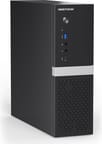
The MINISFORUM 139D7 is a small upright desktop for gaming and creative work with a slot for a low-profile graphics card. It pairs Intel’s 24-core Core i9-13900HX laptop chip with a PCIe 5.0 x16 slot, and MINISFORUM sells it with a low-profile AMD Radeon RX 9060 XT 16GB already fitted or with Intel graphics only. The processor dates from 2023, the slot takes low-profile cards only, and the port list has no USB4 or Thunderbolt.
Each graphics option comes as a barebone or with 32GB of DDR5 and a 1TB SSD, which makes four configurations. MINISFORUM also sells the same case with an AMD Ryzen 9 8945HX board as the 895D7, a separate model.
Pros and Cons
| Pros | Cons |
|---|---|
| 24 cores and 32 threads, run at 100W in the balanced mode | The Core i9-13900HX is a 2023 Raptor Lake chip |
| Radeon RX 9060 XT with 16GB of GDDR6 in the graphics configurations | The x16 slot only fits low-profile cards |
| PCIe 5.0 x16 slot with an internal 8-pin power lead | No USB4, Thunderbolt, or OCuLink |
| Internal 400W supply, so there is no external power brick | One 2.5GbE port and no second network jack |
| Two SO-DIMM slots up to 96GB and two PCIe 4.0 M.2 slots | Front USB-C runs at 5Gbps one way up and USB 2.0 the other |
| Wi-Fi 7 and Bluetooth 5.4 | Much larger than a palm-sized mini PC at 12 x 11.5 x 3.7 inches |
MINISFORUM 139D7 Comparison Chart
 MINISFORUM 139D7 | MINISFORUM 139D7 | MINISFORUM 139D7 | MINISFORUM 139D7 | |
| Price | List Price: $1,599.00 Amazon Prices: Loading prices... | List Price: $1,079.00 Amazon Prices: Loading prices... | List Price: $1,079.00 Amazon Prices: Loading prices... | List Price: $495.00 Amazon Prices: Loading prices... |
| Version | 32GB/1TB/RX 9060 XT | Barebone/RX 9060 XT | 32GB/1TB/Intel UHD | Barebone/Intel UHD |
| Performance Rating | 6.9 | 6.5 | 6.9 | 6.5 |
| Operating System | -- | -- | -- | -- |
| Processor | Twenty-four-core Intel Core i9-13900HX | Twenty-four-core Intel Core i9-13900HX | Twenty-four-core Intel Core i9-13900HX | Twenty-four-core Intel Core i9-13900HX |
| GPU | Dedicated AMD Radeon RX 9060 XT | Dedicated AMD Radeon RX 9060 XT | Integrated Intel UHD Graphics | Integrated Intel UHD Graphics |
| RAM | 32 GB DDR5 SO-DIMM, 2-channel (2x SO-DIMM, DDR5-5600, up to 96GB) | 0 GB DDR5 SO-DIMM, 2-channel (No RAM, SSD, or OS; 2x DDR5-5600 SO-DIMM slots) | 32 GB DDR5 SO-DIMM, 2-channel (2x SO-DIMM, DDR5-5600, up to 96GB) | 0 GB DDR5 SO-DIMM, 2-channel (No RAM, SSD, or OS; 2x DDR5-5600 SO-DIMM slots) |
| Internal Storage | 1 TB NVMe PCIe 4.0 | 0 GB NVMe | 1 TB NVMe PCIe 4.0 | 0 GB NVMe |
| Dimensions width x length x thickness | 12.28 x 11.5 x 3.66 inches (311.91 x 292.1 x 92.96 mm) | 12.28 x 11.5 x 3.66 inches (311.91 x 292.1 x 92.96 mm) | 12.28 x 11.5 x 3.66 inches (311.91 x 292.1 x 92.96 mm) | 12.28 x 11.5 x 3.66 inches (311.91 x 292.1 x 92.96 mm) |
| Weight | 8.5 lbs (3.86 kg) | 8.4 lbs (3.82 kg) | unknown | unknown |
| WiFi | Wi-Fi 7 (802.11be) | Wi-Fi 7 (802.11be) | Wi-Fi 7 (802.11be) | Wi-Fi 7 (802.11be) |
| Bluetooth | Bluetooth 5.4 | Bluetooth 5.4 | Bluetooth 5.4 | Bluetooth 5.4 |
| Ethernet | 1 Ethernet port at 2.5 Gbps | 1 Ethernet port at 2.5 Gbps | 1 Ethernet port at 2.5 Gbps | 1 Ethernet port at 2.5 Gbps |
| HDMI | 2 Full-Size HDMI Ports | 2 Full-Size HDMI Ports | 1 Full-Size HDMI Port | 1 Full-Size HDMI Port |
| DisplayPort | 3 DisplayPorts (Card: DP 2.1, DP 1.4; board: DP 1.4 (BIOS switch)) | 3 DisplayPorts (Card: DP 2.1, DP 1.4; board: DP 1.4 (BIOS switch)) | 1 DisplayPort (HDMI 2.0, DP 1.4; third display via rear USB-C) | 1 DisplayPort (HDMI 2.0, DP 1.4; third display via rear USB-C) |
| VGA | No VGA Ports | No VGA Ports | No VGA Ports | No VGA Ports |
| USB Ports | 2 USB 2.0, 3 USB 3, 2 USB-C Rear USB-C 10Gbps with DP; front USB-C 5Gbps | 2 USB 2.0, 3 USB 3, 2 USB-C Rear USB-C 10Gbps with DP; front USB-C 5Gbps | 2 USB 2.0, 3 USB 3, 2 USB-C Rear USB-C 10Gbps with DP; front USB-C 5Gbps | 2 USB 2.0, 3 USB 3, 2 USB-C Rear USB-C 10Gbps with DP; front USB-C 5Gbps |
| Thunderbolt Ports | No | No | No | No |
| OCuLink | No | No | No | No |
| Internal SATA Ports | No SATA ports | No SATA ports | No SATA ports | No SATA ports |
| Card Reader | No Card Reader | No Card Reader | No Card Reader | No Card Reader |
| Headphone Jack | front | front | front | front |
| Fanless | No | No | No | No |
| VESA Mount | No | No | No | No |
| In the Box | Main unit, power cord, Wi-Fi antennas, graphics card air-sealing foam, screws, manual | Main unit, power cord, Wi-Fi antennas, graphics card air-sealing foam, screws, manual | Main unit, power cord, Wi-Fi antennas, graphics card air-sealing foam, screws, manual | Main unit, power cord, Wi-Fi antennas, graphics card air-sealing foam, screws, manual |
| Expandability | Two DDR5 SO-DIMM slots (96GB max), two M.2 2280 slots, PCIe 5.0 x16 slot for low-profile cards with 8-pin power. Internal 400W supply. | Two DDR5 SO-DIMM slots (96GB max), two M.2 2280 slots, PCIe 5.0 x16 slot for low-profile cards with 8-pin power. Internal 400W supply. | Two DDR5 SO-DIMM slots (96GB max), two M.2 2280 slots, PCIe 5.0 x16 slot for low-profile cards with 8-pin power. Internal 400W supply. | Two DDR5 SO-DIMM slots (96GB max), two M.2 2280 slots, PCIe 5.0 x16 slot for low-profile cards with 8-pin power. Internal 400W supply. |
Related Mini PCs
-
 ASUS ROG GR70The ASUS ROG GR70 packs an AMD Ryzen 9 9955HX3D with 3D V-Cache and an NVIDIA GeForce RTX 5070…
 -
 ASUS ROG NUC 16The ASUS ROG NUC 16 packs a refreshed Intel Core Ultra 9 290HX Plus and an NVIDIA RTX 5080 or RTX…
 -
 MINISFORUM MS-02 UltraThe MINISFORUM MS-02 Ultra is a 4.8-liter box sold with an Intel Core Ultra 9 285HX or 275HX (or a…
 -
 MINISFORUM MS-A2The MINISFORUM MS-A2 pairs a 16-core AMD Ryzen 9 9955HX with two 10G SFP+ ports, two 2.5GbE ports,…
 -
 BOSGAME VTA-439The BOSGAME VTA-439 pairs AMD's Ryzen AI 9 HX 470 (Gorgon Point) with Radeon 890M graphics in a…
 -
 TOPGRO T1-ProA slim vertical tower built from gaming-laptop parts: a 13th-gen Core i9 with a 70W RTX 4060 Laptop…
24 Raptor Lake cores at 100W

The Core i9-13900HX has 8 performance cores and 16 efficient cores, 32 threads, a 5.4GHz boost, and 36MB of cache. Intel launched it in early 2023 for gaming laptops, and it scores about 41,400 on PassMark’s CPU Mark. That is still a high figure for a small desktop in 2026, ahead of most Ryzen AI and Core Ultra mini PC chips in multi-threaded work. MINISFORUM runs it at 100W in the balanced mode, well above the 55W base power Intel rates it for, so long renders and compiles have room to hold their clocks. Newer chips add neural processing units and faster integrated graphics, which matter less in the configurations where the RX 9060 XT handles games and rendering. The gaming, rendering, and GPU AI work in the graphic above applies to those RX 9060 XT configurations.
Memory sits in two DDR5 SO-DIMM slots at up to 5600 MT/s, with a 96GB ceiling. The configured models ship with 32GB and a 1TB PCIe 4.0 SSD in one of the two M.2 2280 slots, and the barebones ship with neither, so buyers fit their own parts and operating system. MINISFORUM lists Windows 11 as the supported system.
The CPU cooler uses a phase change thermal pad and a 3500 RPM blower fan. MINISFORUM rates the noise at 26.4dB at idle and 44.1dB at full load in the balanced mode, measured at 50cm in its own anechoic room.
A low-profile RX 9060 XT on a PCIe 5.0 slot
The graphics configurations come with a low-profile Radeon RX 9060 XT: an RDNA 4 card with 2048 stream processors, 16GB of GDDR6 on a 128-bit bus, and 320 GB/s of memory bandwidth, rated by MINISFORUM at 140W. The desktop RX 9060 XT 16GB scores about 20,100 on PassMark’s G3D Mark, in the same range as an RTX 5060, and the 16GB of memory leaves room for high texture settings and for local AI models that run on the GPU. MINISFORUM aims it at 1080p and 1440p gaming.
The card sits in a PCIe 5.0 x16 slot fed by an 8-pin connector from the internal 400W supply. The Intel graphics configurations leave the slot empty, so a buyer can start with the onboard Intel UHD Graphics and add a low-profile card later; full-height cards do not fit. A foam strip in the box seals the gap around the card for airflow. The slot also takes network or storage cards, and MINISFORUM sells a four-drive M.2 adapter for it.
Ports, displays, and wireless

The 8.5-liter case measures about 12.3 x 11.5 x 3.7 inches and stands upright; MINISFORUM lists about 8.4 to 8.5 pounds with the RX 9060 XT. The front panel holds the power button, a 5Gbps USB-A port, a USB-C port, and headphone and microphone jacks. That front USB-C port runs at 5Gbps with the plug one way up and at USB 2.0 speed when it is flipped. The rear holds two more 5Gbps USB-A ports, two USB 2.0 ports, a 10Gbps USB-C port with DisplayPort output, a 2.5GbE port on a Realtek RTL8125 controller, line in, line out, a second microphone jack, and the board’s HDMI 2.0 and DisplayPort 1.4 outputs.
With the RX 9060 XT fitted, monitors plug into the card’s HDMI 2.1, DisplayPort 2.1, and DisplayPort 1.4 outputs. A fourth display works after the onboard graphics are switched on in the BIOS (Onboard Devices Setting, then Primary Display, then IGFX), which enables one of the board’s HDMI, DisplayPort, or USB-C outputs alongside the card. The Intel graphics configurations drive three displays from the board’s HDMI, DisplayPort, and USB-C outputs.
Wireless is a MediaTek MT7925 module with Wi-Fi 7 and Bluetooth 5.4, with antennas in the box. There is no USB4, Thunderbolt, or OCuLink port, so fast external drives and external GPU docks are out, and the single Ethernet port rules out router or firewall duty without an add-in card.
Barebone or configured, with or without the card
The two barebones cost several hundred dollars less than the configured models with the same graphics, and they suit anyone with spare DDR5 SO-DIMMs, an NVMe drive, and a Windows license. The Intel graphics barebone is the cheapest way into the case and the slot, and a buyer who already owns a low-profile card can fit it there. The configured RX 9060 XT model ships with 32GB, a 1TB SSD, and Windows 11 installed.
Should you buy it?
The 139D7 suits a desk too small for a tower. Its 24 cores at 100W handle long renders and compiles, and the RX 9060 XT configurations add 16GB of graphics memory for 1080p and 1440p gaming and for AI models that run on the GPU. Two SO-DIMM slots, two M.2 slots, and the x16 slot leave room to upgrade later.
Skip it if you need USB4, Thunderbolt, OCuLink, or a second network port, or if your graphics card is full height. The MINISFORUM 795S7 is a smaller 7-liter case with a 16-core Ryzen 9 7945HX and the same kind of low-profile x16 slot, but it has no wireless card. The MINISFORUM M1-1390 uses the same Core i9-13900HX in a much smaller box with no graphics card slot. Compare other boxes that take a graphics card in our Mini PC Comparison Chart.
Frequently Asked Questions
What is the difference between the MINISFORUM 139D7 and the 895D7?
They differ in the processor. Both use the same 8.47-liter case, PCIe 5.0 x16 slot, and 400W supply. The 139D7 runs the Intel Core i9-13900HX with 24 cores and 32 threads, and the 895D7 runs the AMD Ryzen 9 8945HX with 16 cores and 32 threads. MINISFORUM also offers the 895D7 with an RTX 5060.
Can I install a full-size graphics card in the MINISFORUM 139D7?
No. The PCIe 5.0 x16 slot fits low-profile cards only. The internal supply provides an 8-pin power connector. MINISFORUM rates the slot for dual-slot, half-height cards that draw up to 150W.
How much memory does the MINISFORUM 139D7 take?
Up to 96GB of DDR5 in two SO-DIMM slots, at speeds up to 5600 MT/s. MINISFORUM lists factory options from 16GB to 96GB; US models ship with 32GB or as barebones.
Does the MINISFORUM 139D7 need an external power adapter?
No. A 400W supply sits inside the case and takes a standard AC power cord, which ships in the box. It accepts 100 to 240 volts.
Can the MINISFORUM 139D7 run local AI models?
With the RX 9060 XT, models that fit in its 16GB of graphics memory run on the GPU at the card’s 320 GB/s bandwidth. A model too large for the card has to run partly from system memory on a dual-channel DDR5 bus, which is several times slower. The Intel graphics configurations leave AI work to the CPU and the integrated Intel UHD Graphics, which suits only small models.