
MINISFORUM M1-1390
Published on

The MINISFORUM M1-1390 is a compact desktop for CPU-heavy work: code builds, virtual machines, CPU rendering, and office multitasking across three 4K monitors. It is the 13th-gen refresh of the MINISFORUM M1-1295, sold under a new model number in the same case with the same ports, with a Core i9-13900HX in place of the i9-12950HX. The new chip has 24 cores and 32 threads where the i9-12950HX has 16 and 24. Graphics are Intel’s basic integrated UHD, so it does not suit modern games or GPU work. MINISFORUM sells it as a barebone kit or with 16GB/500GB or 32GB/1TB installed.
Pros and Cons
| Pros | Cons |
|---|---|
| 24-core, 32-thread Core i9-13900HX boosts to 5.4GHz | Intel UHD integrated graphics only; not suited to modern games |
| Two DDR4 SO-DIMM slots take up to 96GB | DDR4-3200 memory, where the chip also supports faster DDR5-5600 |
| Two PCIe 4.0 x4 M.2 slots, up to 8TB in total | No USB4, Thunderbolt, or OCuLink, so no external GPU path |
| Three 4K outputs: HDMI, DisplayPort 1.4 at up to 144Hz, and USB-C | Two of the four USB-A ports are USB 2.0 |
| Barebone kit for buyers who already own memory and SSDs | 120W power adapter limits how hard the 157W-rated chip can run |
| WiFi 6E, Bluetooth 5.2, and 2.5GbE | No SD card reader and no front USB ports |
MINISFORUM M1-1390 Comparison Chart
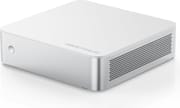 MINISFORUM M1-1390 | MINISFORUM M1-1390 | MINISFORUM M1-1390 | |
| Price | List Price: $399.00 Amazon Prices: Loading prices... | List Price: $599.00 Amazon Prices: Loading prices... | List Price: $767.00 Amazon Prices: Loading prices... |
| Version | Barebone (no RAM/SSD/OS)/Intel Core i9-13900HX | 16GB/500GB/Intel Core i9-13900HX | 32GB/1TB/Intel Core i9-13900HX |
| Performance Rating | 6.5 | 6.5 | 6.9 |
| Operating System | No OS | Windows 11 Pro | Windows 11 Pro |
| Processor | Twenty-four-core Intel Core i9-13900HX | Twenty-four-core Intel Core i9-13900HX | Twenty-four-core Intel Core i9-13900HX |
| GPU | Integrated Intel UHD Graphics | Integrated Intel UHD Graphics | Integrated Intel UHD Graphics |
| RAM | 0 GB DDR4 SO-DIMM, 2-channel (DDR4-3200, up to 96GB) | 16 GB DDR4 SO-DIMM, 2-channel (DDR4-3200, up to 96GB) | 32 GB DDR4 SO-DIMM, 2-channel (DDR4-3200, up to 96GB) |
| Internal Storage | 0 GB NVMe SSD (not included) | 500 GB NVMe SSD | 1 TB NVMe SSD |
| Dimensions width x length x thickness | 7.68 x 7.6 x 2.04 inches (195.07 x 193.04 x 51.82 mm) | 7.68 x 7.6 x 2.04 inches (195.07 x 193.04 x 51.82 mm) | 7.68 x 7.6 x 2.04 inches (195.07 x 193.04 x 51.82 mm) |
| Weight | 2.47 lbs (1.12 kg) | 2.47 lbs (1.12 kg) | 2.47 lbs (1.12 kg) |
| WiFi | Wi-Fi 6E (802.11ax) | Wi-Fi 6E (802.11ax) | Wi-Fi 6E (802.11ax) |
| Bluetooth | Bluetooth 5.2 | Bluetooth 5.2 | Bluetooth 5.2 |
| Ethernet | 1 Ethernet port at 2.5 Gbps | 1 Ethernet port at 2.5 Gbps | 1 Ethernet port at 2.5 Gbps |
| HDMI | 1 Full-Size HDMI Port | 1 Full-Size HDMI Port | 1 Full-Size HDMI Port |
| DisplayPort | 1 DisplayPort (DP 1.4, up to 4K@144Hz) | 1 DisplayPort (DP 1.4, up to 4K@144Hz) | 1 DisplayPort (DP 1.4, up to 4K@144Hz) |
| VGA | No VGA Ports | No VGA Ports | No VGA Ports |
| USB Ports | 2 USB 2.0, 2 USB 3, 1 USB-C All rear: 2x USB-A 3.2 Gen 2, 2x USB-A 2.0, USB-C 3.2 Gen 2 (DP Alt, 15W out) | 2 USB 2.0, 2 USB 3, 1 USB-C All rear: 2x USB-A 3.2 Gen 2, 2x USB-A 2.0, USB-C 3.2 Gen 2 (DP Alt, 15W out) | 2 USB 2.0, 2 USB 3, 1 USB-C All rear: 2x USB-A 3.2 Gen 2, 2x USB-A 2.0, USB-C 3.2 Gen 2 (DP Alt, 15W out) |
| Thunderbolt Ports | No | No | No |
| OCuLink | No | No | No |
| Internal SATA Ports | No SATA ports | No SATA ports | No SATA ports |
| Card Reader | No Card Reader | No Card Reader | No Card Reader |
| Headphone Jack | separate | separate | separate |
| Fanless | No | No | No |
| VESA Mount | Yes | Yes | Yes |
| In the Box | Mini PC, 120W power adapter, HDMI cable, wall mount bracket, manual | Mini PC, 120W power adapter, HDMI cable, wall mount bracket, manual | Mini PC, 120W power adapter, HDMI cable, wall mount bracket, manual |
| Expandability | 2x DDR4-3200 SO-DIMM (up to 96GB). 2x M.2 PCIe 4.0 x4 NVMe (one 2280, one 2242/2260/2280), up to 8TB. | 2x DDR4-3200 SO-DIMM (up to 96GB). 2x M.2 PCIe 4.0 x4 NVMe (one 2280, one 2242/2260/2280), up to 8TB. | 2x DDR4-3200 SO-DIMM (up to 96GB). 2x M.2 PCIe 4.0 x4 NVMe (one 2280, one 2242/2260/2280), up to 8TB. |
Related Mini PCs
-
 MINISFORUM AI X1 Pro-470The MINISFORUM AI X1 Pro-470 drops AMD's Ryzen AI 9 HX 470 (Gorgon Point) into the flagship X1 Pro…
 -
 MINISFORUM AI X1 ProThe MINISFORUM AI X1 Pro combines AMD's flagship Ryzen AI 9 HX 370 processor with three M.2 slots,…
 -
 ACEMAGIC F5AA one-liter AMD Ryzen AI 9 HX 470 mini PC with Radeon 890M graphics, dual USB4, an OCuLink eGPU…
 -
 HP EliteDesk 8 Mini G1iHP's 1-liter EliteDesk 8 Mini G1i puts an Arrow Lake-S desktop chip, three M.2 Gen4 slots,…
 -
 ASUS NUC 15 Pro+The ASUS NUC 15 Pro+ is a 0.7-liter toolless mini PC with Intel Arrow Lake Core Ultra processors,…
 -
 GMKtec NucBox M3 ProA compact office and home-server box for three-monitor desks and small Linux setups; its 2023 Core…
Same M1 case, a 24-core processor inside

The case measures about 7.7 x 7.6 x 2 inches and weighs just under 2.5 pounds, with a white top panel over brushed silver sides. The front carries only the power button, and a vent grille runs along one side. Every port sits on the rear panel: HDMI, DisplayPort 1.4, a 10Gbps USB-C port with DisplayPort output and 15W of power out, two USB-A 3.2 Gen 2 ports, two USB-A 2.0 ports, the 2.5GbE jack, and separate microphone, line-in, and line-out jacks. MINISFORUM rates the HDMI port at 4K 60Hz and the DisplayPort at 4K 144Hz, and all three video outputs can drive 4K screens at once. A wall mount bracket and an HDMI cable come in the box.
Intel’s Core i9-13900HX is a Raptor Lake laptop chip from early 2023 with 8 performance cores and 16 efficient cores. It scores about 41,400 in PassMark’s CPU Mark, against about 31,400 for the i9-12950HX in the M1-1295. Intel rates it at 55W base power and 157W maximum turbo power, while the M1-1390 runs from a 120W adapter that has to feed the whole system, so the chip cannot run at its full turbo rating here. MINISFORUM cools it with three copper heat pipes, a turbine-style fan, and phase-change thermal material.
Memory is DDR4-3200 in two SO-DIMM slots, and MINISFORUM rates the pair for up to 96GB. The i9-13900HX also supports DDR5-5600, so the DDR4 board gives up memory bandwidth (about 51GB/s instead of 90GB/s in dual channel) in exchange for cheaper, easy-to-find modules. Local AI models run faster with more bandwidth, so they lose the most here. Storage goes in two M.2 slots, each PCIe 4.0 x4 and rated for a 4TB drive; the second slot also takes 2242 and 2260 drives. The barebone kit ships with neither memory nor SSD and has no Windows license, while the two configured models come with Windows 11 Pro.
Gains over the M1-1295

MINISFORUM launched the M1-1390 in August 2026. NotebookCheck’s launch report estimates 7 to 13 percent better single-core and around 20 percent better multi-core performance than the M1-1295, a smaller multi-core gain than the roughly 32 percent gap between the two chips’ PassMark CPU Mark scores. The 120W adapter and a turbine-style fan in a 2-inch-tall case limit how much of that the 24 cores can sustain.
Who the M1-1390 suits
The M1-1390 fits a desk where the processor does the work: compiling large projects, running several virtual machines, rendering on the CPU, or keeping many applications open across three 4K monitors. The upgrade path uses common parts, with socketed DDR4 and two standard M.2 slots, and the barebone kit lets you reuse memory and drives you already own.
It is the wrong pick for gaming or GPU work. The integrated UHD graphics do not handle modern 3D games, and without USB4 or OCuLink there is no way to add an external graphics card. Buyers who want a stronger GPU in a small box should compare it with other models in the Mini PC Comparison Chart. For M1-1295 owners, the reason to move up is the extra eight cores.
Frequently Asked Questions
What is the difference between the MINISFORUM M1-1390 and the M1-1295?
The processor. The M1-1390 uses the 13th-gen Intel Core i9-13900HX with 24 cores and 32 threads, and the M1-1295 uses the 12th-gen Core i9-12950HX with 16 cores and 24 threads. The case, ports, DDR4 memory support, M.2 slots, and 120W adapter are the same on both.
How much RAM does the MINISFORUM M1-1390 support?
Up to 96GB of DDR4-3200 across two SO-DIMM slots. The memory is socketed, so you can upgrade the 16GB and 32GB models or fill the barebone kit yourself.
Can the MINISFORUM M1-1390 play modern games?
Not well. It uses Intel UHD integrated graphics, which suit video playback and older or light games but not modern 3D titles. It also has no USB4, Thunderbolt, or OCuLink port for an external graphics card.
How many monitors can the M1-1390 run?
Three 4K monitors at once: one on HDMI (4K at 60Hz), one on DisplayPort 1.4 (4K at up to 144Hz), and one on the USB-C port with DisplayPort output (4K at 60Hz).
What do I need to add to the barebone M1-1390?
The barebone kit has no memory, no SSD, and no operating system. You need DDR4 SO-DIMM modules, an M.2 NVMe drive, and an operating system before it boots.