
MINISFORUM AI X1 Pro-470
Published on

The MINISFORUM AI X1 Pro-470 is the 2026 refresh of the company’s flagship X1 Pro mini PC, swapping in AMD’s Ryzen AI 9 HX 470 while keeping the tall aluminum chassis, the internal power supply, and the enthusiast-grade port layout that set the original apart. It has three M.2 slots, an OCuLink connector for an external GPU, dual 2.5GbE networking, and room for up to 128GB of user-installable DDR5. The pre-configured 32GB models ship with a single memory stick, so they run in single channel until you add a second one. Sold barebone or in two 32GB configurations, it targets home-lab builders and creators who want room to grow.
Pros and cons
| Pros | Cons |
|---|---|
| AMD Ryzen AI 9 HX 470 (12 cores, 24 threads) with a 55 TOPS NPU | Pre-built 32GB models ship single-channel, which throttles the iGPU |
| Triple M.2 2280 layout (2x PCIe 4.0 x4 + 1x x1), up to 12TB | HX 470 is a minor uplift over the HX 370, not a new generation |
| Built-in 135W power supply removes the external brick | Tall chassis takes more desk space at 7.68” x 7.68” x 1.87” |
| OCuLink PCIe 4.0 x4 port for high-bandwidth external graphics | Pre-configured pricing runs high versus the barebone unit |
| Dual 2.5GbE, WiFi 7, and Bluetooth 5.4 | Hidden screw under a glued sticker makes disassembly fiddly (Robtech) |
| Housing and SoC stay at safe temperatures under prolonged load (NotebookCheck) | Integrated speakers and microphone are weak (Robtech) |
Related Videos
MINISFORUM AI X1 Pro-470 Comparison Chart
 MINISFORUM AI X1 Pro-470 | MINISFORUM AI X1 Pro-470 | MINISFORUM AI X1 Pro-470 | |
| Price | List Price: $759.00 Amazon Prices: Loading prices... | List Price: $1,327.00 Amazon Prices: Loading prices... | List Price: $1,399.00 Amazon Prices: Loading prices... |
| Version | Barebone | 32GB/1TB | 32GB/2TB |
| Performance Rating | 6.0 | 6.4 | 6.4 |
| Operating System | Windows 11 Pro | Windows 11 Pro | Windows 11 Pro |
| Processor | Twelve-core 2.00 Ghz (max 5.20 Ghz) AMD Ryzen AI 9 HX 470 | Twelve-core 2.00 Ghz (max 5.20 Ghz) AMD Ryzen AI 9 HX 470 | Twelve-core 2.00 Ghz (max 5.20 Ghz) AMD Ryzen AI 9 HX 470 |
| GPU | Integrated AMD Radeon 890M | Integrated AMD Radeon 890M | Integrated AMD Radeon 890M |
| RAM | 0 GB DDR5 SO-DIMM, 2-channel (2x SO-DIMM DDR5-5600, to 128GB) | 32 GB DDR5 SO-DIMM, 2-channel (Single 32GB SO-DIMM (single-channel)) | 32 GB DDR5 SO-DIMM, 2-channel (Single 32GB SO-DIMM (single-channel)) |
| Internal Storage | 0 GB NVMe SSD (not included) | 1 TB PCIe 4.0 NVMe SSD | 2 TB PCIe 4.0 NVMe SSD |
| Dimensions width x length x thickness | 7.68 x 7.68 x 1.87 inches (195.07 x 195.07 x 47.5 mm) | 7.68 x 7.68 x 1.87 inches (195.07 x 195.07 x 47.5 mm) | 7.68 x 7.68 x 1.87 inches (195.07 x 195.07 x 47.5 mm) |
| Weight | 3.31 lbs (1.5 kg) | 3.31 lbs (1.5 kg) | 3.31 lbs (1.5 kg) |
| WiFi | Wi-Fi 7 (802.11be) | Wi-Fi 7 (802.11be) | Wi-Fi 7 (802.11be) |
| Bluetooth | Bluetooth 5.4 | Bluetooth 5.4 | Bluetooth 5.4 |
| Ethernet | 2 Ethernet ports at 2.5 Gbps | 2 Ethernet ports at 2.5 Gbps | 2 Ethernet ports at 2.5 Gbps |
| HDMI | 1 Full-Size HDMI Port | 1 Full-Size HDMI Port | 1 Full-Size HDMI Port |
| DisplayPort | 1 DisplayPort (DisplayPort 2.0 (8K@60Hz)) | 1 DisplayPort (DisplayPort 2.0 (8K@60Hz)) | 1 DisplayPort (DisplayPort 2.0 (8K@60Hz)) |
| VGA | No VGA Ports | No VGA Ports | No VGA Ports |
| USB Ports | 1 USB 2.0, 2 USB 3, 2 USB-C (2 USB4) 2x USB4 (40Gbps, DP Alt/PD), 2x USB-A 3.2 Gen2, 1x USB-A 2.0 | 1 USB 2.0, 2 USB 3, 2 USB-C (2 USB4) 2x USB4 (40Gbps, DP Alt/PD), 2x USB-A 3.2 Gen2, 1x USB-A 2.0 | 1 USB 2.0, 2 USB 3, 2 USB-C (2 USB4) 2x USB4 (40Gbps, DP Alt/PD), 2x USB-A 3.2 Gen2, 1x USB-A 2.0 |
| Thunderbolt Ports | No | No | No |
| OCuLink | PCIe 4.0 x4 for eGPU | PCIe 4.0 x4 for eGPU | PCIe 4.0 x4 for eGPU |
| Internal SATA Ports | No SATA ports | No SATA ports | No SATA ports |
| Card Reader | Full-size SD | Full-size SD | Full-size SD |
| Headphone Jack | combo | combo | combo |
| Fanless | No | No | No |
| VESA Mount | Yes | Yes | Yes |
| In the Box | Mini PC, power cable, HDMI cable, vertical stand, VESA bracket, M.2 heatsink and thermal pad, user manual | Mini PC, power cable, HDMI cable, vertical stand, VESA bracket, M.2 heatsink and thermal pad, user manual | Mini PC, power cable, HDMI cable, vertical stand, VESA bracket, M.2 heatsink and thermal pad, user manual |
| Expandability | RAM: 2x DDR5-5600 SO-DIMM (up to 128GB). 3x M.2 2280 (max 12TB). OCuLink PCIe 4.0 x4 for eGPU. Built-in 135W PSU. | RAM: 2x DDR5-5600 SO-DIMM (up to 128GB). 3x M.2 2280 (max 12TB). OCuLink PCIe 4.0 x4 for eGPU. Built-in 135W PSU. | RAM: 2x DDR5-5600 SO-DIMM (up to 128GB). 3x M.2 2280 (max 12TB). OCuLink PCIe 4.0 x4 for eGPU. Built-in 135W PSU. |
Related Mini PCs
-
 MINISFORUM AI X1 ProThe MINISFORUM AI X1 Pro combines AMD's flagship Ryzen AI 9 HX 370 processor with three M.2 slots,…
 -
 MINISFORUM M1-1390The MINISFORUM M1-1390 is a 13th-gen refresh of the M1-1295: the same 7.7-inch case with a 24-core…
 -
 ACEMAGIC F5AA one-liter AMD Ryzen AI 9 HX 470 mini PC with Radeon 890M graphics, dual USB4, an OCuLink eGPU…
 -
 MSI Cubi NUC AI+ 3MGThe MSI Cubi NUC AI+ 3MG is a 0.51-liter business mini PC with Intel Panther Lake chips up to the…
 -
 HP EliteDesk 8 Mini G1iHP's 1-liter EliteDesk 8 Mini G1i puts an Arrow Lake-S desktop chip, three M.2 Gen4 slots,…
 -
 ASUS NUC 15 Pro+The ASUS NUC 15 Pro+ is a 0.7-liter toolless mini PC with Intel Arrow Lake Core Ultra processors,…
An expandable chassis around an incremental chip
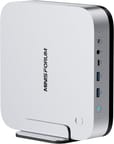
The AI X1 Pro-470 carries over the “mobile on desktop” design of the original X1 Pro: a tall brushed-metal box in the mold of a Mac Mini. It measures 7.68 inches square and 1.87 inches thick and weighs about 3.3 pounds, which makes it noticeably bigger than a palm-sized mini PC, but that volume is what lets MINISFORUM fit a 135W power supply inside the chassis instead of hanging it off a brick. TechRadar put it plainly: “The Minisforum AI X1 Pro-470 looks and feels very different from most mini PCs, with the premium quality brushed metal exterior giving it a similar look to the Mac Mini.” The front face keeps the frequently used connections within reach, with two USB-A 3.2 Gen2 ports, a USB4 port, the full-size SD card slot, a combo audio jack, a fingerprint reader for Windows Hello, and a dedicated Copilot button.
The 12-core, 24-thread Zen 5 chip in the Ryzen AI 9 HX 470 boosts to 5.2GHz and scores around 37,000 in PassMark’s CPU benchmark, pairing with Radeon 890M graphics (16 RDNA 3.5 compute units) and a 55 TOPS NPU that MINISFORUM markets as part of an 86 TOPS total-platform figure. The HX 470 nudges the HX 370’s boost clock up and lifts the NPU from 50 to 55 TOPS, and XDA wrote that “the AMD Ryzen AI HX 470 powering this mini PC is a rehash of last generation’s HX 370 with a fresh coat of paint on the product number and not much else, and the performance was underwhelming.” For a sense of what this class of silicon can and cannot do for local AI, our guide to running Gemma 4 locally maps each RAM tier to specific model sizes.
The pre-configured 32GB units populate only one of the two SO-DIMM slots, so they run in single channel, which starves the iGPU of bandwidth. NotebookCheck, which scored the machine 82%, found that “the memory bandwidth is significantly limited due to the use of only one SO-DIMM module. This single-channel configuration noticeably slows down numerous applications, as our tests show.” Both SO-DIMM slots are user-accessible, so adding a matching stick restores dual channel, which is what the barebone model invites. NotebookCheck praised the thermals, noting “a particularly positive feature is the excellently coordinated cooling: both the housing and the SoC remain at uncritical temperature values even under prolonged and high loads.”
Dual 2.5GbE ports (Realtek) give you redundancy or link aggregation for network-attached workloads, WiFi 7 and Bluetooth 5.4 cover wireless, and an OCuLink port runs at PCIe 4.0 x4 for an external GPU with far less bottleneck than USB4 or Thunderbolt. Our eGPU connector guide breaks down how much performance each port type preserves and when the upgrade is worth it. The triple M.2 layout (two PCIe 4.0 x4 slots plus one x1, up to 12TB total) lets a home-lab build keep boot drive, bulk storage, and a cache drive inside the same box. Buyers eyeing serious local inference should also weigh Strix Halo mini PCs, which offer far larger unified-memory pools for big models.
Reviewer Insights
Robtech’s Perspective
Robtech ran the machine through benchmarks, a teardown, and thermal testing. On the design he said, “Minisforum’s AI X1 Pro is a nice Mac Mini clone for the PC market and it’s back for another round with an AMD CPU update.” His central criticism is the memory configuration on the pre-built units, noting that “Minisforum has gone with a single 32 GB RAM stick configuration” and warning it is “going to tank performance.” He added the broader rule that “no matter the RAM size, any pre-built mini PC using integrated graphics should always come with a kit. No exceptions.” He praised the storage flexibility, calling it “one of few units to feature three M.2 slots,” but flagged the serviceability: “opening up the AI X1 Pro is a bit of work. There are four exposed screws, but for some reason there’s another one hidden under a glued-on sticker, which is a pain to remove.”
Carey Holzman’s Perspective
Carey Holzman unboxed, opened, and tested the HX 470 unit on a live stream, next to the HX 370 model he reviewed the year before. Inside, he pointed out the built-in power supply (“I still can’t get over how small that power supply is”) and found that his unit shipped with a single 32GB module, which he noted leaves room to reach 64GB in dual channel by adding a second 32GB stick. At BIOS defaults and in single channel, it scored 22665 in the Cinebench R23 multi-core test. Under that load he heard the fans for the first time and compared them to “a very small like desk air purifier. Very gentle.” He also noted that the only Type-A port on the back is USB 2.
NotebookCheck Review
NotebookCheck scored the AI X1 Pro-470 at 82% and summed it up as powerful but not optimally configured. Their testing credited the high-quality housing, the strong cooling, the dual 2.5G LAN plus fast WiFi, the OCuLink port, and the ability to install three SSDs. The counterweight was the single-channel memory in the review unit and its effect on the iGPU, along with a slow SD card reader and high DPC latencies.
TechRadar Review
TechRadar, reviewed by Alastair Jennings, rated the machine 4.5 out of 5 and leaned positive on the premium build and the Copilot integration. On everyday capability, the review found that “the AI X1 Pro-470 handles everything from Office to Premiere Pro and mid-weight gaming without issue.” TechRadar listed the single-channel RAM and the single front USB4 port among its cons.
XDA Review
XDA, reviewed by Joe Rice-Jones, was the most skeptical at 6.5 out of 10, arguing the value is thin given the modest generational gains and the price. The port selection was the exception, and he wrote that “the sheer number of ports on offer here makes this mini PC perfect for home lab use.” Rice-Jones also confirmed clean Linux support, writing “no annoying compatibility issues with Linux drivers, it just works, and I appreciate that.”
Buy it barebone and fill both DIMM slots
What holds it back is the Ryzen AI 9 HX 470 being a light refresh of the HX 370, combined with pre-configured 32GB units that ship in single channel and blunt the Radeon 890M until you add a second memory stick.
For home-lab builders and creators who value expansion and a clean single-cable setup, the barebone version is the one to buy, because you set the memory configuration yourself from the start. If you are chasing peak iGPU gaming, a system with dual-channel or soldered LPDDR5X memory will feel faster for the money. Owners deciding between this and other high-end boxes can line up the specs on the Mini PC Comparison Chart, and anyone leaning into local AI can weigh how the Radeon 890M and NPU perform against the guidance in our Ubuntu inference hardware guide.
Frequently Asked Questions
How is the AI X1 Pro-470 different from the original AI X1 Pro?
It uses the same flagship chassis as the original AI X1 Pro but replaces the AMD Ryzen AI 9 HX 370 with the newer Ryzen AI 9 HX 470 (Gorgon Point). The HX 470 is a modest refresh: it raises the boost clock slightly and lifts the NPU from 50 to 55 TOPS, while keeping the same 12-core, 24-thread Zen 5 layout and Radeon 890M graphics. The gain over the HX 370 is incremental.
Why do reviewers say to upgrade the RAM first?
The pre-configured 32GB models ship with a single SO-DIMM, so the memory runs in single channel and starves the Radeon 890M of bandwidth. NotebookCheck and Robtech both measured the hit. Two SO-DIMM slots take up to 128GB of DDR5-5600, so a second matching stick restores dual channel, and the barebone model lets you populate both slots from the start.
What is OCuLink and why does it matter here?
OCuLink is an external PCIe connection running at PCIe 4.0 x4 (roughly 64Gbps), which offers more bandwidth than USB4 or Thunderbolt 4. The X1 Pro-470 includes an OCuLink port so you can attach an external GPU with less bottleneck than other connection types, adding desktop-class graphics when you need it for gaming or GPU-accelerated work.
Does the AI X1 Pro-470 use an external power brick?
No. It has a built-in 135W power supply, so it connects to the wall with a standard power cable and no external brick. That supply is part of why the chassis is taller, and it keeps the desk setup to one cable.
How much storage and how many displays does it support?
It has three M.2 2280 slots (two at PCIe 4.0 x4 and one at PCIe 4.0 x1) for up to 12TB of total NVMe storage. For displays, it drives up to four screens using its HDMI 2.1 port, DisplayPort 2.0 output, and two USB4 ports with DisplayPort Alt Mode.
Does the AI X1 Pro-470 run Linux well?
In XDA’s testing, yes. Reviewer Joe Rice-Jones reported no compatibility issues with Linux drivers and said it “just works.” As with any AMD platform, users planning to run Linux should confirm support for specific features like the fingerprint reader and NPU depending on their distribution.