
ASUS NUC 15 Pro+
Updated on

The ASUS NUC 15 Pro+ is the flagship of ASUS’s 2025 NUC lineup, pairing the compact 0.7-liter chassis that defined the NUC line with Intel’s Arrow Lake Core Ultra processors (Series 2). It is built around the Core Ultra 9 285H at the top end, with Core Ultra 7 255H and Core Ultra 5 225H options below it, aimed at users who want serious multi-core performance without a tower on their desk. The “Plus” designation marks the slim, premium model with PCIe 5.0 storage, WiFi 7, and dual Thunderbolt 4, sitting a tier above the standard ASUS NUC 15 Pro. It carries forward the toolless design philosophy that made the ASUS NUC 14 Pro so easy to live with.
Flagship speed comes with firmware quirks
| Pros | Cons |
|---|---|
| Core Ultra 9 285H delivers desktop-class multi-core performance | No 3.5mm combo audio jack on the chassis |
| PCIe 5.0 primary M.2 slot for the fastest NVMe drives | Second M.2 slot limited to shorter 2242 form factor |
| WiFi 7 and Bluetooth 5.4 for current wireless standards | Verified buyer Ken Oberle hit sleep and wake failures he blames on firmware |
| Dual Thunderbolt 4 with DP 2.1 drives up to four 4K displays | Barebones models arrive with no memory, drive, or operating system |
| Toolless chassis for screwdriver-free RAM and SSD upgrades | Single 2.5GbE port rather than dual networking |
| Supports up to 96GB DDR5 across two SO-DIMM slots | Integrated Arc graphics are not built for AAA gaming |
Related Videos
ASUS NUC 15 Pro+ Comparison Chart
 ASUS NUC 15 Pro+ | ASUS NUC 15 Pro+ | ASUS NUC 15 Pro+ | ASUS NUC 15 Pro+ | ASUS NUC 15 Pro+ | |
| Price | List Price: Amazon Prices: Loading prices... | List Price: $720.00 Amazon Prices: Loading prices... | List Price: $615.00 Amazon Prices: Loading prices... | List Price: $1899.00 Amazon Prices: Loading prices... | List Price: $1229.00 Amazon Prices: Loading prices... |
| Version | Barebones/Core Ultra 9 285H | Barebones/Core Ultra 7 255H | Barebones/Core Ultra 5 225H | 32GB/1TB/Core Ultra 7 255H | 16GB/512GB/Core Ultra 5 225H |
| Performance Rating | 5.9 | 5.4 | 5.3 | 5.8 | 5.3 |
| Operating System | No OS | No OS | No OS | Windows 11 Pro | Windows 11 Pro |
| Processor | Sixteen-core 3.70 Ghz (max 5.40 Ghz) Intel Core Ultra 9 285H | Sixteen-core 2.00 Ghz (max 5.10 Ghz) Intel Core Ultra 7 255H | Fourteen-core 1.70 Ghz (max 4.90 Ghz) Intel Core Ultra 5 225H | Sixteen-core 2.00 Ghz (max 5.10 Ghz) Intel Core Ultra 7 255H | Fourteen-core 1.70 Ghz (max 4.90 Ghz) Intel Core Ultra 5 225H |
| GPU | Integrated Intel Arc 140T | Integrated Intel Arc 140T | Integrated Intel Arc 130T | Integrated Intel Arc 140T | Integrated Intel Arc 130T |
| RAM | 0 GB DDR5 SO-DIMM, 2-channel (Up to 96GB DDR5-5600) | 0 GB DDR5 SO-DIMM, 2-channel (Up to 96GB DDR5-5600) | 0 GB DDR5 SO-DIMM, 2-channel (Up to 96GB DDR5-5600) | 32 GB DDR5 SO-DIMM, 2-channel | 16 GB DDR5 SO-DIMM, 2-channel |
| Internal Storage | 0 GB None (Barebones) | 0 GB None (Barebones) | 0 GB None (Barebones) | 1 TB NVMe SSD | 512 GB NVMe SSD |
| Dimensions width x length x thickness | 5.67 x 4.41 x 1.65 inches (144.02 x 112.01 x 41.91 mm) | 5.67 x 4.41 x 1.65 inches (144.02 x 112.01 x 41.91 mm) | 5.67 x 4.41 x 1.65 inches (144.02 x 112.01 x 41.91 mm) | 5.67 x 4.41 x 1.65 inches (144.02 x 112.01 x 41.91 mm) | 5.67 x 4.41 x 1.65 inches (144.02 x 112.01 x 41.91 mm) |
| Weight | 1.32 lbs (0.6 kg) | 1.32 lbs (0.6 kg) | 1.32 lbs (0.6 kg) | 1.32 lbs (0.6 kg) | 1.32 lbs (0.6 kg) |
| WiFi | Wi-Fi 7 (802.11be) | Wi-Fi 7 (802.11be) | Wi-Fi 7 (802.11be) | Wi-Fi 7 (802.11be) | Wi-Fi 7 (802.11be) |
| Bluetooth | Bluetooth 5.4 | Bluetooth 5.4 | Bluetooth 5.4 | Bluetooth 5.4 | Bluetooth 5.4 |
| Ethernet | 1 Ethernet port at 2.5 Gbps | 1 Ethernet port at 2.5 Gbps | 1 Ethernet port at 2.5 Gbps | 1 Ethernet port at 2.5 Gbps | 1 Ethernet port at 2.5 Gbps |
| HDMI | 2 Full-Size HDMI Ports | 2 Full-Size HDMI Ports | 2 Full-Size HDMI Ports | 2 Full-Size HDMI Ports | 2 Full-Size HDMI Ports |
| DisplayPort | DP 2.1 via Thunderbolt 4; up to 4x 4K displays | DP 2.1 via Thunderbolt 4; up to 4x 4K displays | DP 2.1 via Thunderbolt 4; up to 4x 4K displays | DP 2.1 via Thunderbolt 4; up to 4x 4K displays | DP 2.1 via Thunderbolt 4; up to 4x 4K displays |
| VGA | No VGA Ports | No VGA Ports | No VGA Ports | No VGA Ports | No VGA Ports |
| USB Ports | 1 USB 2.0, 3 USB 3, 1 USB-C Front: 2x USB-A 3.2 Gen2 (10Gbps), 1x USB-C 3.2 Gen2x2 (20Gbps). Rear: 2x Thunderbolt 4, 1x USB-A 3.2 Gen2, 1x USB 2.0 | 1 USB 2.0, 3 USB 3, 1 USB-C Front: 2x USB-A 3.2 Gen2 (10Gbps), 1x USB-C 3.2 Gen2x2 (20Gbps). Rear: 2x Thunderbolt 4, 1x USB-A 3.2 Gen2, 1x USB 2.0 | 1 USB 2.0, 3 USB 3, 1 USB-C Front: 2x USB-A 3.2 Gen2 (10Gbps), 1x USB-C 3.2 Gen2x2 (20Gbps). Rear: 2x Thunderbolt 4, 1x USB-A 3.2 Gen2, 1x USB 2.0 | 1 USB 2.0, 3 USB 3, 1 USB-C Front: 2x USB-A 3.2 Gen2 (10Gbps), 1x USB-C 3.2 Gen2x2 (20Gbps). Rear: 2x Thunderbolt 4, 1x USB-A 3.2 Gen2, 1x USB 2.0 | 1 USB 2.0, 3 USB 3, 1 USB-C Front: 2x USB-A 3.2 Gen2 (10Gbps), 1x USB-C 3.2 Gen2x2 (20Gbps). Rear: 2x Thunderbolt 4, 1x USB-A 3.2 Gen2, 1x USB 2.0 |
| Thunderbolt Ports | 2 | 2 | 2 | 2 | 2 |
| OCuLink | No | No | No | No | No |
| Internal SATA Ports | No SATA ports | No SATA ports | No SATA ports | No SATA ports | No SATA ports |
| Card Reader | No Card Reader | No Card Reader | No Card Reader | No Card Reader | No Card Reader |
| Headphone Jack | none | none | none | none | none |
| Fanless | No | No | No | No | No |
| VESA Mount | Yes | Yes | Yes | Yes | Yes |
| In the Box | Mini PC, AC adapter with power cord, VESA bracket and screws, warranty card | Mini PC, AC adapter with power cord, VESA bracket and screws, warranty card | Mini PC, AC adapter with power cord, VESA bracket and screws, warranty card | Mini PC, AC adapter with power cord, VESA bracket and screws, warranty card | Mini PC, AC adapter with power cord, VESA bracket and screws, warranty card |
| Expandability | 2x DDR5 SO-DIMM (up to 96GB, DDR5-5600 or DDR5-6400 CSO-DIMM). 2x M.2: 2280 PCIe 5.0 x4 + 2242 PCIe 4.0 x4. Toolless chassis access. | 2x DDR5 SO-DIMM (up to 96GB, DDR5-5600 or DDR5-6400 CSO-DIMM). 2x M.2: 2280 PCIe 5.0 x4 + 2242 PCIe 4.0 x4. Toolless chassis access. | 2x DDR5 SO-DIMM (up to 96GB, DDR5-5600 or DDR5-6400 CSO-DIMM). 2x M.2: 2280 PCIe 5.0 x4 + 2242 PCIe 4.0 x4. Toolless chassis access. | 2x DDR5 SO-DIMM (up to 96GB, DDR5-5600 or DDR5-6400 CSO-DIMM). 2x M.2: 2280 PCIe 5.0 x4 + 2242 PCIe 4.0 x4. Toolless chassis access. | 2x DDR5 SO-DIMM (up to 96GB, DDR5-5600 or DDR5-6400 CSO-DIMM). 2x M.2: 2280 PCIe 5.0 x4 + 2242 PCIe 4.0 x4. Toolless chassis access. |
Related Mini PCs
-
 ASUS NUC 15 ProThe ASUS NUC 15 Pro is the mainstream Cyber Canyon NUC, sold mostly as slim or tall barebones kits,…
 -
 ASUS NUC 16 ProThe ASUS NUC 16 Pro brings Intel's Panther Lake architecture to the iconic NUC form factor,…
 -
 GMKtec NucBox M3 ProA compact office and home-server box for three-monitor desks and small Linux setups; its 2023 Core…
 -
 MINISFORUM M2-356HThe MINISFORUM M2-356H puts Intel's Panther Lake Core Ultra 7 356H in a 520-gram box with two DDR5…
 -
 MINISFORUM UN1290The MINISFORUM UN1290 is a Core i9-12900HK mini PC in a 0.9-liter chassis with two DDR4 slots (64GB…
 -
 AOOSTAR GEM12 MAXThe AOOSTAR GEM12 MAX is a 5.12-inch AMD Ryzen 7 8745HS mini PC with an OCuLink port for an…
Two M.2 slots and 96GB of DDR5 behind a toolless panel

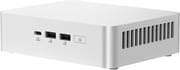
The machine measures 5.67 by 4.41 by 1.65 inches and weighs roughly 1.3 pounds, keeping the slim, low-profile silhouette that distinguishes the Plus model from the taller standard NUC 15 Pro. The chassis is a toolless silver aluminum design: a latch releases the bottom panel so you can reach the two DDR5 SO-DIMM slots and dual M.2 slots without a screwdriver, and one owner described a memory and M.2 install done “in less than a minute.” The front panel carries a 20Gbps USB-C port (USB 3.2 Gen2x2) flanked by two 10Gbps USB-A ports and the power button, while the rear hosts the dual Thunderbolt 4 ports, an additional USB-A, a USB 2.0 port, two HDMI outputs, and the 2.5-gigabit Ethernet jack. One notable omission is the lack of a 3.5mm audio jack, so headphone and speaker connections rely on USB, HDMI, or Bluetooth.
The flagship configuration uses the Intel Core Ultra 9 285H, a 16-core, 16-thread Arrow Lake processor that boosts to 5.4GHz and scores roughly 34,500 on the PassMark CPU benchmark. That puts it well ahead of the previous-generation NUC 14 Pro, with headroom for 4K video timeline scrubbing, heavy multitasking, and software development across dozens of browser tabs. The integrated Intel Arc 140T graphics handle media playback, hardware-accelerated encoding, and light creative work, and the processor’s NPU enables on-device AI features, though as with most integrated solutions this is not a gaming GPU. One owner reported installing 128GB of memory (two 64GB SO-DIMMs, beyond the official 96GB rating) and a 4TB NVMe drive for a “blazing fast” Windows 11 Pro setup.
Wireless duty falls to WiFi 7 (802.11be) and Bluetooth 5.4, while the wired side uses Intel’s I226-V controller for 2.5-gigabit Ethernet. The dual Thunderbolt 4 ports support DisplayPort 2.1 alt mode, and combined with the two HDMI outputs the NUC 15 Pro+ can drive up to four displays, with owners reporting 8K at 60Hz over Thunderbolt. The primary M.2 2280 slot runs at PCIe 5.0 x4 for the fastest current drives, and a second M.2 2242 slot at PCIe 4.0 x4 adds capacity. Memory tops out at 96GB across the two SO-DIMM slots, enough headroom for virtualization or large in-memory workloads.
Reviewer Insights

Robtech framed the launch around performance, billing it as the fastest Intel mini PC available at the time of release and walking through the chassis, upgrade process, and thermals. The Geeky Ricky reaches a similar conclusion, describing the system as compact and fast, while Gearvlog with Mike puts the Arrow Lake silicon through a dedicated benchmark run.
Customer Reviews
Across 50 ratings on Amazon, the ASUS NUC 15 Pro+ averages 4.2 stars, with 56 percent at five stars and a smaller cluster (about 15 percent) at one or two. Buyers who liked it praised the raw speed and how easy it is to add your own RAM and SSD to the barebones unit. A verified buyer wrote “Easy memory and M2 installation — no tools; flip it over, open the latch, insert the memory and M2 drive in less than a minute,” and verified buyer Brad Barnburner described “Performance is Immediate Boot Up with no B.S.”
The recurring complaint is firmware and stability rather than the hardware itself. Verified buyer Ken Oberle gave it two stars, writing it is “Good… when it works” but that “Asus and Microsoft need to put their heads together to straighten out the firmware issues with it,” citing “nonstop hardware issues from not being able to sleep or wake properly.” Verified buyer Tim, otherwise “mostly happy,” noted it “took a couple weeks for it to stabilize.” A one-star buyer called it an “extremely over heating product.”
Read more owner reviews on Amazon.
Flagship Arrow Lake speed at a premium price
The “Plus” name buys the Core Ultra 9 285H, a PCIe 5.0 storage slot, WiFi 7, and dual Thunderbolt 4 in a chassis small enough to hide behind a monitor. The toolless design and the CPU range from the Core Ultra 5 225H up to the Core Ultra 9 285H let you match the configuration to your budget and workload, and the two SO-DIMM slots leave room to grow into 96GB of memory later.
If you rely on a wired headset jack, want dual high-speed Ethernet, or plan to game on integrated graphics, look elsewhere or budget for a Thunderbolt eGPU. Research the reported firmware quirks against your intended operating system before buying. Shoppers cross-shopping the Mac mini for a Windows or Linux workstation should also weigh the Mac mini M4 on price and platform fit.
For those comparing options, Starry Hope’s Mini PC Comparison Chart is a useful way to evaluate it against other mini PCs in its class.
Upgrades
Accessories that fit the ASUS NUC 15 Pro+'s USB4 or Thunderbolt ports.

Core X V2
A Thunderbolt 5 enclosure that Razer lists as working with Thunderbolt 4 and USB4 hosts; it fits a four-slot card and needs an ATX power supply.

DEG2 eGPU Dock
Connects over USB4 or Thunderbolt 5, with an OCuLink input behind a switch, and adds an M.2 slot; it needs an ATX or SFX power supply.

Breakaway Box 850 T5
Has an 850W power supply built in, so only the graphics card is extra, and works with Thunderbolt 4 and USB4 Windows PCs.

TS4 Thunderbolt 4 Dock
An 18-port dock that CalDigit lists for Thunderbolt 4 and USB4 hosts, with 2.5GbE and a DisplayPort 1.4 output.

TBT4-UD5 Thunderbolt 4 Dock
Two HDMI ports drive two 4K60 monitors from one Thunderbolt 4 or USB4 port on a Windows PC.

Revodok Max 208 Thunderbolt 4 Dock
Adds three Thunderbolt 4 ports for dual 4K60 displays plus gigabit Ethernet; it has no HDMI port, so monitors connect over USB-C or an adapter.
Frequently Asked Questions
What processor does the ASUS NUC 15 Pro+ use?
The flagship uses the Intel Core Ultra 9 285H, an Arrow Lake (Series 2) processor with 16 cores and 16 threads that boosts up to 5.4GHz and scores roughly 34,500 on the PassMark CPU benchmark. ASUS also offers the Pro+ with the Core Ultra 7 255H and Core Ultra 5 225H for lower-cost configurations.
Can I upgrade the RAM and storage in the ASUS NUC 15 Pro+?
Both are user-serviceable. The toolless chassis opens without a screwdriver, giving access to two DDR5 SO-DIMM slots (up to 96GB) and two M.2 slots. The primary slot is M.2 2280 running at PCIe 5.0 x4, and the second is a shorter M.2 2242 at PCIe 4.0 x4. Barebones configurations let you supply your own memory and drives.
How many monitors can the ASUS NUC 15 Pro+ drive?
Up to four. The two HDMI 2.1 ports pair with two Thunderbolt 4 ports carrying DisplayPort 2.1 alt mode, and owners report driving 8K at 60Hz over Thunderbolt.
What is the difference between the NUC 15 Pro+ and the NUC 15 Pro?
The NUC 15 Pro+ is the slim, premium model built on the NUC15CRS chassis with Core Ultra 9, 7, and 5 H-series processors, a PCIe 5.0 primary M.2 slot, and Arc 140T graphics on the higher tiers. The standard NUC 15 Pro uses a separate chassis (offered in slim and tall heights) with lower-power Core Ultra and Core processors and Arc 130T graphics. They are distinct products with separate ASUS product pages.
Does the ASUS NUC 15 Pro+ have a headphone jack?
No. The chassis does not include a 3.5mm combo audio jack, so audio runs over USB, HDMI, or Bluetooth. This follows the same pattern as the previous ASUS NUC 14 Pro, which also omitted the analog jack.
Is the ASUS NUC 15 Pro+ good for a home lab?
The Core Ultra processors, support for up to 96GB of DDR5, dual M.2 storage, and low-power compact design suit virtual machines and container workloads. The 2.5-gigabit Ethernet port and 96GB memory ceiling give an always-on box room to grow.