
MINISFORUM M1 Pro
Updated on

The MINISFORUM M1 Pro is an Intel Core Ultra mini PC in an aluminum chassis that fits in your hand, and it carries two features uncommon at this size: WiFi 7 and an OCuLink port for adding an external GPU without Thunderbolt’s bandwidth limits. MINISFORUM sells it in two CPU tiers that share the same chassis, ports, and OCuLink expansion. The 14-core Core Ultra 5 125H tier comes in 32GB/512GB and 32GB/1TB builds, while the step-up 16-core Core Ultra 9 285H tier swaps in Arc 140T graphics, adds 99 TOPS of combined AI throughput, and offers a barebone option for buyers who bring their own RAM and storage. It is aimed at creative work, development, and modular gaming setups rather than budget buyers.
Pros and Cons
| Pros | Cons |
|---|---|
| Aluminum top and sides, with only the bottom panel in plastic | Intel mobile chip pricing runs above AMD parts like the Ryzen 7 8845HS |
| OCuLink port for lossless external GPU expansion (adapter included) | No SD card reader for quick media transfers |
| WiFi 7 and Bluetooth 5.4 wireless | OCuLink adapter uses one M.2 slot when installed |
| Quiet operation at approximately 33dB under normal use | Internal speakers and microphone are subpar quality |
| Dual USB4 ports with 40Gbps throughput and DisplayPort Alt Mode | Fan noise increases noticeably in performance mode |
| Support for up to 128GB DDR5 RAM and dual PCIe 4.0 NVMe drives | Integrated graphics limited for demanding AAA games |
Related Videos
MINISFORUM M1 Pro Comparison Chart
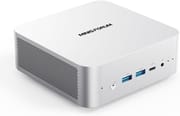 MINISFORUM M1 Pro | MINISFORUM M1 Pro | MINISFORUM M1 Pro | MINISFORUM M1 Pro | |
| Price | List Price: $767.00 Amazon Prices: Loading prices... | List Price: $695.00 Amazon Prices: Loading prices... | List Price: $999.00 Amazon Prices: Loading prices... | List Price: $623.00 Amazon Prices: |
| Version | 32GB/1TB/Intel Core Ultra 5 125H | 32GB/512GB/Intel Core Ultra 5 125H | 32GB/1TB/Intel Core Ultra 9 285H | Barebone/Intel Core Ultra 9 285H |
| Performance Rating | 5.3 | 5.3 | 6.3 | 5.9 |
| Operating System | Windows 11 Pro | Windows 11 Pro | Windows 11 Pro | No OS |
| Processor | Fourteen-core 3.60 Ghz (max 4.50 Ghz) Intel Core Ultra 5 Processor 125H | Fourteen-core 3.60 Ghz (max 4.50 Ghz) Intel Core Ultra 5 Processor 125H | Sixteen-core 3.70 Ghz (max 5.40 Ghz) Intel Core Ultra 9 285H | Sixteen-core 3.70 Ghz (max 5.40 Ghz) Intel Core Ultra 9 285H |
| GPU | Integrated Intel Arc graphics | Integrated Intel Arc graphics | Integrated Intel Arc 140T | Integrated Intel Arc 140T |
| RAM | 32 GB | 32 GB DDR5 SO-DIMM (DDR5-5600) | 32 GB DDR5 SO-DIMM (DDR5-5600 (BIOS supports up to 6400MHz)) | 0 GB DDR5 SO-DIMM (DDR5-5600 (BIOS supports up to 6400MHz)) |
| Internal Storage | 1 TB | 512 GB PCIe 4.0 NVMe SSD | 1 TB PCIe 4.0 NVMe SSD | 0 GB |
| Dimensions width x length x thickness | 4.96 x 5.04 x 2.07 inches (125.98 x 128.02 x 52.58 mm) | 4.96 x 5.04 x 2.07 inches (125.98 x 128.02 x 52.58 mm) | 4.96 x 5.04 x 2.07 inches (125.98 x 128.02 x 52.58 mm) | 4.96 x 5.04 x 2.07 inches (125.98 x 128.02 x 52.58 mm) |
| Weight | 1.32 lbs (0.6 kg) | 1.32 lbs (0.6 kg) | 1.32 lbs (0.6 kg) | 1.32 lbs (0.6 kg) |
| WiFi | Wi-Fi 7 (802.11be) | Wi-Fi 7 (802.11be) | Wi-Fi 7 (802.11be) | Wi-Fi 7 (802.11be) |
| Bluetooth | Bluetooth 5.4 | Bluetooth 5.4 | Bluetooth 5.4 | Bluetooth 5.4 |
| Ethernet | 1 Ethernet port at 2.5 Gbps | 1 Ethernet port at 2.5 Gbps | 1 Ethernet port at 2.5 Gbps | 1 Ethernet port at 2.5 Gbps |
| HDMI | 1 Full-Size HDMI Port | 1 Full-Size HDMI Port | 1 Full-Size HDMI Port | 1 Full-Size HDMI Port |
| DisplayPort | 1 DisplayPort (DP 1.4) | 1 DisplayPort (DP 1.4) | 1 DisplayPort (DP 1.4 up to 8K@60Hz) | 1 DisplayPort (DP 1.4 up to 8K@60Hz) |
| VGA | No VGA Ports | No VGA Ports | No VGA Ports | No VGA Ports |
| USB Ports | 1 USB 2.0, 2 USB 3, 2 USB-C (2 USB4) 2x USB4 (40 Gbps) with DisplayPort Alt Mode, one supports Power Delivery | 1 USB 2.0, 2 USB 3, 2 USB-C (2 USB4) 2x USB4 (40 Gbps) with DisplayPort Alt Mode, one supports Power Delivery | 1 USB 2.0, 2 USB 3, 2 USB-C (2 USB4) 2x USB4 (40 Gbps) with DisplayPort Alt Mode, one supports Power Delivery | 1 USB 2.0, 2 USB 3, 2 USB-C (2 USB4) 2x USB4 (40 Gbps) with DisplayPort Alt Mode, one supports Power Delivery |
| Thunderbolt Ports | No | No | No | No |
| OCuLink | Via included M.2 adapter (PCIe 4.0 x4, uses one M.2 slot) | Via included M.2 adapter (PCIe 4.0 x4, uses one M.2 slot) | Via included M.2 adapter (PCIe 4.0 x4, uses one M.2 slot) | Via included M.2 adapter (PCIe 4.0 x4, uses one M.2 slot) |
| Internal SATA Ports | No SATA ports | No SATA ports | No SATA ports | No SATA ports |
| Card Reader | No Card Reader | No Card Reader | No Card Reader | No Card Reader |
| Headphone Jack | combo | combo | combo | combo |
| Fanless | No | No | No | No |
| VESA Mount | Yes | Yes | Yes | Yes |
| In the Box | Mini PC, 120W power adapter with AC cord, HDMI cable, VESA mounting bracket with screws, OCuLink adapter (M.2 to OCuLink), thermal pad and bracket for second SSD, user manual | Mini PC, 120W power adapter with AC cord, HDMI cable, VESA mounting bracket with screws, OCuLink adapter (M.2 to OCuLink), thermal pad and bracket for second SSD, user manual | Mini PC, 120W power adapter with AC cord, HDMI cable, VESA mounting bracket with screws, OCuLink adapter (M.2 to OCuLink), thermal pad and bracket for second SSD, user manual | Mini PC, 120W power adapter with AC cord, HDMI cable, VESA mounting bracket with screws, OCuLink adapter (M.2 to OCuLink), thermal pad and bracket for second SSD, user manual |
| Expandability | RAM upgradable to 128GB via 2x DDR5-5600 SO-DIMM slots. Storage expandable via 2x M.2 2280 PCIe 4.0 x4 slots with RAID 0/1 support. OCuLink port available for external GPU via included adapter. | RAM upgradable to 128GB via 2x DDR5-5600 SO-DIMM slots. Storage expandable via 2x M.2 2280 PCIe 4.0 x4 slots with RAID 0/1 support. OCuLink port available for external GPU via included adapter. | RAM upgradable to 128GB via 2x DDR5-5600 SO-DIMM slots. Storage expandable via 2x M.2 2280 PCIe 4.0 x4 slots with RAID 0/1 support. OCuLink port available for external GPU via included adapter. | RAM upgradable to 128GB via 2x DDR5-5600 SO-DIMM slots. Storage expandable via 2x M.2 2280 PCIe 4.0 x4 slots with RAID 0/1 support. OCuLink port available for external GPU via included adapter. |
Related Mini PCs
-
 MINISFORUM M1-1295The MINISFORUM M1-1295 is a Core i9-12950HX mini PC with two DDR4 SO-DIMM slots (96GB max), two…
 -
 MINISFORUM UM880 PlusThe MINISFORUM UM880 Plus puts an AMD Ryzen 7 8845HS with Radeon 780M graphics in a 5-inch cube,…
 -
 Beelink EQR7The Beelink EQR7 pairs an AMD Ryzen 7 7735U with a built-in power supply, dual Gigabit Ethernet,…
 -
 Beelink SER5 MAX (Ryzen 7 7735HS)The Beelink SER5 MAX pairs an 8-core Ryzen 7 7735HS and Radeon 680M graphics with 24GB of LPDDR5,…
 -
 BOSGAME M4The BOSGAME M4 pairs an AMD Ryzen 7 8745HS with 32GB of DDR5, an OCuLink port for an external GPU,…
 -
 BOSGAME P3 LiteThe BOSGAME P3 Lite pairs an AMD Ryzen 7 6800H and Radeon 680M graphics with dual 2.5G Ethernet,…
An Aluminum Palm-Sized Box with OCuLink and Two CPU Tiers

The chassis measures just under 5 inches square and about 2 inches thick, and the whole machine weighs 1.32 pounds. The top and sides are metal, which helps heat dissipation; the bottom panel is plastic, which a few reviewers noted feels less premium but keeps weight down and eases upgrades. Most ports sit on the back, which keeps cabling tidy when the unit is VESA-mounted behind a monitor.
The Core Ultra 5 125H brings 14 cores and 18 threads with boost up to 4.5GHz, and its integrated Intel Arc graphics cover everyday work, light video editing, and emulation up through some PS3 and Xbox 360 era titles. TechPowerUp measured a Cinebench 2024 multi-core score of 1,009 and a low 10.3W average idle draw. For more graphics power, the OCuLink port gives a direct PCIe 4.0 x4 link to an external GPU enclosure, avoiding the bandwidth limits of Thunderbolt.
Buyers who want more headroom can step up to the Core Ultra 9 285H tier in the same chassis. That Arrow Lake-H chip pairs six P-cores, eight E-cores, and two low-power E-cores for 16 cores up to 5.4GHz, scoring around 34,000 on PassMark, and swaps the integrated graphics for the faster Intel Arc 140T. Its headline number is 99 combined TOPS across the CPU, NPU, and Arc 140T GPU, enough to run small local language models through tools like Ollama or LM Studio without an external accelerator. Level1Techs called it “literally the smallest Core Ultra 285H mini PC that I’ve looked at” and concluded that for productivity workloads “you’re really not giving up a lot versus a full-size desktop Core Ultra 285.” The 285H tier sells in a 32GB/1TB build (around $999) and a barebone version (around $623) for buyers who supply their own RAM, storage, and operating system.
Wireless duty falls to WiFi 7 and Bluetooth 5.4. The dual USB4 ports carry 40Gbps of data and DisplayPort Alt Mode for high-resolution displays, and the 2.5 Gigabit Ethernet port handles the wired side. Two M.2 2280 slots take PCIe Gen 4 NVMe drives and the two SO-DIMM slots take up to 128GB of DDR5, so a 32GB build can grow well past what it shipped with.
Reviewer Insights

Robtech’s Perspective
Robtech provides a thorough technical analysis of the M1 Pro-125H, describing it as “one of the more decent value propositions from Intel’s Meteor Lake lineup.” He highlights the metal build quality and WiFi 7 support, though he notes that Intel’s pricing makes AMD alternatives more competitive for value-focused buyers. Robtech particularly appreciates the compact 120W power supply and included OCuLink adapter, stating that “it’s basically a copy of the Minisforum AIX1… except the CPU, of course, which has been swapped from AMD to Intel.” He recommends the M1 Pro for Intel enthusiasts and creators who work in the Adobe suite, while suggesting value-oriented buyers consider AMD options.
Family Pop TV’s Perspective
Family Pop TV focuses on the M1 Pro’s versatility and eGPU potential, calling it “the most versatile Mini PC I’ve tested so far” at its price point. The review emphasizes the OCuLink port as “a direct line to the GPU, no bottlenecks, no compromises,” noting how it transforms this compact system into a full gaming rig when paired with a desktop graphics card. At approximately 33dB during typical operation, the M1 Pro earned praise for quiet performance. The reviewer concludes it’s highly recommended for professionals and modular-build enthusiasts who want a system that can grow with their needs.
Chase Brogan’s Perspective
Chase Brogan evaluates the M1 Pro primarily through the lens of gaming and emulation and emphasizes that “this is all metal. There’s no cheap plastic on here. Very durable, very sleek design.” His testing demonstrates smooth performance across retro gaming platforms including PS3, Xbox 360, and GameCube emulation. While noting that modern AAA titles benefit from an external GPU setup, he considers the M1 Pro “more than capable of the majority of gaming” right out of the box. The efficient and quiet cooling system receives particular praise for maintaining performance without excessive noise.
TechPowerUp Professional Review
TechPowerUp gave the M1 Pro a strongly positive review, judging that it performs like a full desktop across work, creative, and entertainment tasks. The review singles out the OCuLink port as rare for a mini PC of this class and the low power draw (about 10.3W at idle), while its main criticisms were the missing SD card reader and the midrange sustained write speed of the bundled SSD.
RandomGaminginHD’s Perspective
RandomGaminginHD tested the Core Ultra 9 285H build’s Arc 140T graphics at 1080p. Counter-Strike 2 averaged 128 FPS on the lowest settings, Fortnite 63 FPS on the low preset at native resolution, and Cyberpunk 2077 52 FPS on its lowest settings with XeSS 2 balanced upscaling. Red Dead Redemption 2 averaged 43 FPS with mostly lowest settings and high textures. In the BIOS performance mode the system stayed quiet while gaming, peaked at 82C, and drew a maximum of 62W.
Madlittlepixel’s Perspective
Madlittlepixel received the 285H with 32GB of DDR5 and a 1TB SSD and found that games would not run until the Intel graphics drivers were updated. After that, Doom: The Dark Ages ran smoothly with upscaling, and Resident Evil 2 and Elden Ring ran decently. He opened the case through four screws on the sides for access to the RAM, the SSD, and the OCuLink board, which ships in the box for the owner to install.
Ryan Adapts’ Perspective
Ryan Adapts tested the same 32GB/1TB configuration, found the cooling “pretty dang quiet,” and measured a sustained SSD write average of about 334MB/s. He ran local language models in LM Studio and Ollama on the integrated graphics and found the output usable though not quick to generate.
Customer Reviews
Across 9 ratings on Amazon, the MINISFORUM M1 Pro averages 4.8 stars, with every visible review rating it 5 stars. The pool is small, so treat it as early sentiment rather than a long track record. Paul Cunliffe, a verified buyer, wrote that the unit “is sleek, well made and most importantly very powerful,” adding that it “Arrived quickly to Thailand” with “Excellent packaging.” Another verified buyer, Daniel, reviewed it in Spanish and reported “Muy buen producto,” noting performance and fluidity beyond what he expected.
Shaun Z., a verified buyer running it as a Plex server, found that his unit shipped with “a single 32 GB DDR5 SDRAM module instead of the dual 16 GB modules I had expected,” a single-channel configuration that “can negatively affect performance.” He noted the only contact path was a support form on Minisforum’s site, which he “found somewhat inconvenient,” but a representative named Andy “responded to my inquiry promptly,” explained the memory was “randomized due to a market shortage,” and sent a prepaid label to swap the single module for two 16 GB modules. If you buy one, it is worth checking whether your unit arrived in single-channel or dual-channel memory.
Read more owner reviews on Amazon.
The OCuLink Port Is the Reason to Pick This One
The OCuLink port gives this compact metal box a path to desktop-class graphics without Thunderbolt’s bandwidth compromises, which is what sets it apart from other Core Ultra mini PCs. That suits creators in the Adobe suite and developers who want quick compile times. Within the Core Ultra 5 125H tier, the 32GB/512GB build suits buyers who will add their own secondary M.2 drive, while the 32GB/1TB build is ready to use out of the box.
Those primarily focused on gaming value or maximum performance per dollar should consider AMD-based alternatives, as Intel’s mobile chip pricing remains less competitive in pure benchmarks. Shoppers who want more multi-core headroom or 99 TOPS of on-device AI should step up to the Core Ultra 9 285H tier, which delivers a 16-core CPU and the faster Arc 140T GPU in the same chassis, or choose its barebone build to supply their own RAM and storage. Starry Hope’s Mini PC Comparison Chart lists its specs alongside the rest of the mini PC catalog.
Upgrades
Accessories that fit the MINISFORUM M1 Pro's OCuLink and USB4 or Thunderbolt ports.
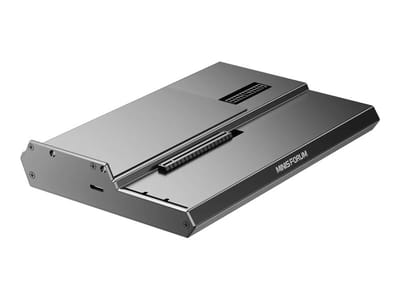
DEG1 eGPU Dock
A plain OCuLink dock with a PCIe 4.0 x4 link for a desktop graphics card; it takes an ATX or SFX power supply that you supply.
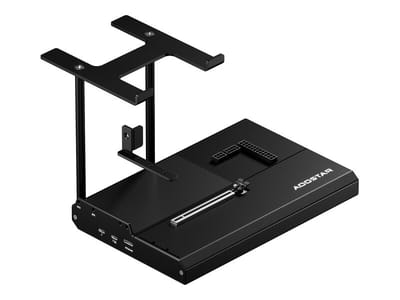
EG02 eGPU Dock
Connects over OCuLink for the full PCIe 4.0 x4 link and has Thunderbolt 5 as a second input; the graphics card and power supply are sold separately.

Core X V2
A Thunderbolt 5 enclosure that Razer lists as working with Thunderbolt 4 and USB4 hosts; it fits a four-slot card and needs an ATX power supply.

DEG2 eGPU Dock
Connects over USB4 or Thunderbolt 5, with an OCuLink input behind a switch, and adds an M.2 slot; it needs an ATX or SFX power supply.

Breakaway Box 850 T5
Has an 850W power supply built in, so only the graphics card is extra, and works with Thunderbolt 4 and USB4 Windows PCs.

TS4 Thunderbolt 4 Dock
An 18-port dock that CalDigit lists for Thunderbolt 4 and USB4 hosts, with 2.5GbE and a DisplayPort 1.4 output.

TBT4-UD5 Thunderbolt 4 Dock
Two HDMI ports drive two 4K60 monitors from one Thunderbolt 4 or USB4 port on a Windows PC.

Revodok Max 208 Thunderbolt 4 Dock
Adds three Thunderbolt 4 ports for dual 4K60 displays plus gigabit Ethernet; it has no HDMI port, so monitors connect over USB-C or an adapter.
Frequently Asked Questions
What is the OCuLink port on the MINISFORUM M1 Pro and why does it matter?
OCuLink gives a direct PCIe 4.0 x4 link to an external GPU. Thunderbolt and USB4 share their bandwidth with other functions; OCuLink does not, so the graphics link keeps its full lane budget. Pair the M1 Pro with an external graphics card enclosure and you get desktop-class graphics on demand from a box that still sits under 5 inches square.
Can I upgrade the RAM and storage in the M1 Pro?
Yes. Two DDR5-5600 SO-DIMM slots take up to 128GB of RAM, and two M.2 2280 PCIe Gen 4 x4 slots take NVMe SSDs with RAID 0/1 support. A thermal pad and bracket for the second SSD come in the box. Using the OCuLink adapter costs you one of those M.2 slots.
How does the Intel Core Ultra 5 125H compare to AMD alternatives for mini PCs?
The Intel Core Ultra 5 125H offers 14 cores and 18 threads with strong single-threaded performance and Intel Arc integrated graphics. While AMD alternatives like the Ryzen 7 8845HS often provide better value for pure gaming benchmarks, Intel shines in applications that use Quick Sync for video encoding and specific creative software optimized for Intel platforms. The choice often comes down to your primary workload and whether you value the OCuLink expansion option.
How many displays can the M1 Pro support?
The M1 Pro can drive up to four displays simultaneously. It features one HDMI 2.1 port, one DisplayPort 1.4, and two USB4 ports that both support DisplayPort Alt Mode.
Is the M1 Pro suitable for gaming?
Casual gaming, esports titles, and retro emulation through the PS3 and Xbox 360 era run well on the integrated Intel Arc graphics. Demanding modern AAA titles at high settings want an external GPU on the OCuLink port, which is the point of having the port at all.
How loud is the M1 Pro during operation?
About 33dB under typical workloads, which reviewers describe as very quiet. It gets noticeably louder under sustained load. Cooling comes from dual fans and copper heat pipes.
What comes in the box with the M1 Pro?
The box holds the mini PC, a 120W power adapter with AC cord, an HDMI cable, a VESA mounting bracket with screws, an OCuLink adapter (M.2 to OCuLink), a thermal pad and bracket for a second SSD, and a user manual. The OCuLink adapter is the part worth noting, since it is what turns the port into a working external GPU link.