
Beelink SEI14 Mini PC
Updated on

The Beelink SEi14 is a compact mini PC built on Intel’s Core Ultra 5 125H, a 14-core, 18-thread chip with integrated Intel Arc graphics. It ships with 32GB of DDR5 (upgradeable to 96GB) and a 1TB PCIe 4.0 SSD, with a second M.2 slot for up to 8TB total. The draw is connectivity and expandability for the price: Thunderbolt 4, an Intel 2.5GbE adapter, Wi-Fi 6, and triple 4K display output over HDMI, DisplayPort, and USB-C.
Its aluminum chassis is often compared to Apple’s Mac Mini, and reviewers single it out as a tidy productivity and home-lab machine. The Arc graphics handle 4K playback and light gaming, but not modern AAA titles at high settings, and reviewers note it runs warm under sustained load. There is no VESA mount.
| Pros | Cons |
|---|---|
| 14-core Core Ultra 5 125H, strong for productivity and multitasking | Arc graphics are weak for newer AAA games |
| Aluminum build often likened to a Mac Mini | Runs warm under sustained load |
| DDR5 to 96GB and two PCIe 4.0 M.2 slots (up to 8TB) | No VESA mount |
| Thunderbolt 4 (eGPU and fast storage) plus triple 4K output | Rubber screw covers make teardown fiddly |
| Intel 2.5GbE adapter, friendly to hypervisors like ESXi | Pricier than AMD-based rivals with stronger graphics |
| Quiet during normal use | Wi-Fi may need extra drivers on Linux |
| AV1 hardware encode, useful for content creators |
Related Videos
Beelink SEI14 Mini PC Comparison Chart
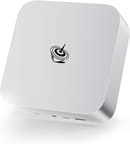 Beelink SEI14 Mini PC | |
| Price | List Price: $649.99 Amazon Prices: |
| Version | 32GB/1TB/Intel Ultra 5 125H |
| Performance Rating | 8.5 |
| Operating System | Windows 11 Pro |
| Processor | Fourteen-core 3.60 Ghz (max 4.50 Ghz) Intel Core Ultra 5 Processor 125H |
| GPU | Integrated Intel Arc graphics |
| RAM | 32 GB |
| Internal Storage | 1 TB |
| Dimensions width x length x thickness | 5.31 x 5.31 x 1.76 inches (134.87 x 134.87 x 44.7 mm) |
| Weight | 1.65 lbs (0.75 kg) |
| WiFi | Wi-Fi 6 (802.11ax) |
| Bluetooth | Bluetooth 5.2 |
| Ethernet | 1 Ethernet port at 2.5 Gbps |
| HDMI | 1 Full-Size HDMI Port |
| DisplayPort | 1 DisplayPort (DisplayPort 1.4a, supports 4K at 144Hz) |
| VGA | No VGA Ports |
| USB Ports | 2 USB 2.0, 2 USB 3, 1 USB 4, 1 USB-C (USB-C is data only (10 Gbps); Thunderbolt 4 supports 40 Gbps and external GPUs) |
| Thunderbolt Ports | 1 |
| OCuLink | No |
| Internal SATA Ports | No SATA ports |
| Card Reader | No Card Reader |
| Headphone Jack | combo |
| Fanless | No |
| VESA Mount | No |
| In the Box | Power supply, HDMI cable, user manual, Mini PC |
| Expandability | Upgradeable RAM (up to 96 GB); second NVMe slot available for additional storage or RAID configuration; supports up to 8 TB total storage |
Related Mini PCs
-
 Beelink EQR6The Beelink EQR6 is a quiet, compact mini PC sold in several AMD configs (Ryzen 9 6900HX down to…
 -
 Beelink SER8The Beelink SER8 is a compact AMD mini PC with the Ryzen 7 8845HS (or 8745HS), Radeon 780M…
 -
 ACEMAGICIAN AD08 Mini PCThe ACEMAGICIAN AD08 is a compact mini PC sold with Intel Core i9-11900H, i9-12900H, or i7-11700B…
 -
 ACEMAGIC AM08 Pro Mini PCThe ACEMAGIC AM08 Pro packs a Ryzen 9 6900HX, Radeon 680M, and 32GB of DDR5 into a sub-9-inch…
 -
 GEEKOM A7The GEEKOM A7 runs an AMD Ryzen 9 7940HS with Radeon 780M graphics in a 0.5-liter aluminum case,…
 -
 GEEKOM IT1 MegaCompact yet powerful, the GEEKOM IT1 Mega boasts up to 64GB DDR5 RAM, dual M.2 storage slots, Intel…
How the SEi14 performs
The Core Ultra 5 125H is a 14-core, 18-thread chip, and reviewers measured Cinebench R23 multi-core in the 12,000 to 14,000 range (Robtech 13,225 stock and 14,109 in performance mode, VirtualizationHowto 13,451, Tek Syndicate 11,956), with Geekbench 6 multi-core around 11,000. That is solid productivity throughput, though Robtech noted the AMD-based SER8 still edges it in single-core (by almost 8% in his Cinebench run). RAM goes to 96GB of DDR5 across two SO-DIMM slots, and there are two M.2 NVMe slots for up to 8TB.
Graphics come from Intel Arc, which is a step up from older Intel iGPUs but lands behind AMD’s Radeon 780M, a comparison Tek Syndicate drew directly. Frame rates at 1080p low-to-medium vary widely by title: Robtech measured about 108 FPS in Counter-Strike 2, Lon.TV 45 to 50 FPS in Red Dead Redemption 2, and Tek Syndicate about 41 FPS in Cyberpunk 2077 on low. The Thunderbolt 4 port takes an external GPU for more; Robtech ran an RTX 3070 through it for roughly 40 FPS in Cyberpunk 2077 at 4K.
Thermals are the recurring caveat. The vapor-chamber cooler keeps the unit quiet at idle, but under sustained load the CPU peaks near 89 to 92C and the fan climbs toward 50 dBA; as Tek Syndicate put it, “the Core Ultras are always warm.” Idle power is low (Lon.TV measured about 32W, and VirtualizationHowto saw 14 to 15W under Proxmox), rising to the high 70s to mid-80s of watts under full load.
What reviewers found
Lon.TV
Lon.TV described the look as “very much an Apple inspired” design and the fan as “super super quiet,” and measured a 3DMark Time Spy of 3,649 with Red Dead Redemption 2 at 45 to 50 FPS (1080p low). His main caveats were the missing VESA mount and that the Wi-Fi can need extra drivers on Linux, landing on a strong but pricier-than-AMD productivity box.
Robtech
Robtech ran it against the AMD SER8, calling it “a good-looking unit with nice build quality” but noting “the SER8 beats it in single-core Cinebench by almost 8%” and leads in gaming. He valued the SEi14 instead for Intel media features like AV1 hardware encoding, and demonstrated an external RTX 3070 over Thunderbolt 4 (around 40 FPS in Cyberpunk 2077 at 4K).
Tek Syndicate
Tek Syndicate leaned on benchmarks, logging Cinebench R23 multi-core at 11,956 and Cyberpunk 2077 at 41 FPS on low, and credited the vapor-chamber cooling. His verdict was that “Intel’s finally here to game,” with the caveats that the Arc graphics trail AMD’s Radeon 780M and that “the Core Ultras are always warm,” noise reaching 50 dBA under load.
VirtualizationHowto
VirtualizationHowto reviewed it as a home-lab host, praising the Intel 2.5GbE adapter (friendly to VMware ESXi, unlike many budget minis) and 96GB DDR5 support. He measured low idle power under Proxmox (14 to 15W) versus ESXi (33 to 34W) and framed it as a tidy, ESXi-friendly virtualization box, with the main limit being a single network port.
Who should consider the Beelink SEi14?
The SEi14 fits people who want a quiet, well-built Intel mini PC for productivity, multi-monitor work, 4K video, or a home-lab host: the 96GB RAM ceiling, dual M.2 slots, Thunderbolt 4, and the ESXi-friendly Intel 2.5GbE adapter are the reasons reviewers reach for it. AV1 hardware encoding makes it a reasonable pick for content workflows too.
It is a weaker choice for gaming, where the Intel Arc graphics trail AMD’s Radeon 780M and the chip runs warm under load, and it costs more than comparable AMD minis. Buyers who want stronger integrated graphics or a VESA mount should look elsewhere. To compare other models, see Starry Hope’s Mini PC Comparison Tool.
Frequently Asked Questions
Can the RAM and storage be upgraded on the Beelink SEI14?
Yes, the RAM and storage are both upgradeable. The SEI14 supports up to 96GB of DDR5 RAM through dual-channel slots. It also features two PCIe 4.0 M.2 slots, allowing you to expand storage up to 8TB (4TB per slot).
Does the Beelink SEI14 support multiple displays?
Yes. The SEi14 supports triple 4K display output across its HDMI, DisplayPort, and USB-C (Thunderbolt 4) connections.
Is the Beelink SEI14 suitable for gaming?
For light gaming, yes. The Intel Arc graphics handle older or less demanding titles at 1080p low-to-medium (reviewers measured around 108 FPS in Counter-Strike 2 but only ~41 FPS in Cyberpunk 2077 on low), and trail AMD’s Radeon 780M. For modern AAA gaming, use the Thunderbolt 4 port with an external GPU or pick a system with a discrete card.
Does the Beelink SEI14 come with a VESA mount?
No, the SEI14 does not include a VESA mount, which means it cannot be easily attached to the back of a monitor or mounted on a wall without additional hardware.
How quiet is the Beelink SEI14 during operation?
The SEI14 operates quietly during regular use, thanks to its efficient cooling system. However, the fan noise may become noticeable under heavy loads, though it remains quieter than many competing Mini PCs.
Does the Beelink SEI14 support Linux?
Yes, the SEI14 can run Linux distributions, but some users have reported that the Wi-Fi adapter may require additional drivers for full compatibility. Wired Ethernet and most other features work out of the box.
What’s included in the box with the Beelink SEI14?
The package includes the Mini PC, a power supply, an HDMI cable, and a user manual. It comes pre-installed with Windows 11 Pro, so it’s ready to use immediately.
Can I use an external GPU with the Beelink SEI14?
Yes, the SEI14 features a Thunderbolt 4 port supporting external GPUs. This allows you to boost gaming or rendering performance if needed significantly.