
GMKtec NucBox K11
Updated on

The GMKtec NucBox K11 is a compact desktop PC built on the AMD Ryzen 9 8945HS (eight cores, 16 threads, up to 5.20 GHz). It ships with 32GB of DDR5 (expandable to 96GB) and a 1TB or 2TB PCIe 4.0 NVMe SSD in one of two M.2 slots, paired with the Radeon 780M for integrated graphics.
The case measures 5.2 x 5 x 2.3 inches and carries two USB4 ports, two 2.5Gbps Ethernet jacks, Wi-Fi 6, Bluetooth 5.2, HDMI, and a DisplayPort 2.1 that drives up to 8K at 60Hz. A front OCuLink port (PCIe 4.0 x4) adds a route to an external GPU, so the graphics ceiling is not fixed at whatever the integrated Radeon 780M can manage on its own.
| Pros | Cons |
|---|---|
| AMD Ryzen 9 8945HS, eight cores and 16 threads, in a 5.2 inch wide case | No VESA mount support for wall or monitor mounting |
| Dual PCIe 4.0 M.2 slots, each supporting up to 4TB storage | Lacks a built-in card reader |
| Expandable RAM up to 96GB DDR5 | Top RGB light cannot be turned off; fans get loud under load |
| Front OCuLink port for an external GPU, plus two USB4 ports | Only one HDMI port |
| Two 2.5Gbps Ethernet ports | No SATA or 2.5-inch drive bay for extra storage |
| DisplayPort 2.1 output at 8K@60Hz | Costs more than entry-level N100 and N150 boxes |
Related Videos
GMKtec NucBox K11 Comparison Chart
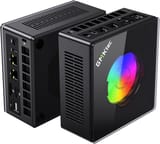 GMKtec NucBox K11 | GMKtec NucBox K11 | |
| Price | List Price: $999.99 Amazon Prices: Loading prices... | List Price: $999.99 Amazon Prices: Loading prices... |
| Version | 32GB/1TB/Ryzen 9 8945HS | 32GB/2TB/Ryzen 9 8945HS |
| Performance Rating | 5.7 | 5.7 |
| Operating System | Windows 11 Pro | Windows 11 Pro |
| Processor | Octa-core 4.00 Ghz (max 5.20 Ghz) AMD Ryzen 9 8945HS | Octa-core 4.00 Ghz (max 5.20 Ghz) AMD Ryzen 9 8945HS |
| GPU | Integrated AMD Radeon 780M | Integrated AMD Radeon 780M |
| RAM | 32 GB | 32 GB |
| Internal Storage | 1 TB | 2 TB |
| Dimensions width x length x thickness | 5.2 x 5 x 2.3 inches (132.08 x 127 x 58.42 mm) | 5.2 x 5 x 2.3 inches (132.08 x 127 x 58.42 mm) |
| Weight | unknown | unknown |
| WiFi | Wi-Fi 6 (802.11ax) | Wi-Fi 6 (802.11ax) |
| Bluetooth | Bluetooth 5.2 | Bluetooth 5.2 |
| Ethernet | 2 Ethernet ports at 2.5 Gbps | 2 Ethernet ports at 2.5 Gbps |
| HDMI | 1 Full-Size HDMI Port | 1 Full-Size HDMI Port |
| DisplayPort | 1 DisplayPort (DisplayPort 2.1 supports 8K@60Hz) | 1 DisplayPort (DisplayPort 2.1 supports 8K@60Hz) |
| VGA | No VGA Ports | No VGA Ports |
| USB Ports | 2 USB 2.0, 2 USB 3, 2 USB-C (2 USB4) (USB 4.0 ports support PD, data, audio, and video) | 2 USB 2.0, 2 USB 3, 2 USB-C (2 USB4) (USB 4.0 ports support PD, data, audio, and video) |
| Thunderbolt Ports | No | No |
| OCuLink | Front OCuLink port (PCIe 4.0 x4) for external GPU | Front OCuLink port (PCIe 4.0 x4) for external GPU |
| Internal SATA Ports | No SATA ports | No SATA ports |
| Card Reader | No Card Reader | No Card Reader |
| Headphone Jack | combo | combo |
| Fanless | No | No |
| VESA Mount | No | No |
| In the Box | Mini PC, power adapter, user manual | Mini PC, power adapter, user manual |
| Expandability | Supports up to 96GB DDR5 RAM and 8TB PCIe 4.0 SSD | Supports up to 96GB DDR5 RAM and 8TB PCIe 4.0 SSD |
Related Mini PCs
-
 GMKtec Nucbox M4 Mini PCThe GMKtec NucBox M4 pairs an 11th-gen Intel Core i9-11900H with DDR4 (up to 128GB), an M.2 NVMe…
 -
 GMKtec Nucbox K8 PLUSThe GMKtec NucBox K8 Plus runs an AMD Ryzen 7 8845HS with Radeon 780M graphics, dual DDR5 slots (up…
 -
 Beelink EQI13 PROThe Beelink EQI13 PRO pairs an Intel Core i7-13620H (10 cores, 16 threads) with 32GB of DDR4 and a…
 -
 Beelink GTi14The Beelink GTi14 pairs an Intel Core Ultra (9 185H or 7 155H) and Arc graphics with up to 96GB…
 -
 GEEKOM XT12 ProThe GEEKOM XT12 Pro is a compact aluminum mini PC with an Intel Core i9-12900H (or i7-12650H), 32GB…
 -
 MINISFORUM MS-01The MINISFORUM MS-01 is an Intel workstation mini PC sold in Core i5-12600H, i9-12900H, and…
Two M.2 slots, two USB4 ports, and a route to an external GPU
The AMD Ryzen 9 8945HS has eight cores and 16 threads, with a 4.00 GHz base and a 5.20 GHz boost, and NotebookCheck measured it holding a 4.0 GHz all-core clock under stress with no notable throttling. That is enough sustained throughput for video editing, software development, and 3D modeling. The integrated Radeon 780M handles 1080p gaming at reasonable settings, and NotebookCheck measured it running up to 15% faster than other systems with the same GPU thanks to GMKtec’s higher power budget.
It comes with 32GB of dual-channel DDR5 (expandable to 96GB) and a 1TB or 2TB PCIe 4.0 NVMe SSD, with a second M.2 2280 slot for another drive (each slot takes up to 4TB, so up to 8TB total). On connectivity it has two USB4 ports (power delivery, data, audio, and video), dual 2.5Gbps Ethernet, Wi-Fi 6, and Bluetooth 5.2.
For display output there is an HDMI 2.1 port and a DisplayPort 2.1 that supports 8K at 60Hz, enough for high-resolution or multi-monitor setups. The front OCuLink port runs at PCIe 4.0 x4, and TechRadar called it the K11’s real differentiator, since pairing it with an external GPU dock brings graphics close to desktop performance. There is no VESA mount and no card reader, so mounting it behind a display takes third-party hardware and SD cards need a USB adapter.
Reviewer Insights
Allen Ngo at NotebookCheck scored the K11 78 percent (“good”). On his test unit the Ryzen 9 8945HS drew 6.6 to 11.3 watts at idle and 76.8 to 88 watts under full load, while fan noise sat around 30 dB(A) at idle and reached 36.4 to 39 dB(A) under load against a 24 dB(A) ambient floor. Core temperatures held between 70 C and 76 C during a Prime95 plus FurMark stress run, with the CPU sustaining a 4.0 GHz all-core clock; Ngo wrote that “performance is consistent with no notable throttling issues.” His benchmark suite logged 16,506 points in Cinebench R23 multi-core (1,814 single-core) and 13,228 in Geekbench 6.7 multi-core. For graphics he found the integrated Radeon 780M “performs very well at up to 15 percent faster than other PCs with the exact same GPU on average.” About the chip’s age, Ngo wrote that “the Ryzen 9 8945HS may be a couple years old, but it still holds up well against pricier alternatives like the Core i9-13900HK or even the newer Core Ultra 9 185H.”
Alastair Jennings at TechRadar rated the K11 4.6 out of 5 and reached very similar CPU figures, measuring 16,194 in the Cinebench multi-core test and SSD speeds of 5,181 MB/s read and 4,724 MB/s write on the bundled Crucial drive. His graphics numbers put that “it was impressive to see that the Wild Life score hit a massive 19,371,” which he called “an excellent result for a mid-range machine.” Jennings singled out the front OCULINK port as the K11’s real differentiator, noting that pairing it with an external GPU gives the machine “the performance of a midrange desktop.”
Power modes get their closest look in Team Pandory’s hands-on review by emuchicken. The reviewer documented the three selectable modes (“quiet, balance, and performance modes, which alter the TDP from 35w, 54w, and 65w”) and measured “36.2 dB in regular gaming,” which the review describes as “pretty quiet,” while flagging that performance mode pushes the fan past the chip’s rated envelope. In games, “even Counter-Strike 2 at low settings hits a respectable 140 FPS,” though Cyberpunk 2077 needed low settings and frame generation to stay playable. The one consistent complaint was wireless: with the stock Intel AX200 card, “we got a mere 67% Wi-Fi strength,” and the reviewer suggests an Ethernet cable or a Wi-Fi card swap for anyone relying on the radio.
Video coverage from trusted channels ETA PRIME and Robtech reports strong productivity and emulation performance, capable 1080p gaming, and an OCULINK port that sets it apart from most mini PCs in this price band.
In 2026 the Ryzen 9 8945HS is a Zen 4 (“Hawk Point”) eight-core, sixteen-thread part that posts a PassMark CPU mark of roughly 29,870, which keeps it ahead of older Intel H-series chips and competitive with parts that still cost considerably more. Newer Zen 5 and Ryzen AI mobile chips have moved the ceiling higher, so this generation makes sense at a price the faster silicon does not match.
Customer Reviews
The Amazon listing pools owner reviews across several GMKtec NucBox models, and some reviewers are clearly describing the K6, K12, or other Ryzen 7 configurations, so the headline star rating reads as general GMKtec sentiment and not a K11-specific score. Among the reviews that do describe the 8945HS K11, the complaints land on the chassis.
Those complaints show up even in five-star writeups. Daniel DeCesare, a verified buyer who rated it five stars, still warned that the “Led on the top of the system doesnt turn off, couldn’t find anything on how to” and that the “fans gets a little loud, i would place it on the back of your desk.” Robtech’s review independently confirms the top RGB “can’t be turned off.” A four-star verified reviewer named Filtered echoed both points, noting the “RGB fan on top is static (cannot adjust the light effect or even turn off)” and that “Temperature is quite high on factory thermal paste (can reach 91c on “Performance” mode).”
Read more owner reviews on Amazon.
A desktop-class box for buyers who can live with the fan and the top light
The Ryzen 9 8945HS, RAM that scales to 96GB, and dual M.2 slots cover heavy rendering and software development work, and the OCuLink port sits alongside two USB4 ports and two 2.5GbE jacks. That OCuLink connector also means the graphics can be upgraded later without replacing the box.
Fanless operation, a card reader, and a VESA mount are all absent, and the top RGB light stays lit. Buyers doing light work will spend less on an N100 or N150 box. Compare the K11 against other Ryzen 9 machines in Starry Hope’s Mini PC Comparison Tool.
Upgrades
Accessories that fit the GMKtec NucBox K11's OCuLink and USB4 or Thunderbolt ports.
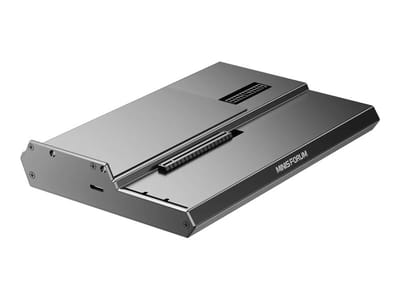
DEG1 eGPU Dock
A plain OCuLink dock with a PCIe 4.0 x4 link for a desktop graphics card; it takes an ATX or SFX power supply that you supply.
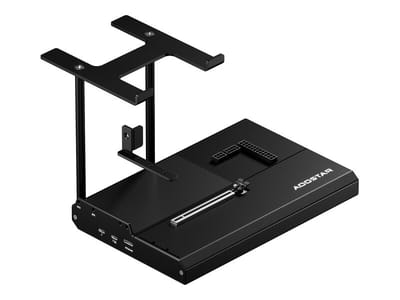
EG02 eGPU Dock
Connects over OCuLink for the full PCIe 4.0 x4 link and has Thunderbolt 5 as a second input; the graphics card and power supply are sold separately.

Core X V2
A Thunderbolt 5 enclosure that Razer lists as working with Thunderbolt 4 and USB4 hosts; it fits a four-slot card and needs an ATX power supply.

DEG2 eGPU Dock
Connects over USB4 or Thunderbolt 5, with an OCuLink input behind a switch, and adds an M.2 slot; it needs an ATX or SFX power supply.

Breakaway Box 850 T5
Has an 850W power supply built in, so only the graphics card is extra, and works with Thunderbolt 4 and USB4 Windows PCs.

TS4 Thunderbolt 4 Dock
An 18-port dock that CalDigit lists for Thunderbolt 4 and USB4 hosts, with 2.5GbE and a DisplayPort 1.4 output.

TBT4-UD5 Thunderbolt 4 Dock
Two HDMI ports drive two 4K60 monitors from one Thunderbolt 4 or USB4 port on a Windows PC.

Revodok Max 208 Thunderbolt 4 Dock
Adds three Thunderbolt 4 ports for dual 4K60 displays plus gigabit Ethernet; it has no HDMI port, so monitors connect over USB-C or an adapter.
Frequently Asked Questions
Can the RAM in the GMKtec NucBox K11 be upgraded?
Yes. Both builds ship with 32GB of dual-channel DDR5, and the slots take up to 96GB for more demanding applications.
How much storage can the NucBox K11 support?
Two PCIe 4.0 M.2 2280 slots take up to 4TB each, so 8TB total, which covers large media libraries or VM storage. There is no SATA or 2.5-inch bay, so both drives have to be M.2.
Does the NucBox K11 support 8K displays?
Yes, through the DisplayPort 2.1 output, which runs 8K at 60Hz. The two USB4 ports carry video as well, so a multi-monitor setup does not have to go through one connector.
Is the GMKtec NucBox K11 fanless?
No, the cooling is active. NotebookCheck measured fan noise at 36.4 to 39 dB(A) under load against a 24 dB(A) ambient floor, and around 30 dB(A) at idle.
What operating system does the NucBox K11 come with?
It ships with Windows 11 Pro pre-installed.
Does the NucBox K11 have a VESA mount?
No. There is no VESA mount support, so putting it behind a monitor or on a wall needs a third-party mounting solution.
What’s included in the box with the NucBox K11?
The box holds the mini PC, a power adapter, and a user manual. Cables and mounting hardware are not included.
Can the NucBox K11 handle gaming?
The Radeon 780M runs 1080p titles at reasonable settings. Team Pandory measured 140 FPS in Counter-Strike 2 at low settings, while Cyberpunk 2077 needed low settings and frame generation to stay playable. The front OCuLink port is the route to more graphics power.
Does the NucBox K11 have USB 4.0 ports?
Yes, two of them. They carry power delivery (PD), data transfer, audio, and video, covering modern peripherals and displays.