
AOOSTAR MACO
Published on

The AOOSTAR MACO is a small aluminum desktop with three PCIe 4.0 M.2 slots, an OCuLink port for an external graphics card, two USB4 ports and two 2.5 Gigabit Ethernet ports. The main build uses the Ryzen 7 PRO 6850H laptop chip with 24GB of LPDDR5-6400 soldered to the board. That memory is fast, which helps the Radeon 680M graphics, but it stays at 24GB for the life of the machine. AOOSTAR also sells the same box with a Ryzen 9 8945HS (barebone, socketed memory) and a Ryzen AI 9 HX 470 (32GB soldered).
Pros and cons
| Pros | Cons |
|---|---|
| Three M.2 2280 slots, all PCIe 4.0 x4 | 24GB of soldered memory on the 6850H build, no upgrade path |
| OCuLink port for an external GPU, plus two USB4 ports | The Ryzen 7 PRO 6850H is a 2022 Zen 3+ chip |
| Two Intel 2.5GbE ports | No VESA mount |
| Fingerprint reader in the power button | Both rear USB-A ports ran at USB 2.0 speed in TechRadar’s test |
| Base comes off with four screws | AOOSTAR’s driver page did not list the MACO in one reviewer’s check |
| Fast LPDDR5-6400 lifts integrated graphics results | No SD card reader |
AOOSTAR MACO Comparison Chart
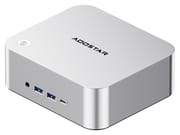 AOOSTAR MACO | AOOSTAR MACO | AOOSTAR MACO | AOOSTAR MACO | AOOSTAR MACO | |
| Price | List Price: $459.00 Amazon Prices: Loading prices... | List Price: $369.00 Amazon Prices: | List Price: $400.00 Amazon Prices: Loading prices... | List Price: $899.00 Amazon Prices: Loading prices... | List Price: $1,099.00 Amazon Prices: |
| Version | 24GB/1TB/Ryzen 7 PRO 6850H | 24GB/No SSD/Ryzen 7 PRO 6850H | Barebone/Ryzen 9 8945HS | 32GB/No SSD/Ryzen AI 9 HX 470 | 32GB/1TB/Ryzen AI 9 HX 470 |
| Performance Rating | 5.1 | 5.1 | 5.3 | 6.4 | 6.4 |
| Operating System | Windows 11 Pro | -- | -- | -- | -- |
| Processor | Octa-core 3.20 Ghz (max 4.70 Ghz) AMD Ryzen 7 PRO 6850H | Octa-core 3.20 Ghz (max 4.70 Ghz) AMD Ryzen 7 PRO 6850H | Octa-core 4.00 Ghz (max 5.20 Ghz) AMD Ryzen 9 8945HS | Twelve-core 2.00 Ghz (max 5.20 Ghz) AMD Ryzen AI 9 HX 470 | Twelve-core 2.00 Ghz (max 5.20 Ghz) AMD Ryzen AI 9 HX 470 |
| GPU | Integrated AMD Radeon 680M | Integrated AMD Radeon 680M | Integrated AMD Radeon 780M | Integrated AMD Radeon 890M | Integrated AMD Radeon 890M |
| RAM | 24 GB LPDDR5 (Soldered LPDDR5-6400) | 24 GB LPDDR5 (Soldered LPDDR5-6400) | 0 GB DDR5 SO-DIMM, 2-channel (2x DDR5-5600 SODIMM, up to 128GB) | 32 GB LPDDR5 (Soldered LPDDR5-8000) | 32 GB LPDDR5 (Soldered LPDDR5-8000) |
| Internal Storage | 1 TB NVMe SSD | 0 GB NVMe SSD | 0 GB NVMe SSD | 0 GB NVMe SSD | 1 TB NVMe SSD |
| Dimensions width x length x thickness | 5.91 x 5.2 x 2.24 inches (150.11 x 132.08 x 56.9 mm) | 5.91 x 5.2 x 2.24 inches (150.11 x 132.08 x 56.9 mm) | 5.91 x 5.2 x 2.24 inches (150.11 x 132.08 x 56.9 mm) | 5.91 x 5.2 x 2.24 inches (150.11 x 132.08 x 56.9 mm) | 5.91 x 5.2 x 2.24 inches (150.11 x 132.08 x 56.9 mm) |
| Weight | unknown | unknown | unknown | unknown | unknown |
| WiFi | Wi-Fi 6 (802.11ax) | Wi-Fi 6 (802.11ax) | Wi-Fi 6 (802.11ax) | Wi-Fi 7 (802.11be) | Wi-Fi 7 (802.11be) |
| Bluetooth | Bluetooth 5.2 | Bluetooth 5.2 | Bluetooth 5.2 | Yes | Yes |
| Ethernet | 2 Ethernet ports at 2.5 Gbps | 2 Ethernet ports at 2.5 Gbps | 2 Ethernet ports at 2.5 Gbps | 2 Ethernet ports at 2.5 Gbps | 2 Ethernet ports at 2.5 Gbps |
| HDMI | 1 Full-Size HDMI Port | 1 Full-Size HDMI Port | 1 Full-Size HDMI Port | 1 Full-Size HDMI Port | 1 Full-Size HDMI Port |
| DisplayPort | 1 DisplayPort (DP 1.4; four displays with HDMI and 2x USB4) | 1 DisplayPort (DP 1.4; four displays with HDMI and 2x USB4) | 1 DisplayPort (DP 1.4; four displays with HDMI and 2x USB4) | 1 DisplayPort (DP 1.4; four displays with HDMI and 2x USB4) | 1 DisplayPort (DP 1.4; four displays with HDMI and 2x USB4) |
| VGA | No VGA Ports | No VGA Ports | No VGA Ports | No VGA Ports | No VGA Ports |
| USB Ports | 2 USB 2.0, 2 USB 3, 2 USB-C (2 USB4) Front: USB4, 2x USB-A 10Gbps. Rear: USB4, 2x USB-A | 2 USB 2.0, 2 USB 3, 2 USB-C (2 USB4) Front: USB4, 2x USB-A 10Gbps. Rear: USB4, 2x USB-A | 2 USB 2.0, 2 USB 3, 2 USB-C (2 USB4) Front: USB4, 2x USB-A 10Gbps. Rear: USB4, 2x USB-A | 2 USB 2.0, 2 USB 3, 2 USB-C (2 USB4) Front: USB4, 2x USB-A 10Gbps. Rear: USB4, 2x USB-A | 2 USB 2.0, 2 USB 3, 2 USB-C (2 USB4) Front: USB4, 2x USB-A 10Gbps. Rear: USB4, 2x USB-A |
| Thunderbolt Ports | No | No | No | No | No |
| OCuLink | Side port, no hot-swap | Side port, no hot-swap | Side port, no hot-swap | Side port, no hot-swap | Side port, no hot-swap |
| Internal SATA Ports | No SATA ports | No SATA ports | No SATA ports | No SATA ports | No SATA ports |
| Card Reader | No Card Reader | No Card Reader | No Card Reader | No Card Reader | No Card Reader |
| Headphone Jack | front | front | front | front | front |
| Fanless | No | No | No | No | No |
| VESA Mount | No | No | No | No | No |
| In the Box | Main unit, 120W power adapter, HDMI cable, SSD heatsink pad, mounting screw | Main unit, 120W power adapter, HDMI cable, SSD heatsink pad, mounting screw | Main unit, 120W power adapter, HDMI cable, SSD heatsink pad, mounting screw | Main unit, 120W power adapter, HDMI cable, SSD heatsink pad, mounting screw | Main unit, 120W power adapter, HDMI cable, SSD heatsink pad, mounting screw |
| Expandability | RAM soldered, not upgradeable. 3x M.2 2280 PCIe 4.0 x4 (up to 24TB). OCuLink for an external GPU. | RAM soldered, not upgradeable. 3x M.2 2280 PCIe 4.0 x4 (up to 24TB). OCuLink for an external GPU. | 2x DDR5-5600 SODIMM (up to 128GB). 2x M.2 2280 PCIe 4.0 x4. OCuLink for an external GPU. | RAM soldered, not upgradeable. 3x M.2 2280 PCIe 4.0 x4 (up to 24TB). OCuLink for an external GPU. | RAM soldered, not upgradeable. 3x M.2 2280 PCIe 4.0 x4 (up to 24TB). OCuLink for an external GPU. |
Related Mini PCs
-
 Beelink EQI13 PROThe Beelink EQI13 PRO pairs an Intel Core i7-13620H (10 cores, 16 threads) with 32GB of DDR4 and a…
 -
 Beelink GTi14The Beelink GTi14 pairs an Intel Core Ultra (9 185H or 7 155H) and Arc graphics with up to 96GB…
 -
 GEEKOM A7The GEEKOM A7 runs an AMD Ryzen 9 7940HS or Ryzen 7 7840HS with Radeon 780M graphics in a 0.5-liter…
 -
 GEEKOM XT12 ProThe GEEKOM XT12 Pro is a compact aluminum mini PC with an Intel Core i9-12900H (or i7-12650H), 32GB…
 -
 GMKtec NucBox K11The GMKtec NucBox K11 is a Ryzen 9 8945HS mini PC with Radeon 780M graphics, two DDR5 slots (96GB…
 -
 MINISFORUM MS-01The MINISFORUM MS-01 is an Intel workstation mini PC sold in Core i5-12600H, i9-12900H, and…
Chassis, ports and storage

The MACO measures about 5.9 x 5.2 x 2.2 inches. AOOSTAR builds the shell from recycled aluminum, and only the base panel is plastic. The power button sits on the top and doubles as a fingerprint reader for Windows Hello. The front carries a 3.5mm audio jack, two USB-A ports at 10Gbps and one USB4 port. The OCuLink port is on the left side under a rubber flap. The back holds the second USB4 port, HDMI 2.1, DisplayPort 1.4, the two Ethernet ports, two USB-A ports and the barrel power input. AOOSTAR lists one rear USB-A port as USB 3.0, but TechRadar tested both rear ports and found both run at USB 2.0.
HDMI, DisplayPort and the two USB4 ports can drive four displays at once. The USB4 ports run at 40Gbps. OCuLink is a 64Gbps PCIe 4.0 x4 link for an external GPU dock, and it does not support hot-swapping, so connect the dock with the machine off. The two 2.5GbE ports use Intel I226-V controllers, which makes the MACO a candidate for a router or firewall box. Wi-Fi 6 and Bluetooth 5.2 come from a replaceable card on the 6850H build; AOOSTAR lists Wi-Fi 7 on the HX 470 build. A 120W (19V, 6.32A) barrel-plug adapter powers every version.
The 6850H and HX 470 builds have three M.2 2280 slots, all wired for PCIe 4.0 x4, and AOOSTAR rates them for up to 24TB in total. The 1TB builds ship with one drive installed and two slots free, and AOOSTAR packs SSD heatsink pads in the box. The 8945HS build uses a different board with two M.2 slots and two DDR5-5600 SODIMM slots for up to 128GB of memory.
6850H, 8945HS or HX 470
The 6850H build has eight Zen 3+ cores and 16 threads, boosting to 4.7GHz, with a PassMark CPU score near 23,400. The PRO suffix adds AMD’s business security and management features to the same silicon as the consumer Ryzen 7 6800H. The chip is from 2022, so it trails current Zen 4 and Zen 5 parts, and it has no NPU. It is still quick enough for office work and home server duty.
The Ryzen 9 8945HS build is sold as a barebone with no memory, storage or Windows license. It is a Zen 4 chip with Radeon 780M graphics and a PassMark score near 29,900, and its SODIMM slots take up to 128GB. Choose it if you already own memory and a drive, or if you need more than 24GB. It has one fewer M.2 slot than the 6850H build.
The Ryzen AI 9 HX 470 build is the fastest version. It has 12 Zen 5 cores, Radeon 890M graphics, a 55 TOPS NPU and 32GB of soldered LPDDR5-8000, with a PassMark score near 36,900. It keeps the three M.2 slots. The reviews below cover the 6850H build only.
Reviewer Insights

TechRadar: 4.5 out of 5 for the 6850H
Mark Pickavance at TechRadar tested the 24GB/1TB build and scored it 4.5 out of 5. He credits the LPDDR5-6400 memory for most of the result. In his benchmark table the MACO scored 708 multi-core and 84 single-core in Cinebench 2024, 9,601 multi-core and 1,996 single-core in Geekbench 6, 2,872 in 3DMark Time Spy and 7,100 in PCMark 10. Those numbers are close to a GMKtec NucBox M7 Pro with the Ryzen 9 PRO 6950H from the same generation. The bundled drive read at 7,070MB/s in CrystalDiskMark. His summary: “But the benchmarks don’t lie, and this highly affordable machine punches significantly above its weight.”
His reservations are the age of the chip, the fixed 24GB of memory, and the missing VESA mount: “One slight disappointment is that it lacks a VESA plate to mount it on a monitor, which feels odd.” He also wished the front ports were labeled, and he found the two rear USB-A ports both run at USB 2.0. On value he concluded: “For the hardware and specifications it has, the Aoostar looks like a bargain.” He sees it as a general-purpose desktop rather than a gaming machine: “Unless you want to play games or something equally demanding, this machine has plenty of performance to spare.”
Carey Holzman: quiet fan, normal temperatures, easy to open
Carey Holzman bought the no-SSD 6850H build on Amazon and reviewed it in two long live streams (part 1, part 2). He opened the base, which comes off with four screws beside the rubber feet (“Looks really easy to open. Four screws.”), installed an NVMe drive and Windows 11, and showed the three M.2 slots, the replaceable Wi-Fi card and the soldered memory. He called the OCuLink port “very unusual for a machine at this price.”
In Cinebench R23 he recorded “1468 on the single core, 11264 on the multi-core.” One core briefly reached 91 C during the run, which he described as “normal and intentional” for a chip boosting to full speed. He said the machine stayed “very quiet the whole time” at light loads and that the single fan became “just a nice little white noise in the background” under heavy load. His complaint was AOOSTAR’s website: when he looked for a BIOS update, the MACO was missing from the driver download page. In part 2 he reported that AOOSTAR support answered his questions within a few hours and sent a Windows product key for the no-SSD build. He called the support excellent.
Customer Reviews
On Amazon, the 24GB/1TB 6850H build holds 4.5 out of 5 stars from 22 ratings. For storage and networking, the three M.2 slots leave room for a boot drive plus a mirrored pair, according to Anna Lee, and the dual Intel ports mean “you can use it as a router too.” Software setup went smoothly for Mac, who found the Windows install clean, moved to Linux and “have had no issues,” with one caveat: “the RAM is soldered so you will not be able to add more.” An external GPU worked with no extra setup for DR T., who paired it with an AG03 dock and an RX 6600 XT: “It recognized my AG03 eGPU with RX6600XT without need for further drivers.” Heat and noise draw mild comments. Anna Lee wrote: “The fan noise is audible, but not that loud.” Buyer hnn measured about 70 C while gaming and wrote that “hot air does blow out the back of the mini pc.”
WMD’s unit “failed hard after about one month of operation,” and getting a working replacement with Windows took “over six weeks of steady messaging with manufacturer.” Brandon K. rated it four stars, saying “it’s not as modifiable as I’d like it to be,” though he called it a “great beginner home server.”
Who the MACO suits
The 6850H MACO fits a buyer who wants a quiet office or home server box with room for three fast drives, two wired network ports and a path to an external GPU. It is a weak choice if you expect to need more than 24GB of memory: pick the 8945HS barebone and add your own SODIMMs. The GMKtec NucBox M7 uses the same Ryzen 7 PRO 6850H. AOOSTAR’s G-FLIP adds a flip-up screen with similar ports. For more on external graphics links, read OCuLink vs USB4 for an external GPU, and compare specs in the Mini PC Comparison Chart.
Upgrades
Accessories that fit the AOOSTAR MACO's OCuLink and USB4 or Thunderbolt ports.
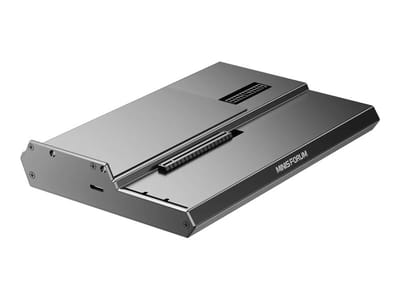
DEG1 eGPU Dock
A plain OCuLink dock with a PCIe 4.0 x4 link for a desktop graphics card; it takes an ATX or SFX power supply that you supply.
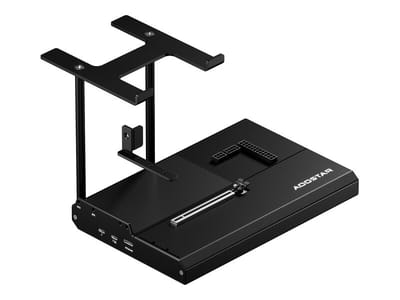
EG02 eGPU Dock
Connects over OCuLink for the full PCIe 4.0 x4 link and has Thunderbolt 5 as a second input; the graphics card and power supply are sold separately.

Core X V2
A Thunderbolt 5 enclosure that Razer lists as working with Thunderbolt 4 and USB4 hosts; it fits a four-slot card and needs an ATX power supply.

DEG2 eGPU Dock
Connects over USB4 or Thunderbolt 5, with an OCuLink input behind a switch, and adds an M.2 slot; it needs an ATX or SFX power supply.

Breakaway Box 850 T5
Has an 850W power supply built in, so only the graphics card is extra, and works with Thunderbolt 4 and USB4 Windows PCs.

TS4 Thunderbolt 4 Dock
An 18-port dock that CalDigit lists for Thunderbolt 4 and USB4 hosts, with 2.5GbE and a DisplayPort 1.4 output.

TBT4-UD5 Thunderbolt 4 Dock
Two HDMI ports drive two 4K60 monitors from one Thunderbolt 4 or USB4 port on a Windows PC.

Revodok Max 208 Thunderbolt 4 Dock
Adds three Thunderbolt 4 ports for dual 4K60 displays plus gigabit Ethernet; it has no HDMI port, so monitors connect over USB-C or an adapter.
Frequently Asked Questions
Can I upgrade the RAM in the AOOSTAR MACO?
Not on the 6850H or HX 470 builds. The 6850H has 24GB of LPDDR5-6400 and the HX 470 has 32GB of LPDDR5-8000, both soldered to the board. The Ryzen 9 8945HS build is different: it ships without memory and has two DDR5-5600 SODIMM slots for up to 128GB.
How many SSDs does the AOOSTAR MACO hold?
The 6850H and HX 470 builds have three M.2 2280 slots, each PCIe 4.0 x4, rated for up to 24TB in total. The 8945HS build has two M.2 2280 slots.
Can the AOOSTAR MACO use an external graphics card?
Yes. The OCuLink port on the left side is a PCIe 4.0 x4 link for an external GPU dock, and the two USB4 ports also work with USB4 docks. OCuLink does not support hot-swapping, so connect the dock with the machine off. One owner ran an RX 6600 XT in an AG03 dock without installing extra drivers.
How many monitors can the AOOSTAR MACO run?
Four. HDMI 2.1, DisplayPort 1.4 and the two USB4 ports can each drive a display at the same time.
Is the Ryzen 7 PRO 6850H still a good chip in 2026?
For office work, development, home server tasks and light gaming, yes. It is a Zen 3+ chip with eight cores and a PassMark score near 23,400, below current Zen 4 and Zen 5 parts, and it has no NPU for AI features. TechRadar found its fast LPDDR5-6400 memory kept it close to a Ryzen 9 PRO 6950H system from the same generation.