
GMKtec Nucbox M7
Updated on

The GMKtec Nucbox M7 runs an AMD Ryzen 7 PRO 6850H with 8 cores and 16 threads boosting to 4.7GHz, and its integrated Radeon 680M graphics cover office productivity, content creation, and light gaming. A front-facing OCuLink port carries PCIe 4.0 x4 bandwidth out to an external GPU enclosure, which lifts the graphics ceiling well past what the 680M manages on its own. Dual 2.5GbE ports, two M.2 2280 slots, and two SO-DIMM DDR5 slots make it as much a home-lab box as a desktop replacement.
Pros and cons
| Pros | Cons |
|---|---|
| OCuLink port for high-speed external GPU connectivity | Radeon 680M iGPU is aging compared to newer 780M/880M models |
| Configurable TDP from 15W to 70W in BIOS | WiFi range underwhelms at distance (Intel AX200 tested at ~100 Mbps) |
| Metal chassis with a tool-less translucent top cover | Only $10 cheaper than the M7 Pro with Ryzen 9 PRO 6950H |
| Dual 2.5GbE Intel i226-V networking ports | Pre-built units may include PCIe 3.0 SSDs despite Gen 4 slot support |
| Dual M.2 slots and up to 96GB DDR5 RAM capacity | AAA gaming at 1080p requires external GPU for high settings |
| 32dBA at idle and 39-44dBA under load | 6000-series CPU rather than latest generation |
Related Videos
GMKtec Nucbox M7 Comparison Chart
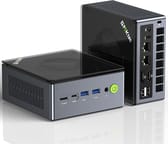 GMKtec Nucbox M7 | |
| Price | List Price: $429.99 Amazon Prices: |
| Version | --- |
| Performance Rating | 5.2 |
| Operating System | Windows 11 Pro |
| Processor | Octa-core 3.20 Ghz (max 4.70 Ghz) AMD Ryzen 7 PRO 6850H |
| GPU | Integrated AMD Radeon 680M |
| RAM | 32 GB DDR5 SO-DIMM |
| Internal Storage | 512 GB |
| Dimensions width x length x thickness | 4.84 x 4.37 x 1.69 inches (122.94 x 111 x 42.93 mm) |
| Weight | unknown |
| WiFi | Wi-Fi 6 (802.11ax) |
| Bluetooth | Bluetooth 5.2 |
| Ethernet | 2 Ethernet ports at 2.5 Gbps |
| HDMI | 1 Full-Size HDMI Port |
| DisplayPort | 1 DisplayPort (DisplayPort 1.4 (some sources report 2.0)) |
| VGA | No VGA Ports |
| USB Ports | 2 USB 2.0, 2 USB 3, 2 USB-C (2 USB4) 2x USB4 Type-C with DisplayPort alt mode and Power Delivery (front and rear). 2x USB-A 3.0 10Gbps (front). 2x USB-A 2.0 (rear). 1x OCuLink port (front) for external GPU at PCIe 4.0 x4 speeds. |
| Thunderbolt Ports | No |
| OCuLink | PCIe 4.0 x4 for eGPU |
| Internal SATA Ports | No SATA ports |
| Card Reader | No Card Reader |
| Headphone Jack | 3.5mm combo audio jack (front) |
| Fanless | No |
| VESA Mount | Yes |
| In the Box | 120W power adapter, VESA mount bracket, user manual |
| Expandability | 2x SO-DIMM DDR5-4800 slots (max 96GB verified). 2x M.2 2280 PCIe 4.0/3.0 slots. OCuLink port for external GPU. Tool-less translucent top cover removal for easy upgrades. |
Related Mini PCs
-
 GMKtec Nucbox K8 PLUSThe GMKtec NucBox K8 Plus runs an AMD Ryzen 7 8845HS with Radeon 780M graphics, dual DDR5 slots (up…
 -
 GMKtec NucBox M7 ProThe GMKtec NucBox M7 Pro runs an AMD Ryzen 9 6900HX (Zen3+) with Radeon 680M graphics, DDR5 (up to…
 -
 AYANEO Retro Mini PC AM02The AYANEO Retro Mini PC AM02 is a NES-styled mini PC with a 4-inch touchscreen, an AMD Ryzen 7…
 -
 Beelink SER7 Mini PCPacked with an AMD Ryzen 7 7840HS, Radeon 780M GPU, and dual M.2 SSD slots, the Beelink SER7 Mini…
 -
 Beelink SER9 PRO+The Beelink SER9 PRO+ pairs an AMD Ryzen 7 H 255 with Radeon 780M graphics, 32GB LPDDR5X RAM, and…
 -
 BOSGAME P5 Mini PCThe BOSGAME P5 is a mini PC with an AMD Ryzen 7 6800H, Radeon 680M graphics, 32GB of DDR5, a 512GB…
Tool-less top cover, 96GB of DDR5 headroom, and a front OCuLink port

RAM and SSD swaps need no disassembly because the translucent cover lifts off by hand and shows the cooling stack underneath. The rest of the chassis is metal. At 4.84 x 4.37 x 1.69 inches it mounts behind a monitor on the included VESA bracket, and inside there are two M.2 2280 NVMe slots and two SO-DIMM DDR5 slots that take up to 96GB.
The Ryzen 7 PRO 6850H takes a configurable TDP anywhere from 15W to 70W, set in the BIOS. GMKtec’s Hyper Ice Chamber 2.0 cooling pairs larger top and bottom fans with 360-degree airflow over a copper base, and holds 35dB in Quiet mode. Cinebench R23 comes in at 1502 single-threaded and 13134 multi-threaded, with Geekbench 6 around 2092 single and 10020 multi. The integrated Radeon 680M and its 12 compute units land close to an NVIDIA GTX 1050 Ti, which puts Rocket League and Fortnite at 1080p on medium to high settings.
The front panel carries the OCuLink port with PCIe 4.0 x4 bandwidth for an eGPU, a USB4 Type-C port, and two USB-A 3.0 ports at 10Gbps. The rear adds HDMI 2.1 with 8K at 60Hz, DisplayPort 1.4, a second USB4 Type-C with DisplayPort alt mode and Power Delivery, two USB-A 2.0 ports, dual 2.5 Gigabit Ethernet on Intel i226-V controllers, and a 3.5mm audio jack. Wireless comes from an Intel AX200 card with WiFi 6 and Bluetooth 5.2, and reviewers measured around 100 Mbps at distance, which is the weakest part of the spec sheet.
Reviewer Insights

ETA PRIME points the value at the OCuLink port
ETA PRIME praises the GMKtec M7 as a versatile mini desktop PC, particularly highlighting its OCuLink capabilities. In his hands-on testing, he notes that “this thing can actually do up to a 70 watt TDP, so that 120 watt PSU is going to come in real handy” when pushing the system in performance mode. He finds the transparent top design appealing and appreciates the active cooling that extends to the RAM and SSD compartment. While he acknowledges that the Radeon 680M is showing its age compared to newer integrated graphics solutions, he concludes that “where this thing really shines is with an OCuLink eGPU” for users who want to game or do GPU-intensive work.
Robtech calls it the value option for OCuLink and Gen 4 storage
Robtech focuses on the M7’s build quality and value. He says that “the M7 brings back the glorious metal and once again I get the premium feel tingling down my spine” when handling the chassis. His testing reveals low noise levels with “fan noise drastically reduced over the M6 predecessor,” measuring just 32dBA at idle and 39-44dBA under load. He recommends the M7 as “the nice value option, especially if you’re going to use some of the features such as OCuLink or the dual Gen 4 M.2 slots,” though he notes some weaknesses in WiFi range and points out that pre-built units ship with PCIe 3.0 SSDs despite the slots supporting Gen 4.
TechRadar measured under 11% between the M7 and M7 Pro
According to TechRadar, the M7 Pro stays within a narrow margin of the M7. Their benchmarking shows that “the difference between the M7 and M7 Pro is tiny. Even with benchmarks showing the greatest advantage for the Ryzen 9-powered box, it never manages an improvement greater than 11%.” In practical terms, they conclude that “most users wouldn’t be able to tell which machine they were using in a blind test.” The review awards 4 out of 5 stars but questions the value given that only $10 separates the two models in the top configuration.
Team Pandory puts the 680M near a GTX 1050 Ti
Team Pandory awards the M7 a strong 4.6 out of 5 rating and highlights the Hyper Ice Chamber 2.0 cooling that “uses bigger top and bottom fans with 360-degree airflow and a copper base, staying whisper-quiet at 35dB in Quiet mode.” They note the GPU’s gaming capability, stating that “the integrated GPU is the AMD Radeon 680M with 12 cores, and its performance is almost close to that of a full NVIDIA GTX 1050 Ti,” enabling play of titles like “Rocket League and Fortnite at 1080p with medium to high settings.” However, they flag the WiFi performance as a weakness, observing signal strength dropped to 72% with speeds around 100 Mbps during testing.
Customer Reviews
Across 963 ratings on Amazon, the GMKtec Nucbox M7 averages 4.5 stars. The distribution skews strongly positive (79 percent five-star, 11 percent four-star), with about 7 percent one-star reviews. The recurring praise centers on a lot of performance in a small metal box and on how easy it is to open up and upgrade. A verified buyer named Filtered listed “Compact in size,” “Sturdy build (metal casing, hard plastic top and bottom),” and “Very easy to open to upgrade RAM and/or NVMe SSD” among the things they liked, and verified buyer Daniel DeCesare wrote it was “So much more powerful then I expected, plays Overwatch and some AAA games extremely well!” Several owners run it as a quiet always-on workstation; verified buyer Bill Mahoney called it a “Good little workstation” that “runs quiet, cool and low power.”
The RGB light on top cannot be switched off: Daniel DeCesare noted the “Led on the top of the system doesnt turn off,” and Filtered separately described the “RGB fan on top is static (cannot adjust the light effect or even turn off).” Fan noise and heat come up too. Daniel DeCesare warned that “fans gets a little loud,” and Filtered measured temperatures that “can reach 91c on “Performance” mode” on the factory thermal paste. One verified buyer, Raltar, reported a quality-control miss, titling the review “Great deal, but mine came with a used SSD” after finding logged prior usage on the included drive. Some of these reviews describe other GMKtec models in the same family (K6, K12) rather than the M7.
Read more owner reviews on Amazon.
Buy it for OCuLink and dual 2.5GbE, not for the 680M
The OCuLink port carries PCIe 4.0 x4 straight to an external GPU enclosure, and the two 2.5 Gigabit Ethernet ports make this a sensible always-on machine for a home lab. The 8-core Ryzen 7 PRO 6850H handles multithreaded work, and the 70W TDP setting is there when a long export or compile needs it. Room for 96GB of DDR5 and a second Gen 4 M.2 drive means the configuration you buy is not the one you are stuck with.
The M7 Pro is worth pricing before you commit. About $10 separates the two in the top configuration, and the Pro’s Ryzen 9 PRO 6950H returns the performance edge TechRadar measured at under 11%. On the integrated graphics the Radeon 680M runs esports titles at 1080p medium settings, and anything more demanding needs the OCuLink eGPU. Starry Hope’s Mini PC Comparison Chart lines this machine up against other mini PCs on cores, ports, and memory ceilings.
Frequently Asked Questions
What is OCuLink and why is it important on the GMKtec M7?
OCuLink is a connector that gives external devices, most often an external graphics card, a direct PCIe 4.0 x4 link worth roughly 64 Gbps. Thunderbolt and USB4 share their bandwidth with other protocols, so OCuLink holds an advantage on eGPU throughput and latency.
How does the GMKtec M7 compare to the M7 Pro?
The M7 uses the AMD Ryzen 7 PRO 6850H and the M7 Pro uses the faster Ryzen 9 PRO 6950H. Benchmarks put the Pro up to 11% ahead, a gap reviewers describe as barely noticeable in everyday use, and only about $10 separates the two in the top configuration.
Can the GMKtec Nucbox M7 handle gaming?
The integrated Radeon 680M GPU can handle esports titles like Rocket League, Fortnite, and similar games at 1080p with medium to high settings. For AAA gaming at high settings, you’ll want to connect an external GPU via the OCuLink port. Reviewers note the 680M performs similarly to an NVIDIA GTX 1050 Ti.
What is the maximum RAM supported by the GMKtec M7?
96GB of DDR5-4800 across the two SO-DIMM slots, verified in teardown reviews, though some marketing materials claim 128GB support. The tool-less translucent top cover makes the upgrade straightforward.
How loud is the GMKtec Nucbox M7 during operation?
In Quiet mode with the lower TDP, reviewers measured around 32-35dBA at idle, barely audible in a typical office. Under full load in Performance mode the Hyper Ice Chamber 2.0 cooling rises to 39-44dBA.
Does the GMKtec M7 support 8K displays?
Yes, the HDMI 2.1 port supports 8K output at 60Hz, and the DisplayPort can drive high-resolution displays as well. The two USB4 ports also support DisplayPort alt mode, giving you multiple options for connecting monitors.
Is the WiFi performance good on the GMKtec M7?
Multiple reviewers have noted that the Intel AX200 WiFi 6 chip underperforms expectations, particularly at distance. In testing, signal strength dropped to around 72% with speeds of approximately 100 Mbps. For best performance, the dual 2.5 Gigabit Ethernet ports provide more reliable high-speed connectivity.