
GMKtec NucBox M7 Pro
Updated on

The GMKtec NucBox M7 Pro is a compact mini PC built on AMD’s Ryzen 9 6900HX, an 8-core, 16-thread Zen3+ chip with Radeon 680M graphics. It ships with 32GB of dual-channel DDR5 (upgradeable to 64GB) and a 1TB PCIe 3.0 SSD, with two M.2 slots (both Gen4-capable) for up to 4TB. The 680M handles productivity, 4K playback, and 1080p gaming with upscaling, but it is a 2022-era integrated GPU, so demanding titles need help.
An OCuLink port (PCIe 4.0 x4) and two USB4 Type-C ports give it two ways to attach an external graphics card. Wired networking runs on dual 2.5GbE Intel i226V NICs, and the rest of the port set covers HDMI, DisplayPort over USB-C, two USB 3.2 Gen2 ports, two USB 2.0 ports, and a combo headphone jack, with Wi-Fi 6 and Bluetooth 5.2 for wireless.
| Pros | Cons |
|---|---|
| Semi-transparent acrylic top lifts off for RAM and SSD access. | The Radeon 680M needs an external GPU for demanding games. |
| AMD Ryzen 9 6900HX with 8 cores and 16 threads for multi-threaded work. | Includes a PCIe 3.0 SSD by default, despite support for faster PCIe 4.0 storage. |
| Expandable to 64GB DDR5 and 4TB of storage across two M.2 slots. | The front-facing Oculink port makes for a cluttered eGPU setup. |
| Dual 2.5Gb Ethernet, two USB 4.0 Type-C ports, and Oculink for expansion. | Team Pandory measured 72% signal strength and speeds under 100 Mbps from the Intel Wi-Fi card. |
| Quiet under load, with a larger, slower case fan than earlier GMKtec models. | The Radeon 680M is a 2022-era RDNA2 design, behind newer RDNA3 and RDNA3.5 integrated GPUs. |
| Ships with Windows 11 Pro and no preinstalled bloatware. | No dust filter over the fan intake. |
Related Videos
GMKtec NucBox M7 Pro Comparison Chart
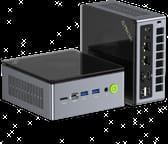 GMKtec NucBox M7 Pro | GMKtec NucBox M7 Pro | GMKtec NucBox M7 Pro | |
| Price | List Price: $659.99 Amazon Prices: | List Price: $619.99 Amazon Prices: | List Price: $459.98 Amazon Prices: |
| Version | 32GB/2TB/Ryzen 9 6900HX | 32GB/1TB/Ryzen 9 6900HX | 16GB/512GB/Ryzen 7 PRO 6850H |
| Performance Rating | 5.3 | 5.3 | 4.8 |
| Operating System | Windows 11 Pro | Windows 11 Pro | Windows 11 Pro |
| Processor | Octa-core 3.30 Ghz (max 4.90 Ghz) AMD Ryzen 9 6900HX | Octa-core 3.30 Ghz (max 4.90 Ghz) AMD Ryzen 9 6900HX | Octa-core 3.20 Ghz (max 4.70 Ghz) AMD Ryzen 7 PRO 6850H |
| GPU | Integrated AMD Radeon 680M | Integrated AMD Radeon 680M | Integrated AMD Radeon 680M |
| RAM | 32 GB | 32 GB | 16 GB |
| Internal Storage | 2 TB | 1 TB | 512 GB |
| Dimensions width x length x thickness | 5.2 x 5 x 2.3 inches (132.08 x 127 x 58.42 mm) | 5.2 x 5 x 2.3 inches (132.08 x 127 x 58.42 mm) | 5.2 x 5 x 2.3 inches (132.08 x 127 x 58.42 mm) |
| Weight | unknown | unknown | unknown |
| WiFi | Wi-Fi 6 (802.11ax) | Wi-Fi 6 (802.11ax) | Wi-Fi 6 (802.11ax) |
| Bluetooth | Bluetooth 5.2 | Bluetooth 5.2 | Bluetooth 5.2 |
| Ethernet | 2 Ethernet ports at 2.5 Gbps | 2 Ethernet ports at 2.5 Gbps | 2 Ethernet ports at 2.5 Gbps |
| HDMI | 1 Full-Size HDMI Port | 1 Full-Size HDMI Port | 1 Full-Size HDMI Port |
| DisplayPort | 1 DisplayPort (USB-C also supports DisplayPort) | 1 DisplayPort (USB-C also supports DisplayPort) | 1 DisplayPort (USB-C also supports DisplayPort) |
| VGA | No VGA Ports | No VGA Ports | No VGA Ports |
| USB Ports | 2 USB 2.0, 2 USB 3, 2 USB-C (2 USB4) Includes 2 USB 2.0, 2 USB 3.2 (Gen2), and 2 USB 4.0 Type-C ports. | 2 USB 2.0, 2 USB 3, 2 USB-C (2 USB4) Includes 2 USB 2.0, 2 USB 3.2 (Gen2), and 2 USB 4.0 Type-C ports. | 2 USB 2.0, 2 USB 3, 2 USB-C (2 USB4) Includes 2 USB 2.0, 2 USB 3.2 (Gen2), and 2 USB 4.0 Type-C ports. |
| Thunderbolt Ports | No | No | No |
| OCuLink | PCIe 4.0 x4 for eGPU | PCIe 4.0 x4 for eGPU | PCIe 4.0 x4 for eGPU |
| Internal SATA Ports | No SATA ports | No SATA ports | No SATA ports |
| Card Reader | No Card Reader | No Card Reader | No Card Reader |
| Headphone Jack | combo | combo | combo |
| Fanless | No | No | No |
| VESA Mount | Yes | Yes | Yes |
| In the Box | NucBox M7 Pro Mini PC, Power Supply & Cable, User Manual, HDMI Cable, VESA Mount with Screws | NucBox M7 Pro Mini PC, Power Supply & Cable, User Manual, HDMI Cable, VESA Mount with Screws | NucBox M7 Pro Mini PC, Power Supply & Cable, User Manual, HDMI Cable, VESA Mount with Screws |
| Expandability | Supports up to 64GB DDR5 RAM and 4TB storage via dual M.2 NVMe slots. | Supports up to 64GB DDR5 RAM and 4TB storage via dual M.2 NVMe slots. | Supports up to 64GB DDR5 RAM and 4TB storage via dual M.2 NVMe slots. |
Related Mini PCs
-
 GMKtec Nucbox K8 PLUSThe GMKtec NucBox K8 Plus runs an AMD Ryzen 7 8845HS with Radeon 780M graphics, dual DDR5 slots (up…
 -
 GMKtec Nucbox M7The GMKtec Nucbox M7 pairs an AMD Ryzen 7 PRO 6850H with an OCuLink port for external graphics,…
 -
 AYANEO Retro Mini PC AM02The AYANEO Retro Mini PC AM02 is a NES-styled mini PC with a 4-inch touchscreen, an AMD Ryzen 7…
 -
 Beelink SER7 Mini PCPacked with an AMD Ryzen 7 7840HS, Radeon 780M GPU, and dual M.2 SSD slots, the Beelink SER7 Mini…
 -
 Beelink SER9 PRO+The Beelink SER9 PRO+ pairs an AMD Ryzen 7 H 255 with Radeon 780M graphics, 32GB LPDDR5X RAM, and…
 -
 BOSGAME P5 Mini PCThe BOSGAME P5 is a mini PC with an AMD Ryzen 7 6800H, Radeon 680M graphics, 32GB of DDR5, a 512GB…
Acrylic top, tool-free upgrades, and a configurable TDP
The chassis measures 5.2 x 5 x 2.3 inches and opens at the semi-transparent acrylic top, which carries its own fan over the memory and storage. EVO Tech read that as GMKtec taking the memory-cooling complaints on its earlier boxes seriously. Lifting that panel is all a RAM or SSD swap needs, and a VESA mount ships in the box for hanging the unit behind a monitor. The Ryzen 9 6900HX runs a configurable TDP, from a 35W quiet profile up to 70W in performance mode.
Reviewer Insights
All three reviewers tested the Ryzen 9 PRO 6950H configuration, the Pro sibling of the Ryzen 9 6900HX (same Zen3+ architecture, same RDNA2 Radeon 680M, slightly higher clocks). EVO Tech describes the 6950H as “essentially the ryzen pro variant of the 6900 HX.” That chip family dates to 2022, so by mid-2026 it sits two generations behind AMD’s current Zen5 mobile parts; the roughly 24,900 PassMark multi-thread score of the 6900HX it is based on now reads as solid midrange rather than flagship. The Radeon 680M is likewise an RDNA2 design now bracketed by the newer RDNA3 (780M) and RDNA3.5 (890M) integrated GPUs.
ETA Prime: Modest on the iGPU, Transformed by Oculink
In his first look, ETA Prime confirmed the review unit’s Ryzen 9 PRO 6950H (8 cores, 16 threads, boost to 4.9 GHz) paired with 32GB of DDR5-4800 and the RDNA2 Radeon 680M (12 compute units, up to 2400 MHz). CPU-Z showed the chip at a 70W TDP in Performance mode, matching GMKtec’s claim, while the lowest Silent profile dropped it to 35W and still played 4K video with zero dropped frames. He left the iGPU’s dedicated memory at the 3GB default, noting it can go up to 16GB in BIOS.
On the integrated Radeon 680M he measured Cyberpunk 2077 at 1080p low with FSR Performance and frame generation on, seeing “averages in the mid-70s,” while Fallout 4 at 1080p medium (no frame generation available) stayed mostly above 60 FPS but would “drop under 60 every once in a while” during heavy particle effects. God of War Ragnarok, which he pushed from 1080p low to medium with FSR 3.1 balanced and frame generation, ran well enough that he was “really impressed,” though he gave no figure for it.
Connecting a Radeon RX 7900 GRE through a Minisforum Oculink dock, he recorded Cyberpunk 2077 at 1440p Ultra with FSR Quality at “averages in the mid90s,” God of War Ragnarok at 1440p ultra with no upscaling at “around 108 FPS” outdoors, and Horizon Forbidden West at 1440p very high jumping from “around 72 FPS” native to “around 164 FPS” once FSR 3 Quality and frame generation were enabled. He called the 7900 GRE overkill and suggested an RTX 4060 instead. His verdict was that the M7 Pro is a “great little mini desktop PC,” tempered by his own caveat that “there are newer chips on the market right now.”
Team Pandory: A Cooler Case, but a Wi-Fi Misstep
Team Pandory’s review focused on the redesigned chassis shared by the M7 and M7 Pro. They measured the M7 Pro’s default TDP at 54W and credited the larger, slower-spinning case fan with making it “much quieter” than earlier GMKtec models, quiet enough that at idle you would not know it was running. The only decibel figure in the video (around 48 dB in Grid Autosport at 45W and 65W) belongs to the older M6. They confirmed the bundled SSD is PCIe 3.0 (both M.2 slots support PCIe Gen4) and that the DDR5 runs at its highest officially supported 4800 MT/s.
On synthetic tests, Geekbench produced “some of the best numbers we see stock for many of the zen3 plus” mini PCs they had tested, and the same held for 3DMark Time Spy, though they gave no scores. Their iGPU gaming clips covered Rocket League and Fortnite at 1080p high and Once Human at 1080p low, again with no frame-rate figures spoken.
The standout measured finding was a negative one: Wi-Fi. Using the same Intel wireless chip as the older K5, signal strength fell to 72% and speeds came in “well below 100” Mbps on their network. Swapping in the MediaTek RZ616 module from the M6 fixed it, and they said they reported the issue to GMKtec. Their summary praised “the new stylish case quiet fan and oculink” while listing the mediocre NVMe choice, the need to “rely on lower graphic options” for 1080p gaming, and the weak Wi-Fi chip as the chief drawbacks.
EVO Tech: Strong Cooling and a Detailed Chip Breakdown
In his review, EVO Tech separates the two models. The Pro carries the Ryzen 9 PRO 6950H while the non-Pro M7 uses the Ryzen 7 PRO 6850H, with “a slight CPU clock speed difference” and the non-Pro “losing 200 MHz” on the GPU. The tested unit shipped with 16GB of memory and, like the others, ran at a 54W TDP. On CPU performance EVO Tech said the 6950H was “the best performing Zen 3 plus CPU that I’ve ever taken a look at,” with “a pretty noticeable gap between the 6900 HX” in Cinebench R23, then immediately qualified that a recent Windows update had lifted Ryzen scores across the board so “you cannot take these numbers as 100% fact.” No absolute Cinebench figure was given.
The integrated Radeon 680M results were mixed and run almost entirely at lowest settings. Black Myth Wukong with FSR Performance and frame generation was “pretty decent” but inconsistent with elevated latency; Returnal, one of the channel’s heavier benchmarks, had “disastrous” 1% lows and a struggling average, which EVO Tech called unsurprising for an RDNA2 part; Counter-Strike 2’s benchmark map was handled “pretty well” without FSR; and Tiny Tina’s Wonderlands with FSR Quality plus Red Dead Redemption 2 with FSR Performance both looked “great” to “really really impressive.” He added that even RDNA3 iGPUs “tend to struggle” with these titles and that it takes RDNA3.5 to comfortably raise settings.
Running Tiny Tina’s at 54W, EVO Tech said “the system is not getting hot at all” and “really not making that much noise,” and he contrasted it favorably against the Minisforum SER5 Max (Ryzen 7 5800H) and SER6 (Ryzen 9 6900HX), which in his testing “make more noise” while delivering a lower result. GMKtec, he concluded, “really seems to have taken to heart” its past memory-cooling problems. Oculink drew a blunter reaction than it did from ETA Prime: he disliked the front-facing port for the clutter it creates and called the technology “a little finicky” and “very very DIY,” since the eGPU dock must be powered on before the PC boots. For buyers who mainly want Oculink, he recommended the cheaper non-Pro M7, reasoning that the iGPU premium goes mostly unused in an eGPU setup.
Where the three reviews agree
Two hardware caveats recur across the three reviews, the default PCIe 3.0 SSD in slots that support PCIe 4.0 and, from Team Pandory, the underperforming Intel Wi-Fi chip. Quiet operation draws praise in all three, with Team Pandory crediting the larger, slower case fan for the low noise, though none of the three published fan-noise decibel figures or internal temperatures. On the graphics side the 680M handles 1080p gaming with FSR and frame generation, and wants an Oculink or USB4 eGPU for anything heavier.
Worth buying for the OCuLink expansion path
The OCuLink port and dual USB4 give this box a graphics ceiling the Radeon 680M cannot reach on its own, which is where ETA Prime’s 1440p figures with an RX 7900 GRE come from. Around that sit 32GB of DDR5, two M.2 slots, and dual 2.5GbE, enough for productivity, storage, and network duty with no add-in card at all.
Anyone planning to game on the 680M alone, or to leave the stock Wi-Fi card and the PCIe 3.0 SSD in place, is buying the least current parts of the machine. Shoppers weighing a Windows box like this against Apple’s compact desktop can read our take on whether the Mac Mini M4 is worth it, and Starry Hope’s Mini PC Comparison Tool helps compare other models.
Upgrades
Accessories that fit the GMKtec NucBox M7 Pro's OCuLink and USB4 or Thunderbolt ports.
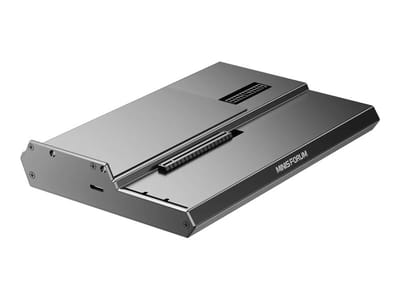
DEG1 eGPU Dock
A plain OCuLink dock with a PCIe 4.0 x4 link for a desktop graphics card; it takes an ATX or SFX power supply that you supply.
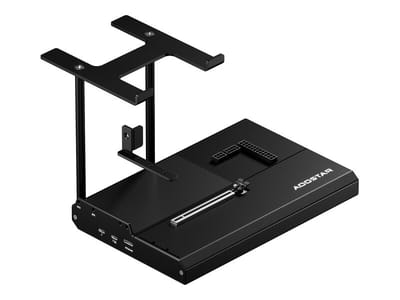
EG02 eGPU Dock
Connects over OCuLink for the full PCIe 4.0 x4 link and has Thunderbolt 5 as a second input; the graphics card and power supply are sold separately.

Core X V2
A Thunderbolt 5 enclosure that Razer lists as working with Thunderbolt 4 and USB4 hosts; it fits a four-slot card and needs an ATX power supply.

DEG2 eGPU Dock
Connects over USB4 or Thunderbolt 5, with an OCuLink input behind a switch, and adds an M.2 slot; it needs an ATX or SFX power supply.

Breakaway Box 850 T5
Has an 850W power supply built in, so only the graphics card is extra, and works with Thunderbolt 4 and USB4 Windows PCs.

TS4 Thunderbolt 4 Dock
An 18-port dock that CalDigit lists for Thunderbolt 4 and USB4 hosts, with 2.5GbE and a DisplayPort 1.4 output.

TBT4-UD5 Thunderbolt 4 Dock
Two HDMI ports drive two 4K60 monitors from one Thunderbolt 4 or USB4 port on a Windows PC.

Revodok Max 208 Thunderbolt 4 Dock
Adds three Thunderbolt 4 ports for dual 4K60 displays plus gigabit Ethernet; it has no HDMI port, so monitors connect over USB-C or an adapter.
Frequently Asked Questions
Can the GMKtec NucBox M7 Pro handle gaming?
Light to moderate gaming, yes. The integrated Radeon 680M runs less demanding titles at 1080p with medium to low settings. Heavier games need an external GPU attached over the Oculink or USB 4.0 ports.
What is the maximum RAM and storage capacity?
Up to 64GB of DDR5 in dual channel, and up to 4TB across the two M.2 slots. The 1TB drive in the box is PCIe 3.0, though both slots run PCIe 4.0 drives.
Does the M7 Pro support multiple displays?
Four at once, through the HDMI port, the DisplayPort, and the two USB4 ports that carry DisplayPort.
Is the M7 Pro noisy?
Team Pandory found it much quieter than earlier GMKtec models and inaudible at idle, and EVO Tech reported little noise at 54W under load. It does spin up in a heavy performance-mode run.
What is the Oculink port used for?
It carries PCIe 4.0 x4 out to an external GPU dock, so a desktop graphics card can take over the 3D work from the Radeon 680M.
Does it come with Windows pre-installed?
Windows 11 Pro is preinstalled, with no bloatware layered on top of it.
What’s included in the box?
The Mini PC, a power supply and cable, an HDMI cable, a VESA mount with screws, and a user manual. The mount fixes the unit to the back of a monitor.
Can I use the M7 Pro as a media server?
ETA Prime played 4K video with zero dropped frames in the 35W silent profile, and the dual 2.5GbE ports and dual M.2 slots suit network storage. The small case and low noise help if it lives in a living room.
Does it have Wi-Fi and Bluetooth?
Wi-Fi 6 and Bluetooth 5.2. Team Pandory measured 72% signal strength and under 100 Mbps from the Intel card, and swapping in a MediaTek RZ616 module fixed it.
Is the M7 Pro easy to upgrade?
The semi-transparent acrylic top lifts off to reach the RAM and the two M.2 SSD slots, with no other panel to remove first.