
ACEMAGIC M1
Updated on

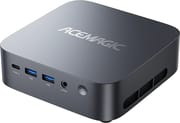
The ACEMAGIC M1 is a 128 x 128 x 41mm square that ACEMAGIC also markets as the Matrix Mini M1, and it puts a full mobile Intel i9 into roughly the footprint of a Mac mini. The flagship build pairs the 14-core, 20-thread Core i9-13900HK with Intel Iris Xe graphics; a cheaper build drops to the 8-core, 16-thread Core i9-11900H with the 11th-generation Intel UHD graphics. Both ship with 32GB of dual-channel DDR4-3200, a 1TB M.2 2280 NVMe drive, a second empty M.2 slot, six USB-A ports, one front USB4 Type-C, HDMI 2.0, DisplayPort 1.4, 2.5 Gigabit Ethernet, and Windows 11 Pro. It is a CPU-and-ports machine rather than a graphics machine.
Pros and Cons
| Pros | Cons |
|---|---|
| The i9-13900HK build brings a full 14-core, 20-thread mobile i9 to this chassis | Integrated graphics rules out modern AAA gaming on either build |
| 32GB DDR4 and a 1TB NVMe drive standard, with a second M.2 2280 slot left free | Plastic outer shell, flagged by both PCWorld and IT Pro |
| Front USB4 Type-C at 40Gbps runs docks, NVMe enclosures, and external GPUs | That USB-C port carries data and video only, so the AC adapter is mandatory |
| How-To Geek measured 1,900Mbps down over the 2.5GbE port | How-To Geek rarely exceeded 500Mbps down over WiFi on the same unit |
| Quiet in normal use, and Tech Guy Beau recorded no throttling at the roughly 60W package limit | IT Pro’s 13900HK unit scored 8,912 in Geekbench 6 multi-core, under the 10,286 of a Geekom Mini IT13 |
| Clean Windows 11 Pro image with over 900GB free and no bundled third-party software | No SD card reader, and no NPU for local AI acceleration |
Related Videos
ACEMAGIC M1 Comparison Chart
 ACEMAGIC M1 | ACEMAGIC M1 | |
| Price | List Price: $699.99 Amazon Prices: Loading prices... | List Price: $599.99 Amazon Prices: |
| Version | 32GB/1TB/i9-13900HK | 32GB/1TB/i9-11900H |
| Performance Rating | 5.7 | 5.0 |
| Operating System | Windows 11 Pro | Windows 11 Pro |
| Processor | Fourteen-core 2.60 Ghz (max 5.40 Ghz) Intel Core i9-13900HK | Octa-core 2.50 Ghz (max 4.90 Ghz) Intel Core i9-11900H |
| GPU | Integrated Intel Iris Xe Graphics | Integrated Intel UHD Graphics |
| RAM | 32 GB DDR4 | 32 GB DDR4 |
| Internal Storage | 1 TB | 1 TB |
| Dimensions width x length x thickness | 5.05 x 5.05 x 1.61 inches (128.27 x 128.27 x 40.89 mm) | 5.05 x 5.05 x 1.61 inches (128.27 x 128.27 x 40.89 mm) |
| Weight | 1.18 lbs (0.54 kg) | 1.18 lbs (0.54 kg) |
| WiFi | Wi-Fi 6E (802.11ax) | Wi-Fi 6E (802.11ax) |
| Bluetooth | Bluetooth 5.2 | Bluetooth 5.2 |
| Ethernet | 1 Ethernet port at 2.5 Gbps | 1 Ethernet port at 2.5 Gbps |
| HDMI | 1 Full-Size HDMI Port | 1 Full-Size HDMI Port |
| DisplayPort | 1 DisplayPort (1.4) | 1 DisplayPort (1.4) |
| VGA | No VGA Ports | No VGA Ports |
| USB Ports | 6 USB 3, 1 USB-C (1 USB4) Front USB4 Type-C: 40Gbps, DisplayPort Alt Mode, no power delivery | 6 USB 3, 1 USB-C (1 USB4) Front USB4 Type-C: 40Gbps, DisplayPort Alt Mode, no power delivery |
| Thunderbolt Ports | No | No |
| OCuLink | No | No |
| Internal SATA Ports | No SATA ports | No SATA ports |
| Card Reader | No Card Reader | No Card Reader |
| Headphone Jack | combo | combo |
| Fanless | No | No |
| VESA Mount | Yes | Yes |
| In the Box | ACEMAGIC M1, 120W Power Adapter, HDMI Cable, VESA Mount Bracket with Screws, User Manual | ACEMAGIC M1, 120W Power Adapter, HDMI Cable, VESA Mount Bracket with Screws, User Manual |
| Expandability | RAM upgradeable to 64GB DDR4, second M.2 2280 slot free from the factory (up to 4TB total) | RAM upgradeable to 64GB DDR4, second M.2 2280 slot free from the factory (up to 4TB total) |
Related Mini PCs
-
 ACEMAGIC M1 (Ryzen 7 7735HS)The 7735HS refresh of the ACEMAGIC M1 puts eight Zen 3+ cores, Radeon 680M graphics, and 24GB of…
 -
 ACEMAGIC K1 (Intel Core i5-12600H)The Intel version of ACEMAGIC's K1 pairs the 12-core Core i5-12600H with triple 4K output, seven…
 -
 ACEMAGICIAN W1The ACEMAGICIAN W1 is a 5-inch mini PC built on the AMD Ryzen 7 H 255 with Radeon 780M graphics,…
 -
 Beelink SER9 Max H 255The Beelink SER9 Max H 255 pairs an AMD Ryzen 7 255 with Radeon 780M graphics in a 5.31-inch…
 -
 Chatreey IT13-13900HThe Chatreey IT13-13900H Mini PC delivers impressive productivity performance with its i9-13900H…
 -
 GEEKOM GT15 Max AIThe GEEKOM GT15 Max AI puts an Intel Core Ultra 9 285H (99 TOPS across CPU, GPU, and NPU) in a…
Two M.2 slots, six USB-A ports, and a 60W power cap
The chassis is a rounded 128 x 128 x 41mm square weighing about 1.18 pounds, sold in silver or graphite, with a VESA bracket in the box so it can sit behind a monitor. PCWorld found “the chassis is made of plastic on the outside and a metal core on the inside,” and IT Pro wrote that “its shell has a plasticy feel to it, which is also visibly noticeable whenever you glance towards it on your desk.” Neither publication treated the material as disqualifying at the price.
The front carries the power button, a 3.5mm combo jack, two USB 3.2 Gen 2 Type-A ports, and the single USB4 Type-C. The rear adds four more USB 3.2 Gen 1 Type-A ports, HDMI 2.0, DisplayPort 1.4, the 2.5 Gigabit Ethernet jack, and the DC input. That totals six USB-A ports and three video outputs, enough to drive three 4K displays at once. The omission is power delivery over that Type-C port. How-To Geek wrote: “this port can’t be used for power, only data and video, so you’re stuck with the included AC adapter.” IT Pro listed the missing SD card reader as its second complaint.
Inside sit two DDR4 SO-DIMM slots (32GB fitted as 2 x 16GB, upgradeable to 64GB) and two M.2 2280 slots, only one of which ships populated. Tech Guy Beau’s teardown confirmed both the free slot and the memory brand, and found a large heat sink with dual heat pipes and ordinary thermal paste on the chip. Filling the free slot takes the storage ceiling to 4TB across the pair.
PCWorld tested the i9-13900HK version and recorded a PCMark 10 overall of 6,288 with a 3DMark CPU-profile single-thread score of 1,082. How-To Geek tested the i9-11900H version and recorded a PCMark 10 total of 4,930, describing it as “behind the average for a 2023 office laptop at 5,848, but still better than 41% of all results.” Those runs come from different testers on different days rather than a controlled head-to-head, so treat the gap as directional. On graphics, the i9-13900HK build gets Iris Xe and the i9-11900H build the older 11th-generation UHD graphics. Neither is a gaming part.
ACEMAGIC holds the 13900HK to roughly a 60W package limit instead of letting it run to its ceiling, and Tech Guy Beau’s live monitoring showed the machine staying quiet without dropping clocks under sustained load. How-To Geek saw the same behavior on the 11900H build, noting a 54W peak and reporting that “it never gets overly hot, nor does the fan run particularly long or loudly.” PCWorld’s phrasing was similar for idle and office use, with the caveat that “under prolonged full load, the fan revs up and is then audible, but not shrill.”
Reviewer Insights
PCWorld measured the i9-13900HK build
PCWorld’s review by Christoph Hoffmann (December 2025) scored the M1 4 out of 5 and tested the i9-13900HK configuration. Its pros list includes “very compact form factor with a fully-fledged i9 platform” and “strong single-core performance also for development and light rendering,” and the verdict calls it “a very fast, surprisingly compact mini PC that brings classic desktop performance and near silent operation.”
The i9-13900HK launched in January 2023, and the numbers track that vintage. PCMark 10 came in at 6,288 overall. Hoffmann put that “around 20 to 25 per cent behind” a Core Ultra 9 285H or Ryzen AI 9 HX 370 mini PC, “without dropping noticeably in typical office workloads.” He measured 1,467 in 3DMark Time Spy and noted that Radeon 890M systems “show a GPU performance that is around 30 to 40 percent higher with 3,500 to 3,700 time-spy points and over 3,000 points in Steel Nomad Light.” He also flagged the absent NPU: “the 13900HK does not have a dedicated NPU, all AI workloads run via CPU and GPU.”
CrystalDiskMark returned “3,425 MB/s read and 3,284 MB/s write,” which Hoffmann listed as a con (“SSD somewhat slow for PCIe 4.0 level”) because the drive is a PCIe 4.0 part performing at PCIe 3.0 speeds.
How-To Geek lived with the i9-11900H build
How-To Geek’s review by Bill Loguidice (December 2025) rated the M1 8 out of 10 and covers the cheaper i9-11900H configuration rather than the 13900HK build the other two publications tested. His conclusion: “this is no PC for graphics-intensive operations or gaming, but for everything else, it’s fair to say that it delivers big things in a very small package.”
On wired networking he wrote, “when wired into one of my TP-Link Deco BE22000 Wi-Fi 7 satellites, Ethernet performance was excellent, with an average ping of 14ms, download speed of 1,900Mbps, and upload speed of 359Mbps.” That result puts the 2.5GbE port well clear of a gigabit. Wireless fell short on the same unit. “Unfortunately, WiFi performance was a bit underwhelming,” he wrote, adding “I rarely exceeded 500Mbps or so download.”
He also called out the software image: “there’s no bloatware or third-party software of any kind, leaving over 900GB of storage space free on the 1TB SSD.” His two stated wishes were more than one Type-C port and the ability to power the machine over USB-C, but his summary judgment was that “what is there, from the processor to the selection of ports to the thermal management, impresses.”
Technically Unsure put the i9-11900H build on the bench
Technically Unsure also tested the i9-11900H build, in his case the roughly $300 barebone configuration (discount codes bring it closer to $270; RAM and storage cost extra). His teardown through the rubber-foot screws found thermal pads already fitted, a Realtek wireless module, Kingston DDR4-3200 memory, and the second free NVMe slot; he installed two 4TB drives and confirmed both bays work at once, “one is Windows, one is Linux,” switching between them in the BIOS.
Cinebench 2024 returned a multi-core score of 454, idle draw sat near 20 watts in Windows and 18 in Ubuntu, and an all-core stress run pushed the package to about 90 watts, the one point where the fans became audible; his overall read was that the machine is “very quiet overall.” Euro Truck Simulator 2 at 1080p ran in the low 20s on high settings but held 33 to 52 fps on medium, which he called “definitely playable,” and an iperf3 run under Linux confirmed the 2.5GbE port delivers its rated speed.
Running Ollama under Ubuntu, the 11900H produced 10 tokens per second on DeepSeek R1’s 14B model and about 19 on a smaller Llama 3.1, drawing around 90 watts: “for a $290, $300 mini computer with 90 watts, we are hitting 10 tokens per second for the 14B model of DeepSeek R1.” His verdict was a thumbs up: “everything I benchmarked, I got impressive scores for the price.”
IT Pro found the multi-core result below expectation
IT Pro’s review by Keumars Afifi-Sabet (December 2025) rated the i9-13900HK unit 4.5 out of 5 and described it as “a smart-looking machine with plenty of connectivity options and a reasonable price.” Its listed strengths were the design and build, the port selection, and value; its listed weaknesses were “less powerful than we’d expect” and “no SD card slot.”
Geekbench 6 returned 2,806 single-core, which the reviewer called highly respectable, but “it scored only 8,912 on multi-core testing. This is less than the Geekom Mini IT13, which scored 10,286,” and the review concluded that “in the Acemagic, the CPU slightly underperformed against expectations.” That is consistent with the power limit ACEMAGIC applies. The SSD measured 3,478MB/s read and 3,370MB/s write on its bench, close to PCWorld’s figures. Even with the shortfall, IT Pro’s verdict stayed positive on price: “you still get far more bang for your buck with it than you might with some of its key rivals.”
IT Pro also noted that its review unit shipped with the i9-13900HK “although you could also pick up a version with the Intel Core i9-11900H processor or AMD’s Ryzen 7 6800H chip.” The AMD side of the line has since moved on. The original 6800H build is out of production, and ACEMAGIC now ships the chassis with a Ryzen 7 7735HS and soldered memory, covered on its own page.
Tech Guy Beau traced the 60W cap and the USB4 port
Tech Guy Beau reviewed the i9-13900HK M1 with a teardown and live thermal monitoring. ACEMAGIC caps the chip well under its ceiling, and he described the choice as giving it “a little bit of a wattage limit here, you know, 60 watts, for example, on the CPU.” At idle he reported “it’s completely silent when just hanging out in Windows doing basic stuff,” and while running the load test he confirmed on screen that “as you can see, we’re not throttling.” His summary was that “this thing runs very, very, very quiet and cool.”
He was direct about the limitation, calling out that “the only real negative, I suppose, if that’s the right term to use here, is it doesn’t have a powerful iGPU, so it’s not a gaming PC.” He then used the front USB4 port to route around it, attaching an external GPU enclosure with a Radeon 7600M XT: “you’re able to take this little ACEMAGIC here, because it has USB4, and turn it into a gaming PC legitimately.” Running Cyberpunk 2077 through that eGPU at 1080p, he reported “right now, you’re getting 60, so you’re able to do stuff like 60 fps gaming at 1080p, which is very good.” He tied that back to the processor: a USB4 mini PC with a weak CPU bottlenecks an external GPU, and the 14-core chip in this box does not.
His teardown also confirmed the expansion story, showing both M.2 bays with one free (“so you can actually get dual 2280 support here”) and two Micron DDR4-3200 modules in accessible SO-DIMM slots.
Customer Reviews
The i9-11900H, 32GB, 1TB configuration sold by ACEMAGIC US carries a 4.3-star average across 90 ratings as of July 2026. Buyers using it as a quiet desktop replacement are positive; the complaints cluster on electrical details and on support.
On the positive side, CleoZ (verified purchase, March 2026) mounted it behind a monitor and wrote that “it’s very quiet; I never even hear the fan unless I put my ear right up next to it,” adding that plenty of I/O remained unused. Cathy Sue (verified purchase, February 2026) reported it handled her photo and video editing and that “quality was better than expected, plenty of ports.” Another verified buyer using it as a home-theater source in January 2026 found that enabling HDR output transformed playback on a 4K set.
Wm Gait (verified purchase, February 2026) rated it 4 stars after months of use and traced an audio problem to the machine: “extraneous noises come out through the speakers indicating a shielding issue with the PC itself.” Retired Badger (verified purchase, January 2026) hit a related electrical issue when using the M1 to drive a CNC controller, explaining that “because the power supply is an AC to DC adapter, the PC itself is not earth grounded,” and that the resulting interference dropped the Ethernet link to the controller. Neither issue affects ordinary desktop use, but both are worth knowing if you plan to wire the M1 into audio gear or shop equipment. The harshest review comes from Sivam (verified purchase, June 2026), whose unit died after a couple of months and who reported that “they don’t have customer support in US” beyond an email route to a team in China.
A quiet i9 desktop box, with graphics as the ceiling
The M1 has no NPU, and its integrated graphics sit well behind a Radeon 890M. It delivers a lot of general-purpose CPU in a very small box, a good port layout for the money, and a cooling design tuned so the machine stays quiet rather than chasing the last 20 percent of the chip’s performance. PCWorld and IT Pro both ran CPU benchmarks and both landed on strong single-threaded work with adequate multi-threaded work.
The choice between the two builds is mostly a budget question. The i9-13900HK is the meaningfully faster chip and the one PCWorld and IT Pro tested; the i9-11900H build is the cheaper one and the one How-To Geek lived with, and it was fast enough that his complaints were about WiFi throughput and USB-C power rather than speed. If you are buying for compiles, virtual machines, browser-heavy multitasking, or a homelab node with a real 2.5GbE port, either build does the job.
The one upgrade path worth planning for is the front USB4 port. Tech Guy Beau’s eGPU demonstration shows the M1 can become a competent 1080p gaming machine later without replacing the box, and a mini PC’s external-GPU options are worth understanding before you commit: see Starry Hope’s guide to mini PC eGPU connectors. To weigh the M1 against current alternatives on specs, the Mini PC Comparison Chart lines them up side by side.
Frequently Asked Questions
What is the difference between the two ACEMAGIC M1 processor options?
The flagship build uses the Intel Core i9-13900HK, a 14-core (6 Performance plus 8 Efficiency), 20-thread Raptor Lake chip that boosts to 5.4GHz and pairs with Intel Iris Xe graphics. The cheaper build uses the Intel Core i9-11900H, an 8-core, 16-thread Tiger Lake chip that boosts to 4.9GHz and pairs with the older 11th-generation Intel UHD graphics. IT Pro also noted an AMD Ryzen 7 6800H version of the same chassis, which has since been replaced by a Ryzen 7 7735HS build with soldered memory, each covered on its own page. RAM, storage, and the port layout are the same across the Intel builds.
Can the RAM and storage be upgraded on the ACEMAGIC M1?
Yes. Memory sits in two standard DDR4 SO-DIMM slots, shipped as 2 x 16GB and expandable to 64GB. Storage uses two M.2 2280 NVMe slots, only one of which is populated from the factory, for up to 4TB total. Tech Guy Beau’s teardown showed both memory slots and both M.2 bays are reachable once the bottom panel comes off.
How many displays can the ACEMAGIC M1 support simultaneously?
Three. The M1 combines HDMI 2.0, DisplayPort 1.4, and a USB4 Type-C port with DisplayPort Alt Mode, and PCWorld confirmed three 4K monitors can run in parallel.
Is the ACEMAGIC M1 suitable for gaming?
Not on its own for modern titles. The integrated graphics handle older and lightweight games, and How-To Geek measured 497 in 3DMark Steel Nomad Light on the i9-11900H build. Tech Guy Beau demonstrated the alternative: attaching an external GPU enclosure to the front USB4 port let him run Cyberpunk 2077 at 1080p at roughly 60 fps.
Can the ACEMAGIC M1 be powered over USB-C?
No. The single USB4 Type-C port handles data and video only, so the bundled AC adapter is required. How-To Geek listed this as one of its two complaints about the machine.
What network speeds does the ACEMAGIC M1 deliver in practice?
How-To Geek measured 1,900Mbps download and 359Mbps upload over the 2.5 Gigabit Ethernet port with a 14ms ping. Wireless was weaker in the same test, rarely exceeding about 500Mbps download. If throughput matters, use the wired port.
How loud is the ACEMAGIC M1 during operation?
Quiet in normal use. PCWorld found it relatively silent at idle with office noise disappearing behind ambient room volume, though under prolonged full load the fan becomes audible without being shrill. Tech Guy Beau reported it silent at idle and saw no throttling under load at the roughly 60W package limit ACEMAGIC sets.
Does the ACEMAGIC M1 have an NPU for local AI work?
No. PCWorld confirmed the i9-13900HK has no dedicated NPU, so AI workloads run on the CPU and integrated GPU. That is fine for occasional transcription or image upscaling, but a Core Ultra or Ryzen AI system will be substantially faster for daily AI work.