
ACEMAGIC M1 (Ryzen 7 7735HS)
Published on
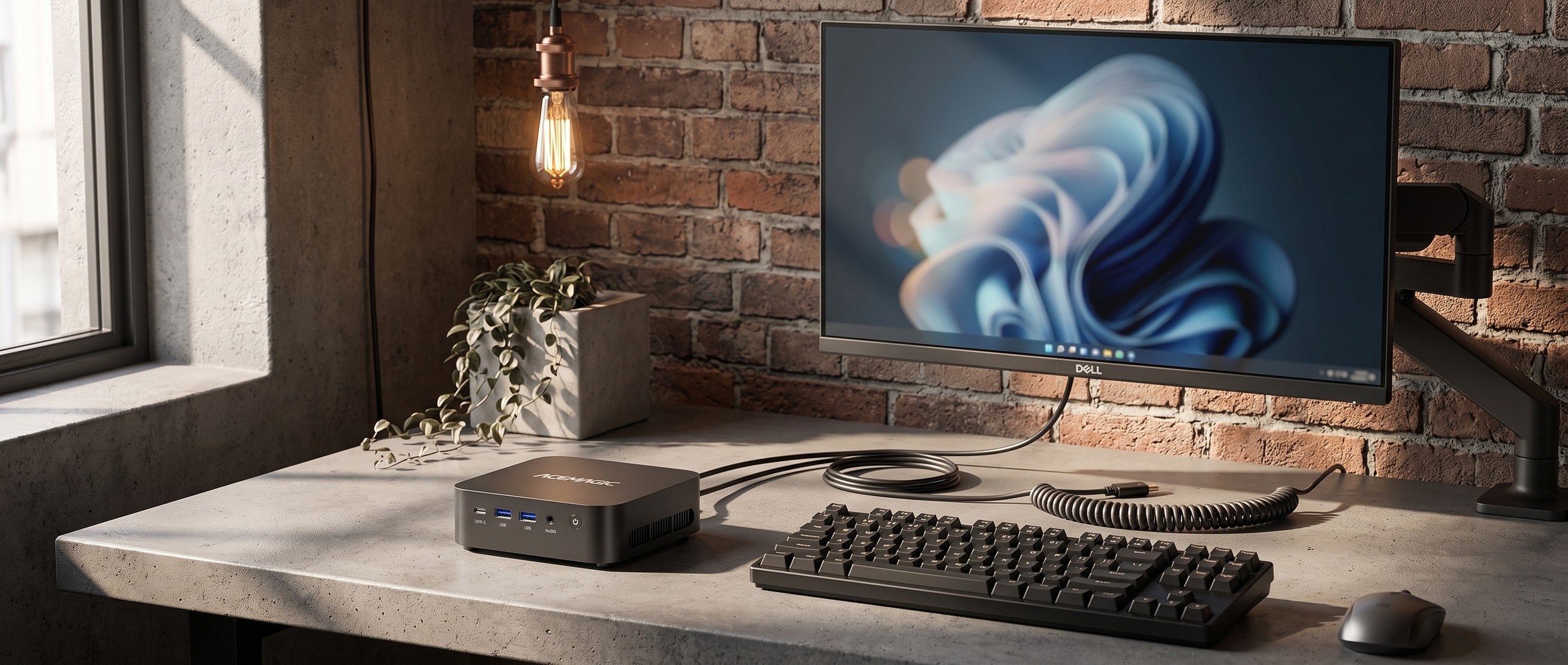
The ACEMAGIC M1 with the Ryzen 7 7735HS is a 5-inch square desktop built around eight Zen 3+ cores and AMD’s Radeon 680M integrated graphics. ACEMAGIC also sells the same chassis with a Ryzen 7 7736U, a lower-power chip from the same Zen 3+ generation with the same Radeon 680M graphics. Every configuration ships with 24GB of LPDDR5 running at 5500MT/s, soldered directly to the board, so the memory the machine ships with is a ceiling you can never raise. HDMI 2.0, DisplayPort 1.4, and a full-function USB-C port each drive a 4K panel at 60Hz, so three monitors run off a machine this size. Storage sits on two M.2 2280 slots that accept PCIe 3.0 or 4.0 NVMe drives up to 4TB combined, and networking covers 2.5GbE, Wi-Fi 6, and Bluetooth 5.2. Windows 11 Pro is preinstalled, and ACEMAGIC lists Ubuntu and other Linux distributions as supported.
ACEMAGIC has now shipped three different machines called the M1, so the naming needs care. This page covers the Ryzen 7 7735HS version and the lower-power Ryzen 7 7736U build in the same chassis. The Intel ACEMAGIC M1 is a separate box built on Core i9 silicon with USB4 and socketed DDR4, and the earlier Ryzen 7 6800H M1 used DDR5 SO-DIMMs plus a 2.5-inch SATA bay, neither of which this generation has. ACEMAGIC also sells the exact machine on this page under its alternate ACEMAGICIAN brand as the “Matrix Mini M1”; the company’s own product page uses that name for the 7735HS board, so the two listings are the same hardware at different prices.
Pros and Cons
| Pros | Cons |
|---|---|
| 24GB of LPDDR5-5500 in every configuration, no RAM to buy | That 24GB is soldered; there is no upgrade path, ever |
| Triple 4K@60Hz across HDMI 2.0, DisplayPort 1.4, and USB-C | No SATA port or 2.5-inch bay, so bulk storage means buying NVMe |
| Two M.2 2280 slots (PCIe 3.0/4.0), up to 4TB total | Rear USB-A ports run at 5Gbps, not the 10Gbps of the front pair |
| 2.5GbE plus Wi-Fi 6 and Bluetooth 5.2 | Zen 3+ silicon launched in Q2 2023 and now trails Zen 4 boxes |
| Radeon 680M handles 4K playback and light gaming | Buyers who hit a hardware failure describe slow, circular support |
| VESA bracket included; SSD swaps need four screws | No USB4, no Thunderbolt, no card reader, no OCuLink |
Related Videos
ACEMAGIC M1 (Ryzen 7 7735HS) Comparison Chart
 ACEMAGIC M1 (Ryzen 7 7735HS) | ACEMAGIC M1 (Ryzen 7 7735HS) | ACEMAGIC M1 (Ryzen 7 7735HS) | |
| Price | List Price: $449.99 Amazon Prices: Loading prices... | List Price: $599.00 Amazon Prices: Loading prices... | List Price: Amazon Prices: Loading prices... |
| Version | 24GB/512GB | 24GB/1TB | 24GB/512GB/AMD Ryzen 7 7736U |
| Performance Rating | 5.2 | 5.2 | 5.0 |
| Operating System | Windows 11 Pro | Windows 11 Pro | Windows 11 Pro |
| Processor | Octa-core 3.20 Ghz (max 4.75 Ghz) AMD Ryzen 7 7735HS | Octa-core 3.20 Ghz (max 4.75 Ghz) AMD Ryzen 7 7735HS | Octa-core 2.70 Ghz (max 4.70 Ghz) AMD Ryzen 7 7736U |
| GPU | Integrated AMD Radeon 680M | Integrated AMD Radeon 680M | Integrated AMD Radeon 680M |
| RAM | 24 GB LPDDR5 (24GB LPDDR5-5500 soldered, no upgrade path) | 24 GB LPDDR5 (24GB LPDDR5-5500 soldered, no upgrade path) | 24 GB LPDDR5 (24GB LPDDR5-5500 soldered, no upgrade path) |
| Internal Storage | 512 GB SSD | 1 TB SSD | 512 GB SSD |
| Dimensions width x length x thickness | 5.05 x 5.05 x 1.61 inches (128.27 x 128.27 x 40.89 mm) | 5.05 x 5.05 x 1.61 inches (128.27 x 128.27 x 40.89 mm) | 5.05 x 5.05 x 1.61 inches (128.27 x 128.27 x 40.89 mm) |
| Weight | unknown | unknown | unknown |
| WiFi | Wi-Fi 6 (802.11ax) | Wi-Fi 6 (802.11ax) | Wi-Fi 6 (802.11ax) |
| Bluetooth | Bluetooth 5.2 | Bluetooth 5.2 | Bluetooth 5.2 |
| Ethernet | 1 Ethernet port at 2.5 Gbps | 1 Ethernet port at 2.5 Gbps | 1 Ethernet port at 2.5 Gbps |
| HDMI | 1 Full-Size HDMI Port | 1 Full-Size HDMI Port | 1 Full-Size HDMI Port |
| DisplayPort | 1 DisplayPort (DisplayPort 1.4, 4K@60Hz) | 1 DisplayPort (DisplayPort 1.4, 4K@60Hz) | 1 DisplayPort (DisplayPort 1.4, 4K@60Hz) |
| VGA | No VGA Ports | No VGA Ports | No VGA Ports |
| USB Ports | 6 USB 3, 1 USB-C 2x USB-A 10Gbps front, 4x USB-A 5Gbps rear, USB-C with DP 1.4 | 6 USB 3, 1 USB-C 2x USB-A 10Gbps front, 4x USB-A 5Gbps rear, USB-C with DP 1.4 | 6 USB 3, 1 USB-C 2x USB-A 10Gbps front, 4x USB-A 5Gbps rear, USB-C with DP 1.4 |
| Thunderbolt Ports | No | No | No |
| OCuLink | No | No | No |
| Internal SATA Ports | No SATA ports | No SATA ports | No SATA ports |
| Card Reader | No Card Reader | No Card Reader | No Card Reader |
| Headphone Jack | combo | combo | combo |
| Fanless | No | No | No |
| VESA Mount | Yes | Yes | Yes |
| In the Box | Mini PC, power adapter, HDMI cable, VESA bracket with screws, user manual | Mini PC, power adapter, HDMI cable, VESA bracket with screws, user manual | Mini PC, power adapter, HDMI cable, VESA bracket with screws, user manual |
| Expandability | RAM fixed at 24GB (soldered); dual M.2 2280 NVMe slots, up to 4TB total | RAM fixed at 24GB (soldered); dual M.2 2280 NVMe slots, up to 4TB total | RAM fixed at 24GB (soldered); dual M.2 2280 NVMe slots, up to 4TB total |
Related Mini PCs
-
 ACEMAGIC M1The ACEMAGIC M1 is a 5-inch square Windows 11 Pro box sold in two very different Intel builds: a…
 -
 ACEMAGIC K1 (Intel Core i5-12600H)The Intel version of ACEMAGIC's K1 pairs the 12-core Core i5-12600H with triple 4K output, seven…
 -
 ACEMAGICIAN W1The ACEMAGICIAN W1 is a 5-inch mini PC built on the AMD Ryzen 7 H 255 with Radeon 780M graphics,…
 -
 Beelink SER9 MaxThe Beelink SER9 Max puts an AMD Ryzen 7 H 255 with Radeon 780M graphics, or a Zen 5 Ryzen AI 7 H…
 -
 Chatreey IT13-13900HThe Chatreey IT13-13900H Mini PC delivers impressive productivity performance with its i9-13900H…
 -
 GEEKOM GT15 Max AIThe GEEKOM GT15 Max AI puts an Intel Core Ultra 9 285H (99 TOPS across CPU, GPU, and NPU) in a…
Seven USB ports, two M.2 slots, and fixed 24GB memory
The chassis measures 5.05 x 5.05 x 1.61 inches (128.2 x 128.2 x 41mm) in matte black or silver. The front face carries a USB-C port, two USB-A 3.2 Gen 2 ports rated at 10Gbps, a 3.5mm combo audio jack, and the power button, with vent slots down each side. The rear adds four more USB-A ports, these at USB 3.2 Gen 1 speed (5Gbps), alongside the 2.5GbE jack, DisplayPort 1.4, HDMI 2.0, and the barrel power input. The DisplayPort version is unsettled. The spec table on ACEMAGIC’s own product page lists the port as DisplayPort 1.4, while several of the company’s own listing graphics label it DisplayPort 2.0, and the teardown video below calls it 2.0 too. This page follows the 1.4 figure from the written spec table, and the stated output is 4K@60Hz either way. That adds up to seven USB ports on a box this size. Screw points on the underside take the bundled VESA bracket, and ACEMAGIC ships a 19V/3.42A (65W) adapter, an HDMI cable, and the mounting screws in the box.
The Ryzen 7 7735HS is a Rembrandt-R chip on TSMC’s 6nm process with 8 cores, 16 threads, a 3.2GHz base clock, and a 4.75GHz boost, and it scores around 24,300 on PassMark. That is close to the Ryzen 7 6800H it replaces (roughly 23,600), while the Zen 4 Ryzen 7 7840HS scores about 19 percent higher at roughly 28,900 and current Ryzen AI 300 parts sit higher again (the Ryzen AI 9 HX 370 lands near 35,500). The Radeon 680M runs 12 RDNA 2 compute units up to 2200MHz for a PassMark G3D score around 4,000, against roughly 6,800 for the Radeon 780M in newer AMD mini PCs. Browser work, spreadsheets, video calls across three monitors, 4K playback, and older or lighter games all sit inside that envelope. Sustained rendering and modern AAA gaming do not.
AMD rates the 7735HS with a default TDP of 35W to 54W, and ACEMAGIC pairs it with a 19V/3.42A (65W) adapter in a chassis whose interior volume is under a liter. ACEMAGIC does not publish the TDP it configures the chip to run at, so the sustained-load ceiling in this chassis is not a published figure. The cooling behind it is conventional and, in the teardown below, tidy. A single fan sits over a finned heatsink block, with thermal paste on the processor, thick pads bridging the board around it, and a separate pad on the primary SSD. No publication has published measured noise or temperature figures for this configuration, so treat ACEMAGIC’s own 38 dB marketing claim as a vendor number rather than a tested one.
Storage is generous, with two M.2 2280 slots that both take PCIe 3.0 or 4.0 NVMe drives and a stated 4TB combined ceiling. ACEMAGIC states plainly that SATA SSDs and 2.5-inch drives are not supported, so the cheap route to bulk storage is closed. The 24GB of LPDDR5 is soldered, so the configuration you buy is the configuration you keep for the life of the machine. Anyone who expects to want 32GB or 64GB later should shop a SO-DIMM box instead.
Reviewer Insights
PBKreviews opened up the 24GB / 512GB configuration and walked its internals. The count and placement of ports in that video match ACEMAGIC’s own listing: a USB-C port, two USB-A 3.2 Gen 2 ports, an audio jack, and the power button on the front, and HDMI, DisplayPort, the 2.5 gigabit LAN port, four USB 3.2 Gen 1 ports, and the DC jack on the back. Getting inside means peeling off four adhesive rubber feet, removing four Phillips screws, and separating the bottom assembly while the power jack stays screwed down and the Wi-Fi antenna cables stay attached to the housing. Under the heatsink the teardown shows thermal paste over the processor and thick thermal pads flanking it, with the RAM chips sitting beside the die.
PBKreviews says, “There are two M.2 slots which support PCIe 3.0 and 4.0 and you can use a total of 4 terabytes.” He adds, “The RAM is soldered to the board, so it’s not user replaceable or expandable.” Taking the box apart looks easy in his hands: “When it comes to taking this apart to replace parts like the SSD or the power jack, it’s pretty simple to do and requires minimal effort.” His closing summary is that “Overall, this mini PC is great for work at home, average gaming, and for home theater setups.”
Beyond that teardown, independent coverage of the 7735HS M1 is thin. Sites publishing under the “ACEMAGIC M1” name repeat the chassis specifications with errors (counting four USB-A ports when there are six, for instance), and no publication we could find has run measured benchmarks on this configuration. The ACEMAGICIAN-branded listing’s ratings do not describe this machine. That listing shows more than 1,800 ratings, but its review pool runs back to March 2023, months before AMD shipped this chip, and several of those reviews name a different machine (the AceMagician AM06 Pro, a Ryzen 5 box with DDR4 SO-DIMMs and a 2.5-inch SATA bay). That average is not describing this hardware. The two ACEMAGIC-branded listings do carry buyer feedback about this machine.
Customer Reviews
JDW, a verified buyer of the silver 24GB / 1TB configuration in April 2026, came from an older ACEMAGIC and moves this one between a 49-inch curved 4K display and two TVs, running creative applications with “17 other browser tabs open” without hitting a wall. He singles out the memory: “super refreshing to find this machine packed with 24GB during this specific period of time with AI causing ram prices to skyrocket”. His summary covers the software as much as the hardware: “No junk software, no sketchy 3rd party ‘optimizations,’ just a clean, functional, space saving PC for work and play.” LA, in April 2026, reports that “This computer is super fast and quiet. I have two monitors attached and they work flawlessly”, and David runs one as a TV-connected media box in July 2026: “Very snappy response to anything I have asked it to do.”
The one-star reviews are about warranty support after a hardware failure. One June 2026 buyer, christopher simcox, opens with “Great little package with impressive specs” and then reports the HDMI port dying at six months, “which made using 2 monitors impossible”. His complaint is the support that followed: he wrote back that the port was still dead, and “Two days later I got an email saying they were glad my problem was resolved.” STEPHEN hit a problem at the same six-month mark in July 2026 and describes support as “a absolute joke making every excuse not to offer a fix or replacements or even a return call”. On a 512GB listing, the buyer h1944s returned the machine inside two weeks: “HDD died after 10 days!!!”
Component failures happen at every price. The buyers here who needed warranty help describe a slow, circular process.
Best suited to multi-monitor productivity and media
Seven USB ports, 2.5GbE, and three display outputs cover a small three-monitor desk. It rewards a buyer who values 24GB of memory arriving in the box over the ability to add more later, and whose workload is productivity, media, and light gaming rather than sustained rendering. The dual M.2 slots take up to 4TB, the 2.5GbE port suits a NAS or home-lab desk, and the VESA bracket hides it behind a monitor. Within those limits it is a well-equipped machine.
Soldered memory is a hard ceiling, the missing SATA bay closes off cheap bulk storage, and the Zen 3+ silicon is three years old, so a Zen 4 or Ryzen AI box will pull ahead on both CPU and integrated graphics. Buyers who want upgradeable RAM in a similar footprint should compare the Intel ACEMAGIC M1, those building an always-on Linux machine can start with our roundup of Linux-friendly mini PCs, and anyone weighing this against the wider market can use the Mini PC Comparison Chart.
Frequently Asked Questions
Can you upgrade the RAM in the ACEMAGIC M1 with Ryzen 7 7735HS?
No. The 24GB of LPDDR5-5500 is soldered directly to the motherboard, and ACEMAGIC states it cannot be upgraded. A teardown by PBKreviews confirms it, showing the memory chips soldered to the board beside the processor. Whichever configuration you buy is the memory the machine keeps.
How much storage can the ACEMAGIC M1 take?
The M1 has two M.2 2280 slots that accept PCIe 3.0 or 4.0 NVMe SSDs, for a stated maximum of 4TB across both. One slot ships filled with either a 512GB or 1TB drive depending on the configuration. There is no SATA port and no 2.5-inch drive bay, so every storage upgrade has to be an M.2 NVMe drive.
How many monitors can the ACEMAGIC M1 drive?
Three, each at 4K and 60Hz. The outputs are HDMI 2.0, DisplayPort 1.4, and a full-function USB-C port that carries DisplayPort 1.4 alongside 10Gbps data.
Is the Ryzen 7 7735HS still worth buying in 2026?
It depends on the workload. The 7735HS is a Zen 3+ part that AMD launched in Q2 2023, with 8 cores, 16 threads, and a PassMark score around 24,300. The Zen 4 Ryzen 7 7840HS scores about 19 percent higher, and the Radeon 680M graphics trail the newer Radeon 780M by a wide margin (roughly 4,000 versus 6,800 on PassMark G3D). Office work, multi-monitor productivity, media playback, and light gaming still run well on it. Sustained rendering and modern AAA gaming want newer silicon.
What ports does the ACEMAGIC M1 have?
Seven USB ports in total: two USB-A 3.2 Gen 2 (10Gbps) and one USB-C 3.2 Gen 2 on the front, plus four USB-A 3.2 Gen 1 (5Gbps) on the rear. The rear also carries HDMI 2.0, DisplayPort 1.4, a 2.5GbE RJ45 jack, and the DC power input, and the front adds a 3.5mm combo audio jack. There is no USB4, Thunderbolt, card reader, or OCuLink connector.
Is the ACEMAGICIAN Matrix Mini M1 the same machine?
Yes. ACEMAGIC’s own product page for the Ryzen 7 7735HS M1 uses “Matrix Mini M1” as the product name, and the ACEMAGICIAN-branded listing carries the identical specification: 7735HS, 24GB LPDDR5, dual M.2 2280 slots, triple 4K output, Wi-Fi 6, and the same 128.2 x 128.2 x 41mm chassis. It is the same hardware sold under the company’s alternate brand.
How is this M1 different from the older 6800H version?
The mainboard changed. The earlier Ryzen 7 6800H M1 used replaceable DDR5 SO-DIMM memory, a single M.2 slot, and a 2.5-inch SATA bay. This 7735HS generation solders 24GB of LPDDR5 to the board, adds a second M.2 slot, and drops SATA support entirely. Both use the same Radeon 680M graphics, so the practical difference is expansion rather than speed.