
ACEMAGICIAN W1
Updated on

The ACEMAGICIAN W1, also marketed as the “Warlord,” is a budget gaming mini PC built around the AMD Ryzen 7 H 255 (a rebranded Ryzen 7 8745HS) and its integrated Radeon 780M graphics. Reviewers put that iGPU level with a dedicated GTX 1060, in a case that fits in the palm of your hand. At around $519 for the 32GB/1TB build, it is one of the cheaper routes to the 780M for people who want to game, edit 4K video, or run demanding productivity work without a full desktop under the table.
Pros and Cons
| Pros | Cons |
|---|---|
| $519 buys 32GB of DDR5 and a 1TB PCIe 4.0 SSD | All-plastic construction that creaks under pressure |
| AMD Radeon 780M delivers GTX 1060-level gaming | Difficult to open for upgrades (adhesive rubber feet) |
| Long WiFi 6 and Bluetooth 5.2 range | Fan noise reaches 44 dBA under heavy load |
| USB4 port with 40Gbps and DisplayPort Alt Mode | Conservative thermal throttling at 85C limits peak performance |
| Dual M.2 NVMe slots and dual RAM slots for upgrades | Only one USB-C port |
| 2.5 Gigabit Ethernet on the rear | Short internal cables make maintenance tricky |
Related Videos
ACEMAGICIAN W1 Comparison Chart
 ACEMAGICIAN W1 | |
| Price | List Price: $519.00 Amazon Prices: Loading prices... |
| Version | 32GB/1TB/Ryzen 7 H 255 |
| Performance Rating | 5.6 |
| Operating System | Windows 11 Pro |
| Processor | Octa-core 3.80 Ghz (max 4.90 Ghz) AMD Ryzen 7 H 255 |
| GPU | Integrated AMD Radeon 780M |
| RAM | 32 GB |
| Internal Storage | 1 TB |
| Dimensions width x length x thickness | 5 x 5 x 1.6 inches (127 x 127 x 40.64 mm) |
| Weight | unknown |
| WiFi | Wi-Fi 6 (802.11ax) |
| Bluetooth | Bluetooth 5.2 |
| Ethernet | 1 Ethernet port at 2 Gbps |
| HDMI | 1 HDMI Port |
| DisplayPort | 1 DisplayPort |
| VGA | No VGA Ports |
| USB Ports | 6 USB 3, 1 USB-C (1 USB4) |
| Thunderbolt Ports | No |
| OCuLink | No |
| Internal SATA Ports | No SATA ports |
| Card Reader | No Card Reader |
| Headphone Jack | combo |
| Fanless | No |
| VESA Mount | Yes |
| In the Box | Power adapter (120W, 19V 6.32A), VESA wall-mount bracket, HDMI cable, user manual, Windows 11 Pro pre-installed |
| Expandability | 2x DDR5 SO-DIMM slots (supports up to 64GB DDR5-5600MHz dual channel); 2x M.2 2280 PCIe 4.0 NVMe slots |
Related Mini PCs
-
 ACEMAGIC M1 (Ryzen 7 7735HS)The 7735HS refresh of the ACEMAGIC M1 puts eight Zen 3+ cores, Radeon 680M graphics, and 24GB of…
 -
 ACEMAGIC M1The ACEMAGIC M1 is a 5-inch square Windows 11 Pro box sold in two very different Intel builds: a…
 -
 Beelink SER9 Max H 255The Beelink SER9 Max H 255 pairs an AMD Ryzen 7 255 with Radeon 780M graphics in a 5.31-inch…
 -
 Chatreey IT13-13900HThe Chatreey IT13-13900H Mini PC delivers impressive productivity performance with its i9-13900H…
 -
 GEEKOM GT15 Max AIThe GEEKOM GT15 Max AI puts an Intel Core Ultra 9 285H (99 TOPS across CPU, GPU, and NPU) in a…
 -
 GMKtec K12The GMKtec K12 is a 1.5-liter mini PC with an AMD Ryzen 7 H 255 (Radeon 780M graphics), three M.2…
Plastic shell, name-brand internals, room for two NVMe drives

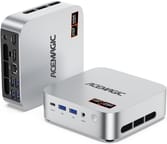
The ACEMAGICIAN W1 measures roughly 5 x 5 x 1.6 inches, small enough to sit behind a monitor on the bundled VESA bracket. The silver shell is all plastic, and several reviewers noted that it feels cheap and creaks when pressure is applied. The parts inside are better: Crucial-branded DDR5 RAM and a fast PCIe 4.0 NVMe SSD. Port coverage runs to six USB 3.2 Type-A ports (two 10Gbps on the front, four 5Gbps on the rear), a single USB4 Type-C with DisplayPort Alt Mode, HDMI 2.0, DisplayPort 2.0, and 2.5 Gigabit Ethernet.
The AMD Ryzen 7 H 255 carries 8 Zen 4 cores and 16 threads, boosts to 4.9GHz, and turns in Geekbench 6 multi-core scores around 12,880. The integrated Radeon 780M graphics runs eSports titles like Apex Legends and Call of Duty smoothly at 1080p, and demanding AAA games stay playable at lower settings. Video editors get 4K timeline scrubbing and exports without hiccups in Adobe Premiere Pro and DaVinci Resolve.
The USB4 port takes an eGPU enclosure for anyone who wants dedicated graphics later, and multiple reviewers praised the WiFi 6 range. HDMI, DisplayPort, and USB-C together drive up to three 8K displays, which covers a multi-monitor productivity desk or emerging AI agent workloads that suit compact always-on hardware. Inside, two M.2 2280 PCIe 4.0 slots and two DDR5 SO-DIMM slots, good for 64GB, leave room to add storage or memory later.
Reviewer Insights

Robtech’s Perspective
Robtech measured fan noise and thermals, and rated the price and the radios: “it’s pretty competitively priced and has excellent wireless and Bluetooth range.” However, he was critical of the difficult disassembly process, stating that “opening it is a real chore… it’s a pain in the ass” due to the adhesive rubber feet that must be removed. His noise measurements showed 29 dBA at idle rising to a noticeable 44 dBA under load, and he observed thermal throttling at 85C during sustained workloads. Despite these concerns, he considered it suitable for users prioritizing compact power and connectivity.
SomeGadgetGuy’s Perspective
SomeGadgetGuy (Juan Bagnell) focused on value, calling it “one of the more cost-effective ways to get a punchy powerful mini PC.” He appreciated the high-quality internal components from Crucial and the dual M.2 slots for expandability. His testing confirmed the 780M GPU is “roughly as powerful as an old GTX 1060 graphics card,” making it suitable for 4K video editing and moderate AAA gaming. Like Robtech, he criticized the plastic shell and difficult internal access, noting “it is a flexy plastic shell, and I really do not like having to rip off adhesive feet to get inside the box.” He highly recommended it for performance-focused users on a budget, especially during sales.
BasicDad Tech’s Perspective
BasicDad Tech was enthusiastic about the performance: “on paper, this might be one of the best mini PCs I’ve ever got my hands on so far.” His gaming tests showed modern AAA titles running better than expected at 1080p, and he found thermal management effective with the system staying “mostly quiet” during gameplay. Unlike other reviewers, he felt the build quality “seems good, doesn’t feel cheap or anything.” He did note the brand’s history with malware concerns and recommended users scan the system after purchase, though he found no bloatware on his unit.
Written Reviews
According to TechXReviews, the W1 stands out as “the cheapest device on the market rocking the AMD 780M iGPU” at $399 for the barebone configuration. Their thermal testing revealed the CPU reaching only 61C during single-core tests and 78C under multi-core loads while maintaining approximately 30dB noise levels. They praised the dual copper tube cooling system as a standout engineering achievement for the compact form factor.
The Gadgeteer described it as “a fairly powerful little PC that takes up only a few square inches of desk space” and noted zero issues during their test period. They highlighted the milled aluminum appearance and 54-watt cooling system with visible fins.
Customer Reviews
Across 233 ratings on Amazon, the ACEMAGICIAN W1 averages 4.3 stars: 69 percent are five-star and another 17 percent four-star, but 8 percent sit at one star, a larger bottom end than the average alone suggests. Most owners praise the speed, small size, and quiet operation. Verified buyer Maicol Diaz wrote “Very impressed with this mini PC so far. Setup was quick and easy, performance is smooth, and it handles everything I need without issues.” Verified buyer Joseph echoed the boot speed in his four-star note: “Boots in 15 seconds or less. Quiet and fast. Very good on board graphics.”
The one-star reviews point at stability rather than performance. Verified buyer Brad titled his “$600 paperweight with no support” and reported it “Crashes and restarts itself at least once every single day with multiple random memory warnings,” adding that he tried contacting the company “multiple times with zero response.” Other owners hit similar hangs but resolved them: Dodge DeBoulet documented BIOS and GRUB tweaks to stop hard hangs when running the unit as a Frigate NVR, and D. Jacobs had an HDMI dual-display problem that vendor support eventually walked him through clearing in Safe Mode (“Vendor’s customer service worked with me to clear all video drivers… No issues whatsoever with replacement mini-PC”).
Read more owner reviews on Amazon.
The Radeon 780M is what the price buys
At $519 the W1 is a cheap way into AMD’s Radeon 780M: enough graphics for 4K video edits, 1080p gaming on modern titles, and productivity work that leans on DDR5 memory and USB4. Sale prices have dipped below $400. If you are weighing whether a mini PC at this price makes sense against a finished laptop, our mini PC vs MacBook Neo breakdown walks through exactly that cost math.
The trade-offs are the case, the noise, and the service access. Plastic flexes where metal would not, the adhesive rubber feet make a RAM or storage swap a chore, fans reach 44 dBA under load, and the 85C throttle ceiling keeps temperatures safe at the cost of sustained speed. If any of those matter more than the price, the GMKtec K12 and Beelink SER9 are worth considering instead.
Starry Hope’s Mini PC Comparison Chart lines the W1 up against the rest of the catalog if you want to check the specs side by side.
Upgrades
Accessories that fit the ACEMAGICIAN W1's USB4 or Thunderbolt ports.

Core X V2
A Thunderbolt 5 enclosure that Razer lists as working with Thunderbolt 4 and USB4 hosts; it fits a four-slot card and needs an ATX power supply.

DEG2 eGPU Dock
Connects over USB4 or Thunderbolt 5, with an OCuLink input behind a switch, and adds an M.2 slot; it needs an ATX or SFX power supply.

Breakaway Box 850 T5
Has an 850W power supply built in, so only the graphics card is extra, and works with Thunderbolt 4 and USB4 Windows PCs.

TS4 Thunderbolt 4 Dock
An 18-port dock that CalDigit lists for Thunderbolt 4 and USB4 hosts, with 2.5GbE and a DisplayPort 1.4 output.

TBT4-UD5 Thunderbolt 4 Dock
Two HDMI ports drive two 4K60 monitors from one Thunderbolt 4 or USB4 port on a Windows PC.

Revodok Max 208 Thunderbolt 4 Dock
Adds three Thunderbolt 4 ports for dual 4K60 displays plus gigabit Ethernet; it has no HDMI port, so monitors connect over USB-C or an adapter.
Frequently Asked Questions
Can the ACEMAGICIAN W1 run modern games?
Yes, the AMD Radeon 780M integrated graphics delivers performance roughly equivalent to an NVIDIA GTX 1060. The W1 can run eSports titles like Apex Legends and Valorant smoothly at 1080p, and even handles demanding AAA games at lower settings. For best results, enable AMD FSR upscaling when available.
How much RAM and storage can I upgrade to?
The W1 supports up to 64GB of DDR5-5600MHz RAM via its two SO-DIMM slots. For storage, it has two M.2 2280 PCIe 4.0 NVMe slots, allowing up to 4TB of total SSD capacity. Note that opening the case requires removing adhesive rubber feet, so plan upgrades carefully.
Is the ACEMAGICIAN W1 loud during normal use?
At idle or during light tasks like web browsing and document editing, the W1 runs at around 29 dBA. Under heavy gaming or sustained CPU loads, fan noise climbs to approximately 44 dBA, loud enough to hear across a quiet room.
What displays can I connect to the ACEMAGICIAN W1?
The W1 supports up to three displays simultaneously through its HDMI 2.0, DisplayPort 2.0, and USB4 Type-C with DisplayPort Alt Mode. All three outputs support up to 8K resolution for multi-monitor productivity setups or high-resolution content creation.
Can I use an external graphics card with the W1?
Yes. The USB4 port supports external GPU enclosures, so a desktop-class graphics card can handle gaming or GPU-accelerated workloads while the box itself stays small.
What is the AMD Ryzen 7 H 255 processor?
The AMD Ryzen 7 H 255 is essentially a rebranded Ryzen 7 8745HS, featuring 8 Zen 4 cores, 16 threads, and boost speeds up to 4.9GHz. It includes the powerful Radeon 780M integrated graphics with 12 RDNA 3 compute units. The different naming is an OEM variant designation and does not indicate different specifications.
Does the ACEMAGICIAN W1 come with Windows pre-installed?
Yes, the W1 ships with Windows 11 Pro pre-installed and activated. Multiple reviewers reported no bloatware on their units, though some recommend running a security scan after initial setup given the brand’s past issues with pre-installed software on other models.