
GMKtec K12
Updated on

The GMKtec K12 steps up to a 1.5-liter chassis, larger than the compact boxes the company built before it. It runs the AMD Ryzen 7 H 255 processor (a rebadged 8745HS with 8 Zen 4 cores) with Radeon 780M integrated graphics. The extra volume buys a dedicated OCuLink port for an external GPU and three M.2 storage slots that hold up to 24TB of NVMe storage. That makes it a desktop replacement aimed at buyers who expect to keep adding to it.
Pros and cons
| Pros | Cons |
|---|---|
| Dedicated OCuLink port for eGPU expansion with better performance than USB4 | Larger 1.5L volume compared to typical mini PCs |
| Three M.2 2280 PCIe Gen4 slots, up to 24TB | Idle fan noise is higher than most mini PCs, and louder in performance mode |
| Dual 2.5GbE Ethernet ports for networking flexibility | No integrated NPU for AI workloads |
| USB4 and USB-C 10Gbps with DisplayPort and Power Delivery | Bluetooth range measured at about 12 feet (3.7 meters) |
| Vapor chamber cooling keeps CPU temperatures manageable | Secondary M.2 slots run at PCIe x2 speeds |
| Three selectable TDP modes (45W/54W/65W) for performance tuning | NotebookCheck measured it 20 to 25 percent slower than the Zen 5 Ryzen AI 9 HX 370 |
Related Videos
GMKtec K12 Comparison Chart
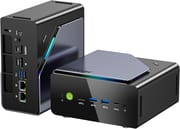 GMKtec K12 | GMKtec K12 | |
| Price | List Price: $569.99 Amazon Prices: Loading prices... | List Price: $879.99 Amazon Prices: Loading prices... |
| Version | --- | 32GB/512GB/Ryzen 7 H 255 |
| Performance Rating | 5.6 | 5.6 |
| Operating System | Windows 11 Pro | Windows 11 Pro |
| Processor | Octa-core 3.80 Ghz (max 4.90 Ghz) AMD Ryzen 7 H 255 | Octa-core 3.80 Ghz (max 4.90 Ghz) AMD Ryzen 7 H 255 |
| GPU | Integrated AMD Radeon 780M | Integrated AMD Radeon 780M |
| RAM | 32 GB DDR5 SO-DIMM | 32 GB DDR5 SO-DIMM |
| Internal Storage | 512 GB | 512 GB |
| Dimensions width x length x thickness | 6.1 x 5.9 x 3.1 inches (154.94 x 149.86 x 78.74 mm) | 6.1 x 5.9 x 3.1 inches (154.94 x 149.86 x 78.74 mm) |
| Weight | 2.07 lbs (0.94 kg) | 2.07 lbs (0.94 kg) |
| WiFi | Wi-Fi 6E (802.11ax) | Wi-Fi 6E (802.11ax) |
| Bluetooth | Bluetooth 5.2 | Bluetooth 5.2 |
| Ethernet | 2 Ethernet ports at 2.5 Gbps | 2 Ethernet ports at 2.5 Gbps |
| HDMI | 1 Full-Size HDMI Port | 1 Full-Size HDMI Port |
| DisplayPort | 1 DisplayPort (DisplayPort 1.4, plus additional DP via USB-C front and USB4 rear) | 1 DisplayPort (DisplayPort 1.4, plus additional DP via USB-C front and USB4 rear) |
| VGA | No VGA Ports | No VGA Ports |
| USB Ports | 2 USB 2.0, 3 USB 3, 2 USB-C (1 USB4) Front: 1x USB-C 10Gbps (Gen2, PD + DP), 2x USB 5Gbps; Rear: 1x USB4 40Gbps, 1x USB 5Gbps, 2x USB 2.0 | 2 USB 2.0, 3 USB 3, 2 USB-C (1 USB4) Front: 1x USB-C 10Gbps (Gen2, PD + DP), 2x USB 5Gbps; Rear: 1x USB4 40Gbps, 1x USB 5Gbps, 2x USB 2.0 |
| Thunderbolt Ports | No | No |
| OCuLink | PCIe 4.0 x4 for eGPU | PCIe 4.0 x4 for eGPU |
| Internal SATA Ports | No SATA ports | No SATA ports |
| Card Reader | No Card Reader | No Card Reader |
| Headphone Jack | 3.5mm combo jack | 3.5mm combo jack |
| Fanless | No | No |
| VESA Mount | Yes | Yes |
| In the Box | 19V 120W power adapter, HDMI cable, VESA mount bracket, user manual | 19V 120W power adapter, HDMI cable, VESA mount bracket, user manual |
| Expandability | RAM: 2x SO-DIMM DDR5-5600 slots (max 64GB); Storage: 3x M.2 2280 PCIe 4.0 slots; OCuLink port for external GPU; Vapor chamber + dual-fan cooling with RGB | RAM: 2x SO-DIMM DDR5-5600 slots (max 64GB); Storage: 3x M.2 2280 PCIe 4.0 slots; OCuLink port for external GPU; Vapor chamber + dual-fan cooling with RGB |
Related Mini PCs
-
 GMKtec Nucbox K8 PLUSThe GMKtec NucBox K8 Plus runs an AMD Ryzen 7 8845HS with Radeon 780M graphics, dual DDR5 slots (up…
 -
 GMKtec NucBox M7 ProThe GMKtec NucBox M7 Pro runs an AMD Ryzen 9 6900HX (Zen3+) with Radeon 680M graphics, DDR5 (up to…
 -
 ACEMAGIC M1 (Ryzen 7 7735HS)The 7735HS refresh of the ACEMAGIC M1 puts eight Zen 3+ cores, Radeon 680M graphics, and 24GB of…
 -
 ACEMAGIC M1The ACEMAGIC M1 is a 5-inch square Windows 11 Pro box sold in two very different Intel builds: a…
 -
 ACEMAGICIAN W1The ACEMAGICIAN W1 is a 5-inch mini PC built on the AMD Ryzen 7 H 255 with Radeon 780M graphics,…
 -
 Beelink SER9 Max H 255The Beelink SER9 Max H 255 pairs an AMD Ryzen 7 255 with Radeon 780M graphics in a 5.31-inch…
A 1.5-liter shell that buys three M.2 slots and an OCuLink port

A metal wrap-around chassis gives the unit a more premium look and feel than GMKtec’s previous all-plastic designs. The device measures 6.1 x 5.9 x 3.1 inches and weighs just over 2 pounds, larger than the typical sub-liter mini PC but still compact enough for desk placement or VESA mounting behind a monitor. Dual fans with RGB lighting work alongside a vapor chamber cooling system to keep thermals in check, though Robtech found the idle fan noise “louder than most minis” and called the Beelink SER9 “a substantially quieter and smaller mini PC.” The same review found that a fan button cycles the lighting modes but cannot turn the light off. Rubber feet on one side panel let it stand vertically, which helps if desk space is tight.
The AMD Ryzen 7 H 255 is a Hawk Point chip, a rebranded Ryzen 7 8745HS designed for the Chinese market. Its 8 Zen 4 cores run at 3.8GHz base and boost to 4.9GHz, and Wccftech measured around 16,000 points in Cinebench R23 multi-core testing. The Radeon 780M integrated graphics with 12 compute units handles 1080p gaming, with Ryan Adapts noting that Battlefield 6 ran “completely fine” on the integrated GPU. Wccftech’s more structured testing showed Cyberpunk 2077 hitting 62 FPS at 1080p medium with FSR enabled, while Forza Horizon 5 reached 94 FPS at high settings. Three TDP modes (45W Silent, 54W Balanced, and 65-70W Performance) let you tune the power and noise balance.
The front panel offers a USB-C 10Gbps port with DisplayPort alt-mode and Power Delivery, two USB 5Gbps Type-A ports, and a 3.5mm audio jack. Around back sits the dedicated OCuLink port, which provides PCIe Gen4 x4 bandwidth directly to an external GPU and bypasses the bandwidth limitations of USB4 or Thunderbolt connections. Tech Guy Beau demonstrated pairing it with a GMK GP1 eGPU dock containing an AMD 7600 MXT, noting that “OCuLink is better in the case that it has considerably better performance” than USB4. Additional rear ports include USB4 at 40Gbps, HDMI 2.1 supporting 4K at 120Hz, DisplayPort 1.4, dual 2.5 Gigabit Ethernet ports using Realtek controllers, and two USB 2.0 ports. WiFi 6E via MediaTek RZ616 and Bluetooth 5.2 cover the wireless side, though Robtech measured Bluetooth range at only about 12 feet.
Reviewer Insights

Robtech: three Gen4 M.2 slots, two of them running at x2
Robtech tears the unit down to show the internal layout. He notes that “GMKtec’s K12 is a big boy, much larger than previous GMKtec minis” but acknowledges that this size enables features like “three 2280 M.2 Gen4 slots.” His testing revealed that the three storage slots and OCuLink port are the standout differentiators, though he cautions that two of the M.2 slots run at PCIe x2 speeds rather than full x4. His noise measurements showed the unit running louder than competitors at idle, leading to his recommendation that users “stick to Balanced as I don’t think the performance boost is worth the extra fan noise” when choosing TDP modes.
Tech Guy Beau: an eGPU dock over OCuLink instead of USB4
Tech Guy Beau spends most of his review on the eGPU capabilities, gaming with an external GPU connected via OCuLink. He describes the AMD 255H processor as “like the GOAT, like actually the GOAT CPU of all time,” referencing its use in popular handheld gaming devices like the ROG Ally and Legion Go. On the port itself he says, “What makes this thing very special beyond that… Is it has an OCuLink port.” He also demonstrates the dual 2.5G Ethernet ports and the vertical stand, presenting the K12 as a foundation for building a high-performance gaming setup with expandability.
Ryan Adapts: Secure Boot off by default, and room for 24TB
Ryan Adapts approaches it as a casual user: “I forgot this thing was running in my office… it’s been like that for 3 weeks and I’ve never noticed.” The review emphasizes the storage expansion capabilities, noting that “this does have the ability to expand the storage. It has three M.2 PCIe 4 slots” that can accommodate up to 24TB total. On the Battlefield 6 test with integrated graphics: “It played Battlefield 6 completely fine. I mean, how cool is that?” One practical note: Ryan Adapts found that Secure Boot was disabled by default in the BIOS and needed to be enabled for some games to run.
According to NotebookCheck, the K12 represents an “incremental update over its predecessor” with the larger chassis enabling additional ports and storage slots. Their testing notes that “performance is very close to the two-year old Ryzen 7 7840HS while being 20 to 25 percent slower than the Zen 5 Ryzen AI 9 HX 370,” which potential buyers should consider if maximum CPU performance is the priority. The review awards a 74% score, praising the triple PCIe4 NVMe SSD support and OCuLink but criticizing the louder cooling system and lack of NPU support.
TechRadar awarded 4.5 out of 5 stars and called the K12 “a sensible investment.” On office use their review says, “As an office machine, the GMKtec K12 is exceptional.” They praise the balance of power and upgradability, concluding that it offers “a level of future-proofing that few other machines of this size or type can offer.”
Wccftech focuses on value, noting that the starting price of the barebone unit makes it competitive. Their thermal testing found the “CPU staying below 70C across all tests” with the dual-fan cooling setup, and they highlight FSR3 and AFMF2 support for gaming: “With features such as AFMF2, Anti-Lag 2, and FSR3, it makes for a perfect table-top experience.”
Customer Reviews
Across 963 ratings on Amazon, the GMKtec K12 averages 4.5 stars, with 79 percent leaving five stars and a smaller 7 percent leaving one star. Owners who bought it for gaming and creative work are the most enthusiastic. Daniel DeCesare, a verified buyer, called it “So much more powerful then I expected, plays Overwatch and some AAA games extremely well” and added that he uses it for music production, running “multiple tracks with heavy vsts” with “lesser latency then expected.” Bill Mahoney, also a verified buyer, runs his as a dedicated workstation: “Runs visual studio and sales server without any latency. Would buy again if I needed another workstation.”
The most consistent complaint across K12 reviews is the top RGB fan light, which several owners say cannot be turned off. Daniel DeCesare noted the “Led on the top of the system doesnt turn off, couldn’t find anything on how to,” and a verified buyer posting as Filtered listed the same issue (“RGB fan on top is static (cannot adjust the light effect or even turn off)”) alongside concerns about heat on the stock thermal paste, writing that temperatures “can reach 91c on ‘Performance’ mode.” Fan noise under sustained load comes up too: Daniel DeCesare said the fans get “a little loud” and suggested placing the unit toward the back of a desk. None of these owners treated the issues as deal-breakers, and most still rated the K12 four or five stars.
Read more owner reviews on Amazon.
Storage and eGPU room, paid for in fan noise
The extra volume over an ultra-compact box buys three M.2 slots, an OCuLink port, and dual 2.5GbE. The Ryzen 7 H 255 and Radeon 780M cover productivity work and 1080p gaming, with the OCuLink port waiting when integrated graphics reach their limits. Fast storage access and the dual Ethernet ports also suit a home server build.
Anyone who wants near-silence or the smallest possible footprint should look elsewhere, since Robtech found idle fan noise higher than most mini PCs and noisier still in performance mode, and that review and several owners report that the top RGB light cannot be switched off. The Mini PC Comparison Chart lists these specs next to other boxes in the same size and price range.
Upgrades
Accessories that fit the GMKtec K12's OCuLink and USB4 or Thunderbolt ports.
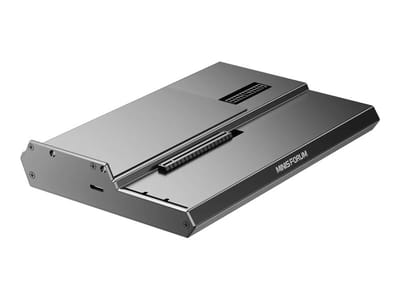
DEG1 eGPU Dock
A plain OCuLink dock with a PCIe 4.0 x4 link for a desktop graphics card; it takes an ATX or SFX power supply that you supply.
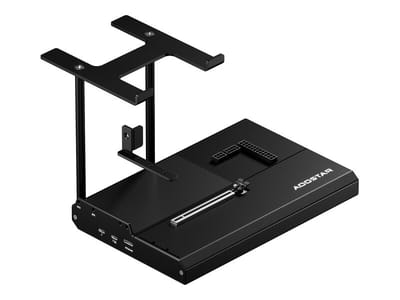
EG02 eGPU Dock
Connects over OCuLink for the full PCIe 4.0 x4 link and has Thunderbolt 5 as a second input; the graphics card and power supply are sold separately.

Core X V2
A Thunderbolt 5 enclosure that Razer lists as working with Thunderbolt 4 and USB4 hosts; it fits a four-slot card and needs an ATX power supply.

DEG2 eGPU Dock
Connects over USB4 or Thunderbolt 5, with an OCuLink input behind a switch, and adds an M.2 slot; it needs an ATX or SFX power supply.

Breakaway Box 850 T5
Has an 850W power supply built in, so only the graphics card is extra, and works with Thunderbolt 4 and USB4 Windows PCs.

TS4 Thunderbolt 4 Dock
An 18-port dock that CalDigit lists for Thunderbolt 4 and USB4 hosts, with 2.5GbE and a DisplayPort 1.4 output.

TBT4-UD5 Thunderbolt 4 Dock
Two HDMI ports drive two 4K60 monitors from one Thunderbolt 4 or USB4 port on a Windows PC.

Revodok Max 208 Thunderbolt 4 Dock
Adds three Thunderbolt 4 ports for dual 4K60 displays plus gigabit Ethernet; it has no HDMI port, so monitors connect over USB-C or an adapter.
Frequently Asked Questions
What is OCuLink and why does the K12 include it?
OCuLink is a high-speed interface that provides PCIe Gen4 x4 bandwidth directly to external devices, most commonly external GPUs. The K12 includes a dedicated OCuLink port that offers better performance than USB4 or Thunderbolt for eGPU connections because it bypasses the overhead and bandwidth limitations of those protocols. That suits buyers who want to game at higher settings by connecting a desktop graphics card via an external enclosure.
How does the AMD Ryzen 7 H 255 compare to the 8745HS?
The AMD Ryzen 7 H 255 (also called 255H) is essentially the same processor as the 8745HS, rebadged for certain markets. Both feature 8 Zen 4 cores, 16 threads, 3.8GHz base clock, 4.9GHz boost, and Radeon 780M integrated graphics. Neither carries the NPU (Neural Processing Unit) found on the 8845HS, which affects on-device AI acceleration capabilities but doesn’t impact gaming or general productivity performance.
Can I upgrade the RAM and storage?
Both are user-replaceable. The K12 has two SO-DIMM DDR5-5600 RAM slots supporting up to 64GB total, and three M.2 2280 PCIe Gen 4.0 NVMe slots that can accommodate up to 24TB of storage combined. One M.2 slot runs at full x4 speed while the other two operate at x2, so you’ll want to install your primary drive in the fastest slot for optimal performance.
How loud is the K12 during normal use?
The K12’s noise levels vary significantly based on workload and TDP mode. Robtech found idle fan noise “higher than most,” said fan noise “does go up in performance mode,” and recommended staying in Balanced mode because the performance boost is not worth the extra fan noise. Ryan Adapts left the K12 running in an office for three weeks without noticing it, though it was not doing much under load during that time.
What games can the K12 play on integrated graphics?
The Radeon 780M integrated graphics handles 1080p gaming quite well for an iGPU. Wccftech’s Cyberpunk 2077 result in the hardware section shows where it lands. For demanding AAA titles at maximum settings, you’ll want to connect an external GPU via the OCuLink port, but casual and competitive gaming works fine on the integrated graphics.
How many monitors can the K12 drive?
Four displays at once. You can connect monitors via HDMI 2.1 (4K at 120Hz), DisplayPort 1.4, the front USB-C port with DisplayPort alt-mode, and the rear USB4 port which also supports video output. This makes the K12 well-suited for multi-monitor productivity setups without requiring additional hardware.
Is the K12 good for running Linux?
The AMD Ryzen processor and Radeon graphics generally have good Linux driver support. The dual Ethernet ports and multiple storage slots make the K12 attractive for home server or NAS applications running Linux distributions. WiFi 6E via the MediaTek RZ616 chipset works with recent Linux kernels.