
ACEMAGICIAN S3A H 255
Published on

The ACEMAGICIAN S3A H 255 is the 2026 redesign of the ACEMAGICIAN S3A: a vertical tower with an AMD Ryzen 7 H 255 and Radeon 780M graphics. It suits office work, photo and video editing, emulation, and lighter gaming on a desk with little room to spare. ACEMAGIC sells it with 16GB of LPDDR5-6400 soldered to the board, so it cannot be upgraded later, while the older S3A used two DDR5 SO-DIMM slots.
Pros and Cons
| Pros | Cons |
|---|---|
| 8-core, 16-thread Ryzen 7 H 255 boosts to 4.9GHz | 16GB of soldered LPDDR5; the RAM cannot be upgraded |
| Radeon 780M handles emulation and lighter games with upscaling | Modern games need lower resolution, low settings, and FSR |
| Very quiet fan, even in the Performance position | Bare-bones BIOS with no fan, CPU, or memory settings |
| Front USB4 port plus DisplayPort 2.0 and HDMI for three displays | No 2.5-inch SATA bay |
| Two M.2 2280 PCIe 4.0 slots for up to 4TB | Barrel power input, not USB-C power |
| 2.5GbE, Wi-Fi 6E, and Bluetooth 5.2 | Brand history includes units that shipped with malware |
Related Videos
ACEMAGICIAN S3A H 255 Comparison Chart
 ACEMAGICIAN S3A H 255 | |
| Price | List Price: $499.00 Amazon Prices: Loading prices... |
| Version | 16GB/512GB/Ryzen 7 H 255 |
| Performance Rating | 5.2 |
| Operating System | Windows 11 Pro |
| Processor | Octa-core 3.80 Ghz (max 4.90 Ghz) AMD Ryzen 7 H 255 |
| GPU | Integrated AMD Radeon 780M |
| RAM | 16 GB LPDDR5, 2-channel (Soldered LPDDR5-6400) |
| Internal Storage | 512 GB NVMe SSD (PCIe 4.0) |
| Dimensions width x length x thickness | 2.83 x 5.31 x 6.41 inches (71.88 x 134.87 x 162.81 mm) |
| Weight | unknown |
| WiFi | Wi-Fi 6E (802.11ax) |
| Bluetooth | Bluetooth 5.2 |
| Ethernet | 1 Ethernet port at 2.5 Gbps |
| HDMI | 1 Full-Size HDMI Port |
| DisplayPort | 1 DisplayPort (DP 2.0 (4K120); DP Alt Mode via USB4) |
| VGA | No VGA Ports |
| USB Ports | 6 USB 3, 1 USB-C (1 USB4) Front: USB4, 2x USB-A 10Gbps. Rear: 4x USB-A 5Gbps |
| Thunderbolt Ports | No |
| OCuLink | No |
| Internal SATA Ports | No SATA ports |
| Card Reader | No Card Reader |
| Headphone Jack | combo |
| Fanless | No |
| VESA Mount | No |
| In the Box | Mini PC, 19V 120W power adapter, HDMI cable, manual |
| Expandability | Storage only: 2x M.2 2280 PCIe 4.0 (up to 4TB). RAM is soldered. |
Related Mini PCs
-
 ACEMAGIC K1 (Intel Core i5-12600H)The Intel version of ACEMAGIC's K1 pairs the 12-core Core i5-12600H with triple 4K output, seven…
 -
 ACEMAGIC M5 Mini PCThe ACEMAGIC M5 packs the 14-core Intel Core i5-14500HX into a 5-inch square chassis. Triple 4K…
 -
 BOSGAME P3The BOSGAME P3 is a compact mini PC on AMD's Ryzen 9 6900HX with Radeon 680M graphics, dual 2.5Gbps…
 -
 Beelink GTi12 UltraThe Beelink GTi12 Ultra is a Core i9-12900H mini PC with two DDR5 slots (64GB max), two PCIe 4.0…
 -
 GMKtec Nucbox M4 Mini PCThe GMKtec NucBox M4 pairs an 11th-gen Intel Core i9-11900H with DDR4 (up to 128GB), an M.2 NVMe…
 -
 BOSGAME P2 LiteCompact yet powerful, the BOSGAME P2 Lite features Intel Iris Xe Graphics, dual 4K monitor support,…
Chassis, ports, and the performance dial

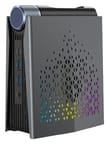
The S3A H 255 stands upright and measures about 5.3 by 2.8 by 6.4 inches. The side panel has a triangle-cut grille with RGB lighting behind it. A horizontal cylinder runs across the top, with the power button and a knurled dial at its front end. The dial selects ACEMAGIC’s three power modes: Silent at 20 to 35W, Auto at 30 to 45W, and Performance at 40 to 54W.
The front face holds a USB4 Type-C port with DisplayPort output, two 10Gbps USB-A ports, and a headphone jack. The back has four 5Gbps USB-A ports, the 2.5GbE port, a DisplayPort 2.0 output, an HDMI port, and the DC input for the 19V power adapter. ACEMAGIC rates the DisplayPort and USB4 outputs for 4K at 120Hz, and all three ports can drive 4K displays at once. Wireless is Wi-Fi 6E with Bluetooth 5.2. The box holds a 120W power adapter, a short HDMI cable, and a manual, with no VESA bracket.
A magnetic cover pops off to reach two M.2 2280 slots, both PCIe 4.0, with room for up to 4TB in total. The included 512GB SSD sits in one of them. There is no SATA connector, and the 16GB of memory is soldered as two 8GB LPDDR5-6400 packages, so storage is the only upgrade.
Processor, graphics, and memory

The Ryzen 7 H 255 belongs to AMD’s Ryzen 200 series from 2025. It pairs eight Zen 4 cores and 16 threads with Radeon 780M graphics, the same core and graphics design that powered many 2024 mini PCs. Its PassMark CPU Mark of about 28,700 puts it well above budget Intel N-series and older Ryzen 5000 boxes, though newer Ryzen AI chips with Radeon 880M or 890M graphics are faster in games.
The Radeon 780M has 12 compute units at up to 2.6GHz and borrows system memory for video memory. Games, the browser, and creative apps all share the same 16GB pool.
Reviewer Insights
Michael Noble
Michael Noble’s review tested a unit ACEMAGIC sent him and confirms the Ryzen 7 255 with Radeon 780M, 16GB of memory at 6,400MT/s, and a 512GB NVMe SSD. He opened with gaming and changed his usual advice: “Normally, these mini PCs are just terrible for gaming, and I have literally said in every other mini PC video that I’ve made, ‘Don’t buy a mini PC for gaming.’ But honestly, nowadays, it’s not a bad choice.” He said modern Unreal Engine 5 games at max settings and native resolution are out of reach, and that dropping the resolution and turning on FSR upscaling gives playable frame rates. On emulation: “Where this mini PC really shines is emulation.”
For creative work he edited the review itself on the S3A: “Video editing, this entire video will be edited on this mini PC, shot in 4K. It handles video editing extremely well.” He advised working with low-resolution proxy files on the timeline, and he called photo editing excellent. For music production he warned that the 16GB of memory limits large sample libraries.
Opening the case, he found the memory soldered: “Come to find out, apparently, the RAM is actually soldered onto the motherboard. So, the only thing you can upgrade on this is the storage. That sucks considering this model only ships with 16 gigs.” He also noted the missing SATA port. The BIOS offers almost no settings, with no fan, CPU, or memory control, so the dial on top is the only way to change the fan behavior. On noise: “This thing is dead silent even on performance mode. It’s really really quiet.” He did not see the unit go above about 72C during heavy gaming.
He mentioned that some of the brand’s earlier mini PCs shipped with malware and advised a clean reinstall of Windows or Linux on any computer bought online. He also called the machine a little pricey for 16GB of memory and 512GB of storage.
Game Roujin Channel (in Japanese)
Game Roujin Channel’s review is in Japanese, so the points below paraphrase his narration. It covers the Japanese 16GB/1TB configuration, supplied by ACEMAGIC. CPU-Z in the video reports the Ryzen 7 255 with Radeon 780M, 8 cores and 16 threads, and two 8GB Samsung LPDDR5 packages. He weighed the unit at about 1.5 pounds (686g) and listed the adapter as 19V and 120W. The unboxing shows the PC, the adapter and power cord, a short HDMI cable, and a manual.
He described the dial as three positions: blue for the lowest power, green for the middle setting, and red for the high-power mode. CPU-Z showed its TDP field fixed at 45W in every position; he concluded that the dial changes the CPU’s sustained and short-boost power limits instead. His benchmark scores rose from Silent to Auto to Performance, but the step from Auto to Performance was small, so he recommends leaving the dial on Auto. Shortly after boot, Windows 11 already used about 25% of the 16GB, and he said 32GB would have been the ideal amount.
For games, he expects most emulators to run, apart from heavy, unfinished ones such as Xbox and Xbox 360 emulators, and said most PS3 games should run. He expects older open-world PC games to run with settings raised a little. Street Fighter 6 was playable only at its lowest settings, and he warned that the newest 3D games either do not run or need the lowest settings.
Jitsuroku! Musume no Sumaho (in Japanese)
Jitsuroku! Musume no Sumaho’s review is also in Japanese and covers the 16GB/1TB configuration. He read the dial positions as 35W for Silent, 45W for Auto, and 50W for Performance (ACEMAGIC’s ranges top out at 35W, 45W, and 54W), and the dial can be turned while the PC is running. He said the case is meant to stand upright and does not support VESA mounting. A magnetic cover gives access to the SSD and the empty second M.2 slot, while the LPDDR5 memory cannot be replaced.
At idle on Auto, the PC drew about 10W, and the fan was inaudible against the 36dB room. In a Final Fantasy benchmark at its standard laptop quality preset, the PC scored 5,093 on Auto and 5,242 on Performance. Power draw during the benchmark peaked at about 80 to 90W, and the fan reached about 39 to 41dB, which he still called quiet. The Dragon Quest benchmark gave it a Very Comfortable rating, Speedometer 3.0 scored 25.1, and the SSD read at about 7,000MB/s and wrote at about 6,100MB/s. After the benchmark runs, the CPU had peaked at 85.4C with no thermal throttling, and it boosted to 4.9GHz. He recommends the balanced Auto mode for most use, and said Silent is enough for office work and video playback.
Who the S3A H 255 fits
Pick it for a small desk that needs a quiet machine for office work, photo and video editing, three monitors, and emulation or lighter games. The USB4 port takes a fast external drive or a dock.
Anyone who works with large sample libraries or runs several virtual machines at once should choose a mini PC with SO-DIMM slots or more memory from the factory. The original ACEMAGICIAN S3A with the Ryzen 7 8745HS takes DDR5 SO-DIMMs in two slots. The Mini PC Comparison Chart lines it up against other Radeon 780M machines.
Upgrades
Accessories that fit the ACEMAGICIAN S3A H 255's USB4 or Thunderbolt ports.

Core X V2
A Thunderbolt 5 enclosure that Razer lists as working with Thunderbolt 4 and USB4 hosts; it fits a four-slot card and needs an ATX power supply.

DEG2 eGPU Dock
Connects over USB4 or Thunderbolt 5, with an OCuLink input behind a switch, and adds an M.2 slot; it needs an ATX or SFX power supply.

Breakaway Box 850 T5
Has an 850W power supply built in, so only the graphics card is extra, and works with Thunderbolt 4 and USB4 Windows PCs.

TS4 Thunderbolt 4 Dock
An 18-port dock that CalDigit lists for Thunderbolt 4 and USB4 hosts, with 2.5GbE and a DisplayPort 1.4 output.

TBT4-UD5 Thunderbolt 4 Dock
Two HDMI ports drive two 4K60 monitors from one Thunderbolt 4 or USB4 port on a Windows PC.

Revodok Max 208 Thunderbolt 4 Dock
Adds three Thunderbolt 4 ports for dual 4K60 displays plus gigabit Ethernet; it has no HDMI port, so monitors connect over USB-C or an adapter.
Frequently Asked Questions
How is the S3A H 255 different from the original ACEMAGICIAN S3A?
The 2026 model uses a Ryzen 7 H 255 instead of the Ryzen 7 8745HS, Wi-Fi 6E instead of Wi-Fi 6, and 16GB of soldered LPDDR5-6400 instead of two DDR5 SO-DIMM slots. Both use Radeon 780M graphics, USB4, 2.5GbE, and two M.2 slots.
Can I upgrade the RAM in the S3A H 255?
No. The 16GB of LPDDR5-6400 is soldered to the board. Storage is the only upgrade: two M.2 2280 PCIe 4.0 slots take up to 4TB in total.
Can the S3A H 255 run modern games?
Yes, at reduced settings. The Radeon 780M needs a lower resolution, low settings, and FSR upscaling for playable frame rates in modern titles. Emulation and older or lighter games run well.
How many monitors can the S3A H 255 drive?
Three: one on HDMI, one on DisplayPort 2.0, and one on the front USB4 port. ACEMAGIC rates the DisplayPort and USB4 outputs for 4K at 120Hz, and all three ports can drive 4K displays at once.
What does the dial on top of the S3A do?
It switches between three power modes: Silent (20 to 35W), Auto (30 to 45W), and Performance (40 to 54W). The BIOS has no fan settings, so the dial is the only way to change fan behavior.
Is the S3A H 255 loud?
No. Michael Noble found it very quiet even in Performance mode, and it stayed at or below about 72C during heavy gaming in his testing.