
Beelink GTi14 Pro
Published on

The Beelink GTi14 Pro is a compact Intel desktop for people who move large files over a 10 gigabit network: video editors working off a NAS, homelab owners, and small offices with a 10GbE switch. It is the same machine as the Beelink GTi14, with the two 2.5GbE ports replaced by two 10GbE ports. It only pays off on a network that can run at 10GbE.
Pros and Cons
| Pros | Cons |
|---|---|
| Two 10GbE ports for fast transfers to a NAS, switch, or second PC | The Core Ultra 9 185H is a late-2023 chip |
| The 16-core Core Ultra 9 185H handles code builds, heavy multitasking, and 4K editing | Integrated Arc graphics only; a desktop GPU needs Beelink’s EX dock, sold separately |
| 145W power supply built into the case, so no external brick | At 2.84 pounds it is heavy for a mini PC |
| Memory upgrades to 96GB, and two M.2 PCIe 4.0 slots take up to 8TB | Beelink does not name the 10GbE controller |
| Wi-Fi 7, Bluetooth 5.4, Thunderbolt 4, and a full-size SD reader | Only one 40Gbps port |
Beelink GTi14 Pro Comparison Chart
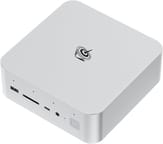 Beelink GTi14 Pro | Beelink GTi14 Pro | |
| Price | List Price: $1,099.00 Amazon Prices: Loading prices... | List Price: $1,399.00 Amazon Prices: Loading prices... |
| Version | 32GB/1TB/Intel Ultra 9 185H | 64GB/1TB/Intel Ultra 9 185H |
| Performance Rating | 5.9 | 6.0 |
| Operating System | Windows 11 Pro | Windows 11 Pro |
| Processor | Sixteen-core 2.30 Ghz (max 5.10 Ghz) Intel Core Ultra 9 Processor 185H | Sixteen-core 2.30 Ghz (max 5.10 Ghz) Intel Core Ultra 9 Processor 185H |
| GPU | Integrated Intel Arc graphics | Integrated Intel Arc graphics |
| RAM | 32 GB DDR5 SO-DIMM, 2-channel | 64 GB DDR5 SO-DIMM, 2-channel |
| Internal Storage | 1 TB NVMe SSD | 1 TB NVMe SSD |
| Dimensions width x length x thickness | 6.22 x 6.22 x 2.2 inches (157.99 x 157.99 x 55.88 mm) | 6.22 x 6.22 x 2.2 inches (157.99 x 157.99 x 55.88 mm) |
| Weight | 2.84 lbs (1.29 kg) | 2.84 lbs (1.29 kg) |
| WiFi | Wi-Fi 7 (802.11be) | Wi-Fi 7 (802.11be) |
| Bluetooth | Bluetooth 5.4 | Bluetooth 5.4 |
| Ethernet | 2 Ethernet ports at 10 Gbps | 2 Ethernet ports at 10 Gbps |
| HDMI | 1 Full-Size HDMI Port | 1 Full-Size HDMI Port |
| DisplayPort | 1 DisplayPort (DP 1.4a, 4K 144Hz) | 1 DisplayPort (DP 1.4a, 4K 144Hz) |
| VGA | No VGA Ports | No VGA Ports |
| USB Ports | 5 USB 3, 2 USB-C (1 USB4) 5x USB-A 10Gbps, 1x USB-C 10Gbps, 1x 40Gbps TB4 | 5 USB 3, 2 USB-C (1 USB4) 5x USB-A 10Gbps, 1x USB-C 10Gbps, 1x 40Gbps TB4 |
| Thunderbolt Ports | 1 | 1 |
| OCuLink | No | No |
| Internal SATA Ports | No SATA ports | No SATA ports |
| Card Reader | SD Card Reader | SD Card Reader |
| Headphone Jack | combo | combo |
| Fanless | No | No |
| VESA Mount | No | No |
| In the Box | Mini PC, HDMI cable, AC power cable, manual | Mini PC, HDMI cable, AC power cable, manual |
| Expandability | Up to 96GB DDR5 (2x SO-DIMM), 2x M.2 PCIe 4.0 to 8TB, PCIe x8 slot for Beelink's EX GPU dock | Up to 96GB DDR5 (2x SO-DIMM), 2x M.2 PCIe 4.0 to 8TB, PCIe x8 slot for Beelink's EX GPU dock |
Related Mini PCs
-
 Beelink GTi12 UltraThe Beelink GTi12 Ultra is a Core i9-12900H mini PC with two DDR5 slots (64GB max), two PCIe 4.0…
 -
 Beelink EQI13 PROThe Beelink EQI13 PRO pairs an Intel Core i7-13620H (10 cores, 16 threads) with 32GB of DDR4 and a…
 -
 GMKtec Nucbox M4 Mini PCThe GMKtec NucBox M4 pairs an 11th-gen Intel Core i9-11900H with DDR4 (up to 128GB), an M.2 NVMe…
 -
 AOOSTAR MACOThe AOOSTAR MACO is a 5.9-inch aluminum mini PC with OCuLink, two USB4 ports, two 2.5GbE ports and…
 -
 GEEKOM A7The GEEKOM A7 runs an AMD Ryzen 9 7940HS or Ryzen 7 7840HS with Radeon 780M graphics in a 0.5-liter…
 -
 GEEKOM XT1 MegaThe GEEKOM XT1 Mega is a compact Meteor Lake mini PC (Intel Core Ultra 5 125H or Ultra 9 185H,…
Ports and the 10GbE upgrade

The two rear RJ45 ports run at 10 gigabits per second each, four times the speed of the 2.5GbE ports on the standard GTi14. The speed needs a 10GbE device on the other end: a 10GbE NAS with SSDs or a fast drive array, a 10GbE switch, or a direct cable to a second machine. Connected to a 1GbE or 2.5GbE router, they gain nothing over the standard GTi14’s ports. Beelink lists Wake-on-LAN and an auto power-on setting, both useful if the box runs as an always-on server.
The rest of the I/O matches the GTi14. The front has one USB-A port, a full-size SD card slot, a 10Gbps USB-C port, a headphone jack, and a power button with a fingerprint reader. The back carries the AC power inlet, HDMI (4K at 60Hz), DisplayPort 1.4a (4K at 144Hz), the 40Gbps Thunderbolt 4 USB-C port with Power Delivery and display output, both Ethernet ports, and four more USB-A ports, for five USB-A 10Gbps ports in total. Wireless is an Intel BE200 card with Wi-Fi 7 and Bluetooth 5.4.
The case measures about 6.2 inches square and 2.2 inches tall and weighs 2.84 pounds, larger than most mini PCs because the 145W power supply sits inside. A PCIe x8 slot on the underside connects to Beelink’s EX docking station for a full-size desktop graphics card.
Core Ultra 9 185H, Arc graphics, and DDR5

The Intel Core Ultra 9 185H has 16 cores and 22 threads, boosts to 5.1GHz, and scores about 29,400 in PassMark’s CPU benchmark. Beelink runs it at a sustained 65W, cooled by a vapor chamber and a fan that draws air in through the base, and rates the noise at 32 decibels. The chip launched at the end of 2023, and Intel’s newer Core Ultra 9 285H scores about 34,500 on the same test.
Integrated Intel Arc graphics (up to 2.35GHz) handle multi-monitor desktop work, video playback, and lighter games. Beelink’s own test figures put League of Legends at 175 to 205 frames per second and PUBG at 50 to 60 at 1080p, but those are vendor numbers, not independent measurements. Heavier games and GPU rendering need a desktop card in the EX dock. Beelink quotes 34.5 TOPS of combined CPU, GPU, and NPU AI performance.
Both configurations use dual-channel DDR5-5600 in two SO-DIMM slots, either 32GB or 64GB, and either can be upgraded to 96GB with two 48GB modules. The 1TB PCIe 4.0 SSD sits in one of two M.2 2280 slots, and the second slot takes another drive for up to 8TB in total. Reviews of the 2.5GbE GTi14 cover the same processor, cooling, and internal layout.
Should you buy it?
The GTi14 Pro makes sense when your NAS or switch already runs at 10GbE, or when you plan to move to one while this machine is in service. It also keeps the GTi14’s path to a desktop graphics card through the EX dock.
Skip it if your network tops out at 2.5GbE, because the standard Beelink GTi14 has the same processor and dock support for less. If you want dual 10GbE with a newer and faster Intel chip, look at the Beelink GTi15 Ultra. To compare other options, use Starry Hope’s Mini PC Comparison Chart.
Frequently Asked Questions
What is the difference between the GTi14 Pro and the GTi14?
The Ethernet ports. The GTi14 Pro has two 10GbE ports, and the standard GTi14 has two 2.5GbE ports. The processor, chassis, internal power supply, Wi-Fi 7, Thunderbolt 4 port, and PCIe x8 dock slot are the same. On Beelink’s store, choose a “Dual LAN (10GB)” option to get the GTi14 Pro.
Do I need a 10GbE network to benefit from the GTi14 Pro?
Yes. Each port settles on the fastest speed both ends support, so on a 2.5GbE router it runs at 2.5 gigabits per second and on a 1GbE router at 1 gigabit.
Can I upgrade the RAM and storage?
Both memory slots and both M.2 slots are user-upgradable. The limits are 96GB of DDR5 and 8TB of NVMe storage across the two drives.
Can it use a desktop graphics card?
With Beelink’s EX docking station, sold separately, which supplies the card’s power. Beelink says the dock supports graphics cards that need 600W or less.
How many monitors can it drive?
Three 4K displays at once, through HDMI (4K at 60Hz), DisplayPort 1.4a (4K at 144Hz), and the 40Gbps Thunderbolt 4 USB-C port.
What comes in the box?
The mini PC, a 100cm HDMI cable, an AC power cable, and a user manual. The power supply is built into the case, so there is no external adapter. Beelink covers it with a three-year warranty.