
Beelink EQI13 PRO
Updated on

The Beelink EQI13 PRO pairs a 13th-generation Intel Core i7-13620H with an aluminum chassis and an 85W power supply built into the case, so a standard AC cord runs to the back of the unit and no brick sits on the desk. The stock build ships with 32GB of DDR4 and a 1TB PCIe 4.0 NVMe SSD. Two HDMI outputs and two Gigabit Ethernet ports cover the wired side.
Pros and Cons
| Pros | Cons |
|---|---|
| Integrated 85W power supply eliminates external power brick | No VESA mount support for monitor attachment |
| Intel Core i7-13620H with 10 cores and 16 threads | USB-C lacks DisplayPort Alt Mode for video output |
| Quiet at idle (around 40 dBA), moderate under load | Intel UHD graphics not suitable for gaming |
| Dual Gigabit Ethernet with link aggregation support | No USB4 or Thunderbolt connectivity |
| Aluminum chassis measuring 4.96 x 4.96 x 1.74 inches | Idle power draw of 11-12W |
| Upgradeable RAM up to 64GB and dual M.2 slots for 8TB storage | DDR4 memory rather than DDR5 |
Beelink EQI13 PRO Comparison Chart
 Beelink EQI13 PRO | Beelink EQI13 PRO | |
| Price | List Price: $539.00 Amazon Prices: | List Price: $639.00 Amazon Prices: |
| Version | 32GB/1TB/Intel Core i7-13620H | 32GB/500GB/Intel Core i5-13500H |
| Performance Rating | 5.4 | 5.3 |
| Operating System | Windows 11 Pro | Windows 11 Pro |
| Processor | Deca-core 3.60 Ghz (max 4.90 Ghz) Intel Core i7-13620H | Twelve-core 3.50 Ghz (max 4.70 Ghz) Intel Core i5-13500H |
| GPU | Integrated Intel UHD Graphics | Integrated Intel Iris Xe Graphics |
| RAM | 32 GB DDR4 SO-DIMM | 32 GB DDR4 SO-DIMM |
| Internal Storage | 1 TB | 500 GB |
| Dimensions width x length x thickness | 4.96 x 4.96 x 1.74 inches (125.98 x 125.98 x 44.2 mm) | 4.96 x 4.96 x 1.74 inches (125.98 x 125.98 x 44.2 mm) |
| Weight | 2.03 lbs (0.92 kg) | 2.03 lbs (0.92 kg) |
| WiFi | Wi-Fi 6 (802.11ax) | Wi-Fi 6 (802.11ax) |
| Bluetooth | Bluetooth 5.2 | Bluetooth 5.2 |
| Ethernet | 2 Ethernet ports at 1 Gbps | 2 Ethernet ports at 1 Gbps |
| HDMI | 2 Full-Size HDMI Ports | 2 Full-Size HDMI Ports |
| DisplayPort | No DisplayPort | No DisplayPort |
| VGA | No VGA Ports | No VGA Ports |
| USB Ports | 1 USB 2.0, 4 USB 3, 1 USB-C USB-C is 10Gbps data only (no DisplayPort Alt Mode or Power Delivery) | 1 USB 2.0, 4 USB 3, 1 USB-C USB-C is 10Gbps data only (no DisplayPort Alt Mode or Power Delivery) |
| Thunderbolt Ports | No | No |
| OCuLink | No | No |
| Internal SATA Ports | No SATA ports | No SATA ports |
| Card Reader | No Card Reader | No Card Reader |
| Headphone Jack | combo | combo |
| Fanless | No | No |
| VESA Mount | No | No |
| In the Box | Mini PC, power cord (150cm), HDMI cable (100cm), user manual, hello card | Mini PC, power cord (150cm), HDMI cable (100cm), user manual, hello card |
| Expandability | RAM upgradeable to 64GB via 2x DDR4 SO-DIMM slots (dual-channel 3200MHz), dual M.2 2280 PCIe 4.0 slots (up to 8TB total storage) | RAM upgradeable to 64GB via 2x DDR4 SO-DIMM slots (dual-channel 3200MHz), dual M.2 2280 PCIe 4.0 slots (up to 8TB total storage) |
Related Mini PCs
-
 Beelink GTi14The Beelink GTi14 pairs an Intel Core Ultra (9 185H or 7 155H) and Arc graphics with up to 96GB…
 -
 Beelink GTi13The Beelink GTi13 pairs an Intel Core i9-13900HK with an internal 145W power supply, dual 2.5G…
 -
 GEEKOM XT12 ProThe GEEKOM XT12 Pro is a compact aluminum mini PC with an Intel Core i9-12900H (or i7-12650H), 32GB…
 -
 GMKtec NucBox K11The GMKtec NucBox K11 is a Ryzen 9 8945HS mini PC with Radeon 780M graphics, two DDR5 slots (96GB…
 -
 MINISFORUM MS-01The MINISFORUM MS-01 is an Intel workstation mini PC sold in Core i5-12600H, i9-12900H, and…
 -
 Reatan Alloy 9The Reatan Alloy 9 is a compact AMD Ryzen 9 7940HS mini PC with Radeon 780M graphics, 32GB DDR5,…
A built-in power supply in a five-inch aluminum box

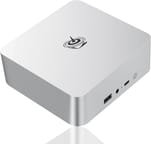
The aluminum chassis measures 4.96 x 4.96 x 1.74 inches and weighs about 2 pounds, and Beelink sells it in Space Gray and Frost Silver with a minimalist look that borrows from the Mac Mini. The front panel carries a 3.5mm combo audio jack, a USB-C port (10Gbps data only), and a USB 3.2 port. The rest of the ports and the standard AC power input sit on the back.
The Intel Core i7-13620H runs 10 cores and 16 threads and boosts up to 4.9GHz. CNX Software, testing the lower i5-13500H variant, measured a Cinebench R23 multi-core score of about 10,600 points, a tier that covers software development, light video editing, running virtual machines, and heavy multitasking. The Intel UHD integrated graphics handle 4K video playback smoothly, but not modern games.
Two HDMI 2.0 ports drive two 4K displays at 60Hz, and the two Gigabit Ethernet ports can run as redundant links or be aggregated. Four USB 3.2 ports at 10Gbps and one USB 2.0 port fill out the wired side, with WiFi 6 (Intel AX200) and Bluetooth 5.2 for wireless. The USB-C port carries no DisplayPort Alt Mode, so the two HDMI outputs are the only way to attach a display. Both M.2 2280 slots run PCIe 4.0 x4 and take up to 4TB each, and the two DDR4 SO-DIMM slots accept 64GB.
Reviewer Insights

TechPowerUp on desk clutter and awkward upgrades
TechPowerUp praised the EQI13 PRO for quiet, capable productivity work and highlighted the built-in power supply as a feature that “helps cut down on desk clutter.” They noted that the clean aluminum chassis suits home office setups, but pointed out that “the interior layout makes upgrades tricky” and that the Intel UHD iGPU model “isn’t meant for gaming.” They concluded: “If you want a quiet, capable Mini-PC for work, streaming, and general use, it delivers.”
WCCFTech on the Recommended Award and value
WCCFTech gave the EQI13 PRO their Recommended Award, and called it a mid-tier productivity machine at its roughly $450 price point. The review emphasized the strong multi-threaded CPU performance and efficient thermal management through Beelink’s MSC 2.0 cooling system. They appreciated the upgradeable memory and storage options, along with the dual monitor capability via dual HDMI ports. Their main criticism was the Intel UHD iGPU’s limited gaming capability compared to AMD alternatives with Radeon graphics, such as the Beelink SER7.
CNX Software on benchmarks and idle power
CNX Software tested the i5 variant, and its findings on the chassis, cooling, and features apply to the i7 model as well. It measured fan noise ranging from 39.4-40.1 dBA at idle to 41.4-45.7 dBA under load. The review praised the USB port performance, which fully met specifications, and the strong network performance (full Gigabit Ethernet throughput and 1.52 Gbps over WiFi). Its main concern was the relatively high idle power consumption of 11-12 watts compared to some competitors under 10 watts.
A clutter-free desktop for productivity work
Quiet running and a tidy desk are the draw here, and the power supply hidden inside the case does most of that work. The i7-13620H has the core count for professional workloads, and the 64GB memory ceiling plus the empty second M.2 slot mean the machine can be extended instead of replaced. TechPowerUp found that “the interior layout makes upgrades tricky.”
Intel UHD graphics cover video playback and little else, so an AMD-based box such as the Beelink SER8 is the better buy for gaming. The display ceiling is two screens because the USB-C port is 10Gbps data only, and with no USB4 or Thunderbolt there is no faster port to fall back on. There are also no VESA holes for hanging the unit behind a monitor.
Starry Hope’s Mini PC Comparison Chart lines it up against similar devices.
Frequently Asked Questions
What processor does the Beelink EQI13 PRO use?
An Intel Core i7-13620H, a 13th-generation chip with 10 cores (6 Performance + 4 Efficiency), 16 threads, and a 4.9GHz boost clock.
Can I upgrade the RAM in the Beelink EQI13 PRO?
Yes. Two DDR4 SO-DIMM slots take up to 64GB in total. The stock configuration fills both with 32GB (2x16GB) of dual-channel DDR4-3200.
Does the Beelink EQI13 PRO support external monitors?
Up to two, through the dual HDMI 2.0 ports, each capable of 4K resolution at 60Hz. The USB-C port does not support DisplayPort Alt Mode, so it cannot be used for video output.
Is the Beelink EQI13 PRO good for gaming?
No. Intel UHD integrated graphics are sufficient for video playback and light graphical tasks but not for modern games. If gaming matters, consider a mini PC with AMD Radeon graphics or a discrete GPU.
Does the Beelink EQI13 PRO require an external power brick?
No. The 85W power supply is built into the case, so a standard AC power cord plugs directly into the unit.
How loud is the Beelink EQI13 PRO during operation?
Around 39-40 dBA at idle. Under heavy load, fan noise rises to roughly 41-46 dBA, which stays moderate but is audible in a quiet room.
Can the Beelink EQI13 PRO be VESA mounted?
No. There are no VESA mounting holes and no bracket in the box, so hanging the unit behind a monitor takes a third-party mounting solution.
What storage options does the Beelink EQI13 PRO support?
Dual M.2 2280 PCIe 4.0 x4 slots, supporting up to 4TB per slot for a maximum of 8TB total storage. The stock configuration includes a 1TB NVMe SSD, leaving the second slot free for expansion.