
MINISFORUM NAB5R
Published on

The MINISFORUM NAB5R is a small desktop for office desks that run several monitors and for home servers that need two network ports. Its 12-core Core i5-13500H still has the multi-core speed for spreadsheets, browsers, and code, and a lid that opens without tools makes memory and storage easy to reach. The chip dates from early 2023, the memory is DDR4, and there is no USB4 port, so newer machines beat it on graphics and expansion. It replaces Minisforum’s 2023 NAB5, which used a 12th-generation Core i5.
Pros and cons
| Pros | Cons |
|---|---|
| 12-core Core i5-13500H measured near a desktop Ryzen 7 5700X in Cinebench R23 multi-core | DDR4 memory and no USB4 or Thunderbolt port |
| Four 4K 60Hz displays at once from two HDMI and two USB-C ports | Both memory slots ship filled, so a RAM upgrade means replacing both sticks |
| Two 2.5G Ethernet ports on an Intel i226-V controller | Raising the power limits in BIOS ran into thermal throttling with almost no multi-core gain |
| Tool-free pop-top lid gives access to the RAM and SSD | One rear USB-C port is video only and runs USB devices at USB 2.0 speed |
| 2.5-inch SATA bay under the lid, with the cable in the box | Iris Xe graphics hold modern 3D games to low settings |
| SSD has its own heatsink and small fan | Swapping the SSD means unplugging a fan cable first |
MINISFORUM NAB5R Comparison Chart
 MINISFORUM NAB5R | |
| Price | List Price: $540.00 Amazon Prices: Loading prices... |
| Version | 16GB/512GB/Core i5-13500H |
| Performance Rating | 4.9 |
| Operating System | Windows 11 |
| Processor | Twelve-core 3.50 Ghz (max 4.70 Ghz) Intel Core i5-13500H |
| GPU | Integrated Intel Iris Xe Graphics |
| RAM | 16 GB DDR4 SO-DIMM, 2-channel (2x 8GB DDR4-3200) |
| Internal Storage | 512 GB NVMe SSD |
| Dimensions width x length x thickness | 5 x 5.02 x 2.15 inches (127 x 127.51 x 54.61 mm) |
| Weight | 1.26 lbs (0.57 kg) |
| WiFi | Wi-Fi 6E (802.11ax) |
| Bluetooth | Bluetooth 5.2 |
| Ethernet | 2 Ethernet ports at 2.5 Gbps |
| HDMI | 2 Full-Size HDMI Ports |
| DisplayPort | DP Alt Mode on both rear USB-C ports |
| VGA | No VGA Ports |
| USB Ports | 4 USB 3, 3 USB-C 4x USB-A 10Gbps; rear video-only USB-C |
| Thunderbolt Ports | No |
| OCuLink | No |
| Internal SATA Ports | 1 SATA port, includes 2.5" drive bay (2.5-inch bay under the lid, cable included) |
| Card Reader | No Card Reader |
| Headphone Jack | combo |
| Fanless | No |
| VESA Mount | Yes |
| In the Box | 120W adapter, power cable, HDMI cable, SATA cable, VESA mount, screws, manual |
| Expandability | Up to 64GB DDR4 (2x SODIMM, both filled). One M.2 2280 PCIe 4.0 slot plus a 2.5-inch SATA bay. |
Related Mini PCs
-
 MINISFORUM NAB6 LiteThe MINISFORUM NAB6 Lite is a Core i5-12600H mini PC with two 2.5G Ethernet ports, two HDMI 2.0…
 -
 MINISFORUM NAB9SThe MINISFORUM NAB9S pairs a 14-core Intel Core i9-13900HK with two DDR4 SO-DIMM slots, two 2.5GbE…
 -
 ACEMAGIC K1 (Intel Core i5-12600H)The Intel version of ACEMAGIC's K1 pairs the 12-core Core i5-12600H with triple 4K output, seven…
 -
 ACEMAGIC K5 (Ryzen 5 PRO 7640HS)The AMD build of ACEMAGIC's 5-inch K5 chassis pairs a six-core Zen 4 Ryzen 5 PRO 7640HS and Radeon…
 -
 ASUS NUC 14 ProThe ASUS NUC 14 Pro pairs Intel Core Ultra processors with a toolless chassis, two DDR5 SODIMM…
 -
 FIREBAT F1The FIREBAT F1 puts an 8-core Ryzen 7 H 255 and Radeon 780M graphics in a 5-inch square chassis…
Four 4K outputs and a SATA bay under the lid

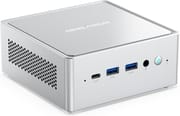
The chassis measures about 5 x 5 x 2.2 inches and weighs about 1.3 pounds. Vents run down both sides, so every port sits on the front or back. The front has a 5Gbps USB-C port for data, two 10Gbps USB-A ports, a combo audio jack, and the power button. The back has two more 10Gbps USB-A ports, two HDMI ports, two 2.5G Ethernet ports, the barrel power input, and two USB-C ports: one handles video, Power Delivery, and data, and the other is for video only. Minisforum rates the two HDMI and two USB-C outputs for four 4K displays at 60Hz.
Memory is 16GB of DDR4-3200 in two SO-DIMM slots running in dual channel, and the platform takes up to 64GB. Both slots arrive filled with 8GB sticks, so going to 32GB or 64GB means buying two new modules. The 512GB SSD sits in an M.2 2280 slot on a PCIe 4.0 x4 link, under a heatsink with its own small fan. A SATA cable in the box connects a 2.5-inch drive, which mounts on the underside of the lid. The wireless module is a MediaTek MT7902 with Wi-Fi 6E and Bluetooth 5.2, and a 120W power adapter ships in the box with a VESA bracket.
The US model ships Windows 11 IoT Enterprise, an edition Minisforum markets for its lack of bundled apps and its security-only update cadence. Units sold in Japan and Hong Kong ship Windows 11 Pro instead. The IoT edition has the same desktop and runs the same software, but check that it suits your update and licensing needs before you deploy it on an office network.
Core i5-13500H performance in 2026

The Core i5-13500H has 4 performance cores and 8 efficiency cores (16 threads) and boosts to 4.7GHz. Intel launched it in early 2023, so it predates Intel’s Core Ultra chips and lacks the NPU those chips add for AI features. Its CPU Mark in the PassMark database is about 23,000, still well above the Intel N100 and N150 chips in budget mini PCs. The NAB5R runs it at a 45W sustained and 64W short-burst power limit. Iris Xe graphics with 80 execution units handle 4K video and office work, but they share system memory and trail AMD’s Radeon 780M in games.
Reviewer insights
Three hands-on video reviews cover the NAB5R: two in Japanese and one in Spanish. Both Japanese channels got their units from Minisforum or its Japanese distributor. The first Japanese unit below ran Windows 11 Pro, the edition sold in Japan, on the same 16GB and 512GB hardware as the US model. Neither Japanese review covers the Windows 11 IoT Enterprise build sold in the US.
Benchmarks and games against the Core i3 NAB3R
A Japanese-language video review used a unit Minisforum supplied and ran it side by side with the cheaper Core i3 NAB3R. The NAB5R scored 12,645 in Cinebench R23 multi-core, which the reviewer noted is close to the roughly 13,000 from the Ryzen 7 5700X desktop the channel edits on, and about 1.5 times the NAB3R’s 8,481. Geekbench 6 came in at 2,396 single-core and 10,801 multi-core. A 10-minute 1080p H.264 export in DaVinci Resolve finished in 171 seconds against 188 seconds on the NAB3R. CrystalDiskMark showed the stock SSD reading at close to 6,000MB/s.
3DMark Steel Nomad Light ran in single-digit frame rates, though about 1.4 times faster than the NAB3R. The Final Fantasy XIV benchmark scored 5,434 at 1080p on the laptop standard preset, which the benchmark rates as average, and 8,127 at 720p. Super Woden Rally Edge held 60fps at 1080p, Fatal Fury: City of the Wolves ran near 60fps at 1080p on its lowest settings, and The King of Fighters XIV ran around 50fps. A phone meter read about 30 decibels under a Cinebench load. The reviewer praised the build, which feels like aluminum, and the one-push lid. The review also noted that replacing the SSD means disconnecting a fan cable, and that the side vents make it a poor fit for standing on edge.
Four 4K displays and the BIOS power limits
miniPCfunnel’s Japanese-language review is marked as a promotional video, with a unit from Links International, Minisforum’s Japanese distributor. HWiNFO showed two 8GB DDR4-3200 sticks with SK hynix chips, a 512GB Kingston QLC SSD, an Intel i226-V Ethernet controller, and the MediaTek MT7902 wireless module. The reviewer measured a PassMark score in the 25,000 range and confirmed four 4K 60Hz displays from the two HDMI ports and the two rear USB-C ports. Raising the BIOS power limits to 70W and 115W triggered thermal throttling, and multi-core performance barely moved.
The rear left USB-C port is meant for video, and a USB drive plugged into it ran at USB 2.0 speed. With two USB-C chargers on the rear right port, the NAB5R shut off before Windows finished loading, so plan on the 120W barrel adapter in the box. The reviewer’s complaints were the throttling under maximum load, the lack of a free memory slot, and a higher price that pays for Japanese domestic support. The review judged it a strong fit as an office PC, where stable performance matters more than speed.
Browser load, 4K video, and Fortnite
NanospeedGamer’s Spanish-language review treats the NAB5R as an office and multi-monitor machine. A wired speed test reached the full speed of the reviewer’s 1Gbps internet plan, and 4K YouTube video at 60fps played smoothly after a short hitch while loading. With a large batch of Chrome tabs open, many of them playing video, memory use climbed to about 80 percent of the 16GB while the CPU sat near 20 percent. Fortnite on automatic settings held about 55 to 60fps. Hogwarts Legacy stuttered with low frame rates even at reduced settings, and the reviewer advised against games of that kind. He liked the latched lid that opens for RAM and drive upgrades, the four video outputs, and the cooling vents on the side and bottom, and he called it a pretty good mini PC for desk work and as a living-room media center.
Who should buy it
The NAB5R suits an office desk that runs three or four monitors, or a home server that uses both 2.5G ports and a 2.5-inch drive in the extra bay. One review measured about 30 decibels under a full CPU load, quiet enough to sit beside a monitor, and light games at 1080p on low settings are playable.
Skip it if you want USB4 for an external GPU or fast docks, or a newer, faster memory platform. The discontinued MINISFORUM Venus Series NPB5 had the same chip with DDR5 and two USB4 ports. The GMKtec NucBox M3 Pro is another Core i5-13500H box, with two M.2 slots but one Ethernet port. The older MINISFORUM NAB6 Lite uses the same pop-top case with a Core i5-12600H. To compare more options, use the Mini PC Comparison Chart.
Frequently Asked Questions
Can I upgrade the RAM in the MINISFORUM NAB5R?
The two DDR4-3200 SO-DIMM slots take up to 64GB. For 32GB or 64GB, buy a matched pair of SO-DIMMs and swap out the stock sticks; the lid opens without tools.
How many monitors can the NAB5R run?
Four. The two HDMI ports and the two rear USB-C ports each drive a 4K display at 60Hz, and a hands-on test ran all four at once.
Can I add a second drive to the NAB5R?
Yes, a 2.5-inch SATA SSD or hard drive. There is only one M.2 slot, which holds the stock 512GB SSD.
Does the NAB5R have USB4 or Thunderbolt?
Neither. Its three USB-C ports are a front 5Gbps data port, a rear port for video, Power Delivery, and data, and a rear port for video only, so external GPU docks are out.
Which version of Windows does the NAB5R come with?
Minisforum says the US model ships with Windows 11 IoT Enterprise, an edition it markets as having no bundled apps and receiving security updates only. Units sold in Japan and Hong Kong ship Windows 11 Pro.
Is the NAB5R good for gaming?
Only for lighter games. One review ran Super Woden Rally Edge at 60fps and Fatal Fury: City of the Wolves near 60fps at 1080p on low settings, but 3DMark Steel Nomad Light ran in single digits. Demanding new games need a machine with stronger graphics.