
GMKtec NucBox M3 Pro
Published on

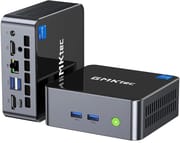
The GMKtec NucBox M3 Pro is a small office and home-server desktop that keeps the chassis of the original GMKtec NucBox M3 and swaps in a 12-core, 16-thread Intel Core i5-13500H. It suits spreadsheets, browsing, video calls, and a three-monitor desk. It is a poor fit for games and local AI. The chip dates from early 2023 and pairs with DDR4 memory, so newer Core Ultra and Ryzen AI mini PCs are well ahead on graphics and AI speed.
Pros and Cons
| Pros | Cons |
|---|---|
| 12-core, 16-thread Core i5-13500H boosts to 4.7GHz | 2023 processor with no NPU |
| Two DDR4 SO-DIMM slots take up to 64GB | DDR4 only, which slows local AI |
| M.2 2280 PCIe 4.0 slot plus a second M.2 2242 slot | No USB4 or Thunderbolt, so no external GPU path |
| Triple 4K60 output from two HDMI 2.0 ports and USB-C | The only USB-C port is on the back |
| Intel 2.5GbE ran at full speed in Lon.TV’s test | Wi-Fi 6 reached about half a gigabit in the same test |
| Barebone version for buyers who bring their own memory and SSD | Iris Xe graphics need two memory sticks; one stick drops it to UHD Graphics |
Related Videos
GMKtec NucBox M3 Pro Comparison Chart
 GMKtec NucBox M3 Pro | GMKtec NucBox M3 Pro | GMKtec NucBox M3 Pro | |
| Price | List Price: $329.99 Amazon Prices: | List Price: $499.99 Amazon Prices: Loading prices... | List Price: $679.99 Amazon Prices: Loading prices... |
| Version | Barebone (no RAM/SSD/OS) | 16GB/512GB/Intel i5-13500H | 32GB/1TB/Intel i5-13500H |
| Performance Rating | 4.9 | 4.9 | 5.3 |
| Operating System | No OS | Windows 11 Pro | Windows 11 Pro |
| Processor | Twelve-core 3.50 Ghz (max 4.70 Ghz) Intel Core i5-13500H | Twelve-core 3.50 Ghz (max 4.70 Ghz) Intel Core i5-13500H | Twelve-core 3.50 Ghz (max 4.70 Ghz) Intel Core i5-13500H |
| GPU | Integrated Intel Iris Xe Graphics | Integrated Intel Iris Xe Graphics | Integrated Intel Iris Xe Graphics |
| RAM | 0 GB DDR4 SO-DIMM, 2-channel (DDR4-3200, up to 64GB) | 16 GB DDR4 SO-DIMM, 2-channel (DDR4-3200, up to 64GB) | 32 GB DDR4 SO-DIMM, 2-channel (DDR4-3200, up to 64GB) |
| Internal Storage | 0 GB NVMe SSD (not included) | 512 GB NVMe SSD (PCIe 3.0) | 1 TB NVMe SSD (PCIe 3.0) |
| Dimensions width x length x thickness | 4.49 x 4.17 x 1.67 inches (114.05 x 105.92 x 42.42 mm) | 4.49 x 4.17 x 1.67 inches (114.05 x 105.92 x 42.42 mm) | 4.49 x 4.17 x 1.67 inches (114.05 x 105.92 x 42.42 mm) |
| Weight | 0.95 lbs (0.43 kg) | 0.95 lbs (0.43 kg) | 0.95 lbs (0.43 kg) |
| WiFi | Wi-Fi 6 (802.11ax) | Wi-Fi 6 (802.11ax) | Wi-Fi 6 (802.11ax) |
| Bluetooth | Bluetooth 5.2 | Bluetooth 5.2 | Bluetooth 5.2 |
| Ethernet | 1 Ethernet port at 2.5 Gbps | 1 Ethernet port at 2.5 Gbps | 1 Ethernet port at 2.5 Gbps |
| HDMI | 2 Full-Size HDMI Ports | 2 Full-Size HDMI Ports | 2 Full-Size HDMI Ports |
| DisplayPort | DP Alt Mode via rear USB-C (4K60) | DP Alt Mode via rear USB-C (4K60) | DP Alt Mode via rear USB-C (4K60) |
| VGA | No VGA Ports | No VGA Ports | No VGA Ports |
| USB Ports | 1 USB 2.0, 3 USB 3, 1 USB-C Front: 2x USB-A 10Gbps. Rear: USB-A 3.2, USB 2.0, USB-C (DP) | 1 USB 2.0, 3 USB 3, 1 USB-C Front: 2x USB-A 10Gbps. Rear: USB-A 3.2, USB 2.0, USB-C (DP) | 1 USB 2.0, 3 USB 3, 1 USB-C Front: 2x USB-A 10Gbps. Rear: USB-A 3.2, USB 2.0, USB-C (DP) |
| Thunderbolt Ports | No | No | No |
| OCuLink | No | No | No |
| Internal SATA Ports | No SATA ports | No SATA ports | No SATA ports |
| Card Reader | No Card Reader | No Card Reader | No Card Reader |
| Headphone Jack | combo | combo | combo |
| Fanless | No | No | No |
| VESA Mount | Yes | Yes | Yes |
| In the Box | Mini PC, 100W power adapter, HDMI cable, VESA mount, manual | Mini PC, 100W power adapter, HDMI cable, VESA mount, manual | Mini PC, 100W power adapter, HDMI cable, VESA mount, manual |
| Expandability | 2x DDR4-3200 SO-DIMM (up to 64GB). M.2 2280 PCIe 4.0 x4 plus M.2 2242 (PCIe 3.0 or SATA). | 2x DDR4-3200 SO-DIMM (up to 64GB). M.2 2280 PCIe 4.0 x4 plus M.2 2242 (PCIe 3.0 or SATA). | 2x DDR4-3200 SO-DIMM (up to 64GB). M.2 2280 PCIe 4.0 x4 plus M.2 2242 (PCIe 3.0 or SATA). |
Related Mini PCs
-
 GMKtec K1The GMKtec K1 (also sold as the NucBox K1) is a Ryzen 7 6800H mini PC with Radeon 680M graphics,…
 -
 GMKtec M3 UltraThe GMKtec M3 Ultra is an aluminum mini PC built on the 14-core Intel Core i7-12700H, with two…
 -
 ASUS NUC 15 Pro+The ASUS NUC 15 Pro+ is a 0.7-liter toolless mini PC with Intel Arrow Lake Core Ultra processors,…
 -
 MINISFORUM M2-356HThe MINISFORUM M2-356H puts Intel's Panther Lake Core Ultra 7 356H in a 520-gram box with two DDR5…
 -
 MINISFORUM UN1290The MINISFORUM UN1290 is a Core i9-12900HK mini PC in a 0.9-liter chassis with two DDR4 slots (64GB…
 -
 AOOSTAR GEM12 MAXThe AOOSTAR GEM12 MAX is a 5.12-inch AMD Ryzen 7 8745HS mini PC with an OCuLink port for an…
Chassis, ports, and upgrades

The M3 Pro measures about 4.5 x 4.2 x 1.7 inches and weighs just under a pound as a barebone unit. Lon.TV describes metal sides with plastic top and bottom panels, while PCWorld describes the glossy black lid, which carries the GMKtec logo, as tempered glass. A copper heat pipe and a single blower fan pull air in at the sides and push it out the back. A VESA bracket and a 100W power adapter come in the box.
The front has two 10Gbps USB-A ports and the power button. The back has the DC input, a combo audio jack, two HDMI 2.0 ports, the 2.5GbE port, a USB-A 3.2 port, a USB 2.0 port, and a USB-C port with DisplayPort output. Each HDMI port and the USB-C port drives a 4K display at 60Hz, so three monitors can run at once. The USB-C port is not USB4 or Thunderbolt. Wireless comes from a Realtek 8852BE card with Wi-Fi 6 and Bluetooth 5.2, and the wired port uses an Intel I226 controller.
The bottom panel comes off to reach two DDR4-3200 SO-DIMM slots, rated for 64GB total (two 32GB sticks). DDR5 does not fit. Install memory in pairs: the Iris Xe graphics need dual-channel memory, and with a single stick the GPU runs as Intel UHD Graphics. The main M.2 slot takes a 2280 NVMe drive at PCIe 4.0 x4, although the SSD GMKtec installs is a PCIe 3.0 drive. A second, shorter M.2 2242 slot takes a PCIe 3.0 NVMe or a SATA drive. GMKtec rates each slot for up to 8TB.
Processor, graphics, and power modes

The Core i5-13500H is a Raptor Lake-H laptop chip with four performance cores and eight efficiency cores. Its PassMark CPU Mark of about 23,000 is a clear step up from the 8-core i5-12450H in the original M3. It is still behind current Core Ultra 200H and Ryzen AI chips, and it has no NPU. The integrated Intel Iris Xe has 80 execution units and a top clock of 1.45GHz, which covers 4K video playback, light games, and emulation, but not current releases.
GMKtec offers three power modes in the BIOS: Silent at 28W, Balanced at 35W, and Performance at 40W with a 45W peak. Lon.TV found the fan rarely spins up during desktop work even in Performance mode.
DDR4 SO-DIMMs can be cheaper to buy than DDR5, which helps anyone filling the barebone model. The lower memory bandwidth slows local language models: Lon.TV measured about 12 tokens per second on a Gemma mixture-of-experts model.
Reviewer Insights
Lon.TV
Lon Seidman’s review tested a GMKtec-supplied unit and summed up the chip this way: “It’s an older Intel processor generation, but it works well for desktop applications and light server tasks.” He measured the 2.5GbE port at its full speed in both directions. Wi-Fi was weaker: “Wi-Fi on this one is Wi-Fi 6. Although, it doesn’t perform all that great. We’re seeing about half a gigabit per second on the downstream.” Upload topped out near 350 megabits per second.
His benchmarks put the box in the Steam Deck’s range for graphics. Cyberpunk 2077 ran at about 20 frames per second at 1080p on the lowest settings, and 3DMark Time Spy scored 1,644. He suggested 8-bit and 16-bit emulation and some GameCube titles as a better fit. A Gemma mixture-of-experts model generated about 12 tokens per second, which he called usable but slower than AMD machines with fast DDR5 that often exceed 20 to 25. In DaVinci Resolve, a 4K60 edit with basic cuts and transitions kept up, but adding video effects slowed things to a crawl. Web browsing felt near instant, 4K60 YouTube played with no dropped frames, and Speedometer scored 29.6. “For general computing workflows, it does quite well, and I think that’s probably what this machine was designed for.”
In Performance mode the M3 Pro passed the 3DMark stress test with no significant throttling, holding about 69C under sustained load. On noise, he said: “The fan isn’t all that loud even under heavy sustained load. You will hear it, of course, but it’s not as obnoxious as many small mini PC fans I have heard.” It drew 10 to 11 watts at idle and about 75 watts under heavy load. Under Ubuntu every piece of hardware was detected, including Wi-Fi, Bluetooth, audio, and Ethernet, and he closed with: “If you’re looking for a little Linux box, this one might be worth taking a look at.”
PCWorld
Christoph Hoffmann’s review for PCWorld tested the 32GB/1TB configuration. On build quality he wrote: “The whole unit feels thoroughly sturdy and is neatly finished.” He described the lid as tempered glass and added: “The downside of the glass lid is that dust and fingerprints are quickly noticeable.” He also wanted a USB-C port on the front, since every USB-C device has to go into the back.
In his tests PCMark 10 scored 6,427 overall, the 3DMark CPU Profile scored 4,678 at maximum threads and 959 single-threaded, and Time Spy scored 1,650. The bundled SSD read at 3,365MB/s and wrote at 2,631MB/s, which is typical for a PCIe 3.0 drive. With no NPU, Geekbench AI results trailed newer Ryzen and Core Ultra systems by a wide margin. The fan was close to inaudible at idle and in office work and became clearly audible but steady under sustained full load. Power draw was about 10 watts at idle and briefly passed 50 watts under heavy CPU load. He also found Secure Boot disabled out of the box and advised turning it on in the UEFI. His verdict: “The GMKtec M3 Pro is a solid office computer with decent multithreaded performance, a generous range of ports, and a high-quality chassis.” He pointed gamers and anyone with serious AI plans to newer platforms.
Who the M3 Pro fits
The M3 Pro fits an office desk, a three-monitor setup, or a quiet Linux server that needs upgradeable memory and a fast wired connection. The barebone version is the simplest way in for buyers who already own DDR4 SO-DIMMs and an NVMe drive.
Skip it if gaming, video effects work, or local AI is the goal: the DDR4 memory and 2023 graphics limit it, and with no USB4 there is no external GPU option. The GMKtec NucBox K7, another 13th-gen Intel GMKtec box, adds USB4 and DDR5 in a plastic shell. To compare more options, use the Mini PC Comparison Chart.
Frequently Asked Questions
How is the M3 Pro different from the original GMKtec M3?
It uses the same chassis but swaps the 8-core, 12-thread Core i5-12450H for the 12-core, 16-thread Core i5-13500H, and the integrated graphics move from Intel UHD to Iris Xe with 80 execution units. GMKtec also rates the M3 Pro for up to 64GB of DDR4, and its main M.2 slot supports PCIe 4.0.
How much RAM does the GMKtec M3 Pro support?
Up to 64GB of DDR4-3200 across two SO-DIMM slots (two 32GB sticks). DDR5 is not supported. Use two matching sticks, because the Iris Xe graphics need dual-channel memory.
Can the M3 Pro drive three monitors?
Yes. The two HDMI 2.0 ports and the rear USB-C port each drive a 4K display at 60Hz, and all three can run at once.
Is the GMKtec M3 Pro good for gaming?
Only for light games and emulation. Lon.TV measured Cyberpunk 2077 at about 20 frames per second at 1080p on the lowest settings, and both reviews scored about 1,650 in 3DMark Time Spy. There is no USB4 or Thunderbolt port for an external GPU.
Does the M3 Pro work with Linux?
Yes. Lon.TV ran Ubuntu on it, and all of the hardware was detected, including Wi-Fi, Bluetooth, audio, and Ethernet.
How loud is the GMKtec M3 Pro?
Near silent at idle and in office work. Under sustained full load the fan is clearly audible but steady, and Lon.TV found it less loud than many small mini PC fans. The BIOS Silent (28W) and Balanced (35W) modes trade some speed for less noise.
What storage can I add to the M3 Pro?
The main slot takes an M.2 2280 NVMe drive at PCIe 4.0 x4, and a second M.2 2242 slot takes a PCIe 3.0 NVMe or SATA drive. GMKtec rates each slot for up to 8TB. There is no 2.5-inch drive bay.
How much power does the M3 Pro use?
About 10 watts at idle in both reviews. Under heavy load, PCWorld measured brief peaks above 50 watts and Lon.TV measured about 75 watts. It ships with a 100W power adapter.