
GMKtec M3 Ultra
Updated on

The Intel Core i7-12700H inside the GMKtec M3 Ultra carries 14 cores and 20 threads, a laptop chip put to work in a desktop small enough to hold in one hand. It is built for productivity work, light content creation, and multi-monitor setups on a desk with no room for a tower.
Pros and Cons
| Pros | Cons |
|---|---|
| Powerful 14-core i7-12700H with 4.7GHz boost | Integrated graphics limit gaming potential |
| Aluminum chassis small enough to mount behind a monitor | Fan audible under load; fan control still immature |
| Triple 4K display output via dual HDMI + USB-C | Only one USB-C port (no Thunderbolt) |
| 2.5GbE networking for fast file transfers | Uses DDR4 rather than newer DDR5 standard |
| Dual M.2 slots with PCIe 4.0 support | No 2.5-inch SATA bay for cheap bulk storage |
| RAM upgradable to 64GB across two SO-DIMM slots | Barebone option requires separate RAM/SSD purchase |
GMKtec M3 Ultra Comparison Chart
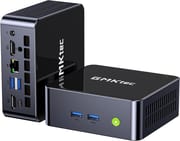
4 configurations
| Configuration | RAM | Storage | Performance | List price | Amazon price | Compare |
|---|---|---|---|---|---|---|
| 16GB/512GB | 16 GB | 512 GB | 5.1 | $429.99 | Details
| |
| 16GB/1TB | 16 GB | 1 TB | 5.1 | $599.99 | Details
| |
| 32GB/1TB | 32 GB | 1 TB | 5.5 | $529.99 | Details
| |
| 32GB/2TB | 32 GB | 2 TB | 5.5 | $629.99 | Details
|
Specs shared by every configuration
| Operating System | Windows 11 Pro |
|---|---|
| Processor | Fourteen-core 3.50 Ghz (max 4.70 Ghz) Intel Core i7-12700H |
| GPU | Integrated Intel Iris Xe Graphics |
| Dimensions width x length x thickness | 4.17 x 4.49 x 1.67 inches (105.92 x 114.05 x 42.42 mm) |
| Weight | 0.95 lbs (0.43 kg) |
| WiFi | Wi-Fi 6 (802.11ax) |
| Bluetooth | Bluetooth 5.2 |
| Ethernet | 1 Ethernet port at 2.5 Gbps |
| HDMI | 2 Full-Size HDMI Ports |
| DisplayPort | No DisplayPort |
| VGA | No VGA Ports |
| USB Ports | 1 USB 2.0, 3 USB 3, 1 USB-C 3x USB 3.2 Gen2 (10Gbps), 1x USB 2.0, 1x USB-C (DP alt mode) |
| Thunderbolt Ports | No |
| OCuLink | No |
| Internal SATA Ports | No SATA ports |
| Card Reader | No Card Reader |
| Headphone Jack | combo |
| Fanless | No |
| VESA Mount | Yes |
| In the Box | Power adapter (100W), HDMI cable, VESA mounting bracket with screws, user manual, warranty card |
| Expandability | RAM upgradable to 64GB via 2x DDR4 SO-DIMM slots (3200MHz), dual M.2 SSD slots supporting up to 8TB total storage |
Related Mini PCs
-
 GMKtec K1The GMKtec K1 (also sold as the NucBox K1) is a Ryzen 7 6800H mini PC with Radeon 680M graphics,…
 -
 GMKtec M6 UltraThe GMKtec M6 Ultra is a Ryzen 5 7640HS mini PC with dual-channel DDR5, two PCIe 4.0 M.2 slots,…
 -
 BMAX B8A ProA small AMD desktop on the Ryzen 7 8745HS for office work and light gaming, with DDR5 in two…
 -
 BOSGAME P3 MIXThe BOSGAME P3 MIX is a Ryzen 5 7640HS mini PC with 16GB of DDR5, a 512GB drive with a second PCIe…
 -
 BOSGAME P3 PlusA budget AMD Ryzen 7 7840HS mini PC with Radeon 780M graphics, dual Gigabit LAN, WiFi 6E, and two…
 -
 MINISFORUM AI X1-255The MINISFORUM AI X1-255 is a Ryzen 7 255 mini PC with Radeon 780M graphics, two DDR5 SO-DIMM…
A 14-Core Laptop Chip in a Palm-Sized Aluminum Shell

The chassis is aluminum with plastic top and bottom covers, roughly 4.5 inches square by 1.7 inches tall. At under a pound it mounts behind a monitor on the included VESA bracket, or tucks into a corner of the desk.
The i7-12700H runs 6 performance cores and 8 efficiency cores, 14 cores and 20 threads in total, a long way past an N100. That hybrid layout pays off in compilation, photo editing, and keeping a dozen applications open at once. The chip boosts to 4.7GHz. GMKtec ships it at 35W, with a 45W performance mode in the BIOS, and thermals and fan noise become factors during sustained heavy loads. TechRadar found it handled Photoshop, Lightroom, and light video editing well, and started to hit its limits in Premiere Pro and DaVinci Resolve.
Two HDMI 2.0 ports at 4K@60Hz and a USB-C port with DisplayPort alt mode drive a triple-display setup. The 2.5 Gigabit Ethernet port moves files to a NAS faster than a standard Gigabit connection. Wireless is WiFi 6 and Bluetooth 5.2, and the wired peripheral side is three USB 3.2 Gen2 ports plus one USB 2.0.
Reviewer Insights

TechRadar
According to TechRadar, the M3 Ultra is a “surprisingly powerful compact mini PC” and “the ideal option for day-to-day office work.” It scored 4.5 out of 5 overall. The reasons to buy are the powerful CPU, the compact size, and flexible upgradeability; the reasons to avoid are thermal constraints, integrated graphics only, and some fan noise under load.
NotebookCheck
NotebookCheck’s technical review gives the M3 Ultra a 70% rating. Its pros include the aluminum and plastic casing, low DPC latencies, and stable CPU performance under load. Its cons include a weak iGPU and fan control that “seems immature”. With the i7-12700H, they write, “it offers solid computing power that significantly outperforms many entry-level CPUs”.
WCCFtech
WCCFtech gives the M3 Ultra its “Great Value” award and calls the $299 barebone variant “very decent”. It credits the 14 cores with “great performance for productivity tasks” and calls the Iris Xe graphics “a fairly old integrated graphics solution” next to Intel’s Arc iGPUs.
A Compact Desktop for Office Work and Light Editing
Buy the M3 Ultra to run office software, photo work, light video editing, and a three-screen layout from a box that hides behind the monitor. The 14-core i7-12700H does the compute and 2.5GbE handles the wired link to a NAS. It also has room to grow, since the two SO-DIMM slots take 64GB of RAM and the two M.2 slots take 8TB of storage.
Iris Xe graphics draw the line. Demanding 3D applications and current games need discrete hardware, and the GMKtec M7 Ultra covers that case with an OCuLink port for an external GPU.
Barebone units start around $299 for buyers supplying their own RAM and storage. Starry Hope’s Mini PC Comparison Chart puts those specs side by side with the other mini PCs we cover.
Frequently Asked Questions
Can the GMKtec M3 Ultra support triple monitors?
Yes. Two HDMI 2.0 ports and one USB-C port with DisplayPort alt mode drive three displays at once, all three at 4K and 60Hz.
What is the maximum RAM capacity of the GMKtec M3 Ultra?
The M3 Ultra supports up to 64GB of DDR4 RAM using two SO-DIMM slots running at 3200MHz in dual-channel mode. It can handle memory-intensive tasks like video editing, virtual machines, and software development.
Is the GMKtec M3 Ultra suitable for gaming?
Only lightly. NotebookCheck names the Intel Iris Xe integrated graphics as the weak point, and WCCFtech calls them dated next to Intel Arc. Demanding AAA games will struggle, so anyone gaming seriously wants discrete graphics.
How loud is the GMKtec M3 Ultra under load?
NotebookCheck measured 25.8 dB(A) at idle and 44.5 to 45.6 dB(A) under load at the default 35W setting. The BIOS also offers a 28W silent mode and a 45W performance mode.
Does the GMKtec M3 Ultra include a VESA mount?
Yes. A VESA bracket and screws ship in the box, so the mini PC can bolt to the back of a compatible monitor and free up the desk surface.
What storage expansion options does the M3 Ultra offer?
The M3 Ultra features two M.2 SSD slots: one 2280 slot supporting PCIe 4.0 NVMe drives and one 2242 slot supporting either PCIe or SATA drives. Combined, you can install up to 8TB of fast solid-state storage. There is no 2.5-inch SATA bay.
Is the GMKtec M3 Ultra good for video editing?
For light work, yes. TechRadar called its performance in Photoshop, Lightroom, and light video editing “exceptionally good,” but saw it reach its limits in Premiere Pro and DaVinci Resolve. Heavier editing calls for a more powerful system.