
GMKtec M7 Ultra
Updated on

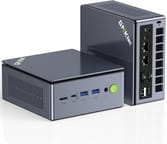
The GMKtec M7 Ultra measures 5.2 x 4.9 x 2.3 inches, weighs 1.33 pounds, and runs an AMD Ryzen 7 PRO 6850U with integrated Radeon 680M graphics. The front panel carries an OCuLink port, which connects an external graphics card at PCIe 4.0 x4 speeds, so graphics power can be added later without replacing the computer.
Pros and Cons
| Pros | Cons |
|---|---|
| OCuLink port enables external GPU at PCIe 4.0 x4 speeds | Requires FSR or frame generation for 60 FPS in demanding games |
| Dual USB4 40Gbps ports with Power Delivery | PCIe 3.0 storage instead of faster PCIe 4.0 |
| Dual 2.5G Intel I226V Ethernet ports | Two of the six USB ports are USB 2.0 |
| Compact 5.2 x 4.9 x 2.3 inch chassis | Plastic chassis despite solid build quality |
| Configurable TDP from 35W to 65W in BIOS | Radeon 680M needs FSR for demanding 1080p titles |
| VESA mount and HDMI cable included in box | No Thunderbolt support despite USB4 ports |
Related Videos
GMKtec M7 Ultra Comparison Chart
 GMKtec M7 Ultra | GMKtec M7 Ultra | GMKtec M7 Ultra | GMKtec M7 Ultra | |
| Price | List Price: $549.99 Amazon Prices: | List Price: $419.99 Amazon Prices: Loading prices... | List Price: $439.99 Amazon Prices: Loading prices... | List Price: $749.99 Amazon Prices: Loading prices... |
| Version | 16GB/512GB/Ryzen 7 PRO 6850U | 16GB/1TB/Ryzen 7 PRO 6850U | 32GB/512GB/Ryzen 7 PRO 6850U | 32GB/1TB/Ryzen 7 PRO 6850U |
| Performance Rating | 4.6 | 4.6 | 5.0 | 5.0 |
| Operating System | Windows 11 Pro | Windows 11 Pro | Windows 11 Pro | Windows 11 Pro |
| Processor | Octa-core 2.70 Ghz (max 4.70 Ghz) AMD Ryzen 7 PRO 6850U | Octa-core 2.70 Ghz (max 4.70 Ghz) AMD Ryzen 7 PRO 6850U | Octa-core 2.70 Ghz (max 4.70 Ghz) AMD Ryzen 7 PRO 6850U | Octa-core 2.70 Ghz (max 4.70 Ghz) AMD Ryzen 7 PRO 6850U |
| GPU | Integrated AMD Radeon 680M | Integrated AMD Radeon 680M | Integrated AMD Radeon 680M | Integrated AMD Radeon 680M |
| RAM | 16 GB DDR5 SO-DIMM, 2-channel | 16 GB DDR5 SO-DIMM, 2-channel | 32 GB DDR5 SO-DIMM, 2-channel | 32 GB DDR5 SO-DIMM, 2-channel |
| Internal Storage | 512 GB | 1 TB | 512 GB | 1 TB |
| Dimensions width x length x thickness | 5.2 x 4.92 x 2.28 inches (132.08 x 124.97 x 57.91 mm) | 5.2 x 4.92 x 2.28 inches (132.08 x 124.97 x 57.91 mm) | 5.2 x 4.92 x 2.28 inches (132.08 x 124.97 x 57.91 mm) | 5.2 x 4.92 x 2.28 inches (132.08 x 124.97 x 57.91 mm) |
| Weight | 1.33 lbs (0.6 kg) | 1.33 lbs (0.6 kg) | 1.33 lbs (0.6 kg) | 1.33 lbs (0.6 kg) |
| WiFi | Wi-Fi 6E (802.11ax) | Wi-Fi 6E (802.11ax) | Wi-Fi 6E (802.11ax) | Wi-Fi 6E (802.11ax) |
| Bluetooth | Bluetooth 5.2 | Bluetooth 5.2 | Bluetooth 5.2 | Bluetooth 5.2 |
| Ethernet | 2 Ethernet ports at 2.5 Gbps | 2 Ethernet ports at 2.5 Gbps | 2 Ethernet ports at 2.5 Gbps | 2 Ethernet ports at 2.5 Gbps |
| HDMI | 1 Full-Size HDMI Port | 1 Full-Size HDMI Port | 1 Full-Size HDMI Port | 1 Full-Size HDMI Port |
| DisplayPort | 1 DisplayPort (DisplayPort 2.0) | 1 DisplayPort (DisplayPort 2.0) | 1 DisplayPort (DisplayPort 2.0) | 1 DisplayPort (DisplayPort 2.0) |
| VGA | No VGA Ports | No VGA Ports | No VGA Ports | No VGA Ports |
| USB Ports | 2 USB 2.0, 2 USB 3, 2 USB-C (2 USB4) 2x USB 3.2 Gen 2 (10Gbps) front, 2x USB 2.0 rear, 2x USB4 40Gbps (front + rear) | 2 USB 2.0, 2 USB 3, 2 USB-C (2 USB4) 2x USB 3.2 Gen 2 (10Gbps) front, 2x USB 2.0 rear, 2x USB4 40Gbps (front + rear) | 2 USB 2.0, 2 USB 3, 2 USB-C (2 USB4) 2x USB 3.2 Gen 2 (10Gbps) front, 2x USB 2.0 rear, 2x USB4 40Gbps (front + rear) | 2 USB 2.0, 2 USB 3, 2 USB-C (2 USB4) 2x USB 3.2 Gen 2 (10Gbps) front, 2x USB 2.0 rear, 2x USB4 40Gbps (front + rear) |
| Thunderbolt Ports | No | No | No | No |
| OCuLink | PCIe 4.0 x4 for eGPU | PCIe 4.0 x4 for eGPU | PCIe 4.0 x4 for eGPU | PCIe 4.0 x4 for eGPU |
| Internal SATA Ports | No SATA ports | No SATA ports | No SATA ports | No SATA ports |
| Card Reader | No Card Reader | No Card Reader | No Card Reader | No Card Reader |
| Headphone Jack | 3.5mm combo | 3.5mm combo | 3.5mm combo | 3.5mm combo |
| Fanless | No | No | No | No |
| VESA Mount | Yes | Yes | Yes | Yes |
| In the Box | Power adapter, VESA mount with screws, HDMI cable, user manual | Power adapter, VESA mount with screws, HDMI cable, user manual | Power adapter, VESA mount with screws, HDMI cable, user manual | Power adapter, VESA mount with screws, HDMI cable, user manual |
| Expandability | 2x SO-DIMM DDR5 slots (max 64GB), 2x M.2 2280 PCIe 3.0 slots (up to 8TB each), OCuLink port for eGPU | 2x SO-DIMM DDR5 slots (max 64GB), 2x M.2 2280 PCIe 3.0 slots (up to 8TB each), OCuLink port for eGPU | 2x SO-DIMM DDR5 slots (max 64GB), 2x M.2 2280 PCIe 3.0 slots (up to 8TB each), OCuLink port for eGPU | 2x SO-DIMM DDR5 slots (max 64GB), 2x M.2 2280 PCIe 3.0 slots (up to 8TB each), OCuLink port for eGPU |
Related Mini PCs
-
 GMKtec K1The GMKtec K1 (also sold as the NucBox K1) is a Ryzen 7 6800H mini PC with Radeon 680M graphics,…
 -
 GMKtec M3 UltraThe GMKtec M3 Ultra is an aluminum mini PC built on the 14-core Intel Core i7-12700H, with two…
 -
 ASUS NUC 13 ProThe ASUS NUC 13 Pro is a 4x4 mini PC sold in Core i5-1340P and Core i7-1360P builds with two DDR4…
 -
 Beelink SER6 MAXThe Beelink SER6 MAX pairs a Ryzen 7 7735HS or Ryzen 9 6900HX with Radeon 680M graphics and up to…
 -
 Dell OptiPlex 7010 MicroDell's OptiPlex 7010 Micro is a 1-liter, 13th-Gen Intel business desktop built for enterprise…
 -
 Dell Pro Micro QCM1250Dell rebrands the long-running OptiPlex Micro line as the Pro Micro and ships the QCM1250 with the…
OCuLink, Dual 2.5GbE, and a Two-Fan Cooling Chamber

The chassis is plastic, and the assembly is dense enough that the machine feels heavier in the hand than its size suggests. A two-fan cooling chamber handles the internals under load, and GMKtec rates noise below 38dB during normal operation. The included VESA mount puts the box behind a monitor for anyone who would rather not give up desk space to it.
The Ryzen 7 PRO 6850U brings eight cores and sixteen threads with boost clocks up to 4.7GHz, and the Radeon 680M graphics carry 12 RDNA2 compute units. That combination covers office productivity, content creation, and light gaming at 1080p on medium settings. The Radeon 680M runs many AAA titles from the past few years at 720p to 1080p on low to medium settings, and newer releases lean on AMD’s FSR upscaling to stay playable.
The front panel holds two USB-A 3.2 Gen 2 ports, one USB4 Type-C port, and the OCuLink connection. The rear adds a second USB4 port, two USB 2.0 ports, HDMI 2.1, DisplayPort 2.0, two 2.5G Ethernet ports on Intel I226V controllers, and a 3.5mm audio combo jack. Wi-Fi 6E and Bluetooth 5.2 handle wireless. The pair of Ethernet ports suits home lab work and anything network-intensive, and both USB4 ports carry 40Gbps data, Power Delivery, and DisplayPort Alt Mode.
Reviewer Insights

Tame That Tech on Build and I/O
Tame That Tech walks through the physical design and the port selection. The reviewer notes that “tiny desktop PCs just keep getting more ridiculous” before covering the I/O, and singles out the “rare OCuLink port which lets you hook up a full desktop graphics card in an external enclosure at near native PCI Express 4.0 x4 speeds.” Tame That Tech describes the machine as dense and solid despite the plastic construction, and credits GMKtec for bundling a VESA mount and keeping the port layout logical across the front and rear panels.
Testing Games on 1080p Framerates
Testing Games benchmarks the M7 Ultra across 13 modern titles at 1080p. AAA titles often need FSR or frame generation to hit 60 FPS, and the integrated graphics deliver playable framerates in the titles tested. Temperatures during gaming ran between 68-76 degrees Celsius with CPU power peaking around 54W, and the two-fan cooling kept up with sustained gaming loads. The channel calls the machine highly capable for a mini PC in its class, particularly for buyers interested in the OCuLink expandability for future gaming upgrades.
Best Suited to a Home Office or a Home Lab
The two 2.5G NICs suit a home lab, and the OCuLink port lets a home-office buyer add an external GPU later without replacing the machine. Configurable TDP from 35W to 65W in the BIOS trades power draw against performance. Our guide to OCuLink, USB4, and MCIO 8i for mini PC eGPUs explains what that port buys you over the alternatives. Buyers who need the highest single-threaded speed, or Thunderbolt specifically, should look elsewhere, and anyone who wants OCuLink in a smaller shell can compare the GMKtec M8.
Pricing runs from $420 to $550 depending on the RAM and storage configuration. The 32GB builds offer the best balance of capability and upgrade headroom, and the second M.2 slot means a 512GB variant can take more storage later instead of being replaced. For the ownership-versus-subscription math, cloud vs. mini PC costs breaks down how the numbers stack up over time. Starry Hope’s Mini PC Comparison Chart sets the specs against other models.
Upgrades
Accessories that fit the GMKtec M7 Ultra's OCuLink and USB4 or Thunderbolt ports.
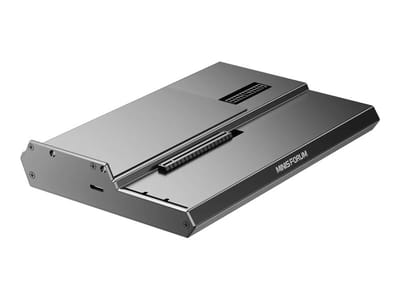
DEG1 eGPU Dock
A plain OCuLink dock with a PCIe 4.0 x4 link for a desktop graphics card; it takes an ATX or SFX power supply that you supply.
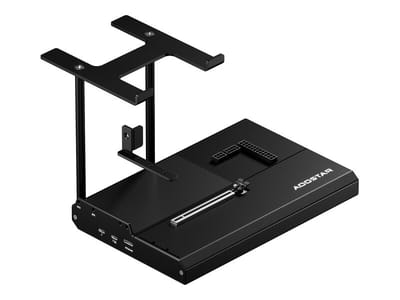
EG02 eGPU Dock
Connects over OCuLink for the full PCIe 4.0 x4 link and has Thunderbolt 5 as a second input; the graphics card and power supply are sold separately.

Core X V2
A Thunderbolt 5 enclosure that Razer lists as working with Thunderbolt 4 and USB4 hosts; it fits a four-slot card and needs an ATX power supply.

DEG2 eGPU Dock
Connects over USB4 or Thunderbolt 5, with an OCuLink input behind a switch, and adds an M.2 slot; it needs an ATX or SFX power supply.

Breakaway Box 850 T5
Has an 850W power supply built in, so only the graphics card is extra, and works with Thunderbolt 4 and USB4 Windows PCs.

TS4 Thunderbolt 4 Dock
An 18-port dock that CalDigit lists for Thunderbolt 4 and USB4 hosts, with 2.5GbE and a DisplayPort 1.4 output.

TBT4-UD5 Thunderbolt 4 Dock
Two HDMI ports drive two 4K60 monitors from one Thunderbolt 4 or USB4 port on a Windows PC.

Revodok Max 208 Thunderbolt 4 Dock
Adds three Thunderbolt 4 ports for dual 4K60 displays plus gigabit Ethernet; it has no HDMI port, so monitors connect over USB-C or an adapter.
Frequently Asked Questions
What is OCuLink and why does the M7 Ultra have it?
OCuLink is a high-bandwidth connection standard that carries an external graphics card at PCIe 4.0 x4 speeds, faster than Thunderbolt for GPU work. The port is there so an external GPU enclosure can take over gaming or content creation loads that the integrated Radeon 680M cannot handle.
Can the GMKtec M7 Ultra run games?
Yes. The integrated Radeon 680M runs many games at 1080p on low to medium settings, older and esports titles run smoothly, and modern AAA games need AMD FSR upscaling to hold playable framerates. Heavier gaming is what the OCuLink port and an external GPU are for.
How much RAM can the M7 Ultra support?
Up to 64GB of DDR5 across two SO-DIMM slots. It ships with either 16GB or 32GB, and the slots are accessible inside the chassis for a later upgrade.
Is the M7 Ultra good for a home server or network appliance?
The two Intel I226V 2.5G Ethernet ports, low power draw, and small footprint suit virtualization, home labs, and network services such as pfSense, and the two M.2 slots hold the storage those jobs need. For heavier networking, the MINISFORUM MS-01 offers dual 10GbE SFP+ ports.
How loud is the GMKtec M7 Ultra?
GMKtec rates the two-fan cooling system below 38dB during normal operation. The fans stay unobtrusive in typical use and become audible under sustained heavy loads such as gaming or benchmarks. Lowering the TDP in the BIOS quiets things further at reduced power.
What displays can the M7 Ultra drive simultaneously?
Four, using HDMI 2.1, DisplayPort 2.0, and the two USB4 ports with DisplayPort Alt Mode. That covers multi-monitor productivity setups and digital signage that needs several screens.
Does the M7 Ultra support VESA mounting?
Yes. GMKtec includes a VESA bracket and screws in the box, and the small chassis and light weight make mounting behind a monitor or TV straightforward.