
Dell OptiPlex 7010 Micro
Published on

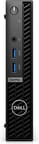
The Dell OptiPlex 7010 Micro is the 13th-Gen entry in Dell’s long-running 1-liter business desktop family, the direct predecessor to the Dell Pro Micro QCM1250 that replaced the OptiPlex name in 2025. The 1.42-inch-thick black box is built for the unglamorous work of corporate fleet refreshes, school carts, reception desks, and home offices that want a real Dell warranty without a tower under the desk. Dell ships it only with low-power 35W “T” series processors; the two configurations covered here are the 14-core Core i5-13500T and the 16-core Core i7-13700T, with Dell’s own spec sheet also listing lower 35W tiers below them. Both pair with DDR4-3200 memory, an Intel Wi-Fi 6E card, and a tool-less chassis that mounts behind a monitor on a VESA bracket.
Pros and cons
| Pros | Cons |
|---|---|
| 13th-Gen 35W processors scale from the 14-core i5-13500T to the 16-core i7-13700T (PassMark roughly 22,600 to 27,500) | Standard HDMI output is capped at 1920x1200 at 60Hz; 4K needs the DisplayPort or the optional Flex video port |
| Intel Wi-Fi 6E AX211 plus Bluetooth 5.3 on a user-replaceable M.2 card | Wired networking stops at a single Gigabit RJ45, with no 2.5GbE option on the board |
| Tool-less chassis with two DDR4 SODIMM slots (up to 64GB), an M.2 NVMe slot, and a 2.5-inch SATA bay | No standard USB-C; a Type-C port exists only if you order the optional Flex video module |
| VESA mountable, so the 1-liter chassis disappears behind a display or under a desk | Two of the rear USB ports are still USB 2.0, and there is no SD or microSD reader |
| Backed by Dell’s business warranty and ProSupport service options | Superseded by the 14th-Gen Dell Pro Micro line, which moves to DDR5 and lifts the HDMI cap to 4K |
Dell OptiPlex 7010 Micro Comparison Chart
 Dell OptiPlex 7010 Micro | Dell OptiPlex 7010 Micro | |
| Price | List Price: $869.00 Amazon Prices: Loading prices... | List Price: $1,239.00 Amazon Prices: Loading prices... |
| Version | 16GB/512GB/Intel Core i5-13500T | 32GB/1TB/Intel Core i7-13700T |
| Performance Rating | 4.9 | 5.8 |
| Operating System | Windows 11 Pro | Windows 11 Pro |
| Processor | Fourteen-core 1.60 Ghz (max 4.60 Ghz) Intel Core i5-13500T | Sixteen-core 1.40 Ghz (max 4.90 Ghz) Intel Core i7-13700T |
| GPU | Integrated Intel UHD Graphics 770 | Integrated Intel UHD Graphics 770 |
| RAM | 16 GB DDR4, 2-channel (DDR4-3200 SODIMM, 2 slots, up to 64GB) | 32 GB DDR4, 2-channel (DDR4-3200 SODIMM, 2 slots, up to 64GB) |
| Internal Storage | 512 GB NVMe SSD | 1 TB NVMe SSD |
| Dimensions width x length x thickness | 7.17 x 7.01 x 1.42 inches (182.12 x 178.05 x 36.07 mm) | 7.17 x 7.01 x 1.42 inches (182.12 x 178.05 x 36.07 mm) |
| Weight | 2.41 lbs (1.1 kg) | 2.41 lbs (1.1 kg) |
| WiFi | Wi-Fi 6E (802.11ax) | Wi-Fi 6E (802.11ax) |
| Bluetooth | Bluetooth 5.3 | Bluetooth 5.3 |
| Ethernet | 1 Ethernet port at 1 Gbps | 1 Ethernet port at 1 Gbps |
| HDMI | 1 Full-Size HDMI Port | 1 Full-Size HDMI Port |
| DisplayPort | 1 DisplayPort (DP 1.4a (HBR2); HDMI 1.4b capped at 1920x1200. Optional Flex video port) | 1 DisplayPort (DP 1.4a (HBR2); HDMI 1.4b capped at 1920x1200. Optional Flex video port) |
| VGA | No VGA Ports | No VGA Ports |
| USB Ports | 2 USB 2.0, 4 USB 3 Front: 2x USB 3.2 Gen 1. Rear: 2x USB 3.2 Gen 1, 2x USB 2.0 (1 Smart Power On). USB-C only via Flex port | 2 USB 2.0, 4 USB 3 Front: 2x USB 3.2 Gen 1. Rear: 2x USB 3.2 Gen 1, 2x USB 2.0 (1 Smart Power On). USB-C only via Flex port |
| Thunderbolt Ports | No | No |
| OCuLink | No | No |
| Internal SATA Ports | 1 SATA port, includes 2.5" drive bay (1x 2.5-inch SATA bay) | 1 SATA port, includes 2.5" drive bay (1x 2.5-inch SATA bay) |
| Card Reader | No Card Reader | No Card Reader |
| Headphone Jack | combo | combo |
| Fanless | No | No |
| VESA Mount | Yes | Yes |
| In the Box | OptiPlex 7010 Micro, power adapter (reseller bundles vary) | OptiPlex 7010 Micro, power adapter (reseller bundles vary) |
| Expandability | Up to 64GB DDR4-3200 (2x SODIMM), 1x M.2 NVMe plus 1x 2.5-inch SATA bay, optional Flex video port | Up to 64GB DDR4-3200 (2x SODIMM), 1x M.2 NVMe plus 1x 2.5-inch SATA bay, optional Flex video port |
Related Mini PCs
-
 Dell Pro Micro QCM1250Dell rebrands the long-running OptiPlex Micro line as the Pro Micro and ships the QCM1250 with the…
 -
 ASUS NUC 13 ProThe ASUS NUC 13 Pro is a 4x4 mini PC sold in Core i5-1340P and Core i7-1360P builds with two DDR4…
 -
 Beelink SER6 MAXThe Beelink SER6 MAX pairs a Ryzen 7 7735HS or Ryzen 9 6900HX with Radeon 680M graphics and up to…
 -
 GEEKOM Mini IT13The GEEKOM Mini IT13 is a 13th-gen Intel mini PC (Core i5-13500H up to i9-13900H/HK) with DDR4 to…
 -
 Glorlin GT105The Glorlin GT105 is a five-inch AMD mini PC sold with either the Ryzen 7 8745HS or the Ryzen 7 PRO…
 -
 GMKtec M7 UltraA compact mini PC with the AMD Ryzen 7 PRO 6850U, with an OCuLink port for an external GPU, dual…
A 35W desktop whose rear I/O is decided at order time

The chassis measures 7.17 by 7.01 by 1.42 inches and weighs between 2.41 and 2.95 pounds depending on whether the optional 2.5-inch drive is fitted. That is the same compact footprint that has defined the OptiPlex Micro line for years, and Dell keeps the layout sensible. The front face carries the power button, a single universal audio jack, and two USB 3.2 Gen 1 Type-A ports, with the diagonal-slat ventilation grille running down one side. The rear adds two more USB 3.2 Gen 1 ports, two USB 2.0 ports (one with Smart Power On for wake-on-USB), a Gigabit RJ45 jack, a DisplayPort 1.4a output, and an HDMI 1.4b output. Dell still caps that HDMI output at 1920x1200 at 60Hz on this generation, so anyone driving a 4K panel should use the DisplayPort or add the optional Flex video port.
The single configurable rear slot can be ordered as a second HDMI 2.1b output, a DisplayPort 1.4a, a legacy VGA connector for older monitors and projectors, or a USB-C port with DisplayPort Alt Mode and power input. It is the same modular idea Dell carried forward and expanded on the Pro Micro that succeeded this machine. Because the slot is configured at order time, two units that look identical from the front can have very different rear I/O, and some of Dell’s own gallery photos show the machine fitted with extra DisplayPort outputs through that bay.
Which “T” processor a unit shipped with sets its ceiling. The Core i5-13500T brings 14 cores and 20 threads for roughly 22,600 on PassMark’s multi-thread test, comfortable territory for heavy multitasking, software development, and 4K video timeline scrubbing. The top Core i7-13700T steps up to 16 cores and 24 threads at around 27,500. Both are 35W parts with Intel UHD 770 integrated graphics, so neither is a gaming or 3D-rendering machine. That integrated UHD 770 handles multi-monitor office work and media playback well and little beyond that.
Reviewer Insights

Hands-on video coverage of the i5-13500T and i7-13700T configurations is thin, which leaves Dell’s published specifications and the track record of the OptiPlex Micro line as the evidence to work from. That track record belongs to the family as a whole: quiet under normal office loads, easy to open and service by design, and built for fleet duty. The small chassis limits cooling headroom, the integrated graphics rule out gaming and GPU compute, and Dell stays conservative with connectivity, which is why this generation ships Gigabit Ethernet and a 1920x1200 HDMI cap with no 2.5GbE or 4K HDMI option.
Dell’s own specifications for the newer Dell Pro Micro QCM1250 list two changes over the OptiPlex 7010 Micro: the HDMI resolution cap rises to 4K 60Hz, and the platform moves to DDR5. On the used or refurbished market, those two points are what separate the two boxes; the chassis, mounting options, and serviceability are close cousins.
Between the two processors here, the i5-13500T is the sweet spot for a general-purpose machine. The i7-13700T earns its price only on sustained multi-threaded work, and a 35W 16-core part in a 1-liter chassis will lean on its fan under prolonged all-core load.
Customer Reviews
Across 14 ratings on Amazon, the 7010 Micro averages 4.2 stars, with roughly 80 percent of reviewers leaving five stars and about 20 percent leaving one star, and little in between. The positive reviews focus on quiet operation, easy setup, and the small footprint. P. Dyer, a verified buyer, wrote “my IT guy recommended this, and I love it” and called it easy to set up for working from home, while verified buyer MAHBUB RAHMAN noted “It’s easy to install and put anywhere, take less spaces.” One verified reviewer, Amazon Customer, framed it as a budget route to a Dell machine and cautioned that the units “are brand new machines but may not be the latest chip…just a generation or so older.”
The one-star reviews name specific failures. A verified buyer named klient reported ordering two units that both dropped Wi-Fi: “I ordered two of those. both have the same issue. loosing wifi connection. past return window.” Another verified buyer, P Steel, said the unit was “Not what is advertised,” reporting they “Could not activate OS license” and that the Dell.com spec page displayed in Chinese. With only 14 ratings, this is a small sample, so weigh the Wi-Fi and OS-activation reports against your own seller and configuration before buying.
Read more owner reviews on Amazon.
A refurb-market buy, superseded for anyone shopping new
This is a dependable, serviceable 1-liter business desktop that tucks behind a monitor, runs a typical office software stack without complaint, and opens up in seconds for a RAM or SSD upgrade. Both processor options, the 14-core i5-13500T and the 16-core i7-13700T, sit comfortably in power-user territory for office and development work. The limits are integrated graphics only, Gigabit-only wired networking, a 1920x1200 HDMI cap unless you configure around it, and no standard USB-C.
Buyers shopping new are better served by the Dell Pro Micro QCM1250, the 14th-Gen successor. The 7010 Micro still earns a place on the off-lease and refurbished market for anyone who wants Dell’s support pedigree in a tidy, mountable footprint, and it is a useful reference for the fleets and home offices already running one. To weigh it against other ultra-compact desktops, see our Mini PC Comparison Chart.
Frequently Asked Questions
What processors does the Dell OptiPlex 7010 Micro use?
Dell offers the OptiPlex 7010 Micro only with low-power 35W “T” series processors and Intel UHD integrated graphics. The two configurations covered here use the 14-core Core i5-13500T (PassMark roughly 22,600) and the 16-core Core i7-13700T (roughly 27,500); Dell’s spec sheet also lists lower 35W tiers below these. What you will not find is a Micro configuration built on a 65W desktop chip such as the Core i3-12100 paired with DDR5 memory; that combination shows up only on mismatched marketplace listings, never in Dell’s own lineup.
Can I upgrade the RAM and storage in the OptiPlex 7010 Micro?
Yes. Two DDR4-3200 SODIMM slots take up to 64GB of memory. Storage runs on one M.2 2230/2280 slot for an NVMe SSD plus a 2.5-inch SATA bay for a second drive, and a separate M.2 2230 slot holds the Wi-Fi card. The tool-less chassis opens without a screwdriver, so RAM, SSD, and the wireless card are all user-serviceable.
Does the OptiPlex 7010 Micro support 4K displays?
Partly. The built-in DisplayPort 1.4a output supports 4K, but the standard HDMI 1.4b port on this generation is capped at 1920x1200 at 60Hz. To drive more than one 4K panel, you configure the optional Flex video port, which can be ordered as an HDMI 2.1b, DisplayPort 1.4a, VGA, or USB-C with DisplayPort Alt Mode output. The later Dell Pro Micro QCM1250 raised the HDMI cap to 4K 60Hz.
What is the difference between the OptiPlex 7010 Micro and the Dell Pro Micro QCM1250?
The Dell Pro Micro QCM1250 is the direct 14th-Gen successor, arriving after Dell retired the OptiPlex brand for its commercial desktops. The two share the same 1-liter form factor and mounting options. The Pro Micro moves to DDR5 memory, lifts the HDMI output to 4K 60Hz, and adds a front USB-C port, where the older box uses DDR4 and 13th-Gen processors and caps standard HDMI at 1920x1200.
Can the OptiPlex 7010 Micro mount behind a monitor?
The chassis supports standard VESA mounting through Dell’s optional bracket, so it can attach to the back of a VESA-compatible monitor, under a desk, or on a wall. Dell also sells a vertical foot stand for desktop placement. At 1.42 inches thick and roughly 2.4 pounds, the unit disappears easily behind most displays.